


Finding the best laptop under 25000 in India is harder than it looks — every listing promises “fast performance” and “all-day battery”, yet most buyers still end up with a sluggish machine that struggles with basic multitasking. Between Android laptops, ChromeOS notebooks, Windows 11 devices, and Jio’s own JioOS, choice overload is real, especially if you need a laptop under 25000 for students, office work, or light content creation.
For this guide, only laptops that genuinely sit under ₹25,000 on major Indian retailers in recent times were considered, with real listings showing street prices between roughly ₹19,000 and ₹20,000. Key specs such as MediaTek Helio G99 and Celeron N4020 processors, 4–8 GB RAM, 64–256 GB eMMC/SSD storage, 11.6–14.1 inch HD or Full HD displays, and claimed 8–14 hour battery life were pulled from official or aggregator spec sheets before being interpreted for real-world use. Gadget Veda’s feature translates those raw numbers into lifestyle benefits so readers can quickly pick the right laptop under 25000 for students, office, or home.
How We Picked the Best Laptops Under 25,000 for Our Audience?
All shortlisted models are currently marketed under ₹25,000 in India, with their most common online prices sitting well below the MRP ceiling. The list deliberately mixes Android-based PrimeOS, ChromeOS, Windows 11, and JioOS machines so that different types of users get an option that matches how they already work and study.
Several hard filters were applied:
At least 4 GB RAM (most have 6–8 GB), so browser tabs, PDF viewers and video calls can run together without constant freezing.
Modern storage: eMMC or SSD, with a full 128–256 GB SSD on the Neopticon BrowseBook for faster boot and app load times.
Reasonable displays for long study or office sessions, from 11.6inch HD panels on ultraportable Chromebooks and JioBook to 14.1inch Full HD IPS screens on Primebook 2 Pro and BrowseBook.
Claimed battery life from about 8 to 14 hours (but expect around 3-4 hours on average), so you can get through classes or a full workday without hugging a power socket.
Finally, each laptop’s ports, wireless connectivity (including options with 4G LTE), and webcam quality were evaluated in the context of online classes, video calls, and hybrid work.
Best laptops under ₹25,000 [Expert Picks]
| Rank | Model & Variant | Key Spec | Gadget Veda Rating | Latest Price |
| 1 | Primebook 2 Pro 2026 (MediaTek Helio G99, 8 GB/128 GB, 14.1inch FHD, PrimeOS 3.0) | Android 15 laptop with Helio G99, 8 GB LPDDR4X RAM, 128 GB UFS, 14.1inch FHD IPS, up to 14hour battery. | 8.5/10 | Check Price on Amazon |
| 2 | Lenovo Chromebook 11IJL9 (Intel Celeron N4500, 4 GB/64 GB, 11.6inch HD, ChromeOS) | 11.6inch HD Chromebook with Celeron N4500, 4 GB LPDDR4x RAM, 64 GB eMMC and up to ~12hour battery. | 8/10
| Check Price on Amazon |
| 3 | Primebook 2 Neo 2025 (Helio G99, 6 GB/128 GB, 11.6inch HD, PrimeOS 3.0) | Compact 11.6inch Android 15 laptop with Helio G99, 6 GB LPDDR4 RAM, 128 GB storage (expandable to 512 GB), and AI features. | 8/10 | Check Price on Amazon |
| 4 | JioBook 11 NB1112MM (Mediatek 8788, 4 GB/64 GB, 11.6-inch HD, 4G LTE, JioOS) | 990 g Android-style notebook with Mediatek 8788, 4 GB RAM, 64 GB eMMC, 11.6inch HD screen, 4G LTE, and dual-band WiFi. | 8/10 | Check Price on Amazon |
| 5 | Neopticon BrowseBook 14.1 BBN40825614 (Celeron N4020, 8 GB/256 GB SSD, 14.1inch FHD, Windows | 14.1inch FHD IPS Windows 11 laptop with Intel Celeron N4020, 8 GB RAM, 256 GB SSD, 38 Wh battery, 1.3 kg. | 08/10 | Check Price on Amazon |
Related: Upcoming Laptops in India
Primebook 2 Pro 2026 – Android laptop that feels like a full desktop
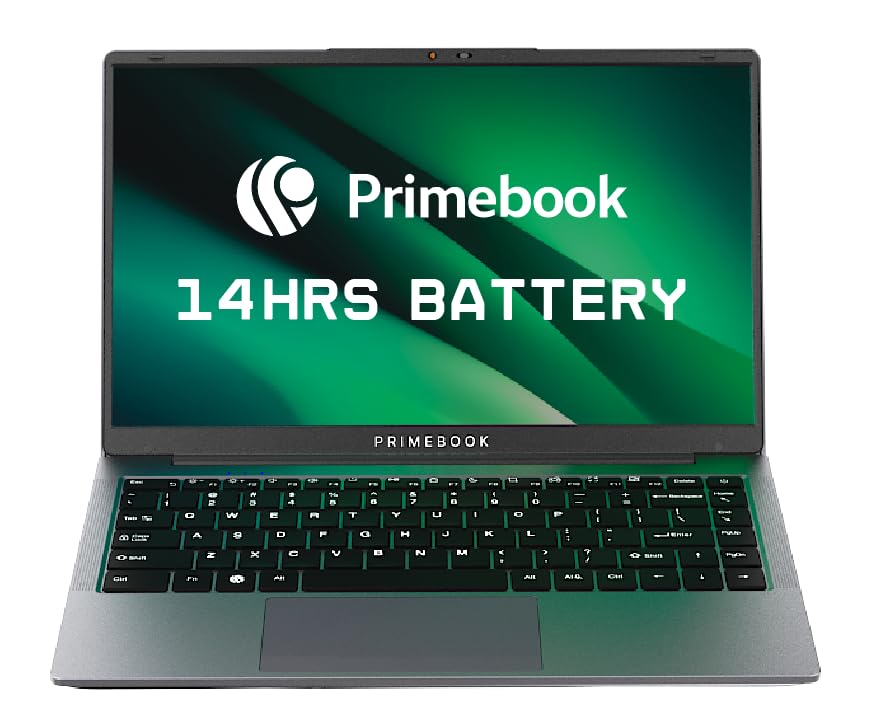
🖥️ Display & Design — 14.1-inch Full HD IPS Anti-Glare (1920×1080), wide viewing angles, backlit keyboard with trackpad, compact laptop form factor built around Android productivity
🧠 Performance & Storage — MediaTek Helio G99 Octa-Core (up to 2.2GHz) · 8GB LPDDR4X RAM · 128GB UFS storage · MicroSD expansion up to 512GB
🔋 Battery & OS — ~60Wh battery rated up to 14 hours · Android 15 (PrimeOS 3.0) · AI Global Search · Gemini Assistant · Cloud PC access for full desktop workflows
Picture an affordable notebook that opens straight into your favorite Android apps, but with a proper keyboard, trackpad, and multiwindow interface instead of a cramped phone screen. Primebook 2 Pro runs Android 15-based PrimeOS 3.0 on a MediaTek Helio G99 octacore processor paired with 8 GB LPDDR4X RAM and 128 GB UFS storage, so juggling Docs, YouTube, WhatsApp Web, and a dozen Chrome tabs feels closer to a midrange phone plus desktop monitor than a typical budget laptop. The 14.1inch Full HD IPS antiglare display delivers sharp text and wide viewing angles, which is a clear step up from the 11.6inch HD panels common in this price band. A 60 Wh class battery rated for up to about 14 hours of mixed use means daylong classes or commute plus office stints are realistic without babysitting the charger.
Where many Windows laptops under ₹25,000 still ship with slow HDD or basic eMMC, Primebook’s UFS storage and Android-optimized OS make app launches and system updates feel snappier. AI-powered global search and Geminibacked assistant features can summarise pages, answer questions, and find files, turning it into a strong pick for research-heavy college work. Dual microphones, stereo speakers, USBA and USBC ports, microSD expansion, and cloud PC access for running full desktop apps further round it out as a practical daily driver for students and freelancers.
Pros
– 14.1inch Full HD IPS antiglare screen offers more space and clarity than typical 11.6inch HD panels at this price.
– Helio G99 with 8 GB LPDDR4X RAM and 128 GB UFS storage keeps Android apps and Chrome tabs feeling responsive even under load.
– Android 15-based PrimeOS 3.0 with AI global search, Gemini assistant, and Cloud PC access is ideal for users who live in Android apps but need keyboard-first productivity.
– Rated up to around 14 hours of battery life with a 60 Wh class pack for true all-day unplugged use.
Cons
– PrimeOS and Android 15 are great for app-centric users but not ideal if strict desktop software like full offline Photoshop is mandatory.
– Limited built-in storage compared with bulkier HDD-based Windows laptops, so heavy offline media hoarders must rely on microSD or cloud storage.
Check Primebook 2 Pro 2026 on Amazon
Lenovo Chromebook 11IJL9 – hassle-free study companion that just works
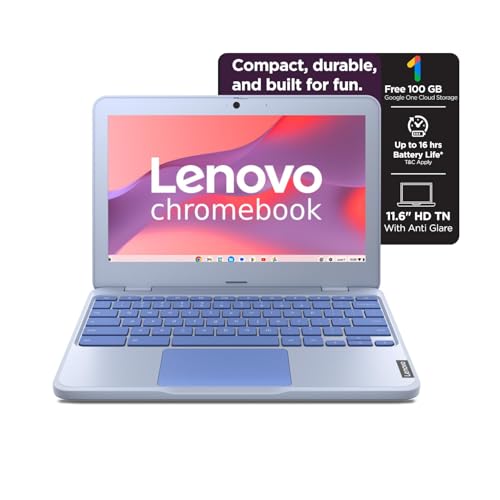
🎒 Build & Display — 11.6-inch HD (1366×768) Anti-Glare panel · ~1.2kg compact chassis · HD webcam with privacy shutter · stereo speakers for online classes
🧠 Processor & Memory — Intel Celeron N4500 dual-core · 4GB LPDDR4x RAM · 64GB eMMC · ChromeOS for fast boot, silent auto-updates, and built-in security
🌐 Battery & Connectivity — 42Wh battery rated ~11.9 hours · USB-C (PD + DisplayPort) · USB-A × 2 · HDMI 1.4 · MicroSD slot for storage expansion
If you want one of the best laptops under 25000 for students, where everything from updates to virus protection is handled in the background, Lenovo’s 11.6-inch Chromebook is the definition of low-maintenance. It pairs an Intel Celeron N4500 dual-core processor with 4 GB LPDDR4x RAM and 64 GB eMMC storage, tuned specifically for ChromeOS, so Google Docs, Meet, Classroom, and YouTube feel smooth as long as you do not push heavy offline editing. The compact 11.6inch HD (1366×768) antiglare display helps keep the chassis under about 1.3 kg and makes it easy to slip into a school bag.
Lenovo rates the 42 Wh battery for close to 12 hours in Google’s power load test, which comfortably covers a full day of classes plus homework browsing. Two USBA ports, one USBC with power delivery and DisplayPort, HDMI, a microSD slot, and a 3.5 mm jack cover peripheral and display needs in a classroom or library. Stereo speakers and an HD webcam with privacy shutter round out the online class experience, while ChromeOS fast boot, autoupdates, and integrated antivirus make this Chromebook feel “appliance-like” for parents and nontechy users.
Pros
– ChromeOS is secure, light, and designed around Google’s education stack, ideal for school and early college workflows.
– 11.6inch antiglare panel and ~1.2 kg weight keep it portable for daily commutes.
– Excellent battery life claim of around 11.9 hours from a 42 Wh pack for all-day unplugged use.
– Good port mix with USBA, USBC (PD + DisplayPort), HDMI, and microSD for displays and storage expansion.
Cons
– 4 GB RAM and 64 GB eMMC limit offline multitasking and local storage compared with 8 GB/256 GB SSD Windows models.
– ChromeOS is browser-first; advanced offline apps and some specialized software are not available natively.
Check Lenovo Chromebook 11IJL9 on Amazon
Primebook 2 Neo– pocket-friendly Android notebook for learners on the move

🪶 Weight & Display — 11.6-inch HD IPS screen · ~1.1kg ultra-light body · compact build ideal for school bags and frequent travel
🧠 Performance & Storage — MediaTek Helio G99 Octa-Core · 6GB LPDDR4 RAM · 128GB internal storage · MicroSD expansion up to 512GB for offline media and files
📲 OS & AI Features — Android 15 (PrimeOS 3.0) · AI-powered global search · AI companion assistant overlay · dual-band Wi-Fi · Bluetooth 5.1 · USB-C + USB-A ports
For younger learners or anyone who wants a feather-weight laptop under 25000 for students that can be carried everywhere, Primebook 2 Neo strikes a compelling balance between power and portability. It uses the same MediaTek Helio G99 octacore platform as the bigger Pro sibling, but pairs it with 6 GB LPDDR4 RAM and 128 GB internal storage in a smaller 11.6inch HD IPS form factor. Storage can be expanded up to 512 GB via microSD, which is handy for offline videos, ebooks, and project files without buying a higher-tier variant later.
Despite the compact size, Primebook 2 Neo keeps dual-band WiFi, Bluetooth 5.1, multiple USB ports including Type-C, and a 3.5 mm jack, so it works nicely with headsets, printers, and external drives. AI-powered global search and an AI companion overlay are baked into PrimeOS 3.0, helping students get instant summaries and clarifications while reading notes or browsing the web. At roughly 1.1 kg, this machine is meaningfully lighter than many traditional 14inch Windows laptops in the same price range, making it ideal for school bags and travel.
Pros
– Helio G99 plus 6 GB RAM delivers snappy Android-style performance for study, OTT, and browsing.
– 11.6inch HD IPS display is compact yet offers good colors and viewing angles for videos and e-learning.
– Storage expandable up to 512 GB via microSD, rare in this class.
– Lightweight design, around 1.1 kg, is excellent for kids and frequent travelers.
Cons
– Smaller screen is less comfortable for multihour spreadsheet or document work compared with 14.1inch options.
– The PrimeOS ecosystem is still maturing for some niche apps compared with Windows or ChromeOS.
Check Primebook 2 Neo on Amazon
JioBook 11 NB1112MM – always-connected budget king with built-in 4G

📶 Connectivity First — Built-in 4G LTE SIM slot + dual-band Wi-Fi · Bluetooth · HD webcam · stereo speakers — true always-on connectivity for online classes and web browsing
🧠 Processor & Memory — MediaTek MT8788 Octa-Core · 4GB LPDDR4 RAM · 64GB eMMC · JioOS (Android-derived) tuned for web, OTT, and Jio services
🪶 Weight & Value — ~990g ultra-light chassis · 11.6-inch HD display · HDMI · USB ports · typically priced ₹12,000–₹15,000 — best value-per-rupee on this list
If you are tired of hunting for WiFi or burning through phone hotspots, JioBook 11 brings smartphone-style 4G LTE straight into a sub₹15,000 laptop form factor. It is powered by a Mediatek 8788 octacore processor with 4 GB LPDDR4 RAM and 64 GB eMMC storage, running JioOS, a lightweight Android-derived system tailored for web, OTT, basic office apps, and Jio’s own services. The 11.6inch HD display and ultralight 990 g chassis make it one of the easiest laptops in this price bracket to carry all day.
Because the SIM lives inside the laptop, students in areas with patchy broadband can stay connected for online classes, job portals, and government services as long as there is Jio coverage. Dualband WiFi, Bluetooth, HDMI, multiple USB ports, stereo speakers and a built-in webcam cover standard connectivity and conferencing needs. Typical online prices float between roughly ₹12,000 and ₹15,000, depending on offers, keeping it safely within the best laptop under 25000 in India territory while undercutting many rivals.
Pros
– Built-in 4G LTE plus dual-band WiFi means true “always-on” internet without relying solely on WiFi hotspots
– Extremely light at around 990 g, great for schoolbags and commuters.
– Priced significantly below the ₹25,000 ceiling, often near entry-level smartphone territory.
– JioOS is tuned for basic productivity, OTT, and web usage with familiar Android-like navigation.
Cons
– 4 GB RAM and 64 GB eMMC storage are restrictive for heavy multitasking or large offline media libraries.
– Strongly tied to the Jio ecosystem, users on other networks must be comfortable managing a separate data plan.
Check JioBook 11 NB1112MM on Amazon
Neopticon BrowseBook 14.1 – Windows 11 laptop with true SSD speed
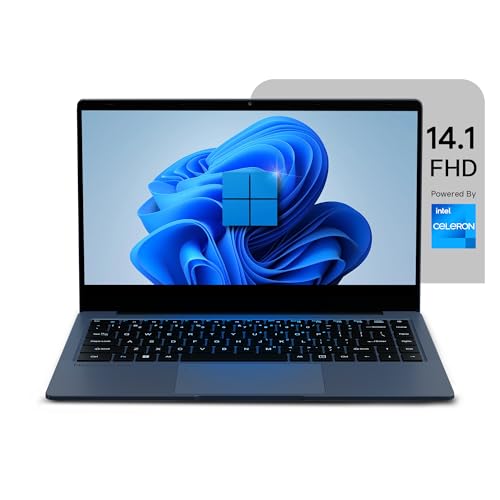
🖥️ Display & Design — 14.1-inch Full HD IPS (1920×1080) · wide viewing angles · ~1.3kg build · comfortable for split-screen document work, coding, and extended study sessions
💾 Performance & Storage — Intel Celeron N4020 (up to 2.8GHz) · 8GB RAM · 256GB SSD · Windows 11 — significantly faster boot and app launch vs eMMC-based rivals
🔌 Battery & Ports — 38Wh battery · up to 8 hours claimed · USB 3.0 · USB-C · Mini HDMI · MicroSD · 3.5mm jack · typically priced around ₹16,990–₹17,500
For buyers who specifically want the best laptops under 25000 with SSD and full Windows 11 for office suites and desktop apps, Neopticon’s BrowseBook 14.1 hits a sweet spot. It combines an Intel Celeron N4020 dual-core processor (up to 2.8 GHz) with 8 GB RAM and a 256 GB SSD, giving it far snappier boot and application launch times than eMMC-based machines when opening Excel sheets, PowerPoint decks or light coding tools. The 14.1inch Full HD (1920×1080) IPS display offers ample space for side-by-side windows, making it a strong laptop under 25000 for office and higher education users.
A 38 Wh battery and a claimed “up to 8 hours” runtime mean it comfortably covers a half-day of classes plus library time or a typical office shift with a top-up. At about 1.3 kg, it remains relatively light for a 14inch Windows machine, and the port selection — USB 3.0, USBC, mini HDMI, microSD, and 3.5 mm jack — covers both legacy peripherals and modern accessories. Pricetracking data shows this configuration usually hovering around ₹16,990 online, well within budget for a serious best laptop under 25000 in India focused on productivity.
Pros
– 256 GB SSD plus 8 GB RAM make Windows 11 feel far smoother than on 4 GB/64 GB eMMC budget laptops.
– 14.1inch Full HD IPS panel is excellent for documents, coding, streaming and split-screen multitasking.
– Good port mix with USB 3.0, USBC, mini HDMI, and microSD lets users hook up monitors, drives, and cards easily.
– Represents outstanding value for a Windows laptop under 25000 for office and college work, with typical prices around ₹17,000.
Cons
– Celeron N4020 is efficient but not suitable for heavy video editing or modern gaming.
– Battery life is solid but shorter than the longest-lasting Android and Chromebook options in this list.
Check Neopticon BrowseBook 14.1 on Amazon
Buyer’s Guide: Best Laptop Under 25000 in India – What to Check Before Buying (Display, Processor, Charging)
Display: Clarity, Comfort, and Size
Budget laptops at this price swing between compact 11.6inch HD panels and roomier 14.1inch Full HD displays, and that choice directly affects eyestrain and productivity. HD (1366×768) screens on devices like Lenovo’s Chromebook and JioBook are fine for notetaking and basic browsing, but feel cramped when you stack multiple windows. Full HD (1920×1080) IPS panels on Primebook 2 Pro and BrowseBook show more content, sharper text and better viewing angles, which pays off during long typing or Excel sessions.
Antiglare coatings are important if you study near windows or work under tube lights, something both Primebook 2 Pro and Lenovo’s Chromebook explicitly offer. Users who watch a lot of content or regularly split the screen between code and docs should strongly prioritize a 14inch Full HD IPS laptop under 25000 for office and college rather than a smaller HD-only machine.
Processor & RAM: Where Smoothness Really Comes from
In this segment, expect efficient chips like MediaTek Helio G99, Mediatek 8788 or Intel Celeron N4020/N4500 rather than heavy-duty Core i-series CPUs. Helio G99, used in both Primebook 2 Pro and Primebook 2 Neo, is one of the more capable options here, especially for multitasking within Android apps and Chrome, while Celeron N4020 and N4500 are well-suited to light Windows or ChromeOS workloads.
RAM is where many budget laptops cut corners: 4 GB is technically usable but will choke quickly if you open many tabs, while 6–8 GB gives much more breathing room. That is why BrowseBook’s 8 GB RAM and Primebook 2 Pro’s 8 GB LPDDR4X stand out among laptops under 25000 for students and office users who multitask aggressively.
Storage & Charging: SSD vs eMMC and Living Off-Plug
Storage type makes a visible difference to how “fast” a laptop feels; true SSDs like the 256 GB drive in the Neopticon BrowseBook load Windows, Office, and browsers much faster than eMMC-based machines, even if both advertise similar capacity. Primebook models use UFS-class storage tuned for Android, which is again speedier than low-end eMMC when launching apps and pulling files.
On battery, check both watt-hours and claimed runtime: Primebook 2 Pro’s around 60 Wh battery and ~14-hour rating, Lenovo’s 42 Wh/11.9-hour Chromebook claim, JioBook’s ~8-hour figure, and BrowseBook’s 38 Wh pack all point to at least a full study or work block away from the charger, with PrimeOS and ChromeOS devices stretching furthest. USBC charging support is increasingly common and lets you reuse phone or powerbank chargers, which is handy if you commute heavily.
💡 Exploring Other Budgets?
If ₹30,000 feels tight or you have a little more flexibility, we have got you covered across the full range:👉 Best Laptops Under ₹35,000 in India — strongest picks for strict budgets across ChromeOS and Windows
👉 Best Laptops Under ₹40,000 in India — more RAM, better displays, and stronger processors for students and office professionals
Gadget Veda Verdict: Which Laptop Under 25000 Should You Buy?
Budget King: JioBook 11 NB1112MM
For buyers who simply want the cheapest reliable laptop under 25000 in India with built-in 4G, long battery life, and enough power for online classes, browsing, and basic office apps, JioBook 11 stands out. Its Mediatek 8788 octacore CPU, 4 GB RAM, 64 GB eMMC, 11.6inch HD display, and sub-1 kg weight make it perfect for students in areas where wired broadband is unreliable, but Jio’s network is strong.
Performance Pro: Primebook 2 Pro 2026
If the budget ceiling is still fixed but you want the fastest feeling experience possible, Primebook 2 Pro is the performance champ: Helio G99, 8 GB LPDDR4X RAM, 128 GB UFS storage, a 14.1-inch FHD IPS panel, and a ~60 Wh battery rated for up to 14 hours combine to deliver a smooth, all-day Android laptop experience under ₹25,000.
Between these two, the choice is straightforward: pick JioBook 11 if constant 4G connectivity and ultralow price matter most, or choose Primebook 2 Pro if you want premium-feeling performance, a bigger Full HD screen, and AI-enhanced Android workflows for study and creative projects. For buyers who specifically need Windows and SSD speed for office tools, Neopticon BrowseBook 14.1 quietly becomes the darkhorse recommendation in the best laptop under 25000 with SSD category, delivering a balanced, familiar desktop experience without stretching your budget.
FAQs
1. Which are the best laptops under 25000 for students right now?
For most students who are comfortable with Android apps, Primebook 2 Pro is the strongest all-rounder thanks to its Helio G99 processor, 8 GB LPDDR4X RAM, 128 GB UFS storage, and 14.1inch Full HD IPS display, which together handle classes, research, and entertainment with ease. Those who prefer Windows and traditional desktop software should look at the Neopticon BrowseBook 14.1 with its 8 GB RAM, 256 GB SSD, and Windows 11 combo.
2. What are the best laptops under 25000 with SSD?
Neopticon BrowseBook 14.1 is the standout best laptop under 25000 with SSD, pairing a 256 GB SSD and 8 GB RAM with Intel Celeron N4020 and a 14.1inch Full HD IPS screen, making it ideal for office documents, coding, browsing, and light multimedia. If you can work comfortably in Android-style workflows, Primebook 2 Pro’s fast UFS storage and Helio G99 also deliver SSD-like responsiveness for app launches and multitasking.
3. Can these laptops handle office work like Excel, PowerPoint, and Zoom?
Yes, but the experience differs by platform: BrowseBook 14.1 on Windows 11 with 8 GB RAM and 256 GB SSD offers the most familiar Excel/PowerPoint/Outlook workflow for a laptop under 25000 for office, while Chromebooks and PrimeOS devices rely more on web-based Google Workspace or Android app versions. JioBook 11 can handle basic office tasks via Android-style apps and web clients but is better viewed as a secondary, always-connected machine than a primary heavy spreadsheet system.
4. Are Android or ChromeOS laptops better than Windows at this price?
Android-based PrimeOS and ChromeOS laptops like Primebook 2 Pro, Primebook 2 Neo, and Lenovo’s Chromebook often feel smoother than low-RAM Windows machines under 25k because the OS is lighter and storage is tuned for app-centric workflows. However, Windows 11 on BrowseBook still wins if you need full desktop software, offline tools, and broader compatibility, especially with 8 GB RAM and SSD, closing the performance gap.



![12 Best Earbuds Under ₹3,000 in India [2026] | GadgetVeda](https://gadgetveda.com/wp-content/uploads/2026/09/Best-Earbuds-Under-₹3000-in-India-150x150.webp)
![11 Best Washing Machines Under ₹50,000 in India [2026]](https://gadgetveda.com/wp-content/uploads/2026/09/Best-Washing-Machines-Under-₹50000-in-India-150x150.webp)
![14 Best Wireless Earbuds Under ₹2,000 in India [2026]](https://gadgetveda.com/wp-content/uploads/2026/09/Best-Wireless-Earbuds-Under-₹2000-in-India-150x150.webp)
![10 Best Wireless Earbuds Under ₹1,000 in India [2026]](https://gadgetveda.com/wp-content/uploads/2026/09/Best-Wireless-Earbuds-Under-₹1000-in-India-150x150.webp)


![12 Best Earbuds Under ₹3,000 in India [2026] | GadgetVeda](https://gadgetveda.com/wp-content/uploads/2026/09/Best-Earbuds-Under-₹3000-in-India-300x167.webp)
![11 Best Washing Machines Under ₹50,000 in India [2026]](https://gadgetveda.com/wp-content/uploads/2026/09/Best-Washing-Machines-Under-₹50000-in-India-300x167.webp)
![14 Best Wireless Earbuds Under ₹2,000 in India [2026]](https://gadgetveda.com/wp-content/uploads/2026/09/Best-Wireless-Earbuds-Under-₹2000-in-India-300x167.webp)
![10 Best Wireless Earbuds Under ₹1,000 in India [2026]](https://gadgetveda.com/wp-content/uploads/2026/09/Best-Wireless-Earbuds-Under-₹1000-in-India-300x167.webp)