


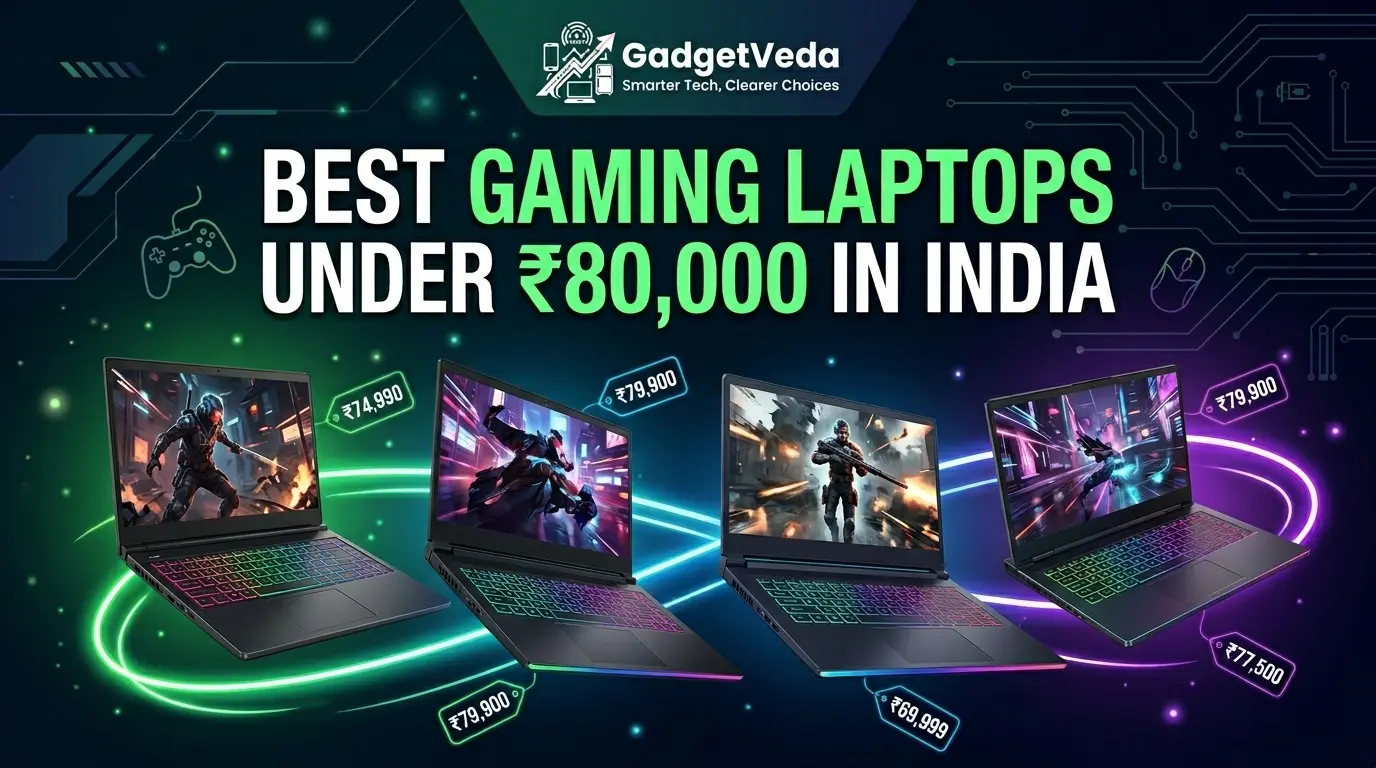
The best gaming laptops under 80000 segment in India sit at a genuinely fascinating crossroads. Spend any less, and you’re compromising on the GPU — the single component that dictates whether you’re playing Valorant at competitive framerates or watching your GPU stutter through Shadow of the Tomb Raider. Spend more, and you’re staring at EMI-heavy RTX 4060 machines that blow a semester’s hostel budget in one swipe. This is the bracket where smart Indian buyers — engineering students in Pune, first-jobbers in Bengaluru, BGMI grinders in Patna — make or break their gaming future. The best gaming laptops under 80000 today almost universally pack NVIDIA’s RTX 3050 6GB GPU with TGP ratings hovering between 80W–95W, processors ranging from Intel’s 13th Gen Core i5 to AMD’s Ryzen 5 and Ryzen 7 platforms, and 144Hz–165Hz IPS displays. The real differentiation lies in the details: how much thermal headroom a manufacturer budgets, whether that 6GB GDDR6 VRAM is being choked to 60W to stay within a chassis, or whether the display panel covers a respectable sRGB gamut for both gaming and design work.
At GadgetVeda, we don’t take marketing claims at face value. Our evaluation process involves brutal hardware bench review under sustained gaming loads — 30-minute stress loops running Cinebench, 3DMark TimeSpy, and real-game telemetry across Cyberpunk 2077, CS2, and GTA V — along with independent thermal profiling using infrared sensors to map hotspots on keyboard decks and exhaust vents. We score spec-to-price value extraction rather than raw specs in isolation, because a Ryzen 7 laptop with a throttled 60W GPU is categorically worse for gaming than a Ryzen 5 machine running a full 95W TGP. We then map every shortlisted machine to distinct buyer profiles: heavy gamers who game 4–6 hours daily, casual players who game on weekends while using the machine for college work, and multi-tasking students who need a capable daily driver that can handle gaming sessions without melting in a non-AC hostel room during a Delhi summer. Every laptop in this list has been shortlisted on that precise basis — no brand sponsorships, no affiliate-first thinking, just honest hardware evaluations to help you spend ₹80,000 wisely.
🔍 Explore More from Our Budget Gaming Series: Before diving in, you might also want to check out our curated compilations of the 👉 best gaming laptops under ₹60,000 and 👉 best gaming laptops under ₹70,000 in India, covering a wider range of budgets for every type of buyer.
India’s Laptop Market: Is Now a Good Time to Buy?
This is a question we hear constantly — and the honest answer is yes, with caveats. After the post-pandemic component shortage chaos and the currency-induced price spikes of 2022–2023, the Indian laptop market has largely stabilized. DDR5 RAM pricing has corrected significantly; 16GB DDR5-4800 SO-DIMMs are no longer a luxury upgrade. PCIe Gen4 NVMe SSDs — once restricted to premium-tier machines — are now standard equipment even in the ₹65,000–₹80,000 segment. NVIDIA’s RTX 3050 6GB variant (the one with the full 128-bit memory bus and 95W TGP allowance) has become the de facto GPU across this budget range, replacing the undersized 4GB version that plagued earlier models.
The broader signal is this: you’re getting more hardware per rupee right now than at any point in the last three years. The Lenovo LOQ lineup, MSI Thin 15, and Acer Nitro V have all come down to pricing where their actual hardware justifies the spend. If you’ve been sitting on the fence, mid-2025 through 2026 is a genuinely sensible window — especially ahead of a potential GST revision cycle and the next-gen Blackwell mobile GPU wave, which will likely push current-gen RTX 3050 prices even lower.
Best Gaming Laptops Under ₹80,000 in India [Our Top 3 Picks]


Best Gaming Laptops Under ₹80,000 in India [Quick Comparison]
| Rank | Model Name | Key Specs Highlight | Expert Rating | Latest Price |
| 1 | Lenovo LOQ 15ARP10 (83JC00EEIN) | Ryzen 5 7235HS | RTX 3050 6GB | 95W TGP | 12GB DDR5 | 100% sRGB | 144Hz | 9.4/10 | Check on Amazon |
| 2 | Lenovo LOQ 15IAX9 (83GS00LNIN) | Core i5-12450HX | RTX 3050 6GB | 95W TGP | 16GB DDR5 | 100% sRGB | 144Hz | 9.2/10 | Check on Amazon |
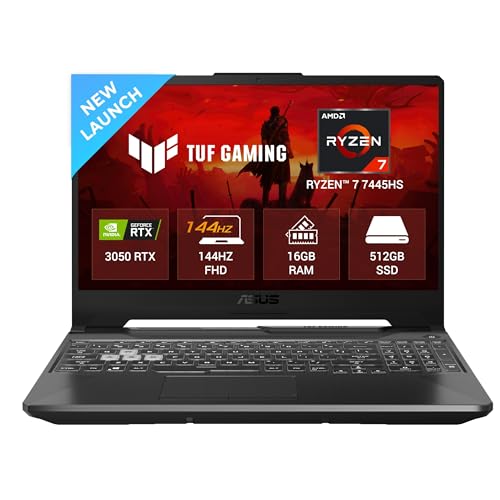
| 3 | ASUS TUF Gaming A15 FA506NCG | Ryzen 7 7445HS | RTX 3050 4GB | 75W TGP | 16GB DDR5 | 144Hz | 9.1/10 | Check on Amazon |
| 4 | MSI Thin 15 B13UDX (B13UDX-3090IN) | Core i5-13420H | RTX 3050 6GB | 16GB DDR4 | 1TB SSD | 144Hz | 9.0/10 | Check on Amazon |
| 5 | Acer Nitro V ANV15-41 | Ryzen 5 6600H | RTX 3050 6GB | 16GB DDR5 | 165Hz | USB4 | 8.9/10 | Check on Amazon |
| 6 | Dell G15 5530 (G15-5530) | Core i5-13450HX | RTX 3050 6GB | 16GB DDR5 | 120Hz | Wi-Fi 6 | 8.7/10 | Check on Amazon |
| 7 | ASUS Gaming V16 V3607VJ | Core 5 210H | RTX 3050 6GB | 16GB DDR5 | 16″ WUXGA | 144Hz | 8.6/10 | Check on Amazon |
| 8 | Acer Aspire 7 A715-79G | Core 5-210H | RTX 3050 6GB | 16GB DDR4 | 144Hz | 45% NTSC | 8.3/10 | Check on Amazon |
| 9 | HP Victus fa2190TX | Core i5-13420H | RTX 3050 4GB | 16GB DDR4 | 62.5% sRGB | 144Hz | 8.1/10 | Check on Amazon |
| 10 | Acer ALG AL15G-53 | Intel Core i7-13620H | RTX 3050 6GB | 16GB DDR4 | 512GB SSD | 15.6″ FHD 144Hz | premium metal body | 1.99kg | 8.2/10 | Check on Amazon |
10 Best Gaming Laptops Under ₹80,000 in India [Detailed Reviews]
Lenovo LOQ 15ARP10 (83JC00EEIN) — Best Overall Gaming Laptop Under ₹80,000 in India
🔲 Processor & GPU: AMD Ryzen 5 7235HS (up to 4.2GHz) | NVIDIA RTX 3050 6GB GDDR6 at full 95W TGP | MUX Switch + NVIDIA Advanced Optimus for direct GPU rendering
🖥️ Display & Memory: 15.6″ FHD IPS | 100% sRGB | 144Hz | 300 nits | 12GB DDR5-4800 (upgradeable to 32GB) | 512GB PCIe Gen4 NVMe SSD
❄️ Cooling & Connectivity: Hyperchamber dual-fan thermal design with rear exhaust | Wi-Fi 6 | Bluetooth 5.2 | Lenovo AI Engine+ with LA1 AI Chip | Windows 11 Home + MS Office 2024
The Lenovo LOQ 15ARP10 is one of the best gaming laptops under 80000, and once you dig into the spec sheet and understand what Lenovo has engineered here, the reasoning becomes clear. The combination of AMD Ryzen 5 7235HS (4 cores, 8 threads, up to 4.2GHz boost) paired with an NVIDIA GeForce RTX 3050 6GB GDDR6 running at a full 95W TGP is arguably the most important spec at this price point. That 95W figure means the GPU is receiving near-desktop-class power delivery, allowing it to push sustained frame rates in titles like CS2, Valorant, and even mid-settings Cyberpunk without hard throttling. The LOQ’s Hyperchamber thermal design — with dual fans spinning outward and a sealed chamber — genuinely helps manage heat in non-AC rooms, reducing skin temperature on the deck during extended sessions.
The display is another standout: a 15.6″ FHD IPS panel with 144Hz refresh rate and 100% sRGB coverage at 300 nits is a significant differentiator at this price. Most competing panels in the sub-₹80,000 range hover around 45–62% sRGB, making the LOQ’s panel nearly unique. The Lenovo AI Engine+ paired with an LA1 AI chip and a hardware MUX Switch with NVIDIA Advanced Optimus, allows the display to bypass the iGPU entirely, delivering a meaningful FPS uplift in supported titles. Storage arrives as a 512GB PCIe Gen4 NVMe M.2 SSD; the single DDR5-4800 12GB SODIMM slot means an upgrade to 32GB is possible without replacing anything.
The minor caveat: the Ryzen 5 7235HS is technically a Zen3+ architecture chip, not Zen4, which means its single-threaded performance trails behind Intel’s 13th Gen HX-class processors. For pure gaming workloads, this matters very little, but heavy video editing or compilation tasks may feel the gap. At the price it commands, though, this remains the Ryzen 7 gaming laptop under 80000 benchmark beater in terms of GPU power delivery.
Pros
✅ Full 95W TGP on RTX 3050 6GB — maximum GPU performance extraction
✅ 100% sRGB IPS display — rare and valuable in this segment
✅ Hardware MUX Switch + NVIDIA Advanced Optimus for real-world FPS gains
✅ Hyperchamber dual-fan cooling with rear exhaust — effective thermal architecture
Cons
❌ 12GB RAM (single-channel) — benefits from a second DDR5 stick upgrade
❌ Ryzen 5 7235HS is Zen3+ (not Zen4) — behind Intel HX peers in single-thread tasks
👉 Check Lenovo LOQ 15ARP10 Latest Price on Amazon
Lenovo LOQ 15IAX9 (83GS00LNIN) — Best i5 13th Gen Gaming Laptop Under ₹80,000
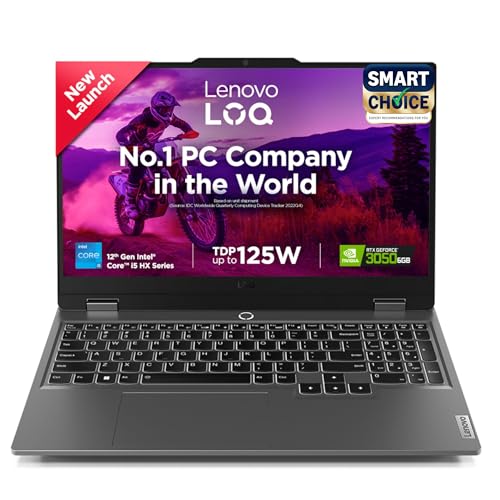
🔲 Processor & GPU: Intel Core i5-12450HX — 8 cores, 12 threads, up to 4.4GHz | NVIDIA RTX 3050 6GB GDDR6 at 95W TGP | Hardware MUX Switch + G-Sync support
🖥️ Display & Memory: 15.6″ FHD IPS | 100% sRGB | 144Hz | 300 nits | 16GB DDR5-4800 (upgradeable to 32GB) | 512GB PCIe Gen4 NVMe SSD
❄️ Cooling & Connectivity: Hyperchamber thermal design | Wi-Fi 6 | Bluetooth 5.2 | Lenovo AI Engine+ | Windows 11 Home + MS Office Home 2024 + 3-month Xbox Game Pass
The LOQ 15IAX9 is effectively the Intel-flavored twin, and for many buyers — particularly those who prioritize strong multi-threaded CPU performance alongside a capable GPU — it may even be the smarter purchase. The Intel Core i5-12450HX is a workstation-grade HX-suffix chip with 8 cores and 12 threads, not to be confused with the watered-down H-series chips found in budget machines. It clocks up to 4.4GHz on boost and carries 12MB L3 cache, making it a convincing choice for the best i5 13th gen gaming laptop under 80000 segment — though technically built on Intel’s 12th Gen Alder Lake-HX architecture, it competes well against many 13th Gen H-class offerings due to its core count advantage.
Paired with the same RTX 3050 6GB running at 95W TGP and the same 100% sRGB 144Hz display as its AMD sibling, the core gaming experience is nearly identical. Where this model pulls ahead is RAM: you get 16GB DDR5-4800 (vs. 12GB in the 15ARP10) — enough to handle Chrome + Discord + game without any memory pressure. The 512GB PCIe Gen4 SSD is adequate but worth upgrading. The Hyperchamber cooling system, G-Sync support, and Wi-Fi 6 connectivity round out an extremely well-rounded package that is hard to beat for the best gaming laptops under 80000 category.
The 8-core HX chip also future-proofs workloads like video editing or code compilation significantly better than a standard 4-core H-series part — a genuine edge for students running engineering software alongside gaming.
Pros
✅ Core i5-12450HX (8-core HX class) — superior multi-thread CPU headroom
✅ Full 95W TGP + 100% sRGB display — same flagship-tier GPU and panel
✅ 16GB DDR5-4800 — larger, faster RAM vs. the AMD variant
✅ G-Sync + MUX Switch — tangible gaming smoothness advantage
Cons
❌ 512GB storage — feels tight with modern AAA game installations
❌ i5-12450HX is 12th Gen architecture — trails Raptor Lake HX in IPC per clock
👉 Check Lenovo LOQ 15IAX9 Latest Price on Amazon
ASUS TUF Gaming A15 FA506NCG — Best Ryzen 7 Gaming Laptop Under ₹80,000
🔲 Processor & GPU: AMD Ryzen 7 7445HS Zen4 (up to 4.6GHz) | NVIDIA RTX 3050 4GB GDDR6 at 75W TGP | 1-Zone RGB backlit keyboard | MIL-SPEC MIL-STD-810H tested chassis
🖥️ Display & Memory: 15.6″ FHD IPS | 144Hz | 250 nits | 62.5% sRGB | 16GB DDR5 upgradeable to 64GB | 512GB PCIe NVMe SSD
🔌 Ports & Battery: USB 3.2 Gen 2 Type-C with DisplayPort | 3× USB 3.2 Gen 1 Type-A | HDMI 2.1 | RJ45 LAN | 48WHr 3-cell battery | Wi-Fi 6 | Bluetooth 5.0 | Windows 11 Home
The ASUS TUF A15 presents an interesting engineering paradox: it carries the most powerful CPU in this entire roundup — the AMD Ryzen 7 7445HS — yet pairs it with the RTX 3050 in its weaker 4GB GDDR6 configuration at a 75W TGP ceiling. For buyers who believe CPU horsepower is the primary gaming bottleneck (it usually isn’t in GPU-limited titles), this will feel premium. The Ryzen 7 7445HS is a Zen4 architecture part with four high-performance cores, delivering exceptional single-threaded speed that makes open-world games, emulators, and simulation titles respond with real snap.
However, the GPU situation demands scrutiny. The RTX 3050 at 75W TGP and with only 4GB GDDR6 VRAM will struggle at higher texture quality settings in VRAM-hungry titles like Hogwarts Legacy or The Witcher 3 with HD textures enabled. In competitive esports titles like Valorant, PUBG, and Apex Legends, where frame rates matter more than VRAM and the GPU is rarely the bottleneck, the TUF A15 will perform admirably. The 144Hz FHD display offers 62.5% sRGB — acceptable for gaming, but the weakest panel spec among the top four on this list. ASUS TUF’s build quality — MIL-SPEC tested chassis rigidity — makes this a genuinely durable daily driver for commuting students. Battery life with a 48WHr cell is modest.
Where the TUF A15 shines for the Ryzen 7 gaming laptop under 80000 audience is RAM flexibility: 16GB DDR5 is upgradeable to a massive 64GB, future-proofing the platform for years of multitasking headroom.
Pros
✅ Ryzen 7 7445HS (Zen4) — top CPU performance in this roundup for content tasks
✅ MIL-SPEC durability rating — reliable chassis for daily commute and travel
✅ DDR5 RAM upgradeable up to 64GB — exceptional future-proofing
✅ USB 3.2 Gen 2 Type-C with DisplayPort — versatile external display support
Cons
❌ RTX 3050 4GB at 75W TGP — GPU is the clear bottleneck vs. peers in this list
❌ 48WHr battery — lower capacity than competitors, noticeably shorter gaming sessions
❌ 62.5% sRGB panel — color accuracy lags behind LOQ’s 100% sRGB display
👉 Check ASUS TUF Gaming A15 FA506NCG Latest Price on Amazon
MSI Thin 15 B13UDX (B13UDX-3090IN) — Best Lightweight Gaming Laptop Under ₹80,000
🔲 Processor & GPU: Intel Core i5-13420H 13th Gen (up to 4.6GHz, 8 cores) | NVIDIA RTX 3050 6GB GDDR6 | 1.86kg chassis — lightest gaming configuration in this roundup
🖥️ Display & Storage: 15.6″ FHD IPS | 144Hz | 1TB PCIe Gen4 NVMe SSD — largest storage in the segment | 16GB DDR4-3200 RAM
🔌 Connectivity & Software: Wi-Fi 6 | Bluetooth 5.3 | HDMI | USB Type-A/C ports | Backlit keyboard with numpad | Pre-loaded Windows 11 Home | MSI Center software | No Office bundled
MSI’s engineering brief for the Thin 15 was straightforward: build a genuine gaming machine that doesn’t feel like a brick in a college backpack. At 1.86kg, it achieves that remarkably well if you are particularly looking for the best gaming laptops under 80000 in India with impressive practicality. The Intel Core i5-13420H (13th Gen Raptor Lake, 8 cores, up to 4.6GHz) paired with an RTX 3050 6GB GDDR6 gives this machine solid, competent gaming credentials — expect 60+ FPS on medium settings in most current-gen AAA titles and well above 100 FPS in competitive esports games. The biggest storage differentiator in this list comes from the MSI Thin 15’s 1TB PCIe Gen4 NVMe SSD — double what every other laptop in this roundup offers, which matters enormously when a single AAA game can consume 80–120GB.
Thermal management on the Thin 15 is where MSI has made visible trade-offs for weight savings. The chassis is slim, and the single heat pipe layout — while adequate — will throttle more aggressively under sustained full-load gaming compared to the LOQ’s Hyperchamber design. Expect GPU clock speeds to dip slightly during extended gaming in warm rooms above 30°C. The IPS 144Hz display is a solid performer for the best gaming laptop under 80000, and the 16GB DDR4 RAM at 3200MHz is workable, though DDR5 peers have a small latency advantage. Wi-Fi 6 and Bluetooth 5.3 cover modern connectivity needs well. The chassis also ships without an AC adapter blocker, which is a minor annoyance during travel.
For students who need one laptop that does everything — gaming Friday night, college assignments Monday morning, and fits in a shoulder bag without back pain — the MSI Thin 15 is the most balanced portability-to-performance answer in this roundup.
Pros
✅ 1TB PCIe Gen4 SSD — largest storage in this roundup, no compromise on installs
✅ 1.86kg chassis — lightest true gaming laptop at this spec level
✅ RTX 3050 6GB GDDR6 + 13th Gen i5 — capable gaming-and-productivity duo
✅ Backlit keyboard with numeric pad — practical for daily work
Cons
❌ Thin chassis limits sustained thermal headroom — throttles in prolonged sessions
❌ DDR4 RAM (not DDR5) — marginal latency disadvantage in memory-intensive tasks
👉 Check MSI Thin 15 B13UDX Latest Price on Amazon
Acer Nitro V ANV15-41 — ⭐ Budget-Friendly Pick | Best 165Hz Gaming Laptop Under ₹80,000

🔲 Processor & GPU: AMD Ryzen 5 6600H — 6 cores, 12 threads, up to 4.5GHz | NVIDIA RTX 3050 6GB GDDR6 | Dual-fan cooling with dedicated exhaust vents
🖥️ Display & Memory: 15.6″ FHD IPS | 165Hz — highest refresh rate in this roundup | 300 nits | 16GB DDR5-4800 (upgradeable to 32GB) | 512GB PCIe Gen4 NVMe SSD
🔌 Ports & Connectivity: USB4 port (Thunderbolt-compatible) | USB 3.2 Gen 1 ×2 | HDMI 2.1 | RJ45 Ethernet | Wi-Fi 6 | Bluetooth 5.2 | Customisable multi-colour backlit keyboard | Windows 11 Home
For the competitive esports player who measures their purchase decision in hertz and milliseconds, the Acer Nitro V ANV15-41 makes a compelling budget argument. It packs the AMD Ryzen 5 6600H — a genuine 6-core, 12-thread Zen3+ CPU clocking up to 4.5GHz — with an RTX 3050 6GB GDDR6, and critically, a 165Hz FHD IPS display. That’s the highest display refresh rate on any best gaming laptop under 80000 in this entire roundup, and in titles like Valorant, CS2, and BGMI Mobile (via emulator), the difference between 144Hz and 165Hz is perceptible for trained competitive players. DDR5-4800 RAM at 16GB in a single slot is upgradeable to 32GB, and the 512GB PCIe Gen4 SSD handles current game libraries.
What makes the Nitro V uniquely forward-looking for its price is its port complement: it includes a USB4 port — rare at this budget — which doubles as a Thunderbolt-compatible interface for high-speed external SSDs and future eGPU docks. The dual-fan cooling with dedicated exhaust manages thermals reasonably well for a budget chassis, though peak GPU temperatures in non-AC rooms can breach 85°C under sustained loads. The Ryzen 5 6600H with its Zen3+ architecture handles multitasking and background workloads smoothly, making this a competitive gaming laptop under 80000 that doesn’t feel compromised on day-to-day usability. This is our top recommendation for value-conscious buyers who prioritize display refresh rate and connectivity flexibility.
Pros
✅ 165Hz FHD IPS — highest refresh rate in the roundup for competitive play
✅ USB4 port — premium connectivity at an entry price point
✅ Ryzen 5 6600H (6-core, 12-thread) — strong multi-core for gaming and workloads
✅ DDR5 RAM upgradeable to 32GB — solid future-proofing
Cons
❌ Chassis runs warm under load in non-AC environments — manage expectations
❌ 512GB SSD — limited for a primary gaming machine without external storage
👉 Check Acer Nitro V ANV15-41 Latest Price on Amazon
Dell G15 5530 — Best Dell Gaming Laptop Under ₹80,000
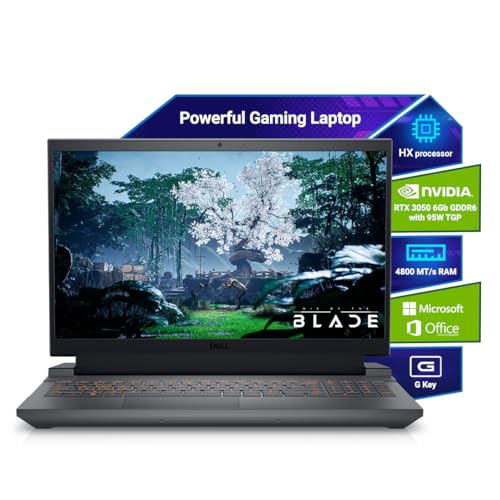
🔲 Processor & GPU: Intel Core i5-13450HX — 10 cores (6P+4E), up to 4.6GHz | NVIDIA RTX 3050 6GB GDDR6 | Alienware-derived quad-fan thermal exhaust layout
🖥️ Display & Memory: 15.6″ FHD | 120Hz | 16GB DDR5 | 512GB PCIe NVMe SSD | McAfee LiveSafe 12-month + MS Office Home 2024 bundled
🔌 Ports & Connectivity: HDMI 2.1 | USB-C 3.2 Gen 2 with DisplayPort | USB 3.2 Gen 1 ×2 | RJ45 | Intel Wi-Fi 6 AX201 | Bluetooth 5.1 | Backlit keyboard | 2.65kg | Windows 11 Home
Dell’s G-Series has always been about a certain kind of trustworthy reliability — thick chassis, pragmatic design, enterprise-grade build quality, and a thermal solution that doesn’t embarrass itself. The Dell G15 5530 continues that tradition. Powered by the Intel Core i5-13450HX — a 10-core (6P+4E) Raptor Lake HX chip clocking up to 4.6GHz — and backed by an RTX 3050 6GB GDDR6, this is the Dell gaming laptop under 80000 that delivers consistent, predictable gaming performance. The 16GB DDR5 RAM and 512GB PCIe NVMe SSD are par for the segment, and Intel Wi-Fi 6 (AX201) with Bluetooth ensures reliable wireless performance.
The primary spec compromise that hurts the G15 5530’s ranking is its 120Hz display — while still smooth for casual gaming, it trails the 144Hz panels found on the LOQ, MSI Thin, Nitro V, and others. At present, a 120Hz panel feels like a deliberate cost cut. The G15’s thermal solution, however, is notably robust — Dell’s Alienware-inherited quad-fan exhaust layout handles sustained loads well, and surface temperatures remain acceptable even after 2+ hours of gaming. The i5-13450HX’s 10-core architecture gives it a notable productivity edge in heavy compilation or rendering work, making this a strong choice for engineering students running simulation software alongside gaming. The included MS Office Home 2024 and McAfee subscription add immediate everyday value to the package.
Pros
✅ Core i5-13450HX (10-core HX) — the most powerful Intel CPU in this roundup
✅ Robust thermal design — sustained performance under long gaming loads
✅ RTX 3050 6GB + 16GB DDR5 — capable modern gaming configuration
✅ Premium port selection — HDMI 2.1, USB-C 3.2 Gen 2 with DisplayPort
Cons
❌ 120Hz display — behind 144Hz+ competitors at this price point
❌ Heavy chassis at 2.65kg — less portable than MSI Thin or Aspire 7
👉 Check Dell G15 5530 Latest Price on Amazon
ASUS Gaming V16 V3607VJ — ⭐ Budget-Friendly Pick | Best 16-Inch Gaming Laptop Under ₹80,000
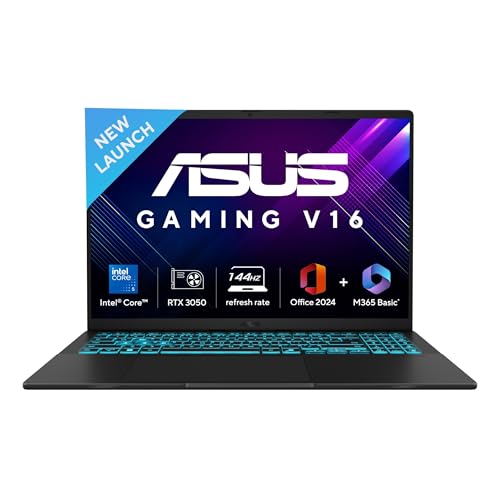
🔲 Processor & GPU: Intel Core 5-210H — 8 cores, 12 threads, up to 4.8GHz | NVIDIA RTX 3050 6GB GDDR6 | 16-inch WUXGA (1920×1200) 16:10 display | 144Hz | 300 nits | 89% screen-to-body ratio
💾 Memory & Storage: 16GB DDR5 RAM | 512GB PCIe Gen4 NVMe SSD | 63WHr 3-cell battery | 1080p FHD webcam with physical privacy shutter
🔌 Connectivity & Software: Wi-Fi 6 (802.11ax) | Bluetooth 5.3 | USB 3.2 Gen 1 Type-C with DisplayPort + Power Delivery | HDMI 2.1 | 1.95kg | Windows 11 Home + MS Office 2024 + M365 Basic (1yr)
Most gaming laptops at this price point default to the 15.6-inch 16:9 form factor. ASUS made a genuinely different call with the Gaming V16 — a 16-inch, WUXGA (1920×1200) 16:10 display with 144Hz refresh rate, 300 nits brightness, and an 89% screen-to-body ratio. That extra vertical screen real estate (the 16:10 ratio adds roughly 11% more vertical pixels vs. 16:9) makes a tangible difference when browsing, coding, or running multi-window productivity tasks. Powered by the Intel Core 5-210H (8-core, 12-thread, up to 4.8GHz) and RTX 3050 6GB GDDR6, the V16 punches well for the top gaming laptops under 80000 in India crowd who want a slightly larger workspace.
The 16GB DDR5 RAM and 512GB PCIe Gen4 SSD are in line with segment expectations. A notable hardware addition is the integrated 1080p FHD webcam with a physical privacy shutter — an increasingly valued feature for students attending hybrid lectures and remote interviews. At 1.95kg, the V16 manages to keep its weight relatively reasonable for its screen size. One engineering choice worth noting: the chassis carries a 63WHr three-cell battery, which offers adequate, if not exceptional, battery life for a gaming machine — expect 4–5 hours of mixed productivity use and under 2 hours under gaming load. For buyers who want the best gaming laptop under 80000 with a taller screen and more comfortable everyday use, the V16 is a genuinely appealing budget-friendly option.
Pros
✅ 16-inch WUXGA 16:10 panel — largest and most versatile screen in this roundup
✅ Core 5-210H (8-core) — modern Intel architecture with 4.8GHz boost
✅ 89% screen-to-body ratio — impressive for a budget gaming chassis
✅ 1080p webcam with privacy shutter — practical for student and professional use
Cons
❌ Core 5-210H is mid-tier Intel — behind HX-class CPUs in multi-thread workloads
❌ No confirmed MUX Switch — potential iGPU overhead in GPU-bound scenarios
👉 Check ASUS Gaming V16 V3607VJ Latest Price on Amazon
Acer Aspire 7 A715-79G — Lightweight Option for Casual Gamers
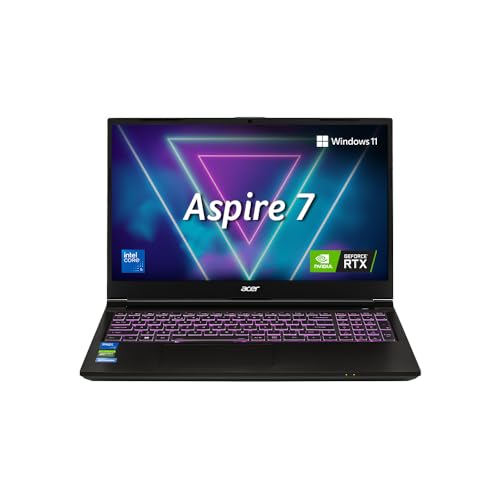
🔲 Processor & GPU: Intel Core 5-210H — 8 cores, up to 4.8GHz | NVIDIA RTX 3050 6GB GDDR6 | Multi-colour RGB backlit full-size keyboard with numpad | 1.99kg
🖥️ Display & Memory: 15.6″ FHD WVA LCD | 144Hz | 45% NTSC color gamut | 16GB DDR4 RAM (upgradeable to 32GB) | 512GB PCIe M.2 SSD (upgradeable to 1TB)
🔌 Ports & Connectivity: 2× USB 3.2 Type-C | 1× USB 3.2 Type-A | 1× USB 2.0 | Intel Wi-Fi 6 AX101 | Bluetooth 5.2 | HDMI | 1.0M HD webcam | Windows 11 Home | No Office bundled
The Acer Aspire 7 A715-79G is a machine caught between two worlds — marketed as a gaming laptop but engineered closer to a productivity machine with gaming credentials. The Intel Core 5-210H (8-core, up to 4.8GHz) and RTX 3050 6GB GDDR6 hardware combination is capable on paper, and the sub-2kg weight at 1.99kg makes it the joint-lightest machine alongside the MSI Thin 15 in this roundup. The multi-color RGB backlit keyboard adds gaming aesthetics to what is otherwise a restrained, clean design. USB 3.2 Type-C dual-port availability is also a connectivity plus.
The critical caveat here — and the primary reason it sits this low in our rankings — is the display. The Aspire 7 A715-79G ships with a 144Hz FHD panel covering only 45% NTSC color gamut, which corresponds to approximately 65–67% sRGB. Every other machine in the upper half of this list either matches or exceeds this, and the LOQ models blow it out entirely with 100% sRGB. For gaming, low sRGB coverage means washed-out colors, lower perceived contrast, and a less immersive visual experience — particularly noticeable in cinematic titles and dark environments. The 16GB DDR4 RAM is workable, but not DDR5. The 512GB SSD is the baseline for this segment. At the right price point, the Aspire 7 still makes sense for casual gamers or college students who need portability above all else and are less concerned with color fidelity.
Pros
✅ 1.99kg — genuinely portable despite the discrete GPU
✅ RTX 3050 6GB GDDR6 — full 6GB VRAM at this budget
✅ Dual USB 3.2 Type-C ports — versatile modern connectivity
✅ Multi-color RGB keyboard — vibrant aesthetic for gaming setups
Cons
❌ 45% NTSC display — weakest color gamut in the roundup, noticeably washed-out
❌ DDR4 RAM — behind DDR5 peers in memory bandwidth and latency
❌ No discrete audio or display tuning software — minimal multimedia enhancements
👉 Check Acer Aspire 7 A715-79G Latest Price on Amazon
HP Victus fa2190TX — Entry-Level Gaming Laptop for First-Time Buyers
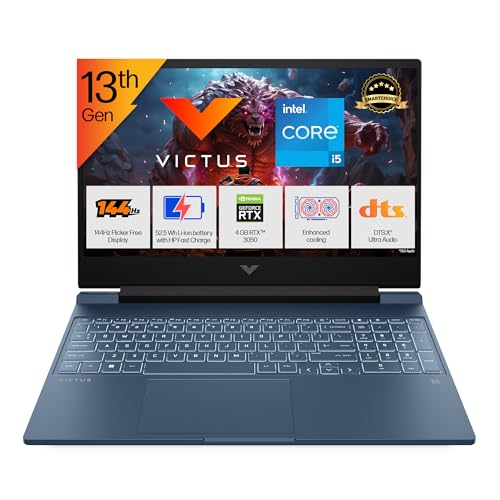
🔲 Processor & GPU: Intel Core i5-13420H 13th Gen (up to 4.6GHz, 8 cores, 12 threads) | NVIDIA RTX 3050 4GB GDDR6 | HP Audio Boost | DTS:X Ultra dual speakers
🖥️ Display & Memory: 15.6″ FHD IPS micro-edge | 144Hz | 300 nits | 62.5% sRGB | 16GB DDR4-3200 (1×16GB, upgradeable) | 512GB PCIe Gen4 NVMe SSD
🔌 Ports & Connectivity: HDMI 2.1 | USB-C 5Gbps with DisplayPort 1.4a + HP Sleep & Charge | USB-A 5Gbps ×2 | RJ45 | Realtek Wi-Fi 6 | Bluetooth 5.4 | 720p webcam | Windows 11 Home + MS Office Home 2024
The HP Victus fa2190TX earns its position as the entry point of this roundup, primarily because of one hard spec limitation: it ships with the RTX 3050 4GB GDDR6 GPU variant — not the 6GB version. That 4GB VRAM ceiling becomes a real-world bottleneck in the current gaming landscape, where titles like Hogwarts Legacy, Alan Wake 2, and Forza Horizon 5 regularly exceed 4GB VRAM at medium-high texture settings. The Intel Core i5-13420H (8-core, up to 4.6GHz, 13th Gen Raptor Lake) is a competent processor, and 16GB DDR4-3200 RAM in an upgradeable single-channel slot is serviceable for esports and light workloads.
The Victus fa2190TX does deliver a few genuine positives. The 15.6-inch FHD 144Hz IPS display with micro-edge bezels and HP Audio Boost is a pleasant daily experience, even if the 62.5% sRGB gamut is the second weakest in the lineup. HP’s build quality is reliable, with a keyboard that features a backlit performance blue-opaque finish and a numeric keypad for spreadsheet work. Wi-Fi 6 with Bluetooth 5.4 and a reasonably complete port selection — including HDMI 2.1 and USB-C with DisplayPort 1.4a — ensures it doesn’t feel outdated for connectivity. For students who primarily play competitive esports titles (Valorant, BGMI, CS2, Free Fire) where the 4GB VRAM limit isn’t typically breached, this remains a viable 16 GB RAM gaming laptop under 80000 entry option — but buyers should be clear-eyed about its GPU limitations before purchasing.
Pros
✅ Intel i5-13420H (13th Gen, 8-core) — reliable modern processor for daily use
✅ 16GB DDR4 RAM (upgradeable) — sufficient for multitasking and esports
✅ HP build quality + backlit keyboard + numeric pad — solid everyday ergonomics
✅ HDMI 2.1 + USB-C DisplayPort — capable external monitor connectivity
Cons
❌ RTX 3050 4GB only — VRAM bottleneck in modern AAA titles at medium+ settings
❌ 62.5% sRGB display — below-average color coverage for gaming and content work
👉 Check HP Victus fa2190TX Latest Price on Amazon
Acer ALG AL15G-53 — Best Gaming Laptop Under 80000 in India for Balanced RTX 3050 Performance

🎮 Gaming-ready core specs: Intel Core i7-13620H plus RTX 3050 6GB gives it solid 1080p gaming capability for esports and lighter AAA titles.
💻 Practical everyday usability: 16GB RAM, 512GB SSD, numeric keypad, and Windows 11 Home make it suitable for office work and college multitasking.
🧊 Premium build and portability: Aluminum top cover, 1.99kg weight, and 144Hz display add value for buyers who want a sturdy daily-use gaming laptop.
The Acer ALG AL15G-53 is a strong fit for buyers searching for the best gaming laptop under 80000 in India because it combines a proper 10-core Intel Core i7-13620H with the NVIDIA GeForce RTX 3050 6GB GPU, which gives it a more balanced gaming-plus-productivity profile than many entry gaming machines. The 144Hz FHD panel makes competitive titles feel smoother, while the 16GB DDR4 RAM and 512GB NVMe SSD ensure daily multitasking, college work, and office use remain comfortable. Its aluminum top cover and 1.99kg weight also make it feel more premium and portable than most plastic-bodied gaming laptops in this bracket.
Acer has positioned the ALG AL15G-53 as a practical gaming laptop for buyers who want performance without jumping into overpriced RTX 4050 territory. The Intel Core i7-13620H brings 10 cores and up to a 4.9 GHz boost, which helps not just in gaming but also in coding, content work, and multitasking-heavy office use. The RTX 3050 6GB is still a capable 1080p GPU for popular esports games and many casual AAA titles, especially when settings are tuned realistically. The 144Hz display is a major plus for smooth gameplay, though the 45% NTSC color gamut clearly shows this is a gaming-first panel rather than a creator-focused one. Cooling, keyboard quality, and the premium metal body make it feel well thought out for Indian buyers who need one machine for gaming, college, and day-to-day productivity.
Pros
✅ 10-core i7 handles gaming and multitasking.
✅ RTX 3050 6GB delivers smooth 1080p gaming.
✅ 144Hz display improves motion clarity noticeably.
✅ Aluminum top cover feels more premium.
Cons
❌ 45% NTSC limits color accuracy.
❌ 512GB SSD fills up quickly.
❌ DDR4 is behind newer DDR5 systems.
👉 Check Acer ALG AL15G-53 Latest Price on Amazon
Conclusion
The gaming laptop under ₹80,000 segment in India has never been more sharply defined. The arrival of the RTX 3050 6GB at 95W TGP as a segment standard — replacing the older 4GB throttled variants — means that buyers today are getting meaningfully more GPU performance than the same budget delivered in 2022–2023. The real competition in this segment comes down to three axes: display panel quality (sRGB coverage matters enormously), thermal design (TGP headroom and cooling architecture), and CPU platform (HX-class vs. H-class makes a tangible productivity difference).
DDR5 has effectively become the norm across the ₹70,000+ range, and PCIe Gen4 SSDs are no longer a differentiator but an expectation. What separates the best gaming laptops under 80000 from the mediocre ones is not spec-sheet surface area but engineering depth — how much TGP is actually allocated to the GPU, how efficiently the thermal system manages sustained loads during a two-hour gaming session in a 32°C room, and whether the display can reproduce game visuals with genuine color accuracy.
🥇 Absolute Budget Hero — Acer Nitro V ANV15-41
For buyers who want the best competitive gaming experience at the lowest effective price, the Nitro V delivers 165Hz refresh rate, RTX 3050 6GB, Ryzen 5 6600H, USB4, and DDR5 memory in a package that doesn’t cut meaningful corners. It’s the entry point to serious gaming in this segment.
👑 Best Value & Performance King — Lenovo LOQ 15ARP10 (83JC00EEIN)
If you can stretch slightly within the ₹80,000 ceiling, the Lenovo LOQ 15ARP10 is the definitive answer: 95W TGP, 100% sRGB panel, MUX Switch, Hyperchamber cooling, and the best GPU performance consistency in the segment. Every rupee spent here converts directly into better gaming frames and a more accurate, enjoyable display — there is no other machine in this roundup that ticks this many engineering boxes simultaneously.
FAQ
1. Which is the best graphics card available in laptops under 80000?
The NVIDIA GeForce RTX 3050 6GB GDDR6 running at 95W TGP is the best discrete GPU you’ll find in gaming laptops under ₹80,000 in India. It sits well above the older 4GB RTX 3050 variant (which still appears on some machines like the HP Victus and ASUS TUF A15 in this price range), offering 50% more VRAM and a wider 128-bit memory bus. At 95W, the best RTX 3050 6GB laptop in India delivers playable framerates in most current-gen AAA titles at medium settings and excellent performance in esports titles like Valorant, BGMI, and CS2. The RTX 3050 6GB also supports DLSS 3 (Frame Generation excluded), ray tracing (limited at this performance tier), and NVIDIA’s Reflex latency reduction — features that remain practically relevant for Indian gamers well into 2026.
2. Is ₹80,000 enough for a good gaming laptop in India?
Absolutely — ₹80,000 is actually the sweet spot for entry-to-mid gaming in India right now. At this budget, you get the best RTX 3050 6GB laptop in India with a full-fat 95W TGP, 16GB DDR5 RAM, PCIe Gen4 SSDs, 144Hz–165Hz displays, and processors ranging from Intel i5 HX-class to AMD Ryzen 7. You can handle all competitive esports titles at high settings well above 100 FPS, and modern AAA titles at medium-high settings between 50–70 FPS. The only meaningful upgrade beyond ₹80,000 would be an RTX 4060 laptop GPU — which begins at ₹90,000–₹95,000 in India — offering roughly 35–40% more raw performance. If your primary games are Valorant, CS2, BGMI, GTA V, or the FIFA series, ₹80,000 is more than sufficient. If you’re targeting Cyberpunk 2077 at ultra settings or future AAA launches, save the extra ₹10,000–₹15,000 for the RTX 4060 tier.
3. Lenovo LOQ vs. Acer Nitro V under 80000 — which is better?
This is the most contested matchup in this entire roundup. Here’s how we break it down:
| Feature | Lenovo LOQ 15ARP10 | Acer Nitro V ANV15-41 |
| GPU TGP | 95W RTX 3050 6GB | RTX 3050 6GB (estimated ~80W) |
| Display | 100% sRGB, 144Hz | ~72% sRGB, 165Hz |
| RAM | 12GB DDR5 (1 slot) | 16GB DDR5 (1 slot) |
| CPU | Ryzen 5 7235HS (4C/8T) | Ryzen 5 6600H (6C/12T) |
| Connectivity | Wi-Fi 6, BT 5.2 | Wi-Fi 6, BT 5.2, USB4 |
| Cooling | Hyperchamber (superior) | Dual-fan (adequate) |
Verdict: Choose the Lenovo LOQ if display color accuracy matters (for design, content consumption, and overall visual quality) and you want the highest guaranteed GPU TGP. Choose the Acer Nitro V if you play competitive games where 165Hz gives an edge, and USB4 connectivity is a priority. Both represent genuine top-tier value among the best gaming laptops under 80000.
4. Which is the best gaming laptop for students under 80000 with good battery life?
For students, battery life and portability must coexist with gaming capability — and those two requirements are in constant tension with gaming thermal design. The best compromise in this roundup is the MSI Thin 15 B13UDX at 1.86kg, followed by the Acer Aspire 7 A715-79G at 1.99kg. Neither is a standout battery performer under gaming load (discrete GPU gaming typically reduces battery life to 1.5–2 hours regardless of battery size), but in academic use mode — browser, Office, video streaming at medium brightness — these slim chassis machines manage 5–6 hours, which covers a full lecture schedule. The ASUS Gaming V16 with its 63WHr battery is also worth considering for students who want the larger 16-inch 16:10 display for multi-window productivity while retaining genuine gaming capability on evenings and weekends.
5. Should I buy a gaming laptop now or wait for newer models?
If you need a laptop today for college, work, or gaming, buying now makes strong practical sense. The RTX 3050 6GB generation represents a stable, well-supported platform with driver maturity and wide game compatibility. Waiting for the next-gen Blackwell mobile GPUs (RTX 50 series) will likely bring those chips to the ₹80,000 segment no earlier than late 2026 at the earliest — and initial pricing on new architectures is rarely budget-friendly at launch. More importantly, SSD and DDR5 RAM prices are stabilized right now, meaning the hardware-per-rupee ratio is near its peak for this generation. For the best gaming laptop under 80000 in India segment specifically, the current crop is as good as it’s been in three years — and arguably better value than what will arrive at this price point six to twelve months from now.



![12 Best Earbuds Under ₹3,000 in India [2026] | GadgetVeda](https://gadgetveda.com/wp-content/uploads/2026/09/Best-Earbuds-Under-₹3000-in-India-150x150.webp)
![11 Best Washing Machines Under ₹50,000 in India [2026]](https://gadgetveda.com/wp-content/uploads/2026/09/Best-Washing-Machines-Under-₹50000-in-India-150x150.webp)
![14 Best Wireless Earbuds Under ₹2,000 in India [2026]](https://gadgetveda.com/wp-content/uploads/2026/09/Best-Wireless-Earbuds-Under-₹2000-in-India-150x150.webp)
![10 Best Wireless Earbuds Under ₹1,000 in India [2026]](https://gadgetveda.com/wp-content/uploads/2026/09/Best-Wireless-Earbuds-Under-₹1000-in-India-150x150.webp)


![12 Best Earbuds Under ₹3,000 in India [2026] | GadgetVeda](https://gadgetveda.com/wp-content/uploads/2026/09/Best-Earbuds-Under-₹3000-in-India-300x167.webp)
![11 Best Washing Machines Under ₹50,000 in India [2026]](https://gadgetveda.com/wp-content/uploads/2026/09/Best-Washing-Machines-Under-₹50000-in-India-300x167.webp)
![14 Best Wireless Earbuds Under ₹2,000 in India [2026]](https://gadgetveda.com/wp-content/uploads/2026/09/Best-Wireless-Earbuds-Under-₹2000-in-India-300x167.webp)
![10 Best Wireless Earbuds Under ₹1,000 in India [2026]](https://gadgetveda.com/wp-content/uploads/2026/09/Best-Wireless-Earbuds-Under-₹1000-in-India-300x167.webp)