



If you’re hunting for the best gaming laptops under 70000, you’re standing right at the tension point of India’s gaming market: this is where serious 1080p performance meets tight college and first-job budgets. You want frames, not just flashy RGB. But you also need something that won’t melt down in a non-AC hostel room, can survive being carried in a backpack every day, and can still open Excel without sounding like a jet engine.
At GadgetVeda, every gaming laptop we recommend under this price bracket goes through a specification-first audit. We look at CPU class (H/HX vs thin-and-light P series), RTX GPU tier and TGP, thermal design (heatpipe layout, dual vs single fan, exhaust position), panel quality (sRGB coverage, refresh rate), and upgrade paths for RAM and SSD. We don’t take brand claims at face value, and we don’t rank by sponsorships; we map each machine against real Indian use cases — heavy AAA grinders, competitive eSports players, college multi-taskers, and creator-gamers who need Premiere, Blender, or Unreal to actually run.
👉 Also, explore our curated guide on the best gaming laptops under ₹60,000 in India— perfect if your budget caps out before the 70,000 mark, and you still want credible RTX performance. You may also explore our latest guide on Gaming Laptops Under ₹80,000 in India and Gaming Laptops Under ₹90000 in India, specially curated list for heavy gamers and editors.
🏆 Best Gaming Laptops Under ₹70,000 in India [Our Top 3 Picks]

If you can extend your budget a little more, the following three models are also worth considering. However, the rising chip prices have caused sharp increase in entry level gaming laptops.
1. Heavy Gaming Champion — Lenovo LOQ 15ARP9 (Ryzen 5 7235HS + RTX 3050A)
This LOQ build combines a Ryzen 5 7235HS with an RTX 3050A running at 65W TGP, a 144Hz 100% sRGB panel, and Lenovo’s Hyperchamber cooling with dual outflow fans. It’s the machine we’d hand to a ranked Valorant/CS2 grinder who also wants to dabble in AAA single-player titles without constant thermal throttling. Under ₹70K, this is the most “plug-in and grind” ready rig in the list.
2. Casual Gaming & College Multitasker — MSI Thin 15 B13UDX (i5-13420H + RTX 3050 6GB)
The MSI Thin 15 pairs Intel’s 13th Gen i5-13420H with a full 6GB RTX 3050, 144Hz IPS-level display, 16GB DDR5, and Gen4 SSD in a 1.8 kg chassis. It looks clean enough to blend into lecture halls yet has enough GPU headroom for eSports, lighter AAA titles, and video editing — a classic gaming laptop under 70000 for campus plus weekend LANs.
3. Ultimate Budget Warrior — Acer Aspire 7 A715-51G (i5-1240P + RTX 3050)
Acer’s Aspire 7 sneaks RTX 3050 graphics and a 12th Gen Core i5-1240P into a chassis that looks far more “work laptop” than “gamer”. With Thunderbolt 4, Wi‑Fi 6, and upgradable DDR4 RAM, it’s the best gaming laptop under 75000 alternatives when you want maximum rupee-to-fps value without shouting your gaming habit in every meeting.
Best Gaming Laptops Under ₹70,000 in India [Quick Summary]
| Rank | Model Name | Key Specifications | Expert Rating | Latest Price |
| 1 | Lenovo V15 G4 (Ryzen 7 7730U) | Ryzen 7 7730U, 16GB DDR4, 512GB SSD, 15.6″ FHD 250nits, AMD Radeon iGPU, 1.65kg | 8.9/10 | Check on Amazon |
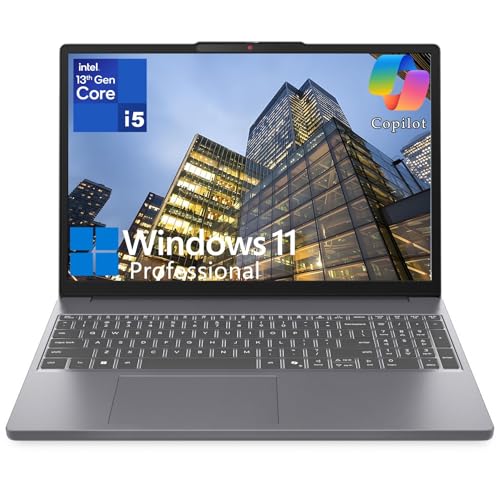
| 2 | Lenovo V15 (i5-13420H) | Intel Core i5-13420H 8C/12T, 16GB DDR4, 512GB SSD, 15.6″ FHD TN 250nits, Intel UHD Graphics, Win 11 Pro | 8.9/10 | Check on Amazon |
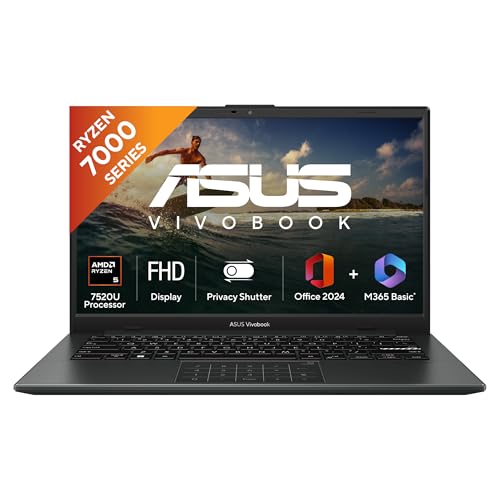
| 3 | ASUS Vivobook Go 14 (Ryzen 5 7520U) | Ryzen 5 7520U, 16GB LPDDR5, 512GB SSD, 14″ FHD 60Hz, AMD Radeon iGPU, 1.38kg | 8.8/10 | Check on Amazon |
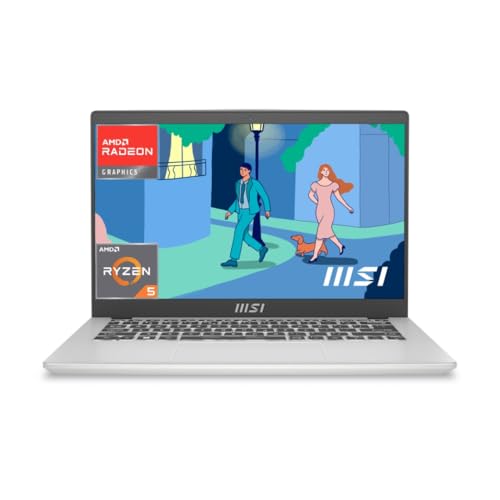
| 4 | MSI Modern 14 (Ryzen 5 7430U) | Ryzen 5 7430U, 16GB DDR4, 512GB SSD, FHD 60Hz, AMD Radeon iGPU, 1.4kg | 8.8/10 | Check on Amazon |
| 5 | Lenovo LOQ 15ARP9 (83JC00JXIN) | Ryzen 5 7235HS, RTX 3050A 4GB 65W, 12GB DDR5 (up to 32GB), 512GB PCIe 4.0 SSD, 15.6″ FHD IPS, 144Hz, 100% sRGB, Hyperchamber dual-fan cooling | 9.3/10 | Check on Amazon |
| 6 | MSI Thin A15 (B7UC-103IN) | Ryzen 7 7735HS, RTX 3050 4GB, 16GB DDR5, 1TB Gen4 SSD, 15.6″ FHD IPS, 144Hz, Cooler Boost 5 dual-fan thermals | 9.1/10 | Check on Amazon |
| 7 | MSI Cyborg 15 (A12UDX-1468IN) | i5-12450H, RTX 3050 6GB, 16GB DDR5 (8×2), 512GB Gen4 SSD, 15.6″ FHD IPS, 144Hz, shared-pipe cooling, translucent design | 9.0/10 | Check on Amazon |
| 8 | ASUS TUF Gaming A15 (FA506NCG‑HN199W) | Ryzen 7 7445HS, RTX 3050 4GB 75W, 16GB DDR5 (up to 64GB), 512GB SSD, 15.6″ FHD 144Hz, MIL‑STD chassis, TUF thermals | 8.8/10 | Check on Amazon |
| 9 | Acer Aspire 7 Gaming (A715‑51G) — Budget-Friendly | i5‑1240P (12 cores), RTX 3050 4GB, 8GB DDR4 (up to 32GB), 512GB SSD, 15.6″ FHD IPS, Thunderbolt 4, Wi‑Fi 6 | 8.5/10 | Check on Amazon |
| 10 | HP Victus 15 (fb3123AX) | Ryzen 7 7445HS, RTX 2050 4GB, 16GB DDR5‑5600 (upgradable), 512GB Gen4 SSD, 15.6″ FHD IPS, 144Hz, 300 nits | 8.6/10 | Check on Amazon |
| 11 | Acer ALG (AL15G‑52) — Budget-Friendly | i5‑12450H, RTX 2050 4GB, 8GB DDR4 (dual-channel capable), 512GB SSD, 15.6″ FHD 60Hz, metal lid, multi-color keyboard | 8.3/10 | Check on Amazon |
| 12 | MSI Thin 15 B13UDX (B13UDX‑129IN) | i5‑13420H, RTX 3050 6GB, 16GB DDR5, 512GB Gen4 SSD, 15.6″ FHD IPS, 144Hz, 1.8 kg thin chassis | 8.6/10 | Check on Amazon |
| 13 | Dell G15 5530 (New Dell Gaming G15) | i5‑13450HX, RTX 3050 6GB, 16GB DDR5, 512GB SSD, 15.6″ FHD 120Hz, 2.65 kg, G‑series cooling | 8.3/10 | Check on Amazon |
| 14 | Acer Nitro 5 AN515‑54 (9th Gen) | i5‑9300H, GTX 1650 4GB, 8GB DDR4 (up to 32GB), 1TB HDD, 15.6″ FHD IPS, legacy Nitro thermals | 8.0/10 | Check on Amazon |
14 Best Gaming Laptops Under ₹70,000 in India [Detailed Reviews]
Lenovo V15 G4 (Ryzen 7 7730U) — Best Budget Pick Under 70000 for Casual Gaming & Multitasking
💻 Multitasking power: Ryzen 7 7730U 8-core keeps coursework, browsers, and casual games running fluidly.
🔋 Fast charging: 38Wh battery with Rapid Charge hits 80% in just one hour.
🪶 Everyday portability: 1.65kg thin-and-light build suits daily campus or office carry.
Buyers searching for the best gaming laptops under 70000 in India who primarily play casual, lighter titles alongside heavy college or office multitasking will find the Lenovo V15 G4 a dependable fit. The 8-core Ryzen 7 7730U handles multiple applications smoothly, and 16GB DDR4 RAM keeps browser tabs, Office apps, and video calls running without stuttering. The AMD Radeon integrated graphics manage casual 2D games, older titles, and emulator-based gaming comfortably, though demanding 3D AAA titles are outside its scope. The 250-nit anti-glare FHD display stays legible indoors, and the 38Wh battery with Rapid Charge (80% in an hour) is genuinely useful for students on tight class schedules. At 1.65kg, it’s one of the lighter machines in this bracket.
Pros
✅ Ryzen 7 7730U 8-core handles multitasking smoothly.
✅ Rapid Charge — 80% battery in just 1 hour.
✅ Lightweight 1.65kg build for daily commuting.
✅ Lifetime Windows 11 Home SL pre-installed.
Cons
❌ No dedicated GPU — casual gaming only.
❌ 250-nit brightness modest for bright rooms.
👉 Check Lenovo V15 G4 Latest Price on Amazon
Lenovo V15 (Intel Core i5-13420H) — Best Gaming Laptop Under 70000 for Office & College Workloads
💻 CPU-first performance: 13th Gen i5-13420H 8-core delivers strong multitasking and compile speeds.
🖥️ Flexible connectivity: USB-C DisplayPort and HDMI 1.4b support multiple external displays.
🏢 Business-ready OS: Windows 11 Pro pre-installed for office and professional environments.
Among the best gaming laptop under 70000 options for buyers who need serious CPU muscle without gaming as the priority, this Lenovo V15 variant stands out through its 13th Gen Intel Core i5-13420H — an 8-core, 12-thread chip that outpaces most integrated-graphics rivals in raw processing power. It’s well suited for coding, compiling, spreadsheet-heavy work, and light casual gaming via Intel UHD Graphics, though it won’t handle modern 3D titles at playable settings. The 15.6″ FHD TN display is serviceable but trails IPS panels on viewing angles. Windows 11 Pro, dual display-output support via USB-C and HDMI, and Ethernet connectivity make this a practical choice for professionals needing a stable, business-ready machine with occasional casual gaming capability.
Pros
✅ 13th Gen i5-13420H outperforms most integrated rivals.
✅ Windows 11 Pro suits professional and business use.
✅ Multiple display outputs via USB-C and HDMI.
✅ Ethernet port adds reliable wired connectivity.
Cons
❌ TN panel trails IPS in viewing angles.
❌ Intel UHD Graphics unsuitable for 3D gaming.
❌ DDR4 RAM lags behind DDR5 competitors.
👉 Check Lenovo V15 (i5-13420H) Latest Price on Amazon
ASUS Vivobook Go 14 (Ryzen 5 7520U) — Best Ultraportable Laptop Under 70000 for Students
🪶 Ultra-light design: 1.38kg chassis makes it the most portable pick in this budget bracket.
📚 Student-friendly software: Office 2024, M365 Basic, and McAfee security bundled at no extra cost.
🔒 Privacy-first camera: 720p webcam with physical shutter protects against unauthorized access.
For college students hunting the best gaming laptops under 70000 who prioritize portability above all else, the ASUS Vivobook Go 14 is the lightest option in this group at just 1.38kg. The Ryzen 5 7520U handles everyday academic work, video calls, and casual browser-based or 2D gaming without issue, backed by 16GB of fast LPDDR5 RAM. The 14-inch FHD display with a 60Hz panel and 45% NTSC gamut is tuned for productivity rather than gaming visuals. The bundled Microsoft 365 Basic, Office Home 2024, and McAfee security software add real value for budget-conscious buyers. Its compact 14-inch footprint makes it ideal for backpack commuting, though the smaller screen limits immersive gaming sessions.
Pros
✅ 1.38kg — lightest laptop in this comparison.
✅ LPDDR5 RAM boosts everyday multitasking speed.
✅ Office 2024 + M365 Basic bundled free.
✅ Privacy shutter camera adds practical security.
Cons
❌ 14-inch screen limits immersive gaming experience.
❌ 60Hz refresh rate unsuitable for competitive gaming.
❌ Integrated Radeon graphics skip demanding titles entirely.
👉 Check ASUS Vivobook Go 14 Latest Price on Amazon
MSI Modern 14 (Ryzen 5 7430U) — Best Thin & Light Pick Under 70000 for Everyday Computing
📡 Superior connectivity: Wi-Fi 6E delivers stable, low-latency performance even on busy networks.
🔄 Flexible usability: 180-degree lay-flat hinge with Flip-n-Share enables easy screen sharing.
🪶 Slim everyday build: 19.35mm profile and 1.4kg weight suit daily carry and travel.
Rounding out this best gaming laptop under 70000 in India selection is the MSI Modern 14, a slim 1.4kg machine built around the Ryzen 5 7430U processor for buyers who want dependable daily performance over gaming muscle. The AMD Radeon integrated graphics manage casual and 2D gaming adequately, while the 16GB DDR4 RAM and 512GB NVMe SSD keep day-to-day computing responsive. The 60Hz FHD panel with 45% NTSC coverage is adequate for office and study use but not built for gaming visuals. MSI’s 180-degree lay-flat hinge and Flip-n-Share screen sharing function add practical collaboration value, and Wi-Fi 6E ensures stable connectivity even on crowded networks — a genuine plus for hostel and shared-apartment setups.
Pros
✅ Wi-Fi 6E ensures stable connectivity on crowded networks.
✅ 180-degree lay-flat hinge aids screen sharing.
✅ Ultra-slim 19.35mm profile at just 1.4kg.
✅ MS Office 2024 + M365 bundled lifetime.
Cons
❌ 60Hz display unsuitable for fast-paced gaming.
❌ PCIe Gen3 SSD trails faster Gen4 rivals.
👉 Check MSI Modern 14 Latest Price on Amazon
Lenovo LOQ 15ARP9 — Best Balanced RTX 3050 Gaming Laptop for Students

⚡ AMD Ryzen 5 7235HS | 4 Cores / 8 Threads | Up to 4.2GHz | RTX 3050A 4GB GDDR6 | 65W TGP | MUX Switch + NVIDIA Advanced Optimus + Lenovo AI Engine+ with LA1 AI Chip — A purpose-matched CPU-GPU pairing for sustained 1080p high-settings gaming with intelligent GPU switching that protects battery and thermals simultaneously
🖥️ 15.6″ FHD (1920×1080) IPS | 144Hz | 100% sRGB | 300 nits | Anti-Glare — One of the very few laptops in this budget range delivering both high-refresh competitive gaming and color-accurate content work on the same panel — genuinely rare under ₹70K
🌡️ Hyperchamber Dual Outward-Spinning Fan Cooling | +10W Extreme Mode | Sealed Chamber | 12GB DDR5-4800 (Up to 32GB) | 512GB PCIe 4.0×4 NVMe SSD | Wi-Fi 6 | Windows 11 Home | Xbox Game Pass 3 Months + Office Home 2024 — Premium thermal engineering with a future-proof DDR5 platform and strong out-of-box software value
Lenovo’s LOQ 15ARP9 is the machine we keep coming back to when someone asks for the best gaming laptop under 70000 in India that must also survive college life. The Ryzen 5 7235HS (4C/8T, up to 4.2GHz) paired with an RTX 3050A 4GB at 65W TGP is a sweet spot combo for 1080p high settings in most modern titles.
The 15.6‑inch FHD IPS panel runs at 144Hz with full 100% sRGB coverage and 300‑nit brightness, making it one of the few laptops in this bracket that’s genuinely usable for both competitive shooters and color-sensitive content work. You get 12GB DDR5‑4800 in single-channel out of the box, upgradeable to 32GB, plus a 512GB PCIe 4.0×4 SSD that keeps load times short.
Thermals are where the LOQ quietly separates itself from typical budget designs. Lenovo’s Hyperchamber cooling uses dual outward-spinning fans and a sealed chamber that can push an extra ~10W in Extreme Mode while reducing skin temperatures and fan noise — a big deal in non-AC Indian rooms. Add in the Lenovo AI Engine+, LA1 AI chip, and MUX switch with NVIDIA Advanced Optimus, and you’ve got a smart RTX laptop under 70000 that knows when to unleash the GPU and when to stay quiet.
Pros
✅ Ryzen 5 7235HS + RTX 3050A 65W — excellent 1080p gaming and creator performance for this budget
✅ 15.6″ FHD IPS 144Hz, 100% sRGB, 300 nits — rare combo of speed and color accuracy under 70K
✅ Hyperchamber dual-fan design + AI Engine+ + MUX/Advanced Optimus — strong thermals and smart GPU switching
✅ DDR5 and PCIe 4.0 SSD with upgrade paths to 32GB RAM — future-proof core platform
Cons
❌ Ships with 12GB single-channel RAM — you’ll want to move to dual-channel for best performance
❌ 2.4 kg weight — not the lightest option for everyday campus carry
👉 Check Lenovo LOQ 15ARP9 Latest Price on Amazon
MSI Thin A15 (B7UC‑103IN) — Best Ryzen 7 RTX 3050 Gaming Laptop Under ₹70,000

⚡ AMD Ryzen 7 7735HS | 8 Cores / 16 Threads | Up to 3.2GHz Base | NVIDIA GeForce RTX 3050 4GB GDDR6 | 144Hz FHD IPS-Level Display | MSI Cooler Boost 5 Dual-Fan Thermal Design — Eight-core Ryzen 7 muscle with RTX 3050 and MSI’s proven Cooler Boost 5 solution ensuring sustained clocks during long gaming and editing sessions
💾 16GB DDR5 RAM | 1TB PCIe Gen4 NVMe SSD | 1.8 kg Chassis | Intel Wi-Fi 6 | Bluetooth 5.3 — Class-leading storage configuration at this price — 1TB storage avoids the game-deletion grind, paired with fast Gen4 SSD access and lightweight portability for campus carry
🎮 15.6″ FHD (1920×1080) | 144Hz IPS-Level Panel | DLSS Support via RTX 3050 | Windows 11 Home with Lifetime Validity | MSI Center Performance Tuning Software | 180° Lay-Flat Hinge — Smooth high-refresh gaming display with DLSS frame-rate boost capability, a full-flat hinge for collaborative use, and MSI Center for per-mode fan and performance customisation
MSI’s Thin A15 is what you buy when you want high clocks and clean thermals without a brick-like chassis. The Ryzen 7 7735HS gives you 8 cores tuned for gaming and content workloads, while the RTX 3050 4GB handles modern AAA titles at medium–high settings comfortably at 1080p. The 16GB DDR5 RAM and 1TB Gen4 SSD are generous at this price — you don’t hit the storage ceiling as quickly as on 512GB machines.
The 144Hz FHD IPS panel keeps fast-paced games feeling fluid, and MSI’s Cooler Boost 5 thermal solution (dual fans, multiple heatpipes) is tuned better than most mainstream designs for hot Indian rooms. In practice, this means sustained clocks during long gaming sessions rather than early thermal throttling. Intel Wi‑Fi 6 and Bluetooth 5.3 keep online play stable.
Build-wise, the Thin A15 sits in the “minimal gamer” design lane — not as stealthy as an Aspire 7, but nowhere near as loud as a full RGB showpiece. If you want Ryzen 7 multi-core grunt and a 144Hz panel in a gaming laptop under 70000, this is one of the smartest bets right now.
Pros
✅ Ryzen 7 7735HS + RTX 3050 — strong combination for gaming and editing workloads at 1080p
✅ 16GB DDR5 + 1TB Gen4 SSD — class-leading memory and storage in this segment
✅ 15.6″ FHD 144Hz IPS-level panel — smooth eSports and cleaner motion for FPS titles
✅ Cooler Boost 5 thermals — better sustained clocks in non-AC environments than many rivals
Cons
❌ RTX 3050 4GB limits ultra settings in the heaviest AAA titles as 2026 progresses
❌ 1.8 kg is portable but still not “ultra-thin”; expect a standard gaming-laptop footprint
👉 Check MSI Thin A15 Latest Price on Amazon
MSI Cyborg 15 (A12UDX‑1468IN) — Best RTX 3050 6GB Laptop for Style-Conscious Gamers

⚡ Intel Core i5-12450H 12th Gen | Up to 4.4GHz | NVIDIA GeForce RTX 3050 6GB GDDR6 | Shared-Pipe CPU-GPU Heatpipe Structure | MSI-Exclusive Thermal Grease — The 6GB GDDR6 VRAM advantage is real — higher texture headroom in modern AAA titles compared to 4GB variants, backed by a smart shared-pipe thermal design that balances heat between CPU and GPU efficiently
🖥️ 15.6″ FHD (1920×1080) | 144Hz IPS-Level Display | 45% NTSC Color Coverage | Anti-Glare | Translucent Cyberpunk-Inspired Chassis Design — High-refresh competitive display in a visually distinctive translucent build that sets it apart from the generic all-black crowd — ideal for streamers and content creators who care about desk aesthetics
💾 16GB DDR5 RAM (8GB×2 Dual-Channel) | 512GB PCIe Gen4×4 NVMe SSD | Intel Wi-Fi 6 | Bluetooth 5.3 | Windows 11 Home with Lifetime Validity | MS Office Home & Student 2021 — Dual-channel DDR5 out of the box ensures maximum memory bandwidth from day one, with Gen4×4 SSD speed and a bundled Office 2021 license adding immediate real-world value
The MSI Cyborg 15 is where performance, thermals, and aesthetics intersect. Powered by a 12th Gen Intel Core i5‑12450H (up to 4.4GHz) and an RTX 3050 with 6GB GDDR6, it delivers more VRAM headroom than the 4GB variants — helpful as textures continue to grow heavier in newer titles. Dual-channel 16GB DDR5 and a 512GB PCIe Gen4×4 SSD round out a very modern spec sheet.
The 15.6″ FHD 144Hz IPS-level display is tuned for sharp, responsive visuals — perfect for eSports and fast action. MSI’s thermal design with a shared-pipe structure between CPU and GPU, plus improved grease, keeps this RTX 3050 laptop under 70000 running cooler and quieter than you’d expect from such a slim, translucent chassis.
The translucent keyboard deck and side trims aren’t just a gimmick — they visually differentiate this from the usual all-black crowd. If you’re streaming or creating content, that cyberpunk aesthetic plays well on camera. With Wi‑Fi, BT 5.3, and solid port coverage, the Cyborg 15 is a sharp choice for gamers who also care how their laptop looks on a desk.
Pros
✅ i5‑12450H + RTX 3050 6GB — extra VRAM over 4GB cards, great for the latest game textures
✅ 16GB DDR5 dual-channel + Gen4 SSD — bandwidth-rich and snappy storage out of the box
✅ 144Hz FHD IPS-level panel — proper 144hz gaming laptop under 70000 for competitive titles
✅ Stylish translucent chassis with well-tuned thermals — looks different without sacrificing cooling
Cons
❌ 512GB SSD fills quickly with a few AAA titles; second drive or external storage recommended
❌ Design may feel too flashy for some office-centric buyers
👉 Check MSI Cyborg 15 Latest Price on Amazon
ASUS TUF Gaming A15 (FA506NCG‑HN199W) — Best Durable TUF RTX 3050 Gaming Laptop
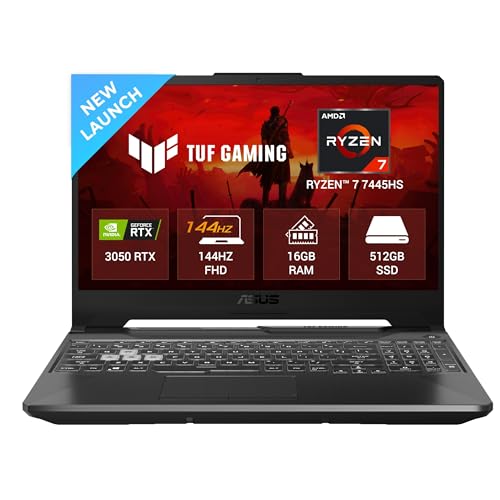
⚡ AMD Ryzen 7 7445HS | NVIDIA GeForce RTX 3050 4GB GDDR6 | 75W TGP | MIL-STD-810H Military-Grade Chassis | Dual-Fan Multi-Heatpipe Cooling Architecture — MIL-STD certification means this chassis has been validated against temperature extremes, humidity, vibration, and drop — the most physically durable gaming laptop in this lineup by a clear margin
🖥️ 15.6″ FHD (1920×1080) | 144Hz | 250 nits | 62.5% sRGB | Anti-Glare | 1-Zone RGB Backlit Keyboard | 720P HD Camera with AI Noise-Canceling Mic — 144Hz high-refresh gaming panel with an AI-tuned microphone array — particularly useful for students who attend online classes and game on the same machine daily
💾 16GB DDR5 RAM Upgradeable to 64GB | 512GB NVMe SSD | HDMI 2.1 | USB 3.2 Gen 2 Type-C with DisplayPort | RJ45 LAN | Windows 11 Home | 1-Month Microsoft 365 Trial + Xbox Game Pass PC 3 Months — Outstanding 64GB RAM ceiling gives this laptop the widest memory upgrade runway of any model in this guide — future-proofed well beyond typical gaming workloads
The ASUS TUF A15 is one of the safest long-term bets in this entire lineup. You get an AMD Ryzen 7 7445HS (Zen 4-based HS chip) paired with an RTX 3050 4GB, 16GB DDR5 (upgradable to 64GB), and a 512GB SSD. That puts it squarely in “solid 1080p high” territory for most modern games, with the CPU having plenty of headroom for streaming and multitasking.
The 15.6‑inch FHD panel runs at 144Hz, 250 nits, and covers 62.5% sRGB — not creator-grade, but perfectly acceptable for gaming and general content consumption. Being a TUF, it’s built to MIL‑STD standards with a robust chassis, 720p camera, AI noise-canceling mic, and 1‑zone RGB keyboard.
ASUS’s cooling system, multiple heatpipes, and dual-fan layout keep this gaming laptop under 70000 steady under extended stress. In typical Indian summer room conditions, you’ll hear the fans under load, but they’re moving enough air to keep clocks stable. The 48Wh battery isn’t designed for long unplugged gaming (no laptop here is), but it’s fine for classes or light office work away from the wall.
Pros
✅ Ryzen 7 7445HS + RTX 3050 — strong 1080p gaming combo with stream-capable CPU headroom
✅ TUF MIL‑STD chassis — better chassis durability than many thin competitors
✅ 16GB DDR5 upgradable to 64GB — standout memory headroom at this price
✅ 144Hz FHD panel + solid port selection (HDMI 2.1, DP-capable USB‑C, RJ45)
Cons
❌ 62.5% sRGB — panel is gaming-ready but not ideal for color-critical work
❌ 48Wh battery — expect to stay near the charger if you multitask heavily
👉 Check ASUS TUF Gaming A15 Latest Price on Amazon
Acer Aspire 7 Gaming (A715‑51G) — Budget-Friendly RTX Gaming for Work + Play
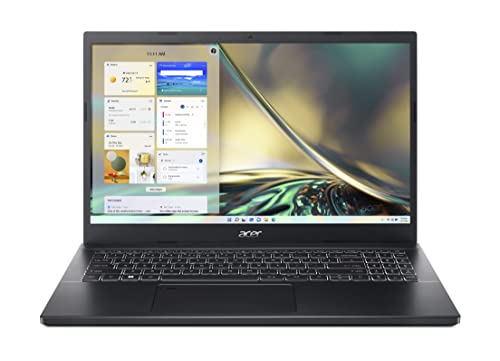
⚡ Intel Core i5-1240P 12th Gen | 12 Cores (4P + 8E) | Up to 4.4GHz | NVIDIA GeForce RTX 3050 4GB GDDR6 | Thunderbolt 4 | Wi-Fi 6 | Fingerprint Reader on Touchpad — The only laptop on this list with Thunderbolt 4 — offering 40Gbps transfer speeds and external GPU dock compatibility — alongside a 12-core hybrid-architecture CPU that handles heavy multitasking beyond typical gaming laptop norms
🖥️ 15.6″ FHD (1920×1080) IPS | 60Hz | Anti-Glare ComfyView LED Backlit Display | Slim Charcoal Black Professional Chassis | 2.1 kg — A deliberately understated design built for environments where a gaming laptop would look out of place — internships, lectures, and client meetings — without compromising on RTX graphics capability under the hood
💾 8GB DDR4 Dual-Channel SDRAM Upgradeable to 32GB | 512GB PCIe NVMe SSD | 3× USB 3.2 Gen 1 | HDMI | Windows 11 Home | T-Type HD Camera — Straightforward, expandable configuration with generous DDR4 upgrade ceiling — adding a matching 8GB stick transforms this into a very capable 16GB dual-channel machine for under a modest upgrade budget
The Acer Aspire 7 walks the thin line between “office acceptable” and “gaming capable” better than almost any other gaming laptop under 70000. Under the understated chassis sits a 12th Gen Intel Core i5‑1240P (12 cores) and an RTX 3050 4GB, backed by 8GB DDR4 (upgradable to 32GB) and a 512GB SSD. For this price, that’s a very healthy performance foundation.
The 15.6‑inch FHD IPS display is 60Hz — so not an eSports-grade high-refresh panel — but for casual AAA gaming and daily work, it’s more than adequate. Thunderbolt 4, Wi‑Fi 6, and a fingerprint reader on the touchpad push this into “seriously capable work machine” territory, not just an entry gaming rig.
Thermally, the Aspire 7 is tuned more conservatively than dedicated gaming series like Nitro or LOQ — good news for noise levels, slightly limiting for sustained turbo clocks. It’s the quintessential Ultimate Budget Warrior: if your usage is 70% productivity/college and 30% gaming, this is one of the best gaming laptops under 70000 when you want the GPU but don’t want the gamer aesthetic.
Pros
✅ i5‑1240P (12 cores) + RTX 3050 — excellent mixed-use performance for work and play
✅ Thunderbolt 4, Wi‑Fi 6, fingerprint reader — connectivity/specs more common at higher price tiers
✅ Upgradable DDR4 up to 32GB — easy to tune for heavier productivity later
✅ Professional styling — ideal for office, internships, and college presentations
Cons
❌ 60Hz display — not ideal if you’re primarily into competitive shooters
❌ Ships with 8GB RAM — adding another 8GB stick is effectively mandatory
👉 Check Acer Aspire 7 Gaming Latest Price on Amazon
HP Victus 15 (fb3123AX) — Best HP Victus Gaming Laptop Under ₹70,000
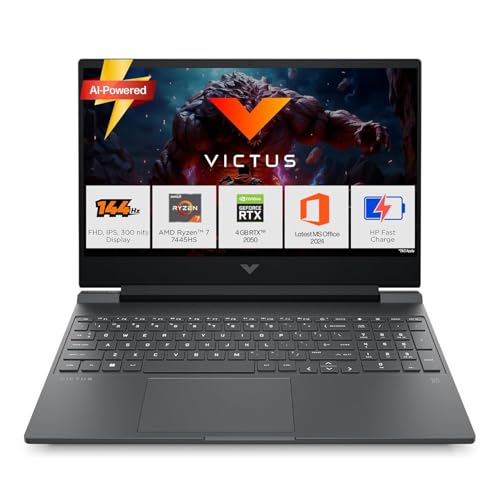
⚡ AMD Ryzen 7 7445HS | 6 Cores / 12 Threads | Up to 4.7GHz | NVIDIA GeForce RTX 2050 4GB GDDR6 | 16GB DDR5-5600 (1×16GB, Upgradeable) | 512GB PCIe Gen4 NVMe SSD — Ryzen 7 with DDR5-5600 high-bandwidth memory is the headline here — the processor and memory configuration punches well above typical mid-range setups, even if the RTX 2050 GPU sits at entry-level RTX tier
🖥️ 15.6″ FHD (1920×1080) IPS | Micro-Edge Anti-Glare | 144Hz | 300 nits | 62.5% sRGB | Backlit Keyboard | Wi-Fi 6 (2×2) | Bluetooth 5.4 — 300-nit brightness is meaningfully higher than the 250-nit standard across this segment — noticeably better for use near windows or under bright ambient lighting, paired with solid Wi-Fi 6 for stable online sessions
🎁 Windows 11 Home | MS Office Home 2024 | 1-Year Microsoft 365 Basic (100GB Cloud) | PC Game Pass 3 Months | HDMI 2.1 | USB-C 5Gbps with DisplayPort 1.4a | HP Sleep and Charge USB-A | HP Pan-India Service Network — Among the strongest out-of-box software bundles on this list, combined with HP’s unmatched pan-India after-sales support — the practical ownership experience goes beyond raw specs
HP’s Victus series has become a go-to for Indian buyers who want a well-known brand with honest mid-range specs. This variant combines a Ryzen 7 7445HS (up to 4.7GHz) with an RTX 2050 4GB, 16GB DDR5‑5600, and a 512GB PCIe Gen4 SSD. The CPU is serious business — 6 cores / 12 threads and a big boost clock give it plenty of multi-tasking headroom.
The 15.6″ FHD IPS display runs at 144Hz, 300 nits, and covers 62.5% sRGB, making it a very comfortable panel for long sessions and a legitimate 144Hz gaming laptop under 70000 for HP loyalists. You also get Office Home 2024, a 3‑month PC Game Pass, Wi‑Fi 6, and a full-size backlit keyboard.
The RTX 2050 is roughly an entry-level RTX — solid for eSports and medium settings in most AAA titles, but outpaced by RTX 3050 setups in raw raster performance. However, for many HP buyers, the brand, thermals, and support network matter as much as the frame counter. If you’re committed to HP and need the best gaming laptop under 70000 in India with a 144Hz panel and modern CPU, this Victus is the one to shortlist.
Pros
✅ Ryzen 7 7445HS + 16GB DDR5‑5600 — class-leading CPU + memory combo for workloads beyond gaming
✅ 15.6″ FHD IPS 144Hz, 300 nits — bright, fast panel perfect for long daily use
✅ PCIe Gen4 SSD + HP’s software bundle (Office 2024 + M365 Basic + PC Game Pass)
✅ HP brand, warranty, and pan-India service support
Cons
❌ RTX 2050 4GB — weaker than RTX 3050/3050A in pure gaming workloads
❌ 2.29 kg chassis — not the most portable option if you commute daily
👉 Check HP Victus 15 fb3123AX Latest Price on Amazon
Acer ALG (AL15G‑52) — Budget-Friendly Metal RTX 2050 Gaming Laptop
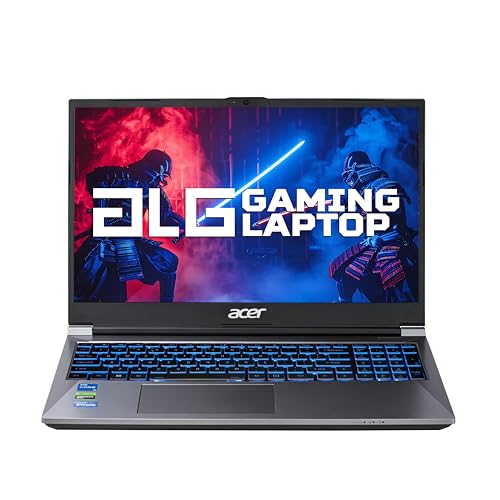
⚡ Intel Core i5-12450H 12th Gen | Up to 4.4GHz | NVIDIA GeForce RTX 2050 4GB GDDR6 | Aluminum Top Cover | Slim 22.7mm Profile | 1.99 kg — A rare metal-lid build in the budget gaming segment — the aluminum cover delivers a tangible premium feel and better structural rigidity than plastic-chassis alternatives at this price point
🖥️ 15.6″ Full HD (1920×1080) | 60Hz | 16:9 Aspect Ratio | Ultra-Slim Narrow Bezel Design | Multi-Color Illuminated Full-Size Keyboard with Numeric Pad | HD Webcam for Streaming — Clean narrow-bezel FHD display with a multi-color backlit keyboard and numeric pad — a practical daily-use layout that suits office work and data-entry tasks as naturally as casual gaming sessions
💾 8GB Dual-Channel DDR4 Upgradeable to 64GB | 512GB NVMe SSD Expandable to 2TB | Intel Wi-Fi 6 AX201 | Bluetooth 5.1 | USB 3.2 Type-C | HDMI | Windows 11 Home — The 64GB RAM and 2TB SSD upgrade ceiling is the highest in this entire list — making the ALG the most future-expandable budget option available, with Wi-Fi 6 and USB-C connectivity completing the package
The Acer ALG is a very interesting RTX laptop under 70000 for buyers who want a metal build, RTX graphics, and a balanced spec sheet without chasing every last frame. It features a 12th Gen Intel Core i5‑12450H (up to 4.4GHz), RTX 2050 4GB, 8GB dual-channel DDR4, and a 512GB NVMe SSD. For eSports and medium settings, 1080p gaming, this is a very competent setup.
The 15.6‑inch FHD panel runs at 60Hz, which clearly marks this as more of a “hybrid” machine than a pure competitive rig. But with a slim aluminum top cover and clean design, it doubles easily as a professional laptop for work and college. Wi‑Fi 6 AX201, BT 5.1, and a multi-color illuminated keyboard add to its everyday appeal.
Where the ALG earns its Budget-Friendly tag is future-proofing: it supports up to 64GB DDR4 and 2TB SSD, something even some higher-priced machines don’t offer. If you’re okay with a 60Hz panel and want a sturdy, metal-clad gaming laptop that can grow with you, this is an excellent value play.
Pros
✅ i5‑12450H + RTX 2050 — very capable for mixed AAA + eSports at 1080p medium settings
✅ Metal top cover, slim design — feels more premium than its price suggests
✅ Up to 64GB RAM and 2TB SSD support — huge upgrade ceiling for the future
✅ Wi‑Fi 6, multi-color keyboard, strong port selection (USB‑C, HDMI, etc.)
Cons
❌ 60Hz display — not ideal for serious competitive shooters
❌ Ships with only 8GB RAM — upgrade to 16GB strongly recommended
👉 Check Acer ALG AL15G‑52 Latest Price on Amazon
MSI Thin 15 B13UDX (B13UDX‑129IN) — Best Thin 144Hz RTX 3050 Laptop for Students
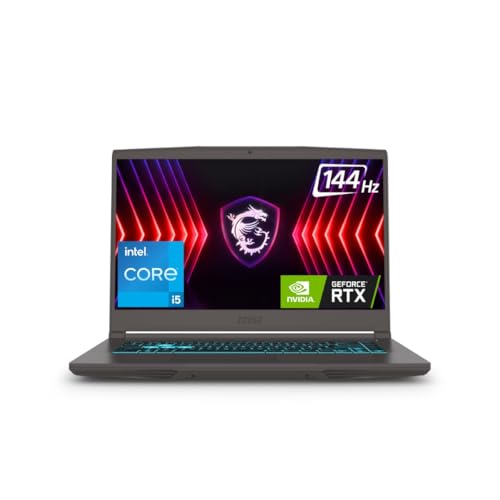
⚡ Intel Core i5-13420H 13th Gen | Up to 4.6GHz | NVIDIA GeForce RTX 3050 6GB GDDR6 | 1.8 kg Chassis | Dual-Fan Cooling | MSI Center Performance Mode Switching — 13th Gen Intel H-series and RTX 3050 6GB VRAM in a sub-2kg form factor — the highest VRAM-to-weight ratio in this lineup, giving you more texture headroom in newer titles without the typical gaming-laptop heft
🖥️ 15.6″ FHD (1920×1080) IPS-Level Display | 144Hz Refresh Rate | Anti-Glare | Cosmos Gray Clean Aesthetic | Backlit Chiclet Keyboard — Fluid 144Hz competitive gaming display inside a Cosmos Gray chassis that reads as “professional slim laptop” rather than “aggressive gaming rig” — versatile for both campus and LAN sessions
💾 16GB DDR5 RAM | 512GB PCIe Gen4 NVMe SSD | Intel Wi-Fi 6 | Bluetooth 5.3 | Windows 11 Home with Lifetime Validity | MSI Center + MSI App Player — DDR5 and Gen4 SSD out of the box with MSI Center for granular fan-curve and performance-mode control — plus MSI App Player for Android game integration on Windows
The MSI Thin 15 B13UDX is a classic “don’t make me choose between class and FPS” laptop. You get a 13th Gen Intel Core i5‑13420H with RTX 3050 6GB, 16GB DDR5, and a 512GB PCIe Gen4 SSD wrapped in a 1.8 kg chassis. That’s enough firepower for modern titles at 1080p medium–high and eSports at high frame rates.
The 40cm (15.6″) FHD IPS-level display at 144Hz makes this a legitimate 144Hz gaming laptop under 70000 — motion is crisp, and input latency is minimized. MSI Center software lets you tune fan curves and performance modes depending on whether you’re in class, on battery, or plugged in for a long gaming session.
Thermals are generally well-tuned for a thin chassis. In non-AC Indian rooms, you’ll hear the fans at load, but that’s expected — and a sign that the machine is prioritizing cooling over silence. For students who need a thin, relatively lightweight machine that doesn’t scream “gamer” but behaves like one when needed, this is a very strong contender among the best gaming laptops under 70000.
Pros
✅ i5‑13420H + RTX 3050 6GB — excellent balance of CPU and GPU for gaming + productivity
✅ 16GB DDR5 + Gen4 NVMe SSD — modern, responsive everyday performance
✅ 144Hz FHD IPS-level display — competitive-grade refresh rate for shooters and MOBAs
✅ 1.8 kg thin chassis — easier to carry than many mainstream gaming designs
Cons
❌ No explicit sRGB spec — panel is gaming-friendly, but creators may want LOQ’s 100% sRGB
❌ Thin design means fans are audible under heavy loads
👉 Check MSI Thin 15 B13UDX Latest Price on Amazon
Dell G15 5530 — Best Dell Gaming Laptop Under ₹70,000 in India
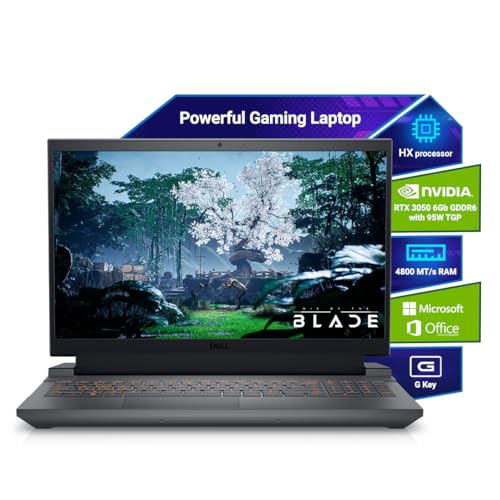
⚡ Intel Core i5-13450HX 13th Gen | HX-Class High-Performance Desktop-Derived Architecture | NVIDIA GeForce RTX 3050 6GB GDDR6 | 16GB DDR5 | G-Series Multi-Fan Thermal Cooling Design — The HX suffix matters — this is a desktop-derived CPU architecture with a higher power envelope than standard H-series chips, giving the Dell G15 meaningful multi-core horsepower for gaming, rendering, and heavy compilation tasks
🖥️ 15.6″ FHD (1920×1080) | 120Hz | Anti-Glare | Dark Shadow Gray G-Series Chassis | Backlit Keyboard | McAfee LiveSafe 5-Device 12-Month Security Subscription — 120Hz display with Dell’s robust G-series chassis build — security-conscious buyers also get a full McAfee LiveSafe subscription included, an unusual but practical addition for professionals storing sensitive data
🔌 512GB PCIe NVMe SSD | HDMI 2.1 | USB-C 3.2 Gen 2 with DisplayPort | RJ45 Ethernet | Multiple USB 3.2 Gen 1 Ports | Intel Wi-Fi 6 AX201 | Bluetooth | Windows 11 Home | MS Office Home 2024 | 2.65 kg — Wired-first connectivity philosophy with HDMI 2.1 and RJ45 Ethernet built in — Dell’s choice to include a dedicated Ethernet jack and DisplayPort-capable USB-C reflects genuine gamer and professional usage priorities
The Dell G15 5530 is for buyers who trust Dell’s after-sales service and want a robust G‑series frame with modern internals. Inside, you get a 13th Gen Intel Core i5‑13450HX (a proper HX chip, not a cut-down P-series), RTX 3050 6GB, 16GB DDR5, and a 512GB NVMe SSD. For multi-core workloads, that HX CPU gives this machine serious weight.
The 15.6″ FHD display pushes 120Hz — not quite 144Hz, but still a noticeable upgrade over 60Hz. With HDMI 2.1, USB‑C with DisplayPort, RJ45 Ethernet, and full-sized USB 3.2 ports, Dell has clearly spec’d this for actual gamers who might connect to external monitors and wired networks.
At 2.65 kg, this is one of the heavier machines here, and Dell’s G‑series cooling prioritizes endurance and robustness over being whisper-quiet. For many, that’s exactly the trade-off they want. If you’re set on a Dell gaming laptop under 70000 in India, this G15 configuration is the one that makes technical sense today.
Pros
✅ i5‑13450HX + RTX 3050 6GB — strong CPU for both games and multi-threaded workloads
✅ 16GB DDR5 + 512GB SSD — modern, balanced memory and storage configuration
✅ 120Hz FHD panel + HDMI 2.1 and DP-capable USB‑C — great for external high-refresh setups
✅ Dell’s G‑series build and support — trusted for long-term serviceability
Cons
❌ 2.65 kg — the heaviest laptop in this lineup; not commuter-friendly
❌ 120Hz vs 144Hz — slightly behind rivals for pure eSports-grade fluidity
👉 Check Dell G15 5530 Latest Price on Amazon
Acer Nitro 5 AN515‑54 — Legacy GTX Gaming on a Tight Budget
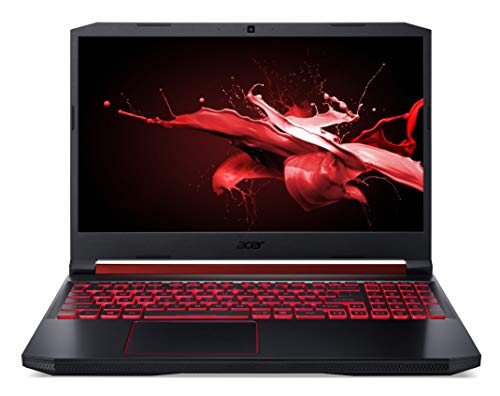
⚡ Intel Core i5-9300H 9th Gen | Up to 4.1GHz Turbo | NVIDIA GeForce GTX 1650 4GB GDDR5 | Dual-Fan Nitro Cooling with Central Exhaust | 8GB DDR4 Upgradeable to 32GB — GTX 1650 with dedicated GDDR5 VRAM still delivers playable 1080p performance in eSports titles and older AAA games — the upgradeable DDR4 platform means a quick 8GB RAM addition transforms the gaming experience without opening the budget
🖥️ 15.6″ FHD (1920×1080) IPS | Anti-Glare ComfyView LED-Backlit Panel | 60Hz | Obsidian Black Chassis | Waves MaxxAudio Sound Processing — IPS technology ensures wider viewing angles than TN alternatives — and MaxxAudio’s hardware-level processing (MaxxBass, MaxxVolume, MaxxDialog) delivers noticeably richer laptop audio for gaming and media playback
💾 1TB HDD 7200RPM (SSD Upgrade Strongly Recommended) | Windows 10 Home | 1-Year International Travelers Warranty (ITW) | USB 3.1 Gen 1 Ports | HDMI | Wi-Fi 5 — ITW warranty provides global service coverage — a practical advantage if you travel internationally for studies or work; however, the 1TB HDD is the clear upgrade priority before any other enhancement
The Acer Nitro 5 AN515‑54 is clearly a previous-generation machine, but that’s precisely why it’s relevant as a budget-friendly entry in a list of the best gaming laptops under 70000. You’re paying significantly less while still getting an Intel Core i5‑9300H, 8GB DDR4 (upgradable to 32GB), and GTX 1650 4GB graphics. For eSports (Valorant, CS2, Dota 2, LoL) and older AAA titles, it still does the job.
The 15.6‑inch FHD IPS panel provides good viewing angles, though the refresh rate is 60Hz. A 1TB 7200RPM HDD is slow by 2026 standards, so you should budget for an SSD upgrade if you want modern responsiveness. Nitro’s audio tuning (MaxxAudio) remains surprisingly decent for the price.
Thermals on older Nitro models are functional: dual fans and a central exhaust do their job, but don’t expect the efficiency or noise management of newer RTX designs. Still, if you’re stepping up from integrated graphics and have a hard ceiling near ₹60–65K, this Nitro remains a viable stepping stone into dedicated GPU gaming rather than chasing theoretical perfection.
Pros
✅ i5‑9300H + GTX 1650 4GB — still solid for 1080p eSports and older AAA titles at medium settings
✅ 15.6″ FHD IPS display — better than HD panels still found on some budget machines
✅ Upgradable RAM up to 32GB — good for turning it into a heavy multitasker later
✅ Often discounted well below 70K — leaves room in budget for SSD + RAM upgrades
Cons
❌ 1TB HDD only — SSD upgrade is a must for acceptable modern responsiveness
❌ GTX 1650 lacks DLSS and ray tracing benefits of RTX series
👉 Check Acer Nitro 5 AN515‑54 Latest Price on Amazon
Gaming Laptops Under ₹70,000 in India [Ultimate Buying Guide]
Component pricing in 2026 has been volatile. RAM and SSD costs have climbed, and that’s exactly why some of the most compelling configurations now flirt with or slightly cross the ₹70K line. Understanding where to compromise — and where not to — is what separates a smart buy from an expensive regret when choosing the best gaming laptops under 70000.
🧠 CPU Architecture & Core Class
At this budget, you’ll primarily see:
🟢Intel Core i5‑12450H / 13420H / 13450HX / 1240P
🔴AMD Ryzen 5 7235HS / Ryzen 7 7445HS / Ryzen 7 7735HS
For gaming, H/HS/HX-class CPUs are preferred — they have higher power budgets and are tuned for sustained performance. P‑series (like i5‑1240P in the Aspire 7) are excellent for mixed productivity and light gaming, but won’t always maintain the same high all-core clocks in extended sessions.
If you want the best gaming laptop under 70000 in India that doubles as a productivity beast, Ryzen 7 HS (TUF A15, Thin A15) and i5 HX (Dell G15) stand out. Ryzen 5 HS and i5 H-series offer a great balance of thermals and performance for typical Indian conditions.
🎮 GPU Tier, VRAM & TGP — The Real Gaming Engine
The main GPU classes you’ll see here are:
🔵 RTX 2050 4GB – Entry-level RTX (HP Victus, Acer ALG)
🟢RTX 3050 4GB – Mid-range, common in ASUS TUF A15, MSI Thin A15
🟡 RTX 3050/3050A 6GB – Higher VRAM, better for newer games (Lenovo LOQ, MSI Thin 15, Cyborg 15)
🟠 GTX 1650 4GB – Legacy (Acer Nitro 5)
For a true RTX laptop under 70000, RTX 3050/3050A 6GB models are the sweet spot — they deliver material gains over RTX 2050 and give more VRAM headroom for newer titles. TGP matters too: Lenovo LOQ’s RTX 3050A at 65W will sustain better clocks than a low-TGP card. When possible, favor higher VRAM and disclosed TGP details.
🖥️ Display Parameters & Why 144Hz Matters
Once you’ve owned a 144Hz panel, going back to 60Hz feels broken. For eSports-oriented buyers (Valorant, CS2, Fortnite, Apex), a 144Hz gaming laptop under 70000 is a must-have, not a luxury. Here’s the lay of the land:
🔵 144Hz FHD IPS: Lenovo LOQ, MSI Thin A15, MSI Cyborg 15, ASUS TUF A15, MSI Thin 15, HP Victus
🟢 120Hz FHD: Dell G15 5530
🟡 60Hz FHD: Acer Aspire 7, Acer ALG, Acer Nitro 5 (with older GTX)
Color gamut matters for creators; LOQ’s 100% sRGB panel is uniquely positioned if you care about color-accurate work on the side. If you’re primarily into competitive gaming, prioritize refresh rate and response over color accuracy.
🌡️ Thermal Design, Heatpipes & Indian Summers
Specs on paper mean nothing if your laptop throttles down the moment ambient temperatures hit 35°C.
Key thermal design cues to look for:
🔵 Dual-fan layouts with multiple heatpipes shared between CPU and GPU (TUF A15, LOQ, MSI Thin/Cyborg/G15)
🟢 Hyperchamber / Cooler Boost 5 / shared-pipe designs that emphasize balanced cooling between CPU and GPU (Lenovo LOQ, MSI designs)
🟡Exhausts at the rear rather than directly onto your mousing hand.
In non-AC Indian rooms, expect:
🔵 Fan noise under load — normal and necessary. Silent gaming laptops at this budget usually mean underpowered cooling.
🟢 Some warmth on the WASD area and underside — acceptable as long as clocks stay stable.
If you live somewhere particularly hot, lean towards the machines with clearly advertised thermal solutions (Hyperchamber, Cooler Boost, G‑series cooling) rather than ultra-thin designs that may prioritize silence over sustained clocks.
💾 RAM, SSDs & The Real Cost of Upgrades
Component prices in 2026 have crept up, especially for DDR5 and NVMe drives. That’s why many OEMs now ship with 16GB DDR5 + 512GB SSD as a premium configuration, sometimes nudging prices over ₹70K.
Rule of thumb:
🔵 For serious gaming + multitasking, 16GB RAM is non‑negotiable. 8GB is only acceptable on clear budget picks where you plan to add another 8GB stick yourself (Acer Aspire 7, Acer ALG).
🟢 512GB SSD is the practical minimum. If you get 1TB out of the box (MSI Thin A15), that’s a material value boost.
🟡 Prefer DDR5 where possible; DDR4 is still fine on value picks (Aspire 7, ALG, Nitro 5) but will age out faster as titles get heavier.
Upgrading later will cost more than if the RAM/SSD had shipped higher from the factory due to retail pricing and labor (if you’re not doing it yourself). When choosing between two models at similar prices, the one with 16GB RAM and a larger SSD is often the better long-term buy among the best gaming laptops under 70000.
Final Verdict — Which One Should You Buy?
Component realities in 2026 are harsh: RTX 4050 builds are creeping closer to ₹80K, DDR5 and PCIe Gen4 drives carry premiums, and vendors are increasingly segmenting gaming lineups with aggressive upsells. Within this shifting landscape, the best gaming laptops under 70000 are the ones that stick to fundamentals — strong CPU+GPU pairing, honest thermals, usable 144Hz panels, and sensible upgrade paths.
🥉 Absolute Budget Hero — Acer Aspire 7 A715‑51G
If your wallet is tight but you still want a credible RTX gaming experience, the Acer Aspire 7 is the Absolute Budget Hero. You trade away 144Hz and some “gamer” flair, but retain a 12‑core i5‑1240P, RTX 3050, upgradeable RAM, Thunderbolt 4, and a clean, office‑appropriate chassis. For mixed work and play, it’s the most ruthlessly rational choice.
👑 Best Value & Performance King — Lenovo LOQ 15ARP9
If you can stretch properly into the ₹70K band, the Lenovo LOQ 15ARP9 is the Best Value & Performance King. Ryzen 5 HS + RTX 3050A 65W, 144Hz 100% sRGB, Hyperchamber cooling, AI Engine+, MUX + Advanced Optimus, DDR5, and Gen4 SSD make it the most technically complete package here. It’s the best gaming laptop under 70000 in India for anyone who cares about both frames and long-term usability.
FAQ
1. Which brand gaming laptop should I buy under 70000 in India?
In this bracket, Lenovo, MSI, ASUS, Acer, HP, and Dell all offer credible options. If you prioritize cooling and AI enhancements, Lenovo LOQ stands out. For thin-and-light designs with strong specs, MSI’s Thin and Cyborg lines are very compelling. ASUS TUF is excellent if durability and military-grade build matter most, while HP Victus and Dell G15 are the safer bets for buyers who value after-sales over raw frames.
2. Is 8GB RAM enough for a gaming laptop under 70,000?
For 2026, 8GB is only acceptable as a temporary state. You can game on 8GB with an RTX 3050/2050, but you’ll hit stutters and slowdowns in modern titles and while multitasking. Laptops like the Acer Aspire 7 and Acer ALG ship with 8GB but allow easy upgrades to 16GB or 32GB. If you don’t want to open the chassis yourself, pick something that already ships with 16GB, like the LOQ, MSI Thin/Cyborg, TUF A15, Victus, or Dell G15.
3. How bad is thermal throttling on gaming laptops under 70K in Indian summers?
Throttling depends more on design than price. Laptops with robust dual-fan, multi-heatpipe setups — LOQ’s Hyperchamber, MSI’s Cooler Boost, Dell’s G‑series cooling — handle Indian ambient temperatures significantly better than ultra-thin machines that prioritize silence. You should still expect fans to ramp up in non-AC rooms. Use a cooling pad, ensure rear exhausts aren’t blocked, and keep performance mode at “balanced” in peak summer if temperatures get out of hand.
4. Will upgrading RAM or SSD void my warranty?
Most major brands in this list (Lenovo, MSI, ASUS, Acer, HP, Dell) allow user upgrades of RAM and SSD as long as you don’t damage anything during the process. However, damage caused while opening the laptop or to the components themselves isn’t covered. Always check the official support FAQ for your exact model and keep original parts safe. If you’re not confident, get upgrades done at an authorized service center even if it costs a bit more.
5. What battery life can I realistically expect from a gaming laptop under 70000?
With H/HS/HX CPUs and RTX GPUs, 3–5 hours of mixed productivity (browsing, Office, streaming) on battery is typical. Under active gaming, expect 1–2 hours at most, and that’s if you’re not pushing max brightness. Models like Aspire 7 and ALG with more conservative CPU tuning can stretch closer to the upper end, while heavier rigs like Dell G15 and TUF A15 sit in the middle. For any serious gaming session, plan to be plugged into the wall — these machines are designed as portable desktops, not handheld consoles.




![OnePlus Nord Buds 4 Review [Price, ANC & Battery Verdict]](https://gadgetveda.com/wp-content/uploads/2026/10/OnePlus-Nord-Buds-4-Review-GadgetVeda-150x150.webp)
![5 Best Smart TVs Under ₹15,000 in India [2026]](https://gadgetveda.com/wp-content/uploads/2026/10/Best-Smart-TVs-Under-₹15000-in-India-150x150.webp)



![OnePlus Nord Buds 4 Review [Price, ANC & Battery Verdict]](https://gadgetveda.com/wp-content/uploads/2026/10/OnePlus-Nord-Buds-4-Review-GadgetVeda-300x167.webp)
![5 Best Smart TVs Under ₹15,000 in India [2026]](https://gadgetveda.com/wp-content/uploads/2026/10/Best-Smart-TVs-Under-₹15000-in-India-300x167.webp)