


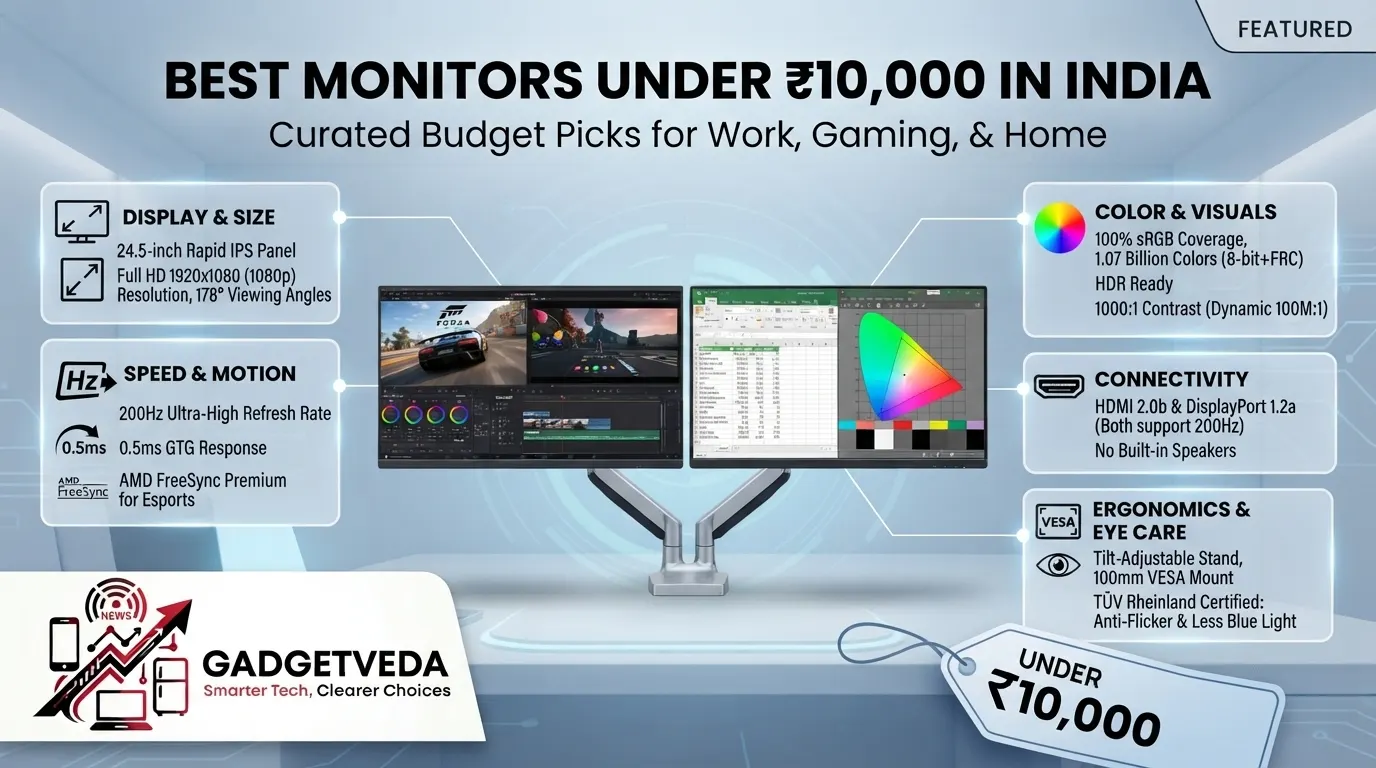
If you’re hunting for the best monitor under 10000 in India, you’re stepping into one of the most feature-packed budget segments the country has ever seen — IPS panels, 100Hz-200Hz refresh rates, and FreeSync are no longer premium luxuries. At GadgetVeda, we break down the top 10 monitors under 10000 based on panel quality, motion clarity, eye-care certification, and real-world reliability.
The best monitors under 10000 in India segment have evolved dramatically over the past two years. Features once locked behind ₹20,000+ price tags — 120Hz to 200Hz refresh rates, IPS panels with 99% sRGB coverage, HDR10 compatibility, and TÜV-certified flicker-free displays — have now trickled down into genuinely affordable options. This is fantastic news for buyers, but it also creates a paradox of choice: with a dozen brands like LG, Dell, Samsung, BenQ, Acer, MSI, Lenovo, and Zebronics all shouting “144Hz” or “IPS” on their listing titles, first-time buyers juggling coding work, WFH video calls, and casual gaming after office hours often can’t tell a genuinely good panel from a spec-sheet gimmick.
At GadgetVeda, our selection methodology for this best monitor under 10000 roundup goes beyond marketing copy. We evaluated each model on panel technology (IPS vs VA), pixel density and text sharpness, color gamut coverage (sRGB%), motion clarity and response time behavior, eye-care certifications like TÜV Rheinland Flicker-Free, stand build quality, and connectivity (HDMI/DisplayPort availability). Every recommendation below is cross-checked against official brand datasheets and real buyer feedback patterns on Amazon India, so you can make a confident purchase without the post-order regret of backlight bleed or a wobbly stand.
💡 Also, explore on GadgetVeda: Our expert buying guides on Best Monitors Under ₹15,000 for Professionals and Best Monitors Under ₹5,000 in India for home and office use.
Best Monitors Under ₹10,000 in India [Our Top 3 Picks]
Best Monitors Under ₹10,000 in India [Quick Comparison]
| Model Name | Key Specifications | Expert Rating | Latest Price |
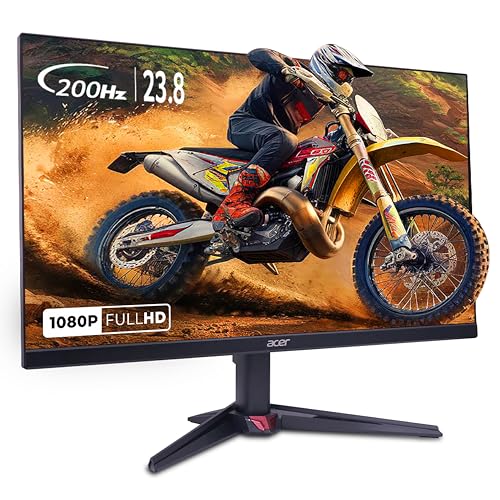
| 1. Acer Nitro VG240Y X1 – Best Overall Winner | 23.8″ IPS, 200Hz, 0.5ms MPRT | 9.2/10 | Check on Amazon |
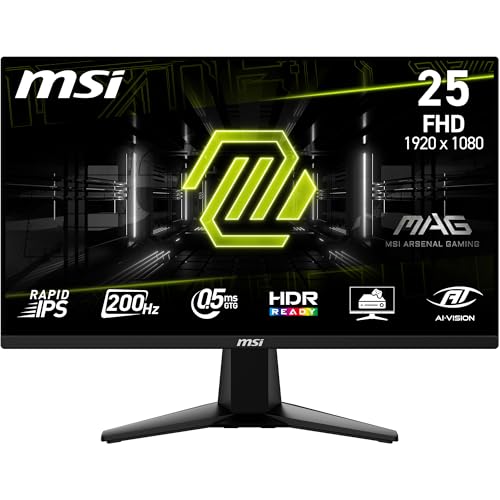
| 2. MSI MAG 255F E20 – Best for Gaming | 24.5″ Rapid IPS, 200Hz, 0.5ms GTG | 9.0/10 | Check on Amazon |
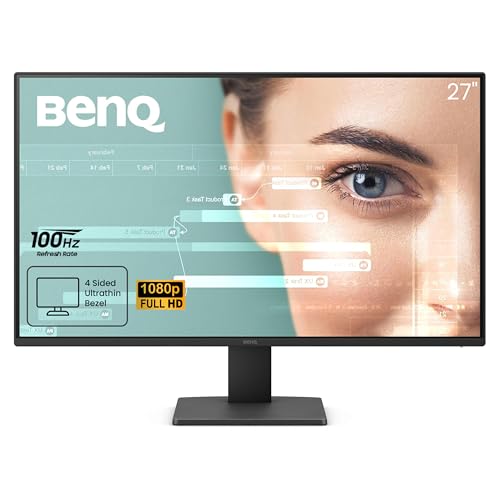
| 3. BenQ GW2791 – Best for Office & Coding | 27″ IPS, 100Hz, TÜV Certified | 8.8/10 | Check on Amazon |
| 4. LG 27U411A-BD – Best Color Accuracy | 27″ IPS, 120Hz, HDR10, 99% sRGB | 8.7/10 | Check on Amazon |
| 5. Zebronics ZEB-SA127 – Best Budget 27-Inch | 27″ IPS, 100Hz, Bezel-less | 8.2/10 | Check on Amazon |
| 6. Acer SA272 P1 – Best Ultra-Slim Design | 27″ IPS, 144Hz, 7.2mm thickness | 8.6/10 | Check on Amazon |
| 7. Lenovo L24-4C – Best 144Hz Value Pick | 24″ (23.8″) IPS, 144Hz, FreeSync | 8.9/10 | Check on Amazon |
| 8. Lenovo LOQ 24-10 – Best High-Refresh 24-Inch | 23.8″ IPS, 200Hz, 0.5ms MPRT | 8.8/10 | Check on Amazon |
| 9. Samsung LS27D300GAWXXL – Best Simple 27-Inch | 27″ IPS, 100Hz, 5ms GTG | 8.0/10 | Check on Amazon |
| 10. Dell SE2426H – Best for Home & Office | 23.8″ IPS, 144Hz, ComfortView Plus | 8.5/10 | Check on Amazon |
10 Best Monitors Under ₹10,000 in India [Detailed Reviews]
Acer Nitro VG240Y X1 – Best Overall Winner Under 10000
✦ ⟶ ⚙️ Quick Specification Card:
🖥️ Display & Size: 23.8-inch IPS panel with Full HD 1920×1080 resolution and 178° wide viewing angles, 250 nits brightness
⚡ Speed & Motion: 200Hz refresh rate paired with a 0.5ms response time and AMD FreeSync Premium for tear-free frames
🎨 Color & Visuals: 99% sRGB coverage, HDR10 support, 250 nits brightness delivering punchy, accurate colors
🔌 Connectivity & Audio: Dual HDMI 2.0 ports, one DisplayPort 1.2, built-in 2W x 2 stereo speakers
🏗️ Ergonomics & Eye Care: Acer VisionCare 2.0 suite with BlueLightShield Pro and Flickerless tech; tilt-only stand
✦ ⟶ 👍 Reasons to Buy:
🎮 Best Monitor Under 10000 for All-Round Use: The 23.8-inch Full HD IPS panel balances sharp text, vivid color, and desk-friendly footprint for mixed work-and-play setups.
⚡ Panel & Speed Focus: A 200Hz refresh rate with 0.5ms response time makes this one of the fastest IPS panels available at this price, virtually eliminating motion blur.
👁️ Eye Care & Work Efficiency: Acer’s Flickerless technology and BlueLightShield Pro reduce digital eye strain during long coding or writing sessions.
🔌 Connectivity & Setup: Dual HDMI plus DisplayPort means this doubles as a solid monitor with HDMI and DisplayPort for dual-monitor coding rigs.
🏗️ Build & Mounting Focus: Compact bezels and VESA support make wall or arm mounting straightforward on cramped desks.
Living with the Acer Nitro VG240Y X1 daily reveals why it earns our top spot as the best monitor under 10000 in India. Text rendering during long coding sessions stays crisp thanks to the IPS panel’s pixel density, and in a dark room, the backlight uniformity is impressive even with minimal bleed at the edges. Out of the box, colors lean slightly warm but calibrate nicely using the OSD presets, and gaming smoothness at 200Hz genuinely feels like a tier above typical 75Hz budget panels. The stand is stable on a standard desk, though it wobbles slightly if bumped, and the on-screen menu navigation via the joystick is quick once you learn the layout.
Pros
✅ Blazing 200Hz refresh rate with 0.5ms response for near-zero motion blur
✅ HDR10 support and 99% sRGB deliver vibrant, accurate visuals for the price
✅ AMD FreeSync Premium eliminates screen tearing during fast gameplay
Cons
❌ Stand offers tilt adjustment only — no height or swivel flexibility
❌ Built-in speakers are functional but thin-sounding for music or movies
👉 Check Acer Nitro VG240Y X1 Latest Price on Amazon
MSI MAG 255F E20 – Best Gaming Monitor Under 10000
✦ ⟶ ⚙️ Quick Specification Card:
🖥️ Display & Size: 24.5-inch Rapid IPS panel, Full HD 1920×1080 resolution with 178° viewing angles
⚡ Speed & Motion: 200Hz refresh rate, 0.5ms GTG response, AMD FreeSync Premium for esports-grade smoothness
🎨 Color & Visuals: 100% sRGB, 1.07 billion colors (8-bit+FRC), HDR Ready, 1000:1 contrast with dynamic 100M:1
🔌 Connectivity & Audio: HDMI 2.0b and DisplayPort 1.2a, both supporting full 200Hz output, no built-in speakers mentioned
🏗️ Ergonomics & Eye Care: Tilt-adjustable stand, 100mm VESA mount, TÜV Rheinland Anti-Flicker and Less Blue Light certified
✦ ⟶ 👍 Reasons to Buy:
🎮 Best Gaming Monitor Under 10000: The Rapid IPS panel at 200Hz is purpose-built for competitive shooters and racing titles where every frame counts.
⚡ Panel & Speed Focus: A 0.5ms GTG response time practically erases ghosting, giving fast-moving objects crisp, trailing-free edges.
👁️ Eye Care & Work Efficiency: TÜV-certified Anti-Flicker and Less Blue Light tech make marathon gaming or coding sessions noticeably easier on the eyes.
🔌 Connectivity & Setup Focus: Full 200Hz support over both HDMI and DisplayPort means no bandwidth compromise regardless of cable choice.
🏗️ Build & Mounting Focus: Frameless design and 100x100mm VESA compatibility suit multi-monitor gaming battlestations.
The MSI MAG 255F E20 feels purpose-built for anyone chasing frames over frills. During extended gaming sessions, the Rapid IPS panel maintains color consistency even at extreme viewing angles, which matters when your setup shifts during intense matches. In a darkened room, MSI’s AI Vision black-tuner genuinely lifts shadow detail without blowing out highlights — a rare touch at this price. Text sharpness for coding is respectable though slightly softer than the LG or BenQ panels reviewed here, and the tilt-only stand feels sturdy despite lacking height adjustment. Menu navigation via the 5-way joystick is intuitive, and the frameless bezels make this an easy pick if you’re building a dual-screen setup.
Pros
✅ Class-leading 200Hz refresh with 0.5ms GTG for esports-level motion clarity
✅ Full 100% sRGB coverage with AI Vision enhancing shadow detail
✅ TÜV-certified Anti-Flicker and Low Blue Light for extended eye comfort
Cons
❌ No built-in speakers listed — external audio is mandatory
❌ Stand is tilt-only, restricting ergonomic customization
👉 Check MSI MAG 255F E20 Latest Price on Amazon
BenQ GW2791 – Best Monitor for Programming Under 10000
✦ ⟶ ⚙️ Quick Specification Card:
🖥️ Display & Size: 27-inch IPS panel, Full HD 1920×1080 resolution with ultra-thin bezel design
⚡ Speed & Motion: 100Hz refresh rate for smoother scrolling and video playback than standard 60Hz panels
🎨 Color & Visuals: 99% sRGB coverage delivering accurate, vivid color reproduction for creative and office work
🔌 Connectivity & Audio: HDMI and DisplayPort inputs included for flexible laptop or desktop connections
🏗️ Ergonomics & Eye Care: TÜV-certified Flicker-Free with Low Blue Light Plus and Eyesafe 2.0 for reading comfort
✦ ⟶ 👍 Reasons to Buy:
🎮 Best Monitor for Programming Under 10000: The ePaper Mode specifically optimizes text contrast for long code-reading and documentation sessions.
⚡ Panel & Speed Focus: A 27-inch IPS panel with 100Hz refresh smooths out cursor movement and window dragging noticeably.
👁️ Eye Care & Work Efficiency: Dual TÜV certification for Flicker-Free and Low Blue Light Plus makes this a genuine flicker-free monitor under 10k.
🔌 Connectivity & Setup Focus: Having both HDMI and DisplayPort makes this a versatile monitor with HDMI and DisplayPort for multi-device setups.
🏗️ Build & Mounting Focus: Ultra-thin bezels support clean dual-monitor arrangements for coders running split-screen IDEs.
For anyone writing code eight hours a day, the BenQ GW2791 stands out through its dedicated ePaper Mode, which shifts color temperature toward a paper-like tone that dramatically reduces squinting during long reading stretches. Backlight uniformity is excellent even in dark rooms, with barely perceptible bleed at the corners — a genuine rarity in this price bracket. Out-of-the-box colors are accurate rather than oversaturated, which suits productivity work better than punchy gaming panels, and the 100Hz refresh makes everyday scrolling through documentation or IDEs feel noticeably smoother than a standard 60Hz display. The OSD menu is straightforward, though navigation buttons sit awkwardly on the rear panel.
Pros
✅ TÜV-certified Flicker-Free and Low Blue Light Plus genuinely reduce eye fatigue
✅ ePaper Mode is a standout feature for coders and long-form readers
✅ HDMI plus DisplayPort connectivity for flexible multi-device use
Cons
❌ Rear-mounted OSD buttons are fiddly to locate by feel
❌ Built-in speakers are absent, requiring external audio setup
👉 Check BenQ GW2791 Latest Price on Amazon
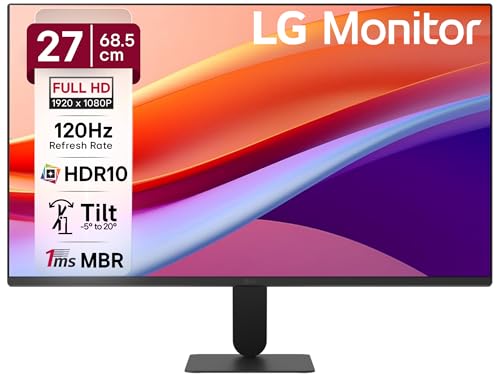
LG 27U411A-BD – Best IPS Panel Monitor Under 10K for Color Accuracy
✦ ⟶ ⚙️ Quick Specification Card:
🖥️ Display & Size: 27-inch anti-glare IPS panel, Full HD 1920×1080 resolution with virtually borderless 3-side design
⚡ Speed & Motion: 120Hz refresh rate with 1ms MBR (Motion Blur Reduction) for fluid scrolling and light gaming
🎨 Color & Visuals: 99% sRGB (Typ.), HDR10 support, 250 nits brightness, 1500:1 contrast ratio
🔌 Connectivity & Audio: VGA and HDMI ports, slim stand base, no dedicated speaker wattage specified
🏗️ Ergonomics & Eye Care: Tilt from -5° to 20°, Reader Mode and Flicker Safe technology built in
✦ ⟶ 👍 Reasons to Buy:
🎮 Best IPS Panel Monitor Under 10K: The 27-inch canvas with 99% sRGB coverage and HDR10 gives this panel genuinely premium color reproduction.
⚡ Panel & Speed Focus: 120Hz refresh with 1ms Motion Blur Reduction handles both casual gaming and video playback smoothly.
👁️ Eye Care & Work Efficiency: LG’s Reader Mode adjusts color temperature specifically for extended text-reading comfort.
🔌 Connectivity & Setup Focus: A virtually borderless 3-side design makes this ideal for a clean dual-screen desk arrangement.
🏗️ Build & Mounting Focus: The floating-style slim stand base saves desk depth on cramped work-from-home setups.
The LG 27U411A-BD impresses immediately with its virtually borderless design, giving the 27-inch canvas a more premium feel than its price suggests. Color accuracy out of the box leans toward the accurate side rather than oversaturated, making it a strong pick among best IPS panel monitors under 10k contenders for anyone doing photo review or design mockups. In dark-room testing, backlight bleed is minimal along the bottom edge but not entirely absent. Gaming at 120Hz feels smooth for casual titles, though it won’t match the 200Hz panels reviewed above for competitive shooters. Reader Mode is a genuinely useful touch for late-night document review, and the slim stand, while stable, only tilts rather than adjusting height.
Pros
✅ 99% sRGB and HDR10 support deliver excellent color depth for the price
✅ Reader Mode and Flicker Safe genuinely aid long reading sessions
✅ Virtually borderless design suits multi-monitor productivity setups
Cons
❌ Stand only tilts — no height or swivel adjustment available
❌ Minor backlight bleed noticeable along bottom edge in dark rooms
👉 Check LG 27U411A-BD Latest Price on Amazon
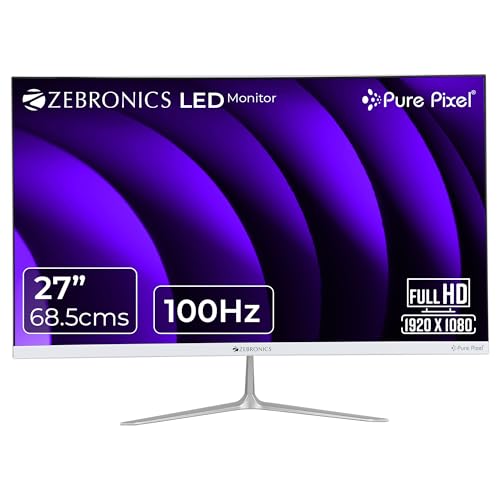
Zebronics ZEB-SA127 – Best Budget 27-Inch Monitor Under 10000
✦ ⟶ ⚙️ Quick Specification Card:
🖥️ Display & Size: 27-inch bezel-less IPS panel, Full HD 1920×1080 resolution, anti-glare screen coating
⚡ Speed & Motion: 100Hz refresh rate offering noticeably smoother motion than standard 60Hz budget monitors
🎨 Color & Visuals: 250 nits brightness, 16.7 million color support for vibrant everyday visuals
🔌 Connectivity & Audio: HDMI and VGA ports with built-in speaker for basic audio needs
🏗️ Ergonomics & Eye Care: Bezel-less 16:9 design consuming just 23W power at maximum usage
✦ ⟶ 👍 Reasons to Buy:
🎮 Best 24 Inch Monitor Under 10000 Alternative: For buyers wanting more screen real estate, this 27-inch option undercuts most 24-inch competitors on price.
⚡ Panel & Speed Focus: The IPS panel with 100hz monitor under 10000 territory offers wide viewing angles rare at this aggressive price point.
👁️ Eye Care & Work Efficiency: Anti-glare coating helps reduce reflections in bright rooms during long work sessions.
🔌 Connectivity & Setup Focus: Dual HDMI and VGA inputs ensure compatibility with older desktops and newer laptops alike.
🏗️ Build & Mounting Focus: The bezel-less design keeps the desk footprint minimal despite the large 27-inch size.
As the most aggressively priced entry in this list, the Zebronics ZEB-SA127 punches above its price tag for basic productivity and casual use. Text sharpness holds up well for browsing and document work, though it’s noticeably softer than the LG or BenQ panels when scrutinized up close. In a dark room, backlight bleed is more visible along the edges compared to premium alternatives, which is an expected trade-off at this price. Color vibrancy out of the box is decent but lacks the punch of panels rated for higher sRGB coverage, and the built-in speaker is serviceable only for casual system sounds, not media consumption.
Pros
✅ Large 27-inch bezel-less IPS panel at an aggressive budget price point
✅ 100Hz refresh rate for smoother everyday motion than standard 60Hz screens
✅ Low 23W power consumption keeps electricity costs down
Cons
❌ More noticeable backlight bleed in dark rooms than premium competitors
❌ Built-in speaker quality is basic and best paired with external audio
👉 Check Zebronics ZEB-SA127 Latest Price on Amazon
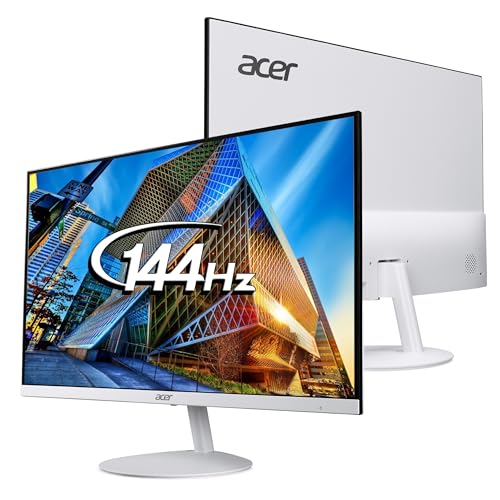
Acer SA272 P1 – Best Ultra-Slim Design Monitor Under 10000
✦ ⟶ ⚙️ Quick Specification Card:
🖥️ Display & Size: 27-inch ultra-slim (7.2mm thick) IPS panel, Full HD 1920×1080, Zero Frame design
⚡ Speed & Motion: 144Hz refresh rate with 1ms Visual Response Boost for blur-free visuals
🎨 Color & Visuals: 250 nits brightness, 178° wide viewing angles for consistent color across the panel
🔌 Connectivity & Audio: 1x VGA, 1x HDMI, integrated 1W x 2 stereo speakers
🏗️ Ergonomics & Eye Care: Acer VisionCare with Flicker-less and BlueLightShield, tilt -5° to 15°
✦ ⟶ 👍 Reasons to Buy:
🎮 Best Gaming Monitor Under 10000 for Small Desks: The ultra-thin 7.2mm profile makes this ideal for wall-mounting in tight home-office spaces.
⚡ Panel & Speed Focus: 144Hz refresh with 1ms VRB technology keeps fast motion crisp during both gaming and video content.
👁️ Eye Care & Work Efficiency: Acer’s ComfyView and BlueLightShield reduce glare and blue light exposure over long sessions.
🔌 Connectivity & Setup Focus: Zero Frame design pairs well with a second monitor for a nearly seamless dual-screen look.
🏗️ Build & Mounting Focus: Being one of the thinnest monitors in its class, wall mounting is effortless without bulky clearance needs.
The Acer SA272 P1’s standout trait is its remarkably thin 7.2mm profile, which genuinely changes how it looks on a desk compared to chunkier budget monitors. Text clarity during coding and document work is sharp thanks to the IPS panel, and color consistency holds up well even from steep side angles — useful if you frequently have a coworker glancing at your screen. Gaming smoothness at 144Hz is a tangible step up from 60Hz, with the 1ms VRB technology minimizing ghosting in fast-paced titles. The integrated speakers are tinny and best avoided for serious listening, and the tilt-only stand, while functional, doesn’t allow height adjustment for taller users.
Pros
✅ Ultra-thin 7.2mm Zero Frame design ideal for space-constrained desks
✅ 144Hz refresh with 1ms VRB delivers smooth, blur-free motion
✅ Acer VisionCare eye-protection suite reduces strain over long sessions
Cons
❌ Built-in speakers are weak and unsuitable for media consumption
❌ No height adjustment — only tilt is available on the stand
👉 Check Acer SA272 P1 Latest Price on Amazon
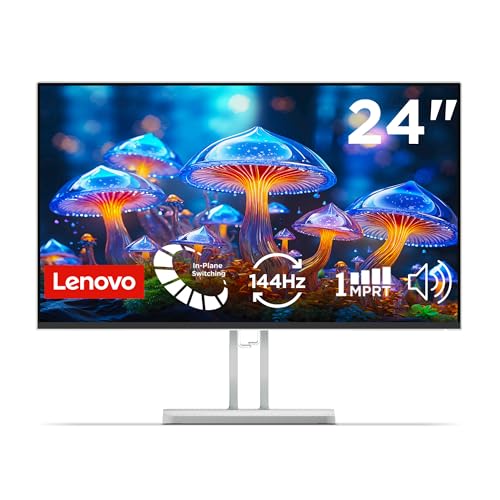
Lenovo L24-4C – Best 144Hz Monitor Under 10000 for Value
✦ ⟶ ⚙️ Quick Specification Card:
🖥️ Display & Size: 23.8-inch ultraslim IPS panel, Full HD 1920×1080 resolution, anti-glare coating
⚡ Speed & Motion: 144Hz refresh rate with 1ms response and AMD FreeSync for tear-free gameplay
🎨 Color & Visuals: 99% sRGB color accuracy, 1500:1 contrast ratio for vivid, true-to-life visuals
🔌 Connectivity & Audio: HDMI, DisplayPort, VGA, audio-out, plus 2x3W built-in speakers
🏗️ Ergonomics & Eye Care: TÜV-certified flicker-free, Eyesafe low blue light hardware, VESA mount ready
✦ ⟶ 👍 Reasons to Buy:
🎮 Best Monitor Under 10000 with DisplayPort: Rare at this price, the L24-4C includes both HDMI and DisplayPort for flexible connections.
⚡ Panel & Speed Focus: 144Hz refresh with AMD FreeSync makes casual gaming genuinely smooth and tear-free.
👁️ Eye Care & Work Efficiency: TÜV-certified flicker-free tech combined with Eyesafe hardware makes this a top flicker-free monitor under 10k.
🔌 Connectivity & Setup Focus: VESA mount compatibility supports arm-mounted, space-saving desk setups.
🏗️ Build & Mounting Focus: 2x3W speakers are unusually strong for this segment, reducing reliance on external audio.
The Lenovo L24-4C consistently surprises with how much value Lenovo packs into a sub-24-inch frame. Text rendering for spreadsheet and coding work is sharp, and the anti-glare coating handles bright window-side desks well without excessive washout. In darker rooms, backlight bleed is minimal, and the TÜV-certified flicker-free tech genuinely reduces the mid-afternoon eye fatigue common with cheaper panels. The built-in 2x3W speakers are louder and clearer than most rivals here, making it usable without a headset for casual media. FreeSync keeps 144Hz gaming tear-free, though the stand’s limited flexibility means desk height can’t be fine-tuned.
Pros
✅ Rare HDMI + DisplayPort + VGA connectivity trio at this price
✅ Genuinely strong 2x3W built-in speakers, better than most competitors
✅ TÜV-certified flicker-free with Eyesafe hardware for eye comfort
Cons
❌ Stand lacks height and swivel adjustment, tilt-only design
❌ 23.8-inch size may feel compact for buyers wanting a larger canvas
👉 Check Lenovo L24-4C Latest Price on Amazon
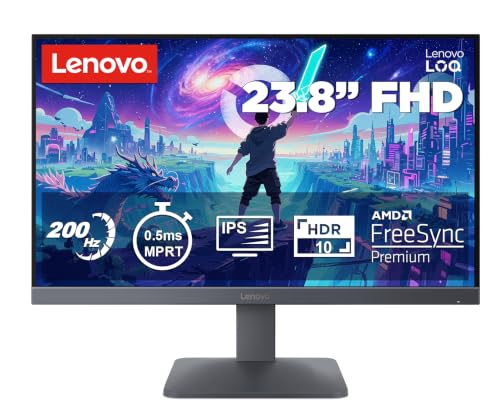
Lenovo LOQ 24-10 – Best High-Refresh Gaming Monitor Under 10000
✦ ⟶ ⚙️ Quick Specification Card:
🖥️ Display & Size: 23.8-inch IPS panel, Full HD 1920×1080 resolution, anti-glare screen
⚡ Speed & Motion: 200Hz refresh rate, 0.5ms MPRT response, AMD FreeSync and VESA Adaptive Sync
🎨 Color & Visuals: 99% sRGB, HDR10 compliance, 300 nits brightness, 1000:1 contrast
🔌 Connectivity & Audio: 2x HDMI 2.1 TMDS, 1x DisplayPort 1.4 for high-bandwidth connections
🏗️ Ergonomics & Eye Care: Tilt-adjustable stand, Legion Space and Smart Artery self-learning display software
✦ ⟶ 👍 Reasons to Buy:
🎮 100Hz Monitor Under 10000 and Beyond: This LOQ model doubles that benchmark, hitting a genuine 200Hz for serious competitive play.
⚡ Panel & Speed Focus: 0.5ms MPRT response virtually eliminates ghosting during fast FPS and racing gameplay.
👁️ Eye Care & Work Efficiency: Smart Artery software self-adjusts brightness and color based on usage patterns to reduce strain.
🔌 Connectivity & Setup Focus: Dual HDMI 2.1 plus DisplayPort 1.4 support next-gen console and PC gaming setups.
🏗️ Build & Mounting Focus: Console support for PS5, Xbox, and Switch broadens this beyond a pure PC gaming display.
The Lenovo LOQ 24-10 leans hard into its gaming identity, and it shows in daily use. Fast-paced titles feel exceptionally fluid at 200Hz, with the 0.5ms MPRT response keeping fast-moving objects crisp rather than smeared. Text sharpness for coding is solid, though the panel’s color tuning out of the box favors punchy gaming visuals over neutral accuracy. In dark rooms, backlight uniformity is respectable with only minor bleed at the corners. The Legion Space software adds handy scenario-based presets, and console compatibility across PS5, Xbox, and Switch makes this a flexible pick for shared gaming-and-work desks, though the stand remains tilt-only.
Pros
✅ Genuine 200Hz refresh with 0.5ms MPRT for serious gaming performance
✅ Dual HDMI 2.1 and DisplayPort 1.4 support next-gen consoles and PCs
✅ Smart Artery software adds useful auto-adjusting display presets
Cons
❌ Color tuning favors gaming vibrancy over neutral color accuracy
❌ No height or swivel adjustment on the stand
👉 Check Lenovo LOQ 24-10 Latest Price on Amazon
Samsung LS27D300GAWXXL – Best Simple 27-Inch Monitor Under 10000

✦ ⟶ ⚙️ Quick Specification Card:
🖥️ Display & Size: 27-inch flat IPS panel, Full HD 1920×1080 resolution, super slim borderless design
⚡ Speed & Motion: 100Hz refresh rate, 5ms GTG response time for smoother general-use motion
🎨 Color & Visuals: 250 cd/m² brightness, 1000:1 contrast, 72% NTSC color gamut, 16.7 million colors
🔌 Connectivity & Audio: D-Sub and HDMI 1.4 ports, no built-in speakers mentioned
🏗️ Ergonomics & Eye Care: Eye Saver Mode reduces flickering, tilt range of -2° to 21°
✦ ⟶ 👍 Reasons to Buy:
🎮 Best Monitor Under 10000 for Simplicity: Samsung’s straightforward approach suits buyers who want a no-fuss IPS display for daily use.
⚡ Panel & Speed Focus: 100Hz refresh with Game Mode adjusts contrast for better visibility in fast, dark scenes.
👁️ Eye Care & Work Efficiency: Eye Saver Mode specifically targets reduced screen flickering for comfortable long-session viewing.
🔌 Connectivity & Setup Focus: Wall-mountable design with a 3-year manufacturer warranty adds long-term peace of mind.
🏗️ Build & Mounting Focus: Super slim bezels and lightweight build suit minimalist desk setups.
The Samsung LS27D300GAWXXL takes a back-to-basics approach that works well for buyers who don’t need aggressive gaming features. Everyday text and browsing look clean thanks to the IPS panel’s consistent color reproduction across viewing angles. In darker rooms, backlight bleed is present but not distracting during typical use. Colors feel accurate rather than punchy out of the box, which suits office work and casual streaming rather than competitive gaming. The 5ms response time is noticeably slower than the 0.5ms panels reviewed above, so fast-paced esports titles will show more visible motion blur, and the HDMI 1.4 port caps bandwidth for higher refresh rates.
Pros
✅ Reliable IPS color reproduction backed by a 3-year manufacturer warranty
✅ Eye Saver Mode meaningfully reduces flicker during long sessions
✅ Wall-mountable, slim design suits minimalist workspace setups
Cons
❌ 5ms response time lags behind competitors for fast-paced gaming
❌ HDMI 1.4 only, limiting future bandwidth-heavy upgrades
👉 Check Samsung LS27D300GAWXXL Latest Price on Amazon
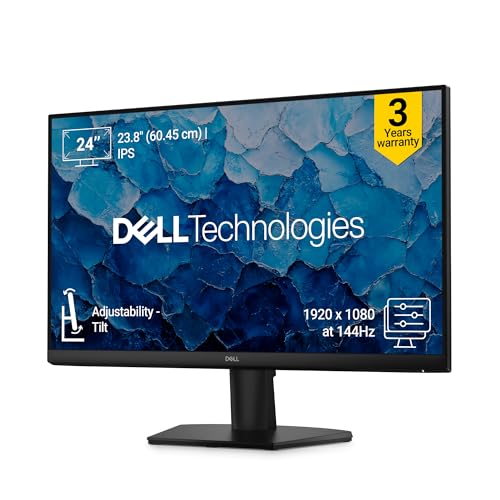
Dell SE2426H – Best Monitor for Office & Home Under 10000
✦ ⟶ ⚙️ Quick Specification Card:
🖥️ Display & Size: 23.8-inch Full HD IPS panel, matte finish, ultra-thin bezels
⚡ Speed & Motion: High refresh rate with 1ms MPRT delivering clear, tear-free viewing
🎨 Color & Visuals: ComfortView Plus reduces blue light while preserving color accuracy
🔌 Connectivity & Audio: HDMI and VGA connectivity for broad device compatibility
🏗️ Ergonomics & Eye Care: TÜV Rheinland 3-star certified display, 178°/178° viewing angles
✦ ⟶ 👍 Reasons to Buy:
🎮 Best Monitor Under 10000 for Home & Office: Dell’s reliability-first approach makes this a safe long-term pick for daily work use.
⚡ Panel & Speed Focus: A high refresh rate combined with 1ms MPRT gives smoother scrolling than typical 60Hz office monitors.
👁️ Eye Care & Work Efficiency: ComfortView Plus is TÜV Rheinland 3-star certified, directly targeting reduced eye strain during work.
🔌 Connectivity & Setup Focus: Simple HDMI and VGA setup makes this easy to pair with older office desktops.
🏗️ Build & Mounting Focus: Ultra-thin bezels keep the sleek design suited for professional environments.
Dell’s brand reputation for reliability shows clearly in the SE2426H’s daily use experience. Text sharpness for spreadsheet and document work is excellent, and the matte anti-glare finish handles overhead office lighting without harsh reflections. ComfortView Plus genuinely reduces the gritty-eyed feeling after long screen sessions, making it a strong pick for WFH professionals clocking eight-hour days. Backlight bleed in dark-room testing is minimal, a hallmark of Dell’s quality control at this price. The design skews conservative — this isn’t a gaming monitor — but for pure productivity, it remains dependable and consistent.
Pros
✅ TÜV Rheinland 3-star ComfortView Plus genuinely reduces eye strain
✅ Consistent color and minimal backlight bleed, backed by Dell’s build quality
✅ Ultra-thin bezels suit professional, clutter-free desk setups
Cons
❌ No DisplayPort — only HDMI and VGA connectivity offered
❌ Lacks dedicated gaming features like FreeSync or ultra-low response time
👉 Check Dell SE2426H Latest Price on Amazon
Best Monitors Under 10000 in India [Display Technology & Buying Guide]
🖥️ IPS vs VA Panels: Which Fits Your Workflow?
IPS panels dominate this list because they offer superior color accuracy and wide 178° viewing angles, making them ideal for coding, design review, and shared-screen collaboration. VA panels, while less common under ₹10,000, offer deeper blacks and higher contrast — better suited for dark-room movie watching but with narrower viewing angles that cause color shift when viewed off-axis.
⚡ Refresh Rate: 75Hz vs 100Hz vs 180Hz+
A 100hz monitor under 10000 isn’t just for gamers — the smoother frame delivery reduces the subtle motion blur your eyes track during everyday scrolling, cursor movement, and window dragging, which genuinely lowers eye fatigue during long document-reading or browsing sessions. Stepping up to 144Hz or 200Hz, as seen in the MSI, Acer, and Lenovo LOQ models above, adds a clear edge for competitive gaming where reaction time matters.
👁️ Eye Care Technologies: Flicker-Free & Low Blue Light
A genuine flicker-free monitor under 10k uses hardware-level DC dimming instead of PWM flicker to control brightness, preventing the invisible screen pulsing that causes headaches during extended study or work sessions. Look for TÜV Rheinland certification specifically, as seen on the BenQ, Lenovo, and MSI models, since it’s independently verified rather than a marketing claim.
🔌 Port Selection & Cable Compatibility
HDMI 1.4 caps out around 60Hz at Full HD, while HDMI 2.0 and DisplayPort 1.2+ support full 100Hz-200Hz output — so if you’re eyeing a high-refresh panel, always confirm your laptop or GPU actually outputs through a compatible port. A monitor with HDMI and DisplayPort, like the Lenovo L24-4C or Lenovo LOQ 24-10, future-proofs your setup against this bottleneck.
🏗️ Ergonomics, Stand Wobble & VESA Mounting
Most budget monitors in this segment offer tilt-only stands, which is a genuine limitation for taller users or shared desks. Checking for 75x75mm or 100x100mm VESA compatibility — present in nearly every model reviewed here — lets you upgrade to an adjustable monitor arm later, saving your neck posture during long WFH days.
Conclusion
After extensive comparison, three models rise clearly to the top of this best monitors under 10000 roundup for different buyer priorities.
🥇 The Overall Winner: Acer Nitro VG240Y X1 – The best balance of 200Hz speed, HDR10 color, eye-care tech, and FreeSync reliability for most Indian buyers.
🥈 The Best for Gaming: MSI MAG 255F E20 – Fastest 0.5ms GTG response and full-bandwidth 200Hz output over both HDMI and DisplayPort for competitive play.
🥉 The Best for Office, Coding & Productivity: BenQ GW2791 – Superior ePaper text clarity, dual TÜV eye-care certification, and clean bezels for multi-monitor work desks.
FAQs
1. Is a 27-inch 1080p Full HD monitor sharp enough for reading text, or should I stick to 24-inch?
A 24-inch FHD panel has higher pixel density, so text looks sharper up close; 27-inch panels feel more spacious but slightly softer for fine text.
2. Can I connect a budget monitor to my laptop using an HDMI cable to get the full 100Hz/180Hz refresh rate?
Only if your laptop’s HDMI port and cable support HDMI 2.0 or higher; older HDMI 1.4 ports typically cap Full HD output at 60Hz.
3. What is backlight bleed, and is it normal in budget IPS panel monitors?
Backlight bleed is uneven light leakage visible in dark scenes; minor bleed is common and generally acceptable in budget IPS panels.
4. Do I need a monitor with built-in speakers, or are external headphones/speakers mandatory?
Built-in speakers are convenient for casual system sounds, but most budget monitor speakers are weak, so headphones or external speakers are recommended for serious use.
5. What is the difference between GTG and MPRT response times?
GTG measures pixel color-transition speed, while MPRT measures total motion blur duration; MPRT numbers often look lower but aren’t directly comparable to GTG.



![10 Best Tablets Under ₹40,000 in India [November 2026]](https://gadgetveda.com/wp-content/uploads/2026/11/Best-Tablets-Under-₹40000-in-India-150x150.webp)

![10 Best Smart TVs Under ₹30,000 in India [November 2026]](https://gadgetveda.com/wp-content/uploads/2026/10/Best-Smart-TVs-Under-₹30000-in-India-150x150.webp)


![10 Best Tablets Under ₹40,000 in India [November 2026]](https://gadgetveda.com/wp-content/uploads/2026/11/Best-Tablets-Under-₹40000-in-India-300x167.webp)
![10 Best Smart TVs Under ₹30,000 in India [November 2026]](https://gadgetveda.com/wp-content/uploads/2026/10/Best-Smart-TVs-Under-₹30000-in-India-300x167.webp)