


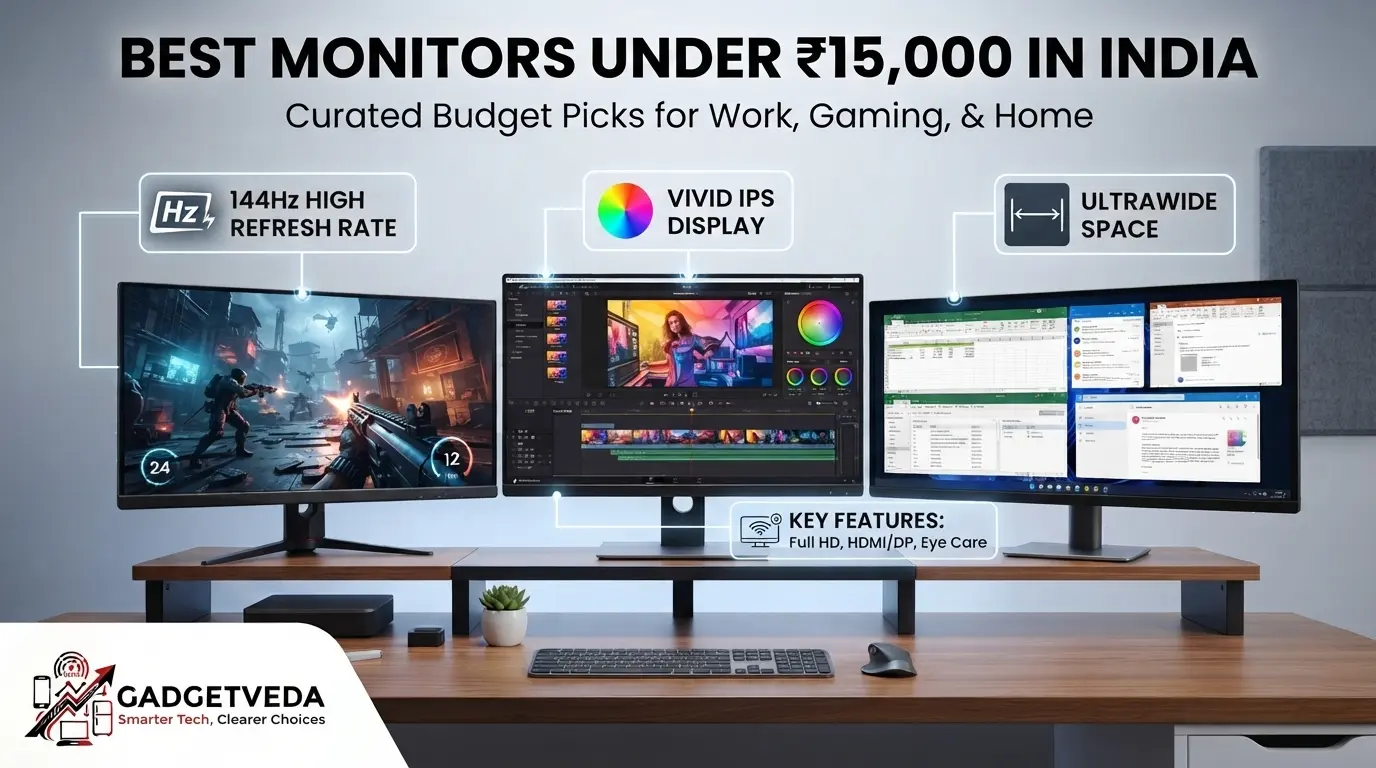
If you’re looking for the best monitors under 15000 in India, this segment has quietly become the sweet spot where QHD resolution, 144Hz-320Hz refresh rates, and genuine IPS color accuracy finally meet realistic Indian pricing. Below, GadgetVeda breaks down 15 top-selling models across gaming, editing, office, and ultrawide use cases so you can buy with confidence.
The under-₹15,000 monitor segment in India has transformed into arguably the most feature-dense price bracket in the entire display market. Just a couple of years ago, QHD (2560×1440) resolution, 144Hz-200Hz refresh rates, USB-C connectivity, and full ergonomic stands with height and pivot adjustment were locked behind ₹25,000+ price tags. Today, brands like Lenovo, Acer, BenQ, MSI, and Dell have pushed these exact features down into this budget, alongside 1ms response times and TÜV-certified eye-care technology. For a first-time buyer trying to pick the best monitor under 15000 in India for coding, editing, or gaming, this abundance creates genuine confusion — nearly every listing claims “144Hz IPS” or “2K gaming ready,” but the real-world experience between a 100Hz office panel and a 200Hz esports display differs enormously.
At GadgetVeda, we built this guide by evaluating each model against its official brand datasheet rather than marketing bullet points alone. Our selection criteria covered panel technology (IPS vs. VA), pixel density and text sharpness at both FHD and QHD resolutions, color gamut coverage (sRGB%/DCI-P3%), motion clarity through refresh rate and response time, eye-care certifications like TÜV Rheinland Flicker-Free, stand ergonomics (tilt, height, swivel, pivot), and connectivity depth across HDMI and DisplayPort. Whether you need the best monitor under 15000 for gaming, the best monitor under 15000 for editing, or a dependable best monitor under 15000 for office work, every recommendation below is grounded in verified specifications, not hype.
💡 Also, explore on GadgetVeda: Our expert guides on Best Monitors Under ₹10,000 and Best Monitors Under ₹5,000 in India for home and office use.
Best Monitors Under ₹15,000 in India [Our Top 3 Picks]

Best Monitors Under ₹15,000 in India [Quick Comparison]
| Model Name | Key Specifications | Expert Rating | Latest Price |
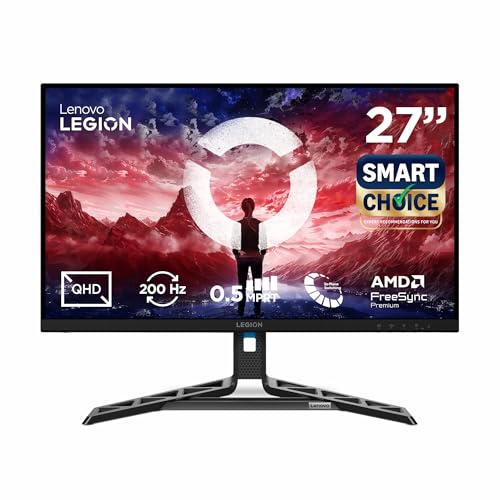
| 1. Lenovo Legion R27qe Gen 2 – Best Overall Winner | 27″ QHD IPS, 200Hz, 0.5ms, G-Sync Compatible, Full Ergonomic Stand | 9.4/10 | Check on Amazon |
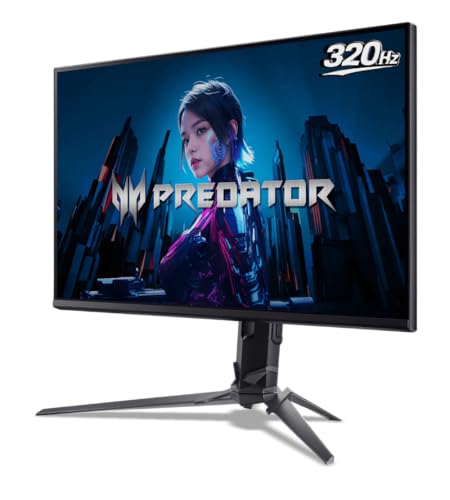
| 2. Acer Predator XB253Q F3 – Best Gaming Monitor Under 15000 | 24.5″ FHD IPS, 320Hz, 1ms VRB, FreeSync Premium | 9.3/10 | Check on Amazon |
| 3. BenQ GW2790Q – Best for Programming & Office | 27″ QHD IPS, 100Hz, Coding Mode, 99% sRGB | 9.2/10 | Check on Amazon |
| 4. Acer Nitro XV272U X1 – Best 2K Gaming Monitor Under 15000 | 27″ QHD IPS, 200Hz, 0.5ms, HDR400, 90% DCI-P3 | 9.2/10 | Check on Amazon |
| 5. Lenovo LOQ 27Q-10 – Best Value 180Hz QHD Gaming | 27″ QHD IPS, 180Hz, 0.5ms, AMD FreeSync | 9.1/10 | Check on Amazon |
| 6. BenQ GW2790TC – Best 144Hz IPS Monitor Under 15000 | 27″ FHD IPS, 144Hz, USB-C 20W, Full Ergonomic Stand | 9.1/10 | Check on Amazon |
| 7. Dell SE2726D – Best for Editing (QHD + 144Hz) | 27″ QHD IPS, 144Hz, 1ms MPRT, TÜV 3-Star | 9.0/10 | Check on Amazon |
| 8. Acer SA272U P1 – Best Ultra-Slim QHD Design | 27″ QHD IPS, 144Hz, 1ms VRB, 7.2mm Profile | 8.9/10 | Check on Amazon |
| 9. MSI MAG 275F – Best 144Hz+ FHD Gaming Pick | 27″ FHD Rapid IPS, 180Hz, 0.5ms, 115% sRGB | 8.8/10 | Check on Amazon |
| 10. MSI PRO MP275Q – Best 27-Inch QHD Office Monitor | 27″ QHD IPS, 100Hz, TÜV Certified, Built-in Speakers | 8.7/10 | Check on Amazon |
| 11. LG 29U511A UltraWide – Best Ultrawide Under 15000 | 29″ WFHD IPS, 21:9, 100Hz, HDR10 | 8.6/10 | Check on Amazon |
| 12. HP Series 5 27-Inch – Best Budget 27-Inch Office Pick | 27″ FHD IPS, 100Hz, 99% sRGB, Eyesafe Certified | 8.5/10 | Check on Amazon |
| 13. LG 32MR50C – Best Large Curved VA Monitor | 31.5″ Curved FHD VA, 100Hz, FreeSync | 8.5/10 | Check on Amazon |
| 14. Samsung LS32D390 – Best Budget Curved 32-Inch | 32″ 1500R Curved FHD, 100Hz, Eye Saver Mode | 8.4/10 | Check on Amazon |
| 15. Zebronics AC32FHD – Best Budget 32-Inch Curved Gaming | 32″ Curved FHD, 165Hz, HDMI/DP, Metal Stand | 8.3/10 | Check on Amazon |
15 Best Monitors Under ₹15,000 in India [Detailed Reviews]
Lenovo Legion R27qe Gen 2 – Best Overall Monitor Under 15000
🖥️ Display & Panel Quality: 27-inch QHD IPS panel, 2560×1440 resolution, 400 nits brightness — sharp text for coding and wide, accurate color for creative work
⚡ Speed & Motion Clarity: 200Hz refresh, 0.5ms MPRT, AMD FreeSync and NVIDIA G-Sync Compatible — near-zero screen tearing across both GPU brands
👁️ Eye Care & Comfort: Anti-Glare coating, Lenovo Smart Artery self-adjusting display software — reduced fatigue during marathon work or gaming sessions
🔌 Connectivity & Audio: 2x HDMI 2.1 TMDS, 1x DisplayPort 1.4 — seamless linking with next-gen consoles and high-refresh GPUs
🏗️ Build, Ergonomics & VESA: Full tilt, swivel, pivot, and height adjustment — genuine flexibility for multi-monitor desk alignment
The Lenovo Legion R27qe Gen 2 earns the top spot in the best monitors under 15000 in India roundup because it’s the rare monitor here that doesn’t force a trade-off between gaming speed and everyday usability. Text sharpness across coding editors and documents is excellent thanks to the QHD IPS panel, and the 200Hz refresh rate with 0.5ms response makes even fast-paced esports titles feel genuinely fluid. Being both AMD FreeSync and NVIDIA G-Sync Compatible is unusual at this price and removes any GPU-brand anxiety. In dark rooms, backlight uniformity holds up well with minimal bleed. The standout, though, is the stand — full height, swivel, and pivot adjustment is rare below ₹15,000, and it genuinely eliminates the neck strain of a fixed-tilt setup. Menu navigation through Lenovo’s software is intuitive once you explore the Scenario Modes.
Pros
✅ Dual G-Sync Compatible and FreeSync support removes GPU brand lock-in concerns
✅ Full height, swivel, and pivot ergonomic stand rare at this exact price
✅ 200Hz refresh with 0.5ms MPRT delivers genuinely smooth competitive gaming
Cons
❌ 400-nit brightness is strong on paper but shows some HDR content clipping
❌ Built-in speakers are absent, requiring external audio for calls or media
👉 Check Lenovo Legion R27qe Gen 2 Latest Price on Amazon
Acer Predator XB253Q F3 – Best Gaming Monitor Under 15000
🖥️ Display & Panel Quality: 24.5-inch FHD IPS panel, 99% sRGB, 250 nits — crisp visuals with accurate color for both work and play
⚡ Speed & Motion Clarity: 320Hz refresh rate, 1ms VRB, FreeSync Premium — genuinely esports-grade motion clarity for competitive titles
👁️ Eye Care & Comfort: Acer VisionCare with Flicker-less and BlueLightShield — reduced strain during extended gaming marathons
🔌 Connectivity & Audio: 2x HDMI 2.0, 1x DisplayPort 1.4, dual 2W speakers — flexible console and PC linking
🏗️ Build, Ergonomics & VESA: ErgoStand with height, tilt, swivel, and pivot adjustment — full customization for competitive seating posture
For anyone specifically hunting the best gaming monitor under 15000, the Acer Predator XB253Q F3’s 320Hz refresh rate is genuinely the standout spec on this entire list. In fast-paced FPS and racing titles, motion feels razor-sharp with almost no perceptible blur, and FreeSync Premium keeps tearing completely in check. Text sharpness for browsing and light coding work is solid thanks to the IPS panel’s 178-degree viewing angles, though the FHD resolution feels less spacious than the QHD panels reviewed elsewhere on this list. In dark rooms, backlight bleed is minimal, and the ErgoStand’s full height, swivel, and pivot range genuinely helps competitive players dial in their exact seating posture. The dual speakers are functional but thin, so a headset remains the better companion.
Pros
✅ Industry-leading 320Hz refresh rate for serious competitive esports gaming
✅ Full ErgoStand with height, tilt, swivel, and pivot adjustment included
✅ FreeSync Premium and 1ms VRB eliminate tearing and motion blur effectively
Cons
❌ FHD resolution feels less immersive than the QHD options on this list
❌ Built-in 2W speakers are weak and best paired with a gaming headset
👉 Check Acer Predator XB253Q F3 Latest Price on Amazon
BenQ GW2790Q – Best Monitor Under 15000 for Programming
🖥️ Display & Panel Quality: 27-inch QHD IPS panel, 2560×1440 resolution, 350 nits brightness — noticeably sharper text than FHD for long coding sessions
⚡ Speed & Motion Clarity: 100Hz refresh, 5ms response, VESA Certified Media Sync — smooth scrolling for documentation and video review
👁️ Eye Care & Comfort: Dedicated Coding Mode and ePaper Mode, Brightness Intelligence Tech Gen2 — genuinely tailored for reduced eye strain
🔌 Connectivity & Audio: 2x HDMI 2.0, 1x DisplayPort 1.2, Easy Switch hotkey — quick toggling between work and gaming sources
🏗️ Build, Ergonomics & VESA: Bezel-less design, Eyesafe certified — clean multi-monitor alignment for dual-screen coding setups
The BenQ GW2790Q stands out among options for the best monitor under 15000 for programming because of its dedicated Coding Mode, a feature genuinely built for developers rather than a generic marketing label. Text rendering on the QHD panel is exceptionally crisp, letting you fit more code or documentation on-screen without squinting, and the Brightness Intelligence Tech Gen2 auto-adjusts screen brightness to ambient lighting throughout the day. In dark rooms, backlight uniformity is strong with negligible bleed. The 100Hz refresh rate, while not gaming-grade, makes everyday window dragging and scrolling noticeably smoother than a standard 60Hz office monitor. The Easy Switch hotkey is a genuinely useful touch for anyone toggling between a work laptop and a gaming PC on the same screen.
Pros
✅ Dedicated Coding Mode and ePaper Mode genuinely reduce eye strain for developers
✅ Sharp QHD resolution fits significantly more code and documentation on-screen
✅ Easy Switch hotkey simplifies toggling between multiple connected devices
Cons
❌ 100Hz refresh rate and 5ms response aren’t suited for competitive gaming
❌ Stand ergonomics are more limited than the full-adjustment models on this list
👉 Check BenQ GW2790Q Latest Price on Amazon
Acer Nitro XV272U X1 – Best 2K Gaming Monitor Under 15000
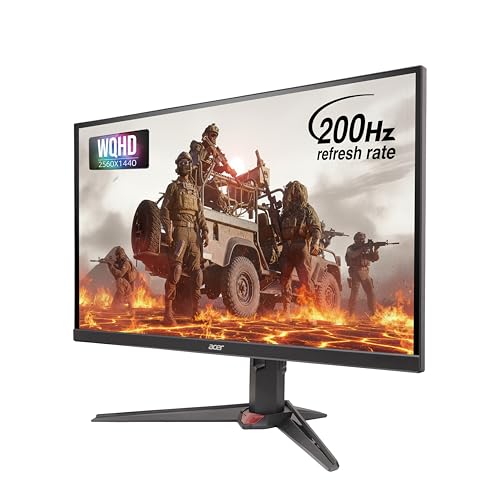
🖥️ Display & Panel Quality: 27-inch WQHD IPS panel, 2560×1440 resolution, 350 nits brightness — sharp detail with 90% DCI-P3 color for vivid gaming visuals
⚡ Speed & Motion Clarity: 200Hz refresh, 0.5ms GTG, AMD FreeSync Premium — seamless motion clarity in fast-paced action titles
👁️ Eye Care & Comfort: Acer VisionCare with BlueLightShield and Flickerless tech — reduced fatigue during extended gaming sessions
🔌 Connectivity & Audio: 2x HDMI 2.0, 1x DisplayPort 1.4, dual 2W speakers — flexible multi-device gaming setup
🏗️ Build, Ergonomics & VESA: ErgoStand with height, tilt, swivel, and pivot — comfortable positioning for long gaming sessions
As a genuine 2k monitor under 15000 built for gaming, the Acer Nitro XV272U X1 delivers on the promise of higher resolution without sacrificing speed. The 200Hz refresh rate combined with HDR400 support makes gaming visuals genuinely pop, with deep contrast and vivid highlights that flat FHD panels can’t match. Text clarity for browsing and light work is excellent given the QHD pixel density. In dark-room testing, backlight bleed is minor and doesn’t distract during actual gameplay. The 90% DCI-P3 coverage gives colors a cinematic punch that’s noticeable immediately out of the box, and the ErgoStand’s full adjustability means this doubles well as a productivity display when you’re not gaming.
Pros
✅ Genuine 200Hz QHD combination rare at this exact price point
✅ HDR400 and 90% DCI-P3 deliver noticeably vivid, cinematic color output
✅ Full ErgoStand adjustment suits both gaming posture and productivity use
Cons
❌ HDR400 is an entry-level HDR tier, not a full high-contrast experience
❌ Built-in speakers remain a weak point, as with most gaming monitors here
👉 Check Acer Nitro XV272U X1 Latest Price on Amazon
Lenovo LOQ 27Q-10 – Best Value 180Hz QHD Gaming Monitor

🖥️ Display & Panel Quality: 27-inch QHD IPS panel, 2560×1440 resolution, 300 nits brightness — sharp visuals for both gaming and daily work
⚡ Speed & Motion Clarity: 180Hz refresh, 0.5ms MPRT, AMD FreeSync and VESA Adaptive Sync — smooth, tear-free motion for fast titles
👁️ Eye Care & Comfort: Anti-Glare coating, HDR10 compliance — comfortable extended viewing with reduced glare
🔌 Connectivity & Audio: 2x HDMI 2.1 TMDS, 1x DisplayPort 1.4 — supports console and PC gaming setups alike
🏗️ Build, Ergonomics & VESA: Tilt-adjustable stand, Legion Space software — scenario-based display presets for gaming and work
The Lenovo LOQ 27Q-10 packs genuine high-refresh QHD performance into a more accessible price than its Legion sibling, making it a strong pick for buyers chasing the best 2k gaming monitor under 15000 without maxing out their budget. During gameplay, the 180Hz refresh and 0.5ms MPRT keep fast motion clean and largely blur-free, and dual HDMI 2.1 ports future-proof this for next-gen console gaming. Text sharpness for coding and browsing benefits from the QHD pixel density, though colors lean slightly cooler out of the box compared to the Legion model. In dark rooms, backlight uniformity is respectable, with only minor edge bleed. The stand, however, is tilt-only, a clear trade-off versus the pricier Legion R27qe Gen 2.
Pros
✅ Genuine 180Hz QHD combination at a more accessible price than rivals
✅ Dual HDMI 2.1 ports support next-gen console and PC gaming alike
✅ Legion Space software adds useful scenario-based display presets
Cons
❌ Stand offers tilt adjustment only, lacking height or swivel flexibility
❌ Colors lean slightly cooler out-of-the-box versus competing QHD panels
👉 Check Lenovo LOQ 27Q-10 Latest Price on Amazon
BenQ GW2790TC – Best 144Hz IPS Monitor Under 15000
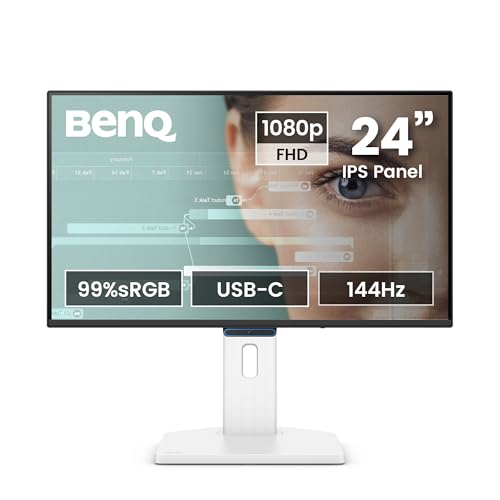
🖥️ Display & Panel Quality: 27-inch FHD IPS panel, 99% sRGB, 300 nits brightness — vivid, accurate color for creative and office work
⚡ Speed & Motion Clarity: 144Hz refresh, 5ms response, AMD FreeSync — smoother scrolling and casual gaming than standard 100Hz panels
👁️ Eye Care & Comfort: ePaper Mode, Care Mode, Visual Optimizer — hardware-tuned comfort for long work sessions
🔌 Connectivity & Audio: USB-C (20W power delivery), HDMI, DisplayPort, 2Wx2 speakers — single-cable laptop charging and display setup
🏗️ Build, Ergonomics & VESA: Height adjustment up to 150mm, tilt, swivel, and pivot — complete ergonomic flexibility for any desk
The BenQ GW2790TC’s headline feature is genuinely its USB-C connectivity with 20W power delivery, letting laptop users charge and display through a single cable — a rare and practical inclusion among 144Hz IPS monitors under 15000 options. Text sharpness across office documents and casual coding is clean thanks to the IPS panel’s accurate color rendering, and the 144Hz refresh rate makes cursor movement and light gaming feel noticeably smoother than a standard 100Hz display. The full height, tilt, swivel, and pivot stand is a genuine standout, letting you rotate the screen to portrait mode for document review. In dark rooms, backlight bleed is minimal, and the Visual Optimizer hotkey conveniently auto-tunes brightness for changing light conditions.
Pros
✅ USB-C with 20W power delivery simplifies single-cable laptop setups
✅ Full height, tilt, swivel, and pivot stand rare at this price segment
✅ 144Hz refresh with 99% sRGB balances smooth motion and accurate color
Cons
❌ FHD resolution feels less spacious than the QHD alternatives reviewed here
❌ 5ms response time trails behind the sub-1ms gaming-focused panels
👉 Check BenQ GW2790TC Latest Price on Amazon
Dell SE2726D – Best Monitor Under 15000 for Editing
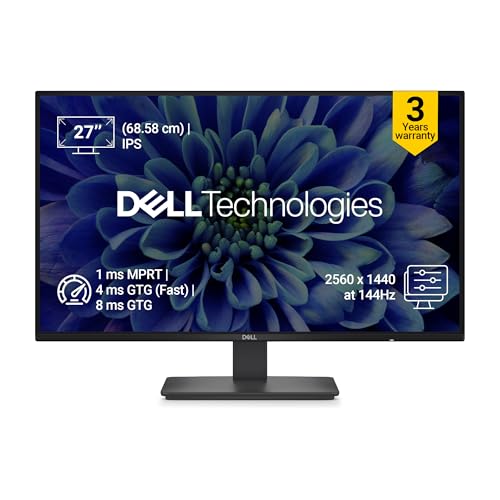
🖥️ Display & Panel Quality: 27-inch QHD IPS panel, 2560×1440 resolution, 1500:1 contrast — 1.77x more detail than FHD for photo and video work
⚡ Speed & Motion Clarity: 144Hz refresh, 1ms MPRT, AMD FreeSync — smooth, tear-free scrubbing through timelines and footage
👁️ Eye Care & Comfort: TÜV Rheinland 3-star Eye Comfort certified, Flicker-Free — genuinely reduced strain during long edit sessions
🔌 Connectivity & Audio: HDMI and DisplayPort connectivity — reliable linking to editing workstations and laptops
🏗️ Build, Ergonomics & VESA: Ultra-thin bezels, wide 178°/178° viewing angles — consistent color for side-by-side monitor comparison
For creators specifically hunting the best monitor under 15000 for editing, the Dell SE2726D’s combination of QHD resolution and 99% sRGB coverage is genuinely compelling. Detail retention in photo and video review is excellent, showing significantly more nuance in gradients and shadows than FHD panels on this list. The 1500:1 contrast ratio gives dark scenes real depth during color grading work, and TÜV Rheinland’s 3-star eye comfort certification genuinely reduces the gritty-eyed feeling after multi-hour editing sessions. The 144Hz refresh rate, while not essential for editing, makes timeline scrubbing feel notably fluid. Backlight uniformity in dark-room testing is strong, with Dell’s typical quality control keeping bleed minimal across the panel.
Pros
✅ QHD resolution and 99% sRGB deliver genuinely detailed color for editing work
✅ TÜV Rheinland 3-star certification meaningfully reduces long-session eye strain
✅ Dell’s consistent build quality keeps backlight bleed minimal in dark rooms
Cons
❌ No USB-C or built-in speakers, requiring separate cables and audio setup
❌ Stand ergonomics are more basic than the full-adjustment competitors here
👉 Check Dell SE2726D Latest Price on Amazon
Acer SA272U P1 – Best Ultra-Slim QHD Monitor Under 15000
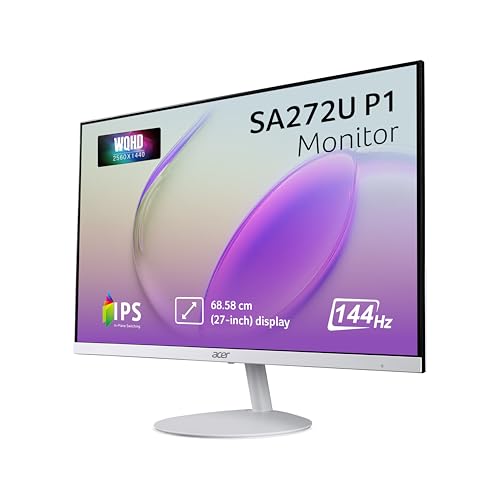
🖥️ Display & Panel Quality: 27-inch WQHD IPS panel, 2560×1440 resolution, 100 million:1 contrast — sharp, vivid detail in an ultra-slim body
⚡ Speed & Motion Clarity: 144Hz refresh, 1ms VRB, AMD FreeSync — fluid motion for gaming and creative scrubbing alike
👁️ Eye Care & Comfort: Acer VisionCare with BlueLightShield and ComfyView — comfortable extended viewing sessions
🔌 Connectivity & Audio: 1x HDMI 2.0, 1x DisplayPort 1.4, built-in dual speakers — straightforward single-device connectivity
🏗️ Build, Ergonomics & VESA: Ultra-slim 7.2mm profile, ZeroFrame design — ideal for space-saving multi-monitor alignment
The Acer SA272U P1’s defining trait is its remarkably thin 7.2mm profile, which genuinely transforms how it looks on a desk compared to bulkier QHD alternatives. Text sharpness during coding and reading is excellent thanks to the IPS panel’s pixel density, and HDR10 support adds noticeable punch to media content. The 144Hz refresh rate with 1ms VRB keeps gaming motion clean, though it caps slightly below the 180-200Hz panels reviewed above. In dark rooms, backlight uniformity is solid with minimal bleed. The ZeroFrame design makes this genuinely one of the best picks for a clean dual-monitor setup, since the ultra-thin bezels virtually disappear between two screens side by side.
Pros
✅ Ultra-thin 7.2mm ZeroFrame design ideal for seamless dual-monitor setups
✅ WQHD resolution with 100 million:1 contrast delivers striking visual depth
✅ 144Hz with 1ms VRB handles both gaming and creative work smoothly
Cons
❌ Only single HDMI and DisplayPort ports limit multi-device connectivity
❌ Built-in speakers are basic and best supplemented with external audio
👉 Check Acer SA272U P1 Latest Price on Amazon
MSI MAG 275F – Best 144Hz+ FHD Gaming Pick Under 15000
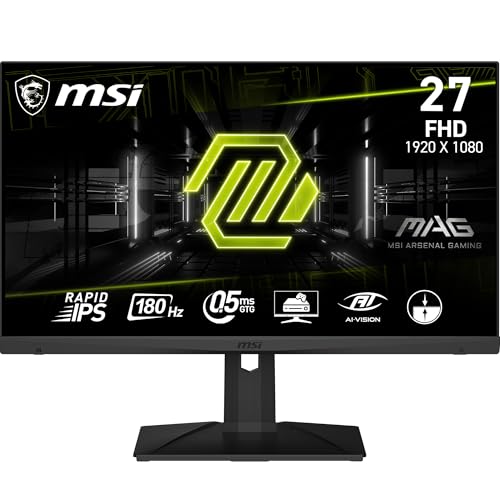
🖥️ Display & Panel Quality: 27-inch FHD Rapid IPS panel, 1920×1080 resolution, 115% sRGB — outstanding color intensity for gaming visuals
⚡ Speed & Motion Clarity: 180Hz refresh, 0.5ms GTG, HDR Ready — near-instant pixel transitions for competitive play
👁️ Eye Care & Comfort: Anti-Flicker and Less Blue Light tech, MSI AI Vision — smart black-tuning reduces eye strain in dark scenes
🔌 Connectivity & Audio: DisplayPort 1.4, HDMI 2.0b, HDMI CEC support — full-bandwidth 180Hz output over both cable types
🏗️ Build, Ergonomics & VESA: Frameless design, tilt-adjustable stand, 5-way joystick — clean aesthetics for multi-monitor gaming rigs
The MSI MAG 275F is purpose-built for buyers chasing the 144hz gaming monitor under 15000 experience with headroom to spare, given its actual 180Hz ceiling. During gameplay, the Rapid IPS panel’s 115% sRGB coverage produces genuinely vivid, punchy colors that stand out immediately, and the 0.5ms GTG response virtually eliminates ghosting in fast-paced titles. AI Vision’s smart black-tuner noticeably lifts shadow detail during dark scenes without blowing out highlights. Text sharpness for coding remains solid despite the FHD resolution, though QHD rivals on this list edge it out for pure detail. The frameless design and tilt-only stand keep the desk footprint minimal, and full 180Hz support over both DisplayPort and HDMI removes any cable-related bandwidth concerns.
Pros
✅ 115% sRGB Rapid IPS panel delivers exceptionally vivid gaming color
✅ Full 180Hz support over both DisplayPort and HDMI removes bottlenecks
✅ MSI AI Vision genuinely enhances shadow detail during dark gaming scenes
Cons
❌ FHD resolution trails the sharper QHD panels reviewed elsewhere on this list
❌ Stand is tilt-only, lacking height or swivel adjustment options
👉 Check MSI MAG 275F Latest Price on Amazon
MSI PRO MP275Q – Best 27-Inch QHD Office Monitor Under 15000

🖥️ Display & Panel Quality: 27-inch QHD IPS panel, 2560×1440 resolution, 300 nits — sharp text and detail for office documents and spreadsheets
⚡ Speed & Motion Clarity: 100Hz refresh rate — noticeably smoother scrolling than standard 60Hz office displays
👁️ Eye Care & Comfort: TÜV Rheinland Eye Comfort certified, Eye-Q Check software — proactive eye-strain monitoring for long workdays
🔌 Connectivity & Audio: HDMI 2.0b, DisplayPort 1.2a, built-in 2W speakers — convenient for video calls without extra hardware
🏗️ Build, Ergonomics & VESA: 100mm VESA mount, tilt-adjustable, cable management clip — clean, organized desk setup
The MSI PRO MP275Q targets desk-bound professionals who want QHD sharpness without gaming-oriented pricing, and it’s a genuinely strong fit for the best monitor under 15000 for the office work category. Text rendering across spreadsheets, browsers, and documents is crisp thanks to the QHD panel, and the 100Hz refresh rate smooths out everyday scrolling noticeably compared to 60Hz baselines. The TÜV-certified Eye Comfort tech, combined with the built-in Eye-Q Check software, genuinely helps flag fatigue during long workdays — a thoughtful touch rarely found at this price. Built-in 2W speakers are convenient for quick video calls, though not a substitute for dedicated audio. The tool-free stand assembles quickly, and 100mm VESA support makes arm-mounting straightforward.
Pros
✅ TÜV Rheinland-certified Eye Comfort tech with proactive Eye-Q Check software
✅ QHD resolution and 100Hz refresh sharply improve daily office visual comfort
✅ Built-in speakers add convenience for video calls without extra hardware
Cons
❌ 100Hz refresh rate isn’t suited for serious competitive gaming use
❌ Stand offers tilt-only adjustment without height or swivel flexibility
👉 Check MSI PRO MP275Q Latest Price on Amazon
LG 29U511A UltraWide – Best Ultrawide Monitor Under 15000
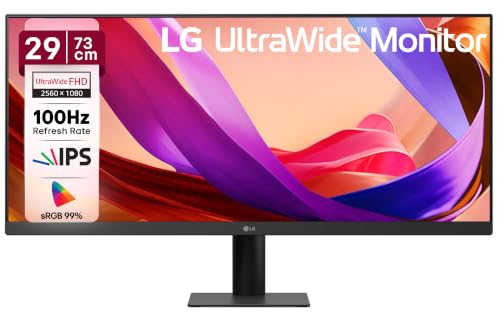
🖥️ Display & Panel Quality: 29-inch UltraWide IPS panel, 2560×1080 resolution, 350 nits — expansive 21:9 canvas for multitasking
⚡ Speed & Motion Clarity: 100Hz refresh, 5ms GTG — smoother visuals optimized for gaming and fast-paced content
👁️ Eye Care & Comfort: Anti-Glare surface treatment, HDR10 and HDR Effect — enhanced contrast without harsh reflections
🔌 Connectivity & Audio: HDMI 1.4, DisplayPort 1.4, headphone-out — flexible single-device connectivity
🏗️ Build, Ergonomics & VESA: 3-side virtually borderless, tilt -5° to +15°, 100x100mm VESA — space-efficient wide-screen workspace
The LG 29U511A carves out a unique niche among monitors under 15000 by trading vertical height for dramatically more horizontal workspace. In daily use, the 21:9 aspect ratio genuinely transforms multitasking — you can comfortably view a code editor and browser side-by-side without constant window switching. Text sharpness across the IPS panel remains excellent, and the 99% sRGB coverage keeps colors accurate for design review work. The 3-side virtually borderless design looks premium on a desk, and in dark rooms, HDR10 support adds noticeable contrast depth to compatible content. The stand’s tilt-only range is a limitation for buyers wanting to fine-tune height, and the single HDMI port may feel restrictive for multi-device setups.
Pros
✅ Expansive 21:9 UltraWide canvas genuinely transforms multitasking productivity
✅ HDR10 and HDR Effect add noticeable contrast depth to supported content
✅ 3-side virtually borderless design looks clean on any modern desk
Cons
❌ Stand offers tilt-only adjustment, no height or swivel flexibility
❌ Single HDMI port limits simultaneous multi-device connectivity
👉 Check LG 29U511A UltraWide Latest Price on Amazon
HP Series 5 27-Inch – Best Budget 27-Inch Office Monitor
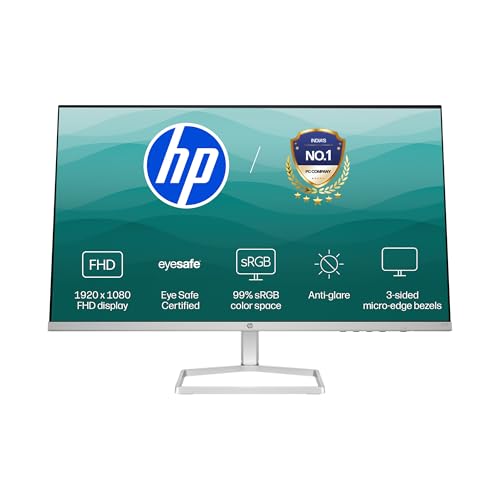
🖥️ Display & Panel Quality: 27-inch FHD IPS panel, 99% sRGB, 300 nits, 1500:1 contrast — vibrant, accurate color for everyday content
⚡ Speed & Motion Clarity: 100Hz refresh rate — seamless scrolling and stutter-free viewing for office tasks
👁️ Eye Care & Comfort: HP Eye Ease with Eyesafe certification — limits blue light without impacting color accuracy
🔌 Connectivity & Audio: 1x VGA, 2x HDMI 1.4 — broad compatibility with both modern and legacy office systems
🏗️ Build, Ergonomics & VESA: 3-sided borderless design, tilt-adjust stand — clean, seamless dual-screen setup
The HP Series 5 27-inch is a straightforward, dependable pick for buyers wanting a trusted brand name without gaming-oriented pricing. Text clarity across spreadsheets and documents is excellent given the IPS panel’s 99% sRGB coverage, and the Eyesafe-certified Eye Ease mode genuinely reduces the gritty-eyed feeling during 8-hour workdays without washing out colors. The 100Hz refresh rate makes browsing feel noticeably smoother than a standard 60Hz monitor, and the thin-and-light, 3-sided borderless design looks genuinely premium for the price. In dark rooms, backlight uniformity is solid with minimal bleed. This isn’t a gaming display, and the dual HDMI 1.4 ports cap bandwidth for higher-refresh content, but for pure office use, it’s dependable.
Pros
✅ Eyesafe-certified Eye Ease genuinely reduces strain without dulling colors
✅ 99% sRGB and 1500:1 contrast deliver accurate, vibrant everyday visuals
✅ 3-sided borderless design suits clean dual-monitor office setups
Cons
❌ HDMI 1.4 ports cap bandwidth, limiting future high-refresh upgrades
❌ No gaming-oriented features like FreeSync or sub-5ms response time
👉 Check HP Series 5 27-Inch Latest Price on Amazon
LG 32MR50C – Best Large Curved VA Monitor Under 15000
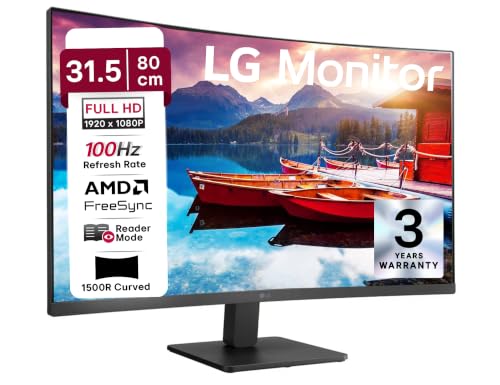
🖥️ Display & Panel Quality: 31.5-inch curved FHD VA panel, 1920×1080 resolution, 3000:1 contrast — deep blacks for immersive dark-room viewing
⚡ Speed & Motion Clarity: 100Hz refresh, 5ms GTG, AMD FreeSync — smooth motion handling for casual gaming and streaming
👁️ Eye Care & Comfort: Flicker Safe, Reader Mode, Color Weakness Mode — genuine variety of eye-care presets
🔌 Connectivity & Audio: D-Sub, 2x HDMI — flexible connectivity for both older and newer systems
🏗️ Build, Ergonomics & VESA: 3-side virtually borderless, tilt-adjustable, wide 178° viewing angles — large-screen immersion at a modest footprint
The LG 32MR50C delivers genuine big-screen immersion for buyers prioritizing size over pixel density. The curved VA panel’s 3000:1 contrast ratio produces noticeably deeper blacks during movie nights than the IPS panels on this list, making it a strong choice for a shared entertainment-and-work setup. Text sharpness for browsing and light coding is acceptable, though VA panels naturally render fine text a touch softer than IPS alternatives. AMD FreeSync keeps casual gaming free of tearing, and Black Stabilizer helps visibility in dark game scenes. In brighter rooms, the 250 cd/m² brightness feels adequate but not exceptional. The multiple picture modes, including Reader and Color Weakness, add genuine everyday utility beyond typical monitor presets.
Pros
✅ Deep 3000:1 contrast ratio delivers immersive blacks for movie viewing
✅ Large 31.5-inch curved canvas adds genuine visual immersion at this price
✅ AMD FreeSync and Black Stabilizer improve the casual gaming experience
Cons
❌ VA panel renders fine text softer than the IPS alternatives on this list
❌ 250 cd/m² brightness feels modest under bright ambient room lighting
👉 Check LG 32MR50C Latest Price on Amazon
Samsung LS32D390 – Best Budget Curved 32-Inch Monitor

🖥️ Display & Panel Quality: 32-inch 1500R curved FHD panel, 1920×1080 resolution, 250 cd/m² — immersive wraparound viewing for media and casual gaming
⚡ Speed & Motion Clarity: 100Hz refresh, 4ms GTG — reduced lag and motion blur for fast-paced content
👁️ Eye Care & Comfort: TÜV-certified Eye Saver Mode, Less Screen Flickering — genuine comfort during extended sessions
🔌 Connectivity & Audio: D-Sub, HDMI 1.4, headphone jack — standard connectivity for desktop and laptop pairing
🏗️ Build, Ergonomics & VESA: Wall mountable, 95% sRGB coverage, Game Mode presets — flexible large-screen desk or wall setup
The Samsung LS32D390 brings the tightest curve on this list, with a 1500R radius that genuinely wraps around your peripheral vision more noticeably than the LG 32MR50C’s curve. This makes it a compelling pick for buyers who prioritize immersion in gaming and streaming over pixel-level sharpness. Color output at 95% sRGB is respectable, and the TÜV-certified Eye Saver Mode does measurably reduce blue light and flicker during long sessions. Text sharpness is acceptable for browsing, but not ideal for fine detail work given the FHD resolution stretched across 32 inches. In darker rooms, backlight uniformity shows some inconsistency near the curve edges, a common trade-off in this price tier. Samsung’s 3-year warranty adds welcome peace of mind.
Pros
✅ Tight 1500R curve deliversa genuinely immersive wraparound viewing experience
✅ TÜV-certified Eye Saver Mode measurably reduces blue light and flicker
✅ Backed by Samsung’s reliable 3-year manufacturer warranty
Cons
❌ FHD resolution stretched across 32 inches reduces overall pixel density
❌ Backlight uniformity shows mild inconsistency near curved screen edges
👉 Check Samsung LS32D390 Latest Price on Amazon
Zebronics AC32FHD – Best Budget 32-Inch Curved Gaming Monitor

Key Specs & Feature Highlights:
🖥️ Display & Panel Quality: 32-inch curved FHD panel, 1920×1080 resolution, 300 nits — bright, immersive visuals at an aggressive price point
⚡ Speed & Motion Clarity: 165Hz refresh rate — genuinely fast motion handling, rare at this exact budget tier
👁️ Eye Care & Comfort: Curved screen design reduces peripheral distraction — more comfortable extended viewing sessions
🔌 Connectivity & Audio: HDMI, DisplayPort, USB port, built-in speakers — unusually complete connectivity bundle
🏗️ Build, Ergonomics & VESA: Metal stand, wall mountable, ultra-slim bezel — sturdy build with flexible mounting options
The Zebronics AC32FHD is the most aggressively priced large-screen gaming option on this list, and it punches well above its price with a genuine 165Hz refresh rate on a 32-inch curved canvas. Gaming motion feels notably smoother than standard 100Hz curved competitors, and the metal stand offers a sturdier, less wobbly base than the plastic stands common at this budget. Text sharpness holds up reasonably for casual browsing, though the FHD resolution stretched across 32 inches shows softer detail up close compared to smaller, denser panels. In dark rooms, backlight bleed is more noticeable along the edges, an expected trade-off at this price. The built-in speakers and USB port add genuine everyday convenience rarely bundled together at this cost.
Pros
✅ Rare 165Hz refresh rate on a 32-inch curved panel at this exact price
✅ Sturdy metal stand offers noticeably less wobble than typical plastic stands
✅ Unusually complete connectivity with HDMI, DisplayPort, and USB together
Cons
❌ More visible backlight bleed along edges compared to premium alternatives
❌ FHD resolution stretched over 32 inches softens fine text and detail
👉 Check Zebronics AC32FHD Latest Price on Amazon
Conclusion
The best monitors under 15000 segment prove that QHD resolution, high refresh rates, and genuine ergonomics no longer demand premium pricing, making informed comparison essential before buying.
🥇 The Overall Winner: Lenovo Legion R27qe Gen 2 – The best overall balance of 200Hz QHD speed, dual-sync compatibility, full ergonomic stand, and reliability for most users.
🥈 The Best for Gaming: Acer Predator XB253Q F3 – A blistering 320Hz refresh rate, 1ms VRB, and full ErgoStand deliver the fastest, most competitive-ready experience here.
🥉 The Best for Office, Coding & Productivity: BenQ GW2790Q – Dedicated Coding Mode, sharp QHD text rendering, and genuine eye-care certification make it ideal for multi-monitor work desks.
FAQs
1. Which is the best monitor under 15000 in India for gaming and video editing both?
The Dell SE2726D and Acer Nitro XV272U X1 balance QHD sharpness with 144-200Hz refresh rates, making them equally capable for editing and competitive gaming.
2. Can I find a genuine 4K monitor under 15000 in India?
It is hard to find a 4K panel in this exact budget; QHD (2560×1440) is currently the highest realistic resolution available under the ₹15,000 range.
3. Is a 27-inch monitor better than a 32-inch curved monitor under 15000?
27-inch QHD panels offer sharper pixel density for text and coding, while 32-inch curved options prioritize immersion for gaming and movies over detail.
4. Do I need G-Sync or FreeSync specifically for a gaming monitor under 15000?
FreeSync works with AMD GPUs and often NVIDIA cards via compatibility mode; only the Lenovo Legion R27qe Gen 2 here is officially G-Sync Compatible.
5. Are 144Hz IPS monitors under 15000 reliable for long-term daily use?
Yes, models like the BenQ GW2790TC and Acer SA272U P1 combine 144Hz IPS panels with TÜV-grade eye care, making them dependable for daily 8-hour use.



![16 Best Laptops Under ₹1,00,000 in India [2026] | GadgetVeda](https://gadgetveda.com/wp-content/uploads/2026/09/Best-Laptops-Under-₹100000-in-India-150x150.webp)
![Hard Water Washing Machine Care India [Scale, Heater & Aqua Energie]](https://gadgetveda.com/wp-content/uploads/2026/09/Hard-Water-Washing-Machine-Problems-in-India-150x150.webp)
![12 Best Monitors Under ₹20,000 in India [2026]](https://gadgetveda.com/wp-content/uploads/2026/09/Best-Monitors-Under-₹20000-in-India-150x150.webp)
![Googlebook Laptops Launched With Gemini Intelligence And Android Integration [Price, Specs, India Availability]](https://gadgetveda.com/wp-content/uploads/2026/09/Googlebook-Laptops-Launched-With-Gemini-Intelligence-And-Android-Integration-150x150.webp)
![12 Best Mobile Phones Under ₹40,000 in India [2026]](https://gadgetveda.com/wp-content/uploads/2026/09/Best-Mobile-Phones-Under-₹40000-in-India-150x150.webp)

![16 Best Laptops Under ₹1,00,000 in India [2026] | GadgetVeda](https://gadgetveda.com/wp-content/uploads/2026/09/Best-Laptops-Under-₹100000-in-India-300x167.webp)
![Hard Water Washing Machine Care India [Scale, Heater & Aqua Energie]](https://gadgetveda.com/wp-content/uploads/2026/09/Hard-Water-Washing-Machine-Problems-in-India-300x167.webp)
![12 Best Monitors Under ₹20,000 in India [2026]](https://gadgetveda.com/wp-content/uploads/2026/09/Best-Monitors-Under-₹20000-in-India-300x167.webp)
![Googlebook Laptops Launched With Gemini Intelligence And Android Integration [Price, Specs, India Availability]](https://gadgetveda.com/wp-content/uploads/2026/09/Googlebook-Laptops-Launched-With-Gemini-Intelligence-And-Android-Integration-300x169.webp)