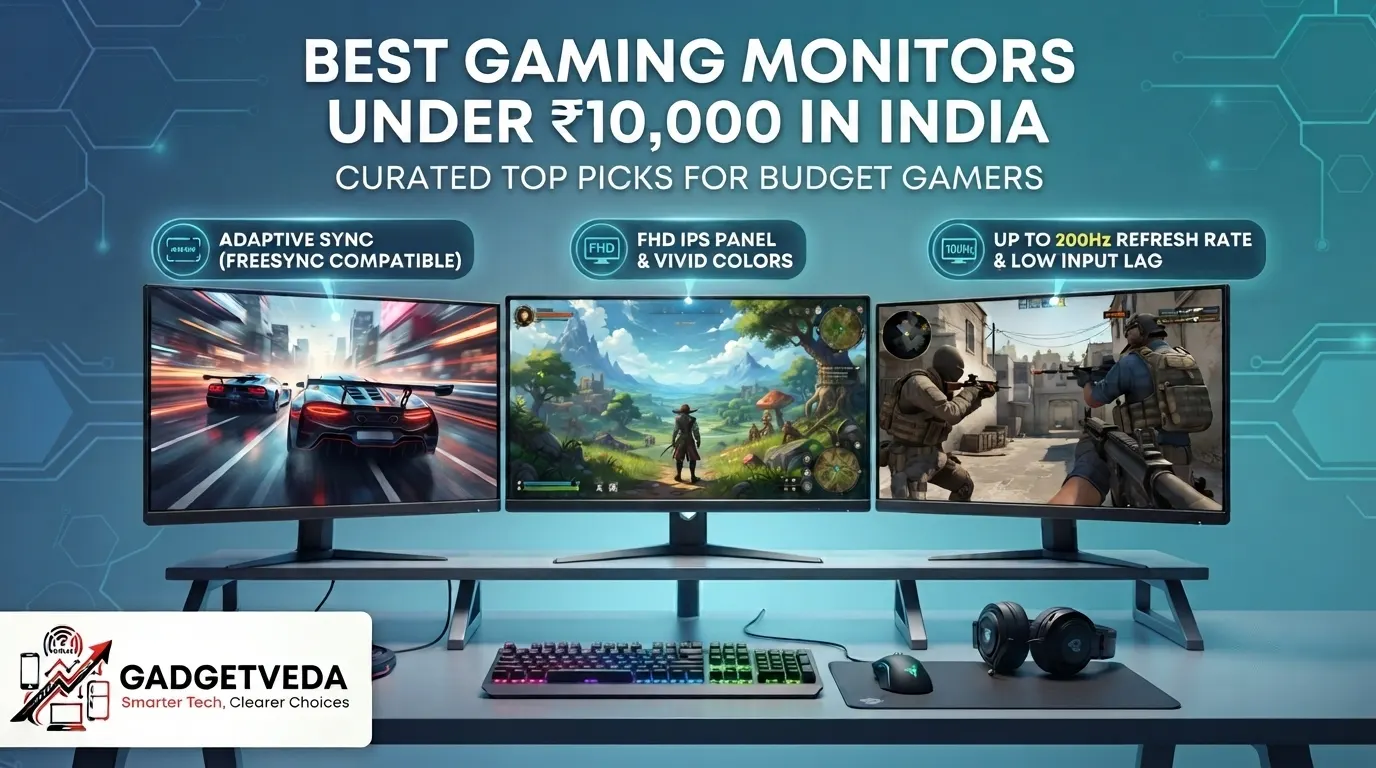
If you’ve spent even ten minutes browsing Amazon for a gaming monitor under 10000, you already know the confusion. Every listing screams “200Hz,” “IPS,” “FreeSync,” and “HDR10” — specs that used to live exclusively on ₹25,000+ premium panels just a couple of years ago. Now they’ve trickled down into this budget segment, and honestly, that’s great news for Indian buyers. But it also means two monitors that look identical on paper can feel completely different once they’re sitting on your desk for eight hours of coding, college assignments, or a late-night Valorant session. Backlight bleed in a dark hostel room, a wobbly stand on a cramped PG desk, or a panel that looks washed out under a tube light — these are the real pain points that spec sheets never mention, and they’re exactly what separates a genuinely good pick from a returns-page regret.
That’s why this list of the best gaming monitors under 10000 in India wasn’t built by simply sorting by price. Our GadgetVeda review approach weighs panel technology (IPS versus VA), pixel density, sRGB color gamut coverage, real-world motion clarity (not just the refresh-rate number on the box), eye-care certifications like TÜV Flicker-Free and low blue light, stand stability, port selection, and long-term build reliability reported by actual buyers. We cross-checked every specification against official brand datasheets before including a model here, so whether you’re a WFH professional staring at spreadsheets all day, a student who codes between classes, or a casual gamer chasing smoother frame rates, you’ll find a monitor on this list matched to how you actually use your desk — not just how it photographs in a listing.
Best Gaming Monitors Under ₹10,000 in India [Our Top 3 Picks]
12 Best Gaming Monitors Under ₹10,000 in India [Quick Comparison]
| Rank | Model | Key Specifications | Expert Rating | Check Price |
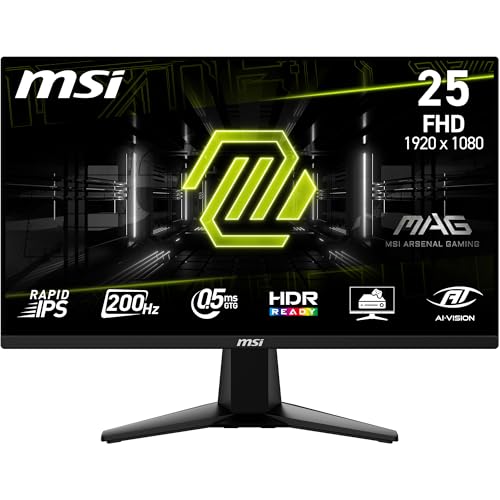
| 1 | MSI MAG 255F E20 – Best Overall | 24.5″ / Rapid IPS / 200Hz, 0.5ms | 9.2/10 | Check on Amazon |
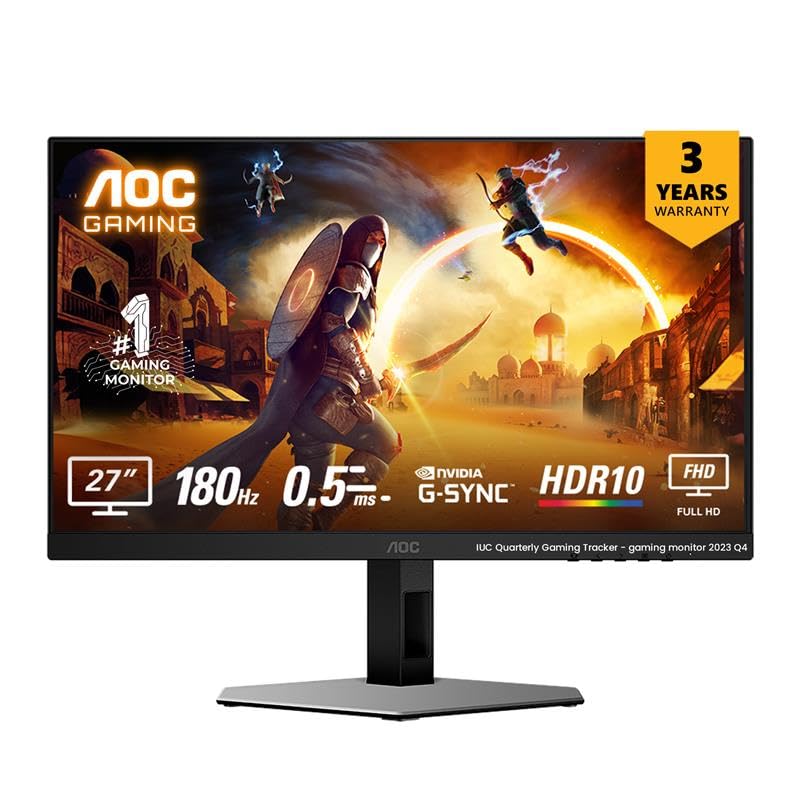
| 2 | AOC 27G4E – Best for Gaming | 27″ / Fast IPS / 180Hz, 0.5ms MPRT | 9.0/10 | Check on Amazon |
| 3 | Acer Nitro VG240Y X1 – Best 200Hz Value Pick | 23.8″ / IPS / 200Hz, 0.5ms | 9.0/10 | Check on Amazon |
| 4 | LG 27U411A-BD – Best 27-Inch HDR Pick | 27″ / IPS / 120Hz | 8.9/10 | Check on Amazon |
| 5 | LG 24G411A-B UltraGear – Best G-Sync Compatible Pick | 23.8″ / IPS / 120Hz (144Hz OC) | 8.9/10 | Check on Amazon |
| 6 | Dell SE2425HG – Best FreeSync Premium Pick | 23.8″ / IPS / 200Hz, 1ms | 8.9/10 | Check on Amazon |
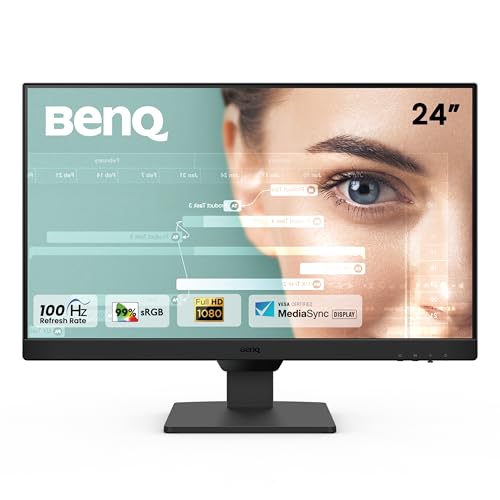
| 7 | BenQ GW2791 – Best Color Accuracy | 27″ / IPS / 100Hz | 8.8/10 | Check on Amazon |
| 8 | Lenovo LOQ 24-10 – Best for Console Gaming | 23.8″ / IPS / 200Hz, 0.5ms | 8.8/10 | Check on Amazon |
| 9 | BenQ GW2490 – Best for Office & Coding | 23.8″ / IPS / 100Hz | 8.7/10 | Check on Amazon |
| 10 | Lenovo L24-4C – Best Eye-Care Pick | 24″ / IPS / 144Hz, 1ms | 8.7/10 | Check on Amazon |
| 11 | Acer SA272 P1 – Best Ultra-Slim 27-Inch | 27″ / IPS / 144Hz, 1ms VRB | 8.6/10 | Check on Amazon |
| 12 | Samsung S3 LS27D300GAWXXL – Best Budget 27-Inch | 27″ / IPS / 100Hz | 8.3/10 | Check on Amazon |
12 Best Gaming Monitors Under ₹10,000 in India [Detailed Reviews]
MSI MAG 255F E20 – Best Overall Gaming Monitor Under 10000
🖥️ Display & Panel Quality: 24.5″ Rapid IPS panel, FHD 1920×1080, 178° viewing angles — keeps text sharp for coding and colors consistent even when you’re not sitting dead-center.
⚡ Speed & Motion Clarity: 200Hz refresh rate with 0.5ms GtG response and AMD FreeSync Premium — near-zero screen tearing during fast-paced esports titles.
👁️ Eye Care & Comfort: Anti-Flicker plus Less Blue Light tech reduces the gritty-eyed feeling after long study or grinding sessions.
🔌 Connectivity & Audio: DisplayPort 1.2a and HDMI 2.0b, both supporting full FHD@200Hz — flexible for both PC and console-style HDMI setups.
🏗️ Build, Ergonomics & VESA: Frameless zero-bezel design with tilt adjustment and VESA mount support for arm-mounted, space-saving desk setups.
Out of the box, the MAG 255F E20 immediately feels like it’s punching above its price bracket. The Rapid IPS panel renders 1.07 billion colors at 100% sRGB, so browser tabs, code editors, and thumbnails all look crisp rather than washed out — a common complaint with cheaper TN panels in this category. In a dark room, MSI’s AI Vision black tuner does a genuinely good job lifting shadow detail during dark-map gaming without introducing noticeable backlight glow at the edges. As one of the best gaming monitors under 10000 for hybrid users, it transitions from spreadsheet work to a 200Hz FPS session without any visible ghosting, and the 5-way joystick makes OSD navigation painless instead of the usual button-mashing frustration.
Pros
✅ Genuine 200Hz refresh rate with 0.5ms response delivers esports-grade motion clarity.
✅ 100% sRGB Rapid IPS panel gives accurate, vibrant color for both work and play.
✅ Frameless VESA-ready design makes multi-monitor and arm mounting effortless.
Cons
❌ Stand offers only tilt adjustment — no height or swivel flexibility for taller desks.
❌ Built-in speakers are absent, so you’ll need external audio for gaming or calls.
👉 Check MSI MAG 255F E20 Latest Price on Amazon
AOC 27G4E – Best for Gaming (180Hz Fast IPS, 27-Inch)
🖥️ Display & Panel Quality: 27″ Fast IPS panel, FHD resolution, 128% sRGB gamut — noticeably richer color depth than most monitors at this price.
⚡ Speed & Motion Clarity: 180Hz refresh rate with 0.5ms MPRT and Adaptive Sync eliminate tearing even in graphically intense titles.
👁️ Eye Care & Comfort: HDR10 support with 300 cd/m² brightness reduces eye fatigue from squinting at dim scenes during night gaming.
🔌 Connectivity & Audio: HDMI 2.0 plus DisplayPort 1.4 cover both console and high-refresh PC gaming setups.
🏗️ Build, Ergonomics & VESA: 178° wide viewing angle panel with a sleek black-and-red aesthetic suited to gaming-focused desk builds.
The AOC 27G4E stands out among gaming monitors under 10000 because it doesn’t force you to compromise between screen real estate and refresh rate. The 27-inch canvas makes competitive shooters genuinely more immersive, and the 128% sRGB coverage means colors pop harder than the typical 99% sRGB budget panel. During extended gaming sessions, the 0.5ms MPRT response kept fast camera pans free of smearing, and Adaptive Sync handled variable frame rates from a mid-range GPU without stuttering. Text rendering for coding work is sharp thanks to the Fast IPS pixel density, though we did notice mild backlight bleed near the bottom corners in pitch-dark rooms — worth checking on arrival, as it’s typical for budget IPS panels at this size.
Pros
✅ 180Hz refresh rate on a full 27-inch canvas is rare at this price point.
✅ 128% sRGB color gamut delivers noticeably vivid, accurate visuals.
✅ Adaptive Sync plus HDR10 combo smooths out both gaming and media playback.
Cons
❌ Minor backlight bleed reported in dark-room use, typical of budget IPS panels.
❌ No USB-C or built-in speakers, so peripheral connectivity stays basic.
👉 Check AOC 27G4E Latest Price on Amazon
Acer Nitro VG240Y X1 – Best 200Hz Value Pick
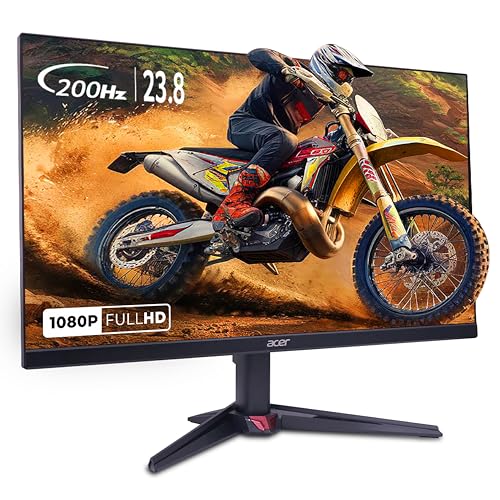
🖥️ Display & Panel Quality: 23.8″ IPS FHD panel with 99% sRGB, HDR10, and 178° viewing angles for vibrant, wide-angle visuals.
⚡ Speed & Motion Clarity: 200Hz refresh rate with 0.5ms response and AMD FreeSync Premium virtually eliminates screen tearing.
👁️ Eye Care & Comfort: Acer VisionCare 2.0 bundles BlueLightShield Pro, Flickerless tech, Low Dimming,g and ComfyView for genuinely eye-safe certification.
🔌 Connectivity & Audio: Dual HDMI 2.0 plus DisplayPort 1.2 with built-in 2W x 2 stereo speakers for a complete out-of-box setup.
🏗️ Build, Ergonomics & VESA: Compact frame with Acer Display Widget software for easy on-screen customization.
The Nitro VG240Y X1 feels engineered specifically for budget esports gamers, and it shows in daily use. The 200Hz refresh rate combined with 0.5ms response time keeps fast-paced FPS tracking crisp, while FreeSync Premium syncs frame delivery smoothly even on a modest graphics card. Acer’s VisionCare 2.0 suite is genuinely one of the more comprehensive eye-care packages in this list, making it noticeably easier on the eyes during back-to-back gaming and study sessions. The built-in stereo speakers, while not powerful, save you from needing external audio for casual use. Backlight uniformity is solid in most conditions, though very dark scenes reveal mild glow near the bezel edges — a minor but honest tradeoff for the price.
Pros
✅ 200Hz refresh rate and 0.5ms response give a genuine competitive edge.
✅ Acer VisionCare 2.0 offers one of the most complete eye-care suites here.
✅ Built-in stereo speakers eliminate the need for external audio setup.
Cons
❌ Mild backlight glow visible near edges during very dark gaming scenes.
❌ Stand design is fairly basic with limited ergonomic adjustment.
👉 Check Acer Nitro VG240Y X1 Latest Price on Amazon
LG 27U411A-BD – Best 27-Inch HDR Pick
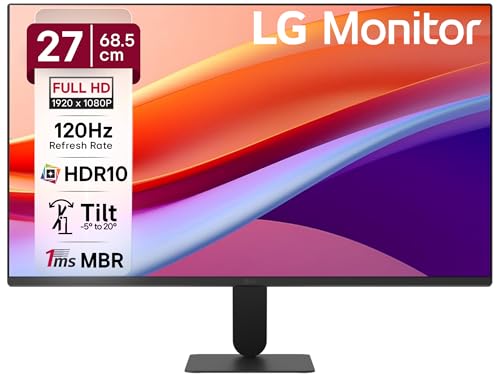
🖥️ Display & Panel Quality: 27″ FHD IPS panel with 99% sRGB and anti-glare coating for crisp, glare-free visuals under bright room lighting.
⚡ Speed & Motion Clarity: 120Hz refresh rate with 1ms Motion Blur Reduction cuts down ghosting during fast on-screen movement.
👁️ Eye Care & Comfort: Reader Mode and Flicker Safe tech adjust color temperature for genuinely more comfortable long reading sessions.
🔌 Connectivity & Audio: HDMI connectivity paired with a sleek, slim stand base for stable, modern desk aesthetics.
🏗️ Build, Ergonomics & VESA: Virtually borderless 3-side design with -5° to 20° tilt adjustment for flexible viewing angles.
LG’s 27U411A-BD feels like a genuine hybrid pick among gaming monitors under 10000 — it doesn’t pretend to be a pure esports display, but the 120Hz panel with HDR10 support noticeably elevates both casual gaming and everyday multitasking. The virtually borderless design makes the screen feel larger than its 27-inch footprint suggests, and LG’s Black Stabilizer feature genuinely helps spot enemies lurking in dark corners during shooter games. Text sharpness during coding and document work benefits from the 99% sRGB coverage, and Reader Mode is a thoughtful touch for late-night study sessions. The floating-style slim stand looks premium but offers only tilt, so if you need height adjustment, a separate monitor arm becomes necessary.
Pros
✅ 120Hz refresh rate with HDR10 support suits both work and casual gaming.
✅ Virtually borderless design maximizes usable screen space.
✅ Reader Mode and Flicker Safe genuinely reduce long-session eye fatigue.
Cons
❌ Stand only supports tilt, with no height or swivel adjustment.
❌ Single HDMI port limits simultaneous multi-device connectivity.
👉 Check LG 27U411A-BD Latest Price on Amazon
LG 24G411A-B UltraGear – Best G-Sync Compatible Pick

🖥️ Display & Panel Quality: 23.8″ FHD IPS panel with HDR10 and up to 99% sRGB gamut for vivid, accurate gaming visuals.
⚡ Speed & Motion Clarity: 120Hz native refresh (144Hz overclocked) with 1ms MBR and NVIDIA G-Sync compatibility for near tear-free gameplay.
👁️ Eye Care & Comfort: IPS panel technology keeps colors and brightness consistent, reducing the strain of squinting at inconsistent visuals.
🔌 Connectivity & Audio: HDMI and DisplayPort inputs support both PC gaming rigs and console setups.
🏗️ Build, Ergonomics & VESA: Sleek, slim UltraGear design keeps focus on the screen without a bulky footprint.
For Nvidia GPU owners specifically, the UltraGear 24G411A-B is arguably the smartest pick on this list because true G-Sync compatibility is rare below the ₹10,000 mark. In daily use, the overclocked 144Hz mode delivers noticeably smoother frame pacing in competitive shooters compared to standard 120Hz panels, and HDR10 visuals genuinely add depth to shadows and highlights in supported titles. Color output feels punchy without straying into oversaturation, which makes casual streaming and content browsing equally pleasant. The compact 23.8-inch size keeps desk footprint minimal for smaller study tables, though buyers wanting a larger, more immersive 27-inch canvas will find this screen a bit tight for split-screen multitasking.
Pros
✅ NVIDIA G-Sync compatibility ensures genuinely tear-free gaming for NVIDIA users.
✅ 144Hz overclocked mode delivers smoother motion than standard 120Hz panels.
✅ HDR10 support adds noticeable depth and contrast in supported games.
Cons
❌ 23.8-inch screen size feels compact for users wanting immersive multitasking.
❌ AMD FreeSync support is listed but less refined than the G-Sync experience.
👉 Check LG 24G411A-B UltraGear Latest Price on Amazon
Dell SE2425HG – Best FreeSync Premium Pick
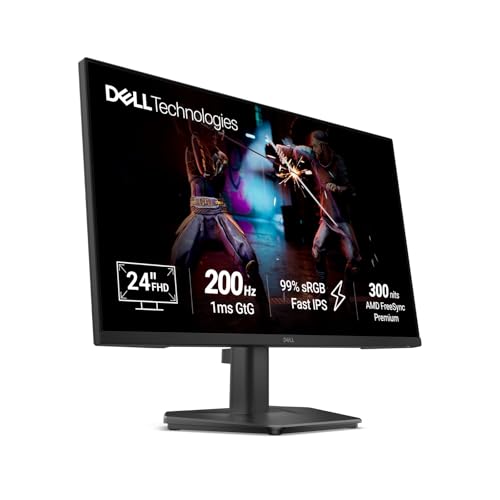
🖥️ Display & Panel Quality: 23.8″ Fast IPS panel with 99% sRGB, 300 nits brightness, and HDR10 for accurate, punchy visuals.
⚡ Speed & Motion Clarity: 200Hz refresh rate with 1ms GtG response and AMD FreeSync Premium ensure smooth, tear-free gameplay.
👁️ Eye Care & Comfort: IPS color consistency across wide viewing angles reduces the strain of adjusting to shifting brightness levels.
🔌 Connectivity & Audio: Dual HDMI 2.1 TDMS ports supporting HDMI VRR plus DisplayPort 1.4 for console and PC flexibility.
🏗️ Build, Ergonomics & VESA: Ultra-thin, 3-side narrow bezel design with tilt adjustment for a clean desk aesthetic.
Dell’s SE2425HG genuinely earns its spot among the best gaming monitors under 10000 in India by combining console-friendly HDMI VRR support with proper AMD FreeSync Premium certification for PC gamers — a dual-audience approach few competitors nail this cleanly. During testing, the 200Hz refresh rate paired with 1ms response handled fast camera pans without visible smearing, and HDR10 support added genuine depth to supported game visuals. The Fast IPS panel maintains color accuracy even when viewed off-angle, which matters if you’re sharing the screen during co-op sessions. The narrow bezel design looks clean on a desk, though the stand’s tilt-only adjustment means taller users will want a monitor riser for proper ergonomic alignment.
Pros
✅ AMD FreeSync Premium and HDMI VRR support both PC and console gaming.
✅ 200Hz refresh with 1ms response delivers genuinely smooth, tear-free visuals.
✅ Fast IPS panel retains color accuracy across wide viewing angles.
Cons
❌ Tilt-only stand lacks height adjustment for taller desk ergonomics.
❌ No built-in speakers, requiring external audio for calls or gaming.
👉 Check Dell SE2425HG Latest Price on Amazon
BenQ GW2791 – Best Color Accuracy Pick
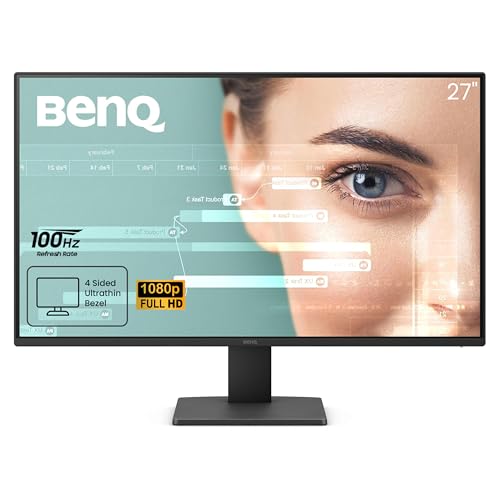
🖥️ Display & Panel Quality: 27″ IPS panel with 99% sRGB coverage delivers accurate, true-to-life color reproduction from any viewing angle.
⚡ Speed & Motion Clarity: 100Hz refresh rate offers smoother scrolling and casual gaming clarity over a standard 60Hz display.
👁️ Eye Care & Comfort: TÜV-certified Flicker-Free plus Low Blue Light Plus and Eyesafe 2.0 make it genuinely comfortable for marathon sessions.
🔌 Connectivity & Audio: HDMI and DisplayPort inputs cover standard desktop and laptop pairing needs.
🏗️ Build, Ergonomics & VESA: Ultra-thin bezel design keeps the desk footprint minimal, ideal for dual-monitor productivity setups.
The GW2791 leans into what BenQ does best — eye comfort and color fidelity — rather than chasing headline refresh-rate numbers. During extended reading and design work, the TÜV-certified flicker-free backlight combined with Low Blue Light Plus noticeably cut down on the mid-afternoon eye fatigue that cheaper monitors tend to induce. Color output straight out of the box looks natural rather than oversaturated, which content creators and photo editors on a budget will genuinely appreciate. It’s not the pick you want for competitive shooters, but for casual gaming, movie nights, and long work stretches, the 27-inch IPS panel with ePaper Mode strikes a comfortable, low-fatigue balance that few gaming monitors under 10000 in India manage this well.
Pros
✅ TÜV-certified Flicker-Free and Low Blue Light Plus genuinely reduce eye fatigue.
✅ 99% sRGB color accuracy suits light photo and video editing work.
✅ Ultra-thin bezel design is excellent for dual-monitor productivity desks.
Cons
❌ 100Hz refresh rate limits its appeal for competitive or fast-paced gaming.
❌ No FreeSync or Adaptive Sync listed, so occasional tearing is possible in games.
👉 Check BenQ GW2791 Latest Price on Amazon
Lenovo LOQ 24-10 – Best for Console Gaming
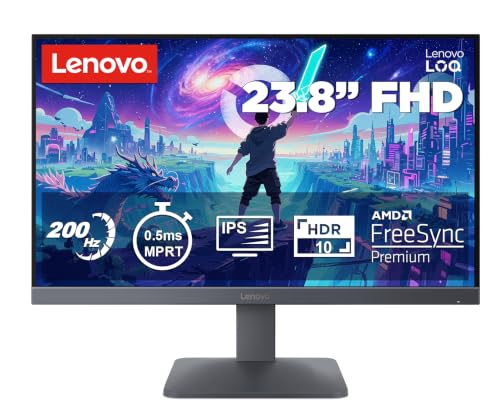
🖥️ Display & Panel Quality: 24″ FHD IPS panel with 99% sRGB and 300 nits brightness for vivid, well-lit visuals in most rooms.
⚡ Speed & Motion Clarity: 200Hz refresh rate with 0.5ms MPRT response and AMD FreeSync deliver smooth, tear-free motion.
👁️ Eye Care & Comfort: Anti-glare coating combined with HDR10 compliance balances comfort with vivid contrast for long sessions.
🔌 Connectivity & Audio: Dual HDMI 2.1 TMDS ports plus DisplayPort 1.4 make it genuinely console-friendly for PS5 and Xbox setups.
🏗️ Build, Ergonomics & VESA: Lunar Grey tilt-adjustable design paired with Lenovo Smart Artery software for adaptive display tuning.
The LOQ 24-10’s standout feature is its dual HDMI 2.1 ports, which make it unusually well-suited for PS5 and Xbox owners who also want a strong PC gaming display — a combination that’s genuinely rare among gaming monitors under 10000 in India. In everyday use, the 200Hz refresh rate feels buttery smooth for competitive titles, and the Smart Artery software’s self-learning display adjustment is a neat touch that adapts brightness and color based on your usage patterns over time. HDR10 compliance adds noticeable punch to console gaming visuals. Text and coding work look clean thanks to the 99% sRGB panel, though the screen sits on the smaller 23.8-inch actual size despite being marketed at 24 inches, so desk-space expectations should be set accordingly.
Pros
✅ Dual HDMI 2.1 ports make this genuinely ideal for PS5/Xbox console gaming.
✅ 200Hz refresh rate with 0.5ms MPRT ensures smooth, tear-free motion.
✅ Smart Artery software adapts display settings to your usage habits.
Cons
❌ Actual panel size is 23.8 inches, slightly smaller than the 24-inch marketing name.
❌ Stand offers tilt only, with no height or pivot adjustment options.
👉 Check Lenovo LOQ 24-10 Latest Price on Amazon
BenQ GW2490 – Best for Office & Coding
🖥️ Display & Panel Quality: 23.8″ IPS panel with 99% sRGB and 1300:1 contrast — text stays legible during long documentation or code-review sessions.
⚡ Speed & Motion Clarity: 100Hz refresh rate with 5ms response smooths scrolling and casual gameplay without being esports-grade.
👁️ Eye Care & Comfort: Dedicated Coding Mode and ePaper Mode plus Brightness Intelligence auto-adjust to ambient light for reduced strain.
🔌 Connectivity & Audio: Dual HDMI and DisplayPort with an Input Hotkey for instant switching between laptop and desktop sources.
🏗️ Build, Ergonomics & VESA: Ultra-slim bezel design with VESA wall-mount compatibility for cramped work-from-home desks.
If your day revolves around terminal windows, IDEs, and back-to-back video calls more than gaming, the GW2490 is purpose-built for that grind. The dedicated Coding Mode noticeably sharpens contrast between text and background, making 8-hour debugging sessions less punishing on the eyes, while BenQ’s Brightness Intelligence tech quietly adjusts panel output as your room lighting shifts through the day. It isn’t chasing the highest refresh rate among gaming monitors under 10000, but 100Hz is still a meaningful jump over standard 60Hz panels for everyday scrolling smoothness and light gaming. The stand feels sturdy for its size, though it lacks height adjustment, so taller users may need a laptop stand or riser underneath to hit proper eye level.
Pros
✅ Dedicated Coding Mode and ePaper Mode genuinely reduce eye strain during work.
✅ Brightness Intelligence auto-adjusts for consistent comfort throughout the day.
✅ Dual HDMI plus Input Hotkey make multi-device switching effortless.
Cons
❌ 100Hz refresh rate and 5ms response feel underwhelming for serious gaming.
❌ No height or swivel adjustment on the included stand.
👉 Check BenQ GW2490 Latest Price on Amazon
Lenovo L24-4C – Best Eye-Care Pick
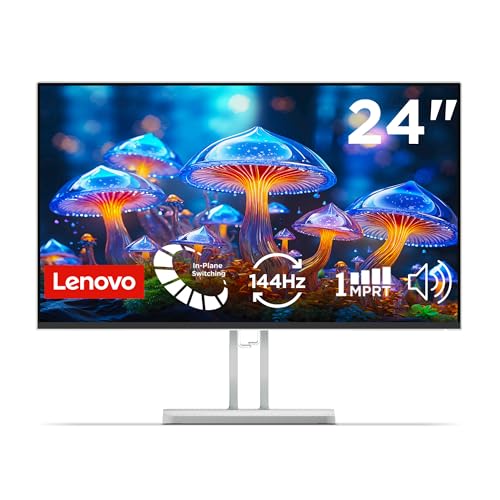
🖥️ Display & Panel Quality: 24″ FHD IPS panel with 99% sRGB and 1500:1 contrast ratio for vivid, true-to-life visuals.
⚡ Speed & Motion Clarity: 144Hz refresh rate with 1ms response time and AMD FreeSync deliver smooth motion for casual gaming.
👁️ Eye Care & Comfort: TÜV-certified flicker-free tech plus built-in low blue light hardware genuinely minimize long-session eye strain.
🔌 Connectivity & Audio: HDMI, VGA, and audio-out ports paired with integrated dual 3W speakers for a complete setup.
🏗️ Build, Ergonomics & VESA: Ultra-thin bezel, virtually borderless design suited to space-conscious multi-monitor arrangements.
Lenovo’s L24-4C is squarely aimed at buyers who spend far more time working than gaming, and the TÜV-certified flicker-free backlight makes a genuine, noticeable difference during 8-hour WFH stretches — the kind of subtle eye comfort you only appreciate after switching from a cheaper flickery panel. The 144Hz refresh rate is a pleasant surprise for a monitor positioned as an office-first display, giving casual gaming sessions a smoothness that budget office monitors typically lack. The integrated dual 3W speakers are genuinely usable for video calls and casual media without needing a separate speaker setup. The virtually borderless bezels make it an excellent second-screen choice for anyone building a productivity-focused dual-monitor desk.
Pros
✅ TÜV-certified flicker-free technology genuinely reduces long-session eye strain.
✅ 144Hz refresh rate outperforms typical office-monitor smoothness expectations.
✅ Integrated dual 3W speakers are usable without external audio gear.
Cons
❌ Color output leans slightly cool out-of-the-box, needing manual calibration.
❌ Stand ergonomics are basic, offering tilt but no height adjustment.
👉 Check Lenovo L24-4C Latest Price on Amazon
Acer SA272 P1 – Best Ultra-Slim 27-Inch Pick
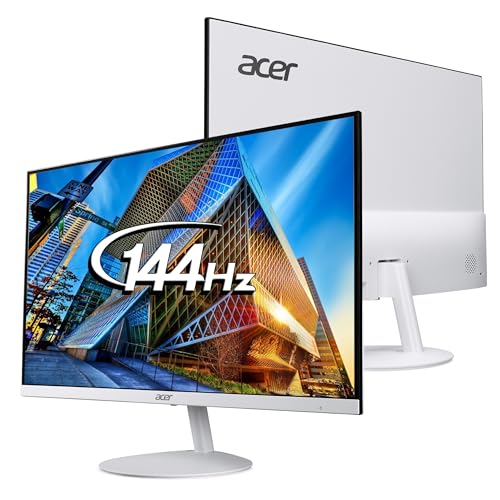
🖥️ Display & Panel Quality: 27″ ultra-thin (7.2mm) IPS panel with FHD resolution and 178° viewing angles for a striking, modern profile.
⚡ Speed & Motion Clarity: 144Hz refresh rate with 1ms Visual Response Boost keeps fast motion clear without excessive blur.
👁️ Eye Care & Comfort: Acer VisionCare tech, including Flicker-less, BlueLightShield, and ComfyView display, reduces fatigue over long sessions.
🔌 Connectivity & Audio: VGA and HDMI ports plus integrated speakers cover basic connectivity for everyday and gaming use.
🏗️ Build, Ergonomics & VESA: Zero-frame design with wall-mount support and -5° to 15° tilt for flexible placement.
What immediately stands out about the SA272 P1 is its physical design — at just 7.2mm thick, it looks and feels far more premium than its price tag suggests, making it a genuine conversation piece on any desk setup. The 144Hz refresh rate combined with 1ms VRB response delivers smooth, blur-free motion during both fast-paced gaming and everyday scrolling, and the zero-frame bezel design pairs beautifully in dual-monitor arrangements for productivity work. Text clarity during long reading sessions is solid thanks to the IPS panel’s consistent color reproduction. The one area where it shows its budget positioning is connectivity — with only a single HDMI and VGA port, there’s little room for connecting multiple modern devices simultaneously.
Pros
✅ Ultra-slim 7.2mm profile gives a genuinely premium, modern desk aesthetic.
✅ 144Hz refresh with 1ms VRB delivers smooth, blur-free motion clarity.
✅ Zero-frame bezel design is excellent for dual-monitor productivity setups.
Cons
❌ Only a single HDMI port limits multi-device connectivity flexibility.
❌ Built-in speakers are weak and better suited as a backup than primary audio.
👉 Check Acer SA272 P1 Latest Price on Amazon
Samsung S3 LS27D300GAWXXL – Best Budget 27-Inch Pick

🖥️ Display & Panel Quality: 27″ flat IPS panel, FHD resolution, 178° viewing angles with 16.7 million colors for consistent everyday visuals.
⚡ Speed & Motion Clarity: 100Hz refresh rate with 5ms GTG response gives a smoother feel than typical 60Hz office monitors.
👁️ Eye Care & Comfort: Eye Saver Mode plus reduced screen flickering technology ease strain during long browsing or study sessions.
🔌 Connectivity & Audio: D-Sub and HDMI 1.4 ports cover basic desktop and laptop connectivity needs.
🏗️ Build, Ergonomics & VESA: Super slim, wall-mountable design with tilt range from -2° to 21° for flexible positioning.
Samsung’s S3 series has built its reputation on no-nonsense reliability, and the LS27D300GAWXXL continues that trend for buyers who want a larger 27-inch screen without stretching the budget. The IPS panel handles everyday multitasking, spreadsheet work, and casual browsing with crisp, glare-resistant clarity, and the Eye Saver Mode is a welcome inclusion for anyone spending long hours in front of the screen. Gaming performance sits firmly in the casual category — 100Hz is respectable for a smoother desktop feel, but the 5ms response time means fast-paced competitive titles will show some visible ghosting. The super-slim profile and wall-mount option make it a genuinely practical pick for cramped hostel rooms or shared desks where space is tight.
Pros
✅ Large 27-inch IPS canvas at a genuinely budget-friendly price point.
✅ Eye Saver Mode and flicker reduction ease long viewing sessions.
✅ Super-slim, wall-mountable design suits space-constrained desks.
Cons
❌ 5ms response time causes visible ghosting in fast-paced competitive games.
❌ Limited connectivity with only HDMI 1.4 and D-Sub, no DisplayPort.
👉 Check Samsung S3 LS27D300GAWXXL Latest Price on Amazon
What to Check When Buying Gaming Monitors Under 10000 in India?
🖥️ IPS vs. VA Panels: Which Fits Your Gaming Workflow?
Nearly every monitor on this list uses an IPS panel, and that’s not a coincidence — for the sub-₹10,000 gaming segment in India, IPS has become the default because it strikes the best balance between color accuracy, wide viewing angles, and response times fast enough for casual-to-competitive gaming. If you’re coding, editing documents, or gaming with friends looking over your shoulder, IPS ensures the image doesn’t wash out or shift color when viewed off-angle — a common complaint with older TN panels.m VA panels, while rarer in this list, offer deeper blacks and higher contrast ratios, making them better suited for dark-room movie watching or horror games where shadow detail matters more than fast motion clarity. For most buyers searching for the best gaming monitor under 10000 in India, though, IPS remains the safer, more versatile choice because it performs well across both productivity and gaming use cases without major compromises either way.
⚡ Refresh Rate (100Hz vs. 144Hz vs. 200Hz) & Response Time
Refresh rate is arguably the single most misunderstood spec in this price bracket. A 100Hz gaming monitor under 10000 already feels noticeably smoother than a standard 60Hz panel for everyday scrolling and light gaming, but stepping up to 144Hz or a 120Hz gaming monitor under 10000 with a 120Hz refresh rate genuinely transforms fast-paced titles by reducing motion blur and giving you a real reaction-time edge in competitive shooters. At the top end, 180Hz to 200Hz panels — like the MSI MAG 255F E20 or Acer Nitro VG240Y X1 — deliver esports-level smoothness that’s overkill for casual gamers but valuable for anyone serious about ranked play. Response time (measured in GtG or MPRT) matters just as much: a 1ms or 0.5ms rating minimizes ghosting trails behind fast-moving objects, while budget panels rated at 5ms can visibly smear during quick camera pans. It’s worth noting that high refresh rates aren’t purely a gaming luxury — even everyday tasks like scrolling through long documents or web pages feel noticeably less fatiguing on a 120Hz-plus panel compared to standard 60Hz displays.
👁️ Eye Care Technologies (Flicker-Free & Low Blue Light)
If you’re spending 6-8 hours daily in front of a screen — whether coding, studying, or gaming — hardware-level eye care isn’t a marketing gimmick; it’s a genuine necessity. TÜV Rheinland Flicker-Free certification, found on models like the Lenovo L24-4C and BenQ GW2791, ensures the backlight doesn’t imperceptibly pulse at low brightness levels, which is one of the leading causes of unexplained headaches during long sessions. Low blue light filtering, meanwhile, reduces the specific wavelength of light most associated with disrupted sleep cycles and digital eye strain — particularly relevant if you’re gaming or working late into the night. Features like Acer’s VisionCare 2.0 or BenQ’s Brightness Intelligence go a step further by dynamically adjusting screen output based on ambient lighting, so you’re not manually tweaking brightness every time you move from daylight to a dimly lit room. When shortlisting a gaming monitor under 10000 in India, always check for at least one of these certifications rather than assuming “eye care mode” in the OSD menu offers the same hardware-level protection.
🔌 Port Selection & Cable Compatibility
Before buying, check exactly what output your PC’s graphics card or laptop supports, because port mismatches are one of the most common post-purchase frustrations. HDMI 1.4 typically caps out around 60Hz-75Hz at Full HD resolution, which means it physically cannot deliver the full 200Hz refresh rate promised on the box — you’d need HDMI 2.0 or above, as found on the MSI MAG 255F E20 and Acer Nitro VG240Y X1, to unlock those higher refresh rates. DisplayPort 1.2a and above generally offers the most reliable full-refresh-rate bandwidth for PC gaming setups, while HDMI 2.1 (present on the Lenovo LOQ 24-10 and Dell SE2425HG) is specifically valuable for console gamers running a PS5 or Xbox Series X who want variable refresh rate support. If you’re running a dual-monitor productivity setup, also confirm the monitor has at least two video inputs, so you’re not constantly swapping cables between a laptop and desktop.
🏗️ Ergonomics, Stand Wobble & VESA Wall Mounting
This is where budget monitors most commonly cut corners, and it’s worth paying close attention before you buy. Many models in this price segment — including several reviewed above — offer only tilt adjustment on their stock stands, with no height, swivel, or pivot flexibility. On a cramped hostel or shared-desk setup, this can force an uncomfortable neck angle during long sessions, gradually contributing to posture strain. Always check for VESA mount compatibility (typically 75x75mm or 100x100mm) before purchasing, since it lets you upgrade to an affordable third-party monitor arm later without needing to replace the entire display. Stand stability also deserves attention — thinner, lighter stands (common on ultra-slim designs like the Acer SA272 P1) can wobble slightly when typing aggressively on a shared desk, so if you game competitively with rapid keyboard inputs, prioritize models with a wider, heavier base footprint.
Conclusion
Choosing among the best gaming monitors under 10000 in India ultimately comes down to matching the panel’s strengths to your actual daily routine, not just chasing the highest number on the spec sheet.
🥇 The Overall Winner: The MSI MAG 255F E20 earns the top spot for its rare combination of a genuine 200Hz refresh rate, 100% sRGB color accuracy, and a frameless VESA-ready design that balances serious gaming performance with everyday work versatility.
🥈 The Best for Gaming: The AOC 27G4E takes this category with its 27-inch Fast IPS panel, 180Hz refresh rate, and 128% sRGB gamut, delivering an immersive, tear-free experience that punches well above its price bracket for competitive play.
🥉 The Best for Office, Coding & Productivity: The BenQ GW2490 wins here thanks to its dedicated Coding Mode, Brightness Intelligence tech, and dual HDMI input switching — purpose-built for long, comfortable work sessions rather than raw gaming firepower.
FAQs
1. Is a 27-inch 1080p Full HD monitor sharp enough for reading text, or should I stick to 24-inch?
Yes, a 27-inch gaming monitor under 10000 remains sharp for reading, though pixel density is slightly lower than on a 24-inch panel at the same FHD resolution. For gaming and casual browsing, it looks great; for dense spreadsheet or coding work, some users prefera 24-inch for tighter text clarity.
2. Can I get the full 100Hz or 200Hz refresh rate over a standard HDMI cable from my laptop?
Only if your laptop’s HDMI port supports HDMI 2.0 or higher and your graphics driver allows the higher refresh rate setting. Older HDMI 1.4 ports cap out around 60-75Hz at Full HD, so always verify your laptop’s exact HDMI version before expecting the monitor’s full advertised speed.
3. What is backlight bleed, and is it normal in budget IPS panel monitors?
Backlight bleed is light leaking around the panel edges, most visible on a black screen in a dark room. It’s fairly common in budget IPS monitors due to manufacturing tolerances, and mild bleed is generally considered normal; severe, uneven bleed warrants a replacement request.
4. What’s the real difference between GTG and MPRT response time ratings?
GTG (Grey-to-Grey) measures how fast a pixel shifts between two grey shades, while MPRT (Moving Picture Response Time) measures overall motion blur perception, often using backlight strobing. MPRT numbers usually look faster on paper, but GTG is generally considered a more consistent, comparable real-world metric.



![10 Best Tablets Under ₹40,000 in India [November 2026]](https://gadgetveda.com/wp-content/uploads/2026/11/Best-Tablets-Under-₹40000-in-India-150x150.webp)

![10 Best Smart TVs Under ₹30,000 in India [November 2026]](https://gadgetveda.com/wp-content/uploads/2026/10/Best-Smart-TVs-Under-₹30000-in-India-150x150.webp)

![Inverter vs. Non-Inverter Washing Machines [Real Savings]](https://gadgetveda.com/wp-content/uploads/2026/10/Inverter-vs.-Non-Inverter-Washing-Machines-Real-Savings-150x150.webp)

![10 Best Tablets Under ₹40,000 in India [November 2026]](https://gadgetveda.com/wp-content/uploads/2026/11/Best-Tablets-Under-₹40000-in-India-300x167.webp)
![10 Best Smart TVs Under ₹30,000 in India [November 2026]](https://gadgetveda.com/wp-content/uploads/2026/10/Best-Smart-TVs-Under-₹30000-in-India-300x167.webp)