


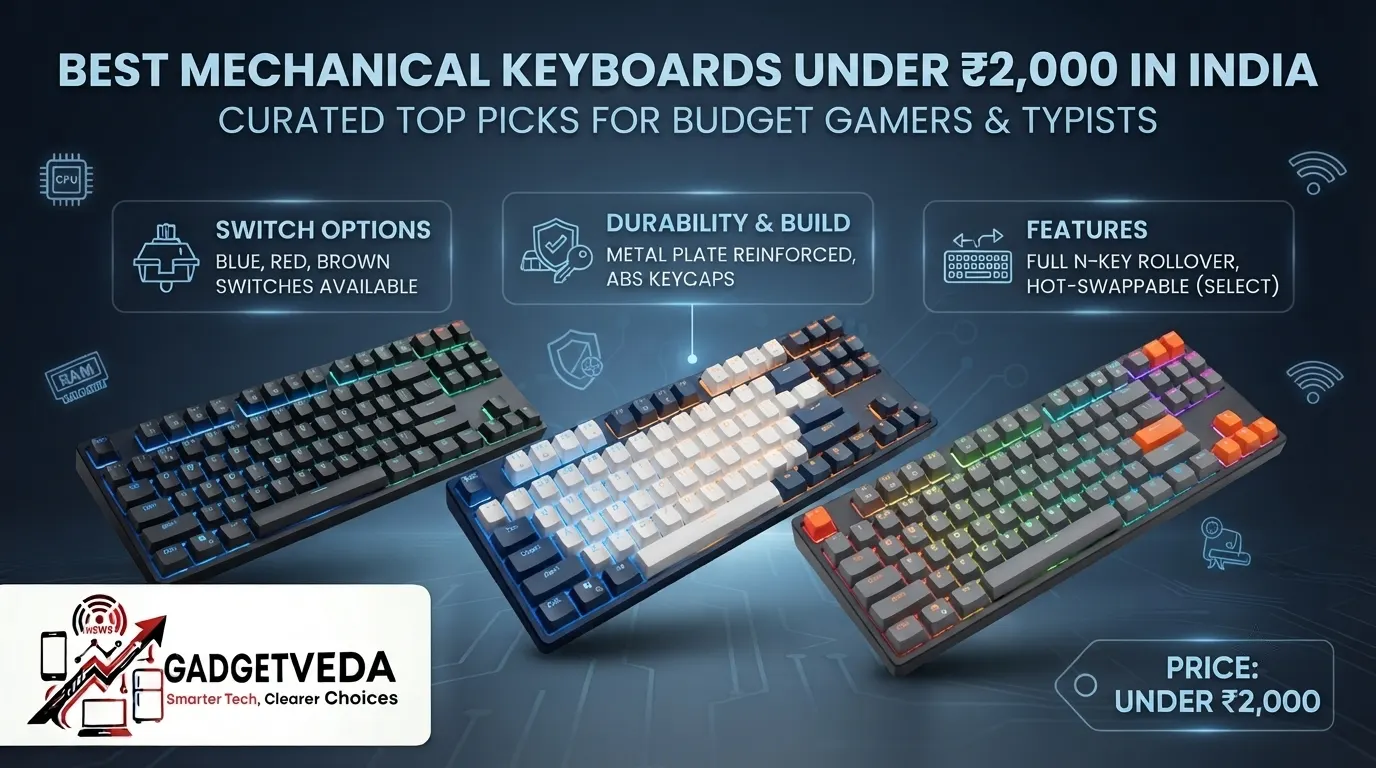
Choosing a keyboard for under ₹2,000 feels like walking into a maze. Every listing screams “mechanical,” but half of them are membrane boards wearing a mechanical-sounding name, and the other half are semi-mechanical hybrids that only tell half the truth on the box. If you’ve ever typed on a ₹400 office keyboard until the keys started sticking with dust, or watched your roommate glare at you for the loud clacking during a 1 AM ranked match, you already know why this decision matters more than the price tag suggests.
The real dilemma at this budget is switch technology. Membrane keyboards feel mushy and die early under heavy gaming or coding loads. Semi-mechanical (mecha-membrane) boards try to bridge the gap with independent switches but still lack true mechanical travel. Genuine mechanical switches — linear, tactile, or clicky — cost more to manufacture, so finding one under ₹2,000 that doesn’t cut corners on the PCB, stabilizers, or keycap plastic takes real filtering. Add in humid Indian conditions that turn glossy ABS keycaps oily within months, and dusty desk environments that jam scissor switches, and you can see why picking blind is risky. This guide exists to remove that gamble and help you land on the best mechanical keyboard under 2000 in India for your exact use case — gaming, coding, or general productivity.
How We Selected These Mechanical Keyboards
At GadgetVeda, we don’t just reread spec sheets and call it a review. Our process for shortlisting the best mechanical keyboards under 2000 combines actuation force benchmarking (how many grams of force a switch needs before it registers), acoustic sound testing across linear, tactile, and clicky variants, and PCB hot-swap versatility checks (3-pin vs. 5-pin compatibility). We also weigh keycap wear resistance — PBT versus ABS — under simulated humidity and finger-oil exposure, cross-reference verified buyer feedback and long-term durability threads, and physically inspect stabilizer wobble on spacebars and enter keys. Anything that reads well on paper but fails our acoustic or durability filters gets dropped. What’s left is a shortlist of genuine hidden gems that justify their price, not just their marketing copy.
🛡️ Why Trust GadgetVeda?
At GadgetVeda, our recommendations are driven by deep technical analysis, aggregated acoustic and latency benchmark data, real-world user feedback telemetry, and teardown evaluations. We do not accept paid placements or sponsored reviews. When you buy through our links, we may earn a small affiliate commission at zero extra cost to you, allowing us to keep our testing and review criteria 100% independent and consumer-first.
Best Mechanical Keyboards Under ₹2,000 in India [Top 3 Specialist Champions]
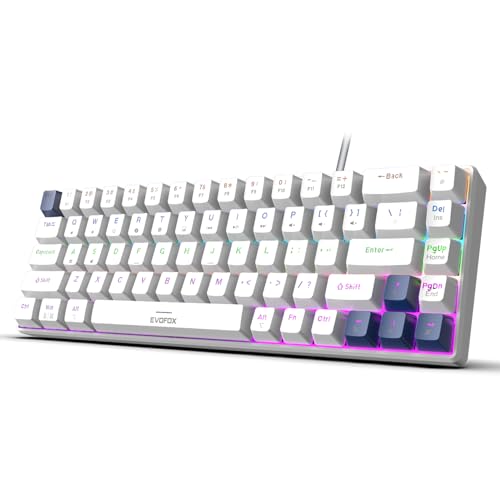
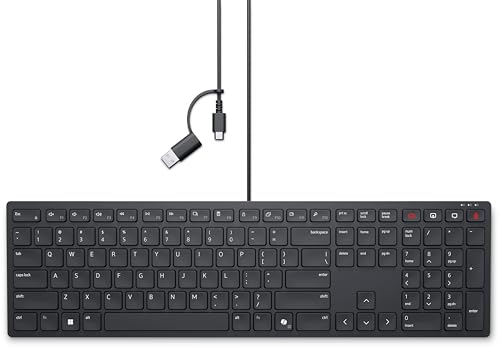
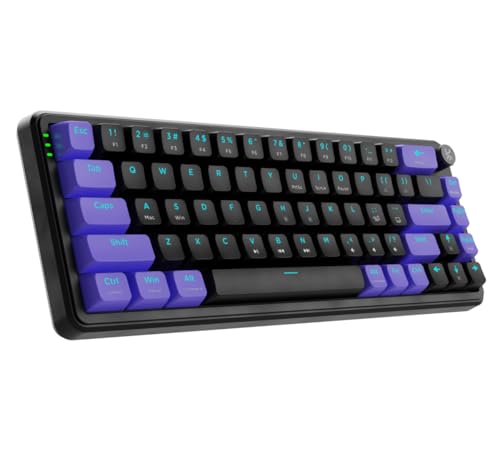
🥇 The Esports Low-Latency Champion — EvoFox Katana S Mini
For players chasing every millisecond in Valorant or CS2, this 60% wired mechanical keyboard pairs hot-swappable silent Jixian Red switches with a 1000Hz polling rate and full anti-ghosting. That’s near-zero input lag on every skillshot, in a featherlight 484g frame that’s easy to carry between LAN setups. It’s the best gaming keyboard under 2000 for competitive players who refuse to compromise on responsiveness.
🥈 The Silent Productivity & Coding King — Dell Pro KB525C
Long coding sessions and back-to-back Zoom calls demand a keyboard that won’t announce every keystroke to your family. The KB525C’s low-profile plunger switches, spill-resistant deck, and wired USB-C connection deliver quiet, consistent presses with zero perceptible lag — making it the best silent keyboard under 2000 for coding, drafting, and all-day office typing.
🥉 The Ultimate Customization & Hot-Swap Warrior — Kreo Hive 65
Modders and value-hunters get a gasket-mounted 65% layout with pre-lubed linear switches, a rare 5-pin hot-swap PCB at this price, and dual-layer internal foam for a deeper, less hollow sound signature. It’s the most upgrade-friendly board on this list and arguably the best mechanical keyboard under 2000 in India for anyone who wants to build their dream board over time.
Best Mechanical Keyboards Under ₹2,000 in India [Quick Comparison]
| Rank | Model Name | Key Specifications | Expert Rating | Latest Price |
| 1 | Kreo Hive 65 RGB Mechanical Keyboard | 65% / Pre-lubed Linear, 5-Pin Hot-Swap / Wired USB-C | 9.0/10 | Check on Amazon |
| 2 | EvoFox Katana S Mini | 60% / Hot-Swap Silent Red (Jixian) / Wired, 1000Hz | 8.9/10 | Check on Amazon |
| 3 | Ant Esports Scorpion MK20 | 75% TKL / Linear Red, PBT Keycaps / Wired | 8.8/10 | Check on Amazon |
| 4 | EvoFox Katana X2 TKL | TKL / Clicky Blue, 3-Pin Hot-Swap / Wired | 8.6/10 | Check on Amazon |
| 5 | Portronics Ki-Pad 5 Combo | Full-Size / Membrane / Wired USB-A | 8.5/10 | Check on Amazon |
| 6 | HP GK400Y | Full-Size / Mechanical, Dust & Splash-Resistant / Wired USB-C | 8.4/10 | Check on Amazon |
| 7 | HP 350 Compact Bluetooth (Budget Pick) | Compact / Membrane / Bluetooth 5.2 | 8.3/10 | Check on Amazon |
| 8 | Dell Pro KB525C | Full-Size / Silent Plunger Switch / Wired USB-C | 8.3/10 | Check on Amazon |
| 9 | Ant Esports MK801 V2 Pro | Full-Size / Mecha-Membrane / 2.4GHz & Bluetooth | 8.2/10 | Check on Amazon |
| 10 | Zebronics K5002MW | Full-Size / Scissor Switch / Bluetooth + 2.4GHz | 8.1/10 | Check on Amazon |
| 11 | KARNAGE Visage | 84-Key / Semi-Mechanical Membrane / BT, 2.4GHz, USB-C | 8.0/10 | Check on Amazon |
| 12 | ZEBRONICS Transformer PRO Combo | Full-Size / Membrane / 2.4GHz Wireless | 7.9/10 | Check on Amazon |
| 13 | HP 230 Wireless Keyboard | Full-Size / Membrane Chiclet / 2.4GHz Wireless | 7.8/10 | Check on Amazon |
13 Best Mechanical Keyboards Under ₹2,000 in India [Detailed Reviews]
Kreo Hive 65 RGB Mechanical Gaming Keyboard – Best Mechanical Keyboard Under 2000 in India
⌨️ Switch Mechanics & Feel: Pre-lubed Kreo Linear switches with gasket-mount plate — smooth, rattle-free, fatigue-free keystrokes.
🔌 Connectivity & Latency: Wired USB-C with detachable cable — ensures near-zero input lag every session.
🔤 Keycap Architecture & Build: Double-shot ABS keycaps with light pass-through — resist sweat, allow vivid RGB shine-through.
🛠️ Customization & Hot-Swap: Rare 5-pin hot-swap PCB — allows effortless switch swapping without soldering tools.
🔋 Battery & Chassis Acoustics: No battery (wired), dual-layer case and PCB foam — dampens hollow ping, deepens sound.
The Hive 65 is the closest thing to a custom mechanical keyboard you’ll find under ₹2,000. The gasket-mounted plate flexes just enough to soften bottom-outs, and the pre-lubed linear switches glide with none of the scratchiness cheaper boards suffer from at launch. Thanks to the double-layer foam, you get a deep, cushioned “thock” instead of the tinny ping common in budget 65% boards — a genuine acoustic upgrade over anything else on this list.
Where it earns long-term loyalty is the 5-pin hot-swap socket. Most sub-₹2,000 boards, if they offer hot-swap at all, limit you to 3-pin switches. Here, you can drop in virtually any MX-style switch from the aftermarket as your preferences evolve, making this the best mechanical keyboard under 2000 pick for anyone who plans to upgrade gradually instead of buying a new board every year.
Pros
✅ Genuine 5-pin hot-swap accepts almost any switch
✅ Gasket-mount design reduces flex and vibration
✅ Pre-lubed switches feel smooth out of the box
✅ Dual-layer foam gives a deeper, premium sound
Cons
❌ ABS keycaps will show oily shine over time
❌ 65% layout drops dedicated arrow cluster space
❌ No wireless mode for cable-free desks
👉 Check Kreo Hive 65 Latest Price on Amazon
EvoFox Katana S Mini – Best Gaming Keyboard Under 2000 for Esports
⌨️ Switch Mechanics & Feel: Hot-swappable silent Jixian Red linear switches — smooth, quiet keystrokes with no clatter.
🔌 Connectivity & Latency: Wired connection with 1000Hz polling rate — delivers flawless, competition-ready input accuracy.
🔤 Keycap Architecture & Build: Double-injection keycaps — resist fading and oily shine over years of grinding.
🛠️ Customization & Hot-Swap: 3-pin hot-swap sockets — swap red switches for a tactile or clicky feel anytime.
🔋 Battery & Chassis Acoustics: No battery drain (wired), 484g lightweight 60% chassis — travels easily to LAN events.
Weighing just 484 grams and shrunk to a 60% footprint, the Katana S Mini is built purely for speed. The silent red switches bottom out with a soft, muffled thump rather than a sharp click, which matters if your setup sits in a shared room. Full N-key rollover and all-key anti-ghosting mean every WASD-plus-ability combo registers exactly when you press it, with zero double-typing anxiety during clutch rounds.
The 1000Hz polling rate is the standout spec here — it isn’t just a number on a listing; it means your inputs get polled every millisecond instead of the standard 8ms on cheaper boards, so headshots and parries land the instant you commit. As one of the best gaming keyboards under 2000 with hot-swap flexibility baked in, it also doubles as a stealthy option for late-night sessions without waking the house.
Pros
✅ 1000Hz polling rate crushes input lag completely
✅ Silent red switches ideal for shared rooms
✅ 3-pin hot-swap lets you customize switch feel
✅ Ultra-compact 484g build is travel-friendly
Cons
❌ 60% layout removes function row and arrows
❌ RGB drains desktop USB power at full brightness
❌ No dedicated media control keys included
👉 Check EvoFox Katana S Mini Latest Price on Amazon
Ant Esports Scorpion MK20 – Best Wired Keyboard Under 2000 for Gaming
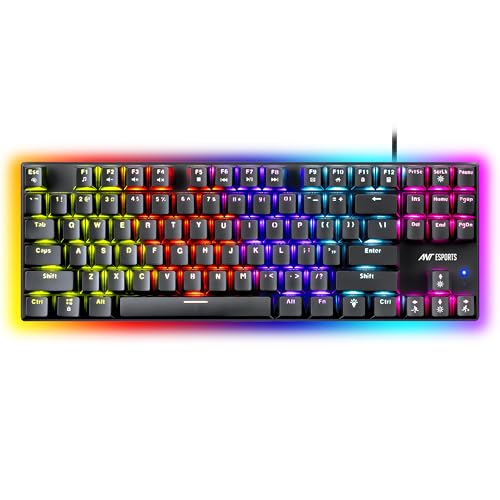
⌨️ Switch Mechanics & Feel: Linear Red mechanical switches — buttery-smooth keystrokes with no tactile interruption.
🔌 Connectivity & Latency: Detachable USB wired cable — stable, lag-free connection for competitive gaming sessions.
🔤 Keycap Architecture & Build: Double-shot PBT keycaps — resist fading, sweat, and years of finger oil buildup.
🛠️ Customization & Hot-Swap: 75% compact layout with full anti-ghosting — no dedicated hot-swap socket confirmed.
🔋 Battery & Chassis Acoustics: Wired (no battery), 19 RGB backlight modes — compact chassis saves valuable desk space.
The Scorpion MK20 nails the fundamentals that matter most at this price: genuine linear red switches and proper double-shot PBT keycaps, not the shiny ABS caps that dominate the sub-₹2,000 segment. Within weeks of daily gaming, PBT keeps its matte texture instead of turning glossy, which is a real problem in India’s humidity and heat, where finger sweat accelerates ABS degradation dramatically.
The 75% layout keeps the arrow cluster and function row while trimming the numpad, giving you extra mousepad room without sacrificing usability for spreadsheet work or coding shortcuts. Twelve dedicated multimedia keys add convenience, and the detachable USB cable means you’re not stuck buying a whole new board if the cable frays. For gamers, typists, and programmers hunting the best mechanical keyboard under 2000 for coding and gaming in one board, this is a genuinely well-rounded pick.
Pros
✅ True double-shot PBT resists Indian-weather shine
✅ Linear red switches suit fast, repeated key presses
✅ 75% layout balances compactness with full functionality
✅ Detachable USB cable simplifies future replacement
Cons
❌ No confirmed hot-swap socket for switch upgrades
❌ RGB modes limited to 19 preset patterns
❌ Stabilizers can rattle slightly on longer keys
👉 Check Ant Esports Scorpion MK20 Latest Price on Amazon
EvoFox Katana X2 TKL – Best Gaming Keyboard Under 2000 With a Volume Knob

⌨️ Switch Mechanics & Feel: Clicky Blue 3-pin switches — satisfying tactile bump with an audible, precise click.
🔌 Connectivity & Latency: Wired TKL connection with full N-key rollover — every command registers without ghosting.
🔤 Keycap Architecture & Build: Double-injection keycaps — dual-layer durability keeps legends clear for years.
🛠️ Customization & Hot-Swap: 3-pin hot-swappable switches — swap Blue for Red or Brown anytime, no soldering.
🔋 Battery & Chassis Acoustics: Wired (no battery), 11 backlight modes — multi-function knob controls volume instantly.
If you like your typing loud and proud, the Katana X2 TKL’s clicky blue switches deliver that classic, satisfying click on every press — though that’s a double-edged sword in shared households where late-night sessions might irritate sleeping family members. The tenkeyless layout frees up desk space for wide mouse swipes, useful for lower-sensitivity FPS players who need more room to flick.
The physical multi-function knob is a rare inclusion at this price, letting you tweak volume or RGB brightness without alt-tabbing out of your game. Dedicated Copilot, Xbox Game Bar, and screenshot keys add genuine daily convenience. Combined with 3-pin hot-swap support, this board offers a real upgrade runway, making it one of the more versatile picks among the best mechanical keyboards under 2000 for players who also stream or multitask.
Pros
✅ Physical volume knob adds real workflow convenience
✅ 3-pin hot-swap allows future switch experimentation
✅ Full anti-ghosting handles complex key combos reliably
✅ TKL layout frees up meaningful mouse space
Cons
❌ Clicky blue switches are loud for shared rooms
❌ No dedicated wrist rest included in the box
❌ Keycap legends can wear faster under heavy use
👉 Check EvoFox Katana X2 TKL Latest Price on Amazon
Portronics Ki-Pad 5 Wired Combo – Best Budget Wired Keyboard Under 2000
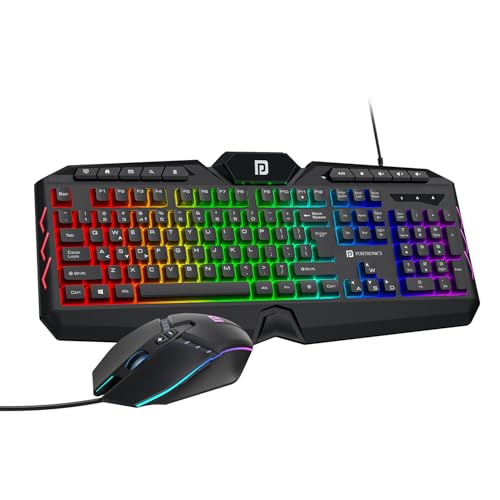
⌨️ Switch Mechanics & Feel: Membrane dome switches — softer keystrokes suited to casual typing and browsing.
🔌 Connectivity & Latency: 1.5m braided USB-A cable — stable, tangle-resistant wired connection for everyday use.
🔤 Keycap Architecture & Build: Standard ABS keycaps with printed legends — functional but prone to shine over time.
🛠️ Customization & Hot-Swap: No hot-swap support — fixed switches, bundled 7-button mouse included for free.
🔋 Battery & Chassis Acoustics: Wired (no battery), 19-key anti-ghosting — RGB backlight with simple on/off control.
As our designated budget entry, the Ki-Pad 5 isn’t chasing mechanical-switch bragging rights — it’s chasing maximum value per rupee for casual gamers and students who need a reliable keyboard-mouse combo without stretching the wallet. The 19-key anti-ghosting handles moderate multi-key gaming reasonably well, and the bundled 7-button mouse with adjustable DPI up to 3600 sweetens the deal considerably for a two-in-one purchase.
Don’t expect mechanical-grade tactile feedback here; the membrane switches feel noticeably mushier during long typing sessions, and the ABS keycaps will develop a visible shine within a few months of daily use. But for anyone who just wants dependable plug-and-play performance and colorful RGB flair without any driver installation hassle, it does its job without complaint.
Pros
✅ Bundled 7-button mouse adds genuine combo value
✅ 1.5m braided cable resists everyday wear
✅ Plug-and-play setup needs zero driver installation
✅ 19-key anti-ghosting covers casual gaming needs
Cons
❌ Membrane switches lack true mechanical tactile feedback
❌ ABS keycaps develop shine within months
❌ No hot-swap or switch customization available
👉 Check Portronics Ki-Pad 5 Latest Price on Amazon
HP GK400Y Mechanical Gaming Keyboard – Best Full-Size Mechanical Keyboard Under 2000
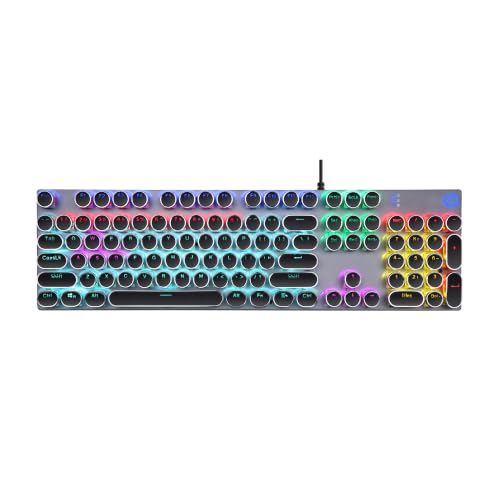
⌨️ Switch Mechanics & Feel: Full-size mechanical switches — engineered for durability and professional-grade tactile precision.
🔌 Connectivity & Latency: Wired USB-C plug-and-play — instant setup with zero driver installation required.
🔤 Keycap Architecture & Build: Metal panel deck construction — dust-proof and splash-resistant for long-term reliability.
🛠️ Customization & Hot-Swap: LightSync RGB backlighting — no confirmed hot-swap socket for switch replacement.
🔋 Battery & Chassis Acoustics: Wired (no battery), auto-sleep mode — conserves energy during idle desktop periods.
HP’s GK400Y leans on brand trust and build quality rather than flashy extras. The metal panel construction genuinely helps against India’s dust-heavy desk environments, sealing out the fine particles that jam cheaper plastic-frame keyboards over time. Full-size mechanical switches under this metal deck deliver a satisfying, consistent actuation that holds up well across months of daily gaming and typing.
The ergonomic layout reduces wrist strain during marathon sessions, and the auto-sleep mode is a thoughtful touch for anyone leaving their PC running overnight. It skips the hot-swap trend entirely, so what you get out of the box is what you keep — fine for buyers who just want a dependable, no-fuss best wired keyboard under 2000 without tinkering, but a dealbreaker for switch enthusiasts.
Pros
✅ Dust-proof, splash-resistant metal panel construction
✅ Full-size mechanical switches feel consistently durable
✅ Auto-sleep mode saves energy when idle
✅ Plug-and-play USB-C needs no extra software
Cons
❌ No hot-swap socket for switch customization
❌ Full-size layout takes up significant desk space
❌ RGB lighting software options feel fairly basic
👉 Check HP GK400Y Latest Price on Amazon
HP 350 Compact Multi-Device Bluetooth Keyboard – Best Budget Wireless Keyboard Under 2000
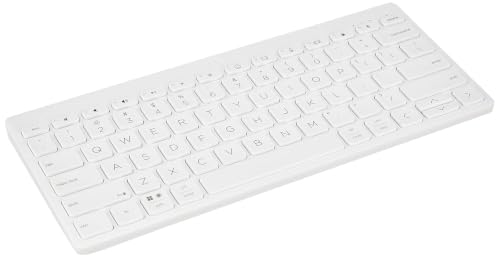
⌨️ Switch Mechanics & Feel: Standard chiclet membrane keys — full-size keycaps despite the compact, travel-ready frame.
🔌 Connectivity & Latency: Bluetooth 5.2 with 3-device pairing — instantly switch between laptop, tablet, and phone.
🔤 Keycap Architecture & Build: Standard-size printed keycaps — comfortable spacing despite the ultra-compact footprint.
🛠️ Customization & Hot-Swap: No hot-swap or RGB — smart Fn shortcuts for emojis, dictation, and screenshots.
🔋 Battery & Chassis Acoustics: Up to 24 months of battery life — silent scissor-style keystrokes, minimal desk footprint.
The HP 350 targets a completely different buyer than the gaming boards on this list — someone juggling a laptop, tablet, and phone who wants one keyboard that follows them everywhere. Bluetooth 5.2 lets you pair and instantly toggle across three devices with a dedicated switching key, and the 24-month battery life means you’ll likely forget it even needs batteries.
As our second designated budget pick, it earns its spot on value alone: for professionals wanting the best wireless keyboard under 2000 for multi-device productivity rather than gaming, this compact Bluetooth board is hard to beat. Just don’t expect mechanical feel or RGB flair — this is a minimalist, quiet workhorse built for portability, not competitive gaming.
Pros
✅ Seamless 3-device Bluetooth switching for multitaskers
✅ 24-month battery life removes recharging hassle
✅ Compact frame remains genuinely travel-friendly
✅ Smart Fn shortcuts speed up daily workflows
Cons
❌ Membrane switches unsuitable for serious gaming
❌ No RGB or backlighting for low-light use
❌ Bluetooth introduces minor latency versus wired boards
👉 Check HP 350 Compact Bluetooth Keyboard Latest Price on Amazon
Dell Pro KB525C Silent Wired Keyboard – Best Silent Keyboard Under 2000 for Office Work
⌨️ Switch Mechanics & Feel: Low-profile plunger switches — quiet, consistent presses ideal for shared workspaces.
🔌 Connectivity & Latency: Wired USB-C connection — instant, lag-free response for professional business tasks.
🔤 Keycap Architecture & Build: Spill-resistant low-profile keys — adjustable tilt improves visibility and comfort.
🛠️ Customization & Hot-Swap: 15 programmable keys — Copilot key built in, no mechanical hot-swap support.
🔋 Battery & Chassis Acoustics: Wired (no battery), slim 26.2mm profile — genuinely quiet acoustic signature throughout.
For coders, writers, and remote professionals stuck on back-to-back calls, the KB525C’s biggest strength is what you don’t hear. The low-profile plunger switches produce a soft, cushioned thud instead of a sharp click, letting you type through a video meeting without your mic picking up every keystroke — a genuinely underrated feature for anyone chasing the best silent keyboard under 2000 for coding and office use.
Build quality reflects Dell’s enterprise heritage: a slim 26.2mm profile, spill-resistant deck, and 458g weight make it easy to slot into any laptop bag. It skips gaming extras entirely — no RGB, no hot-swap, no anti-ghosting claims — but backs itself with a 3-year manufacturer warranty and Advanced Exchange Service, a rare reassurance at this price point.
Pros
✅ Plunger switches stay near-silent during calls
✅ 3-year warranty with Advanced Exchange Service included
✅ Slim, lightweight build suits mobile workstations
✅ 15 programmable keys speed up repetitive tasks
Cons
❌ No RGB lighting or gaming-focused features
❌ Plunger switches lack true mechanical tactile bump
❌ Limited appeal for competitive gaming use cases
👉 Check Dell Pro KB525C Latest Price on Amazon
Ant Esports MK801 V2 Pro – Best Wireless Keyboard Under 2000 for Gaming Setups
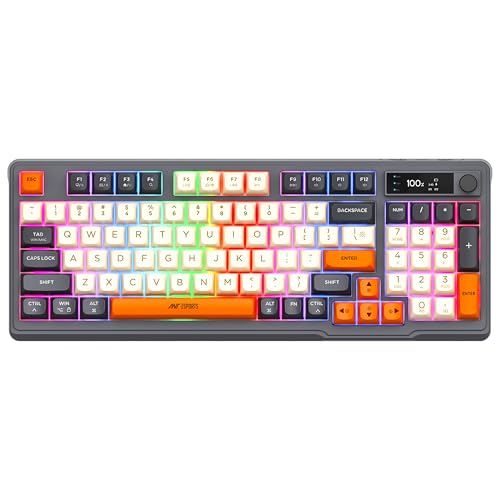
⌨️ Switch Mechanics & Feel: Mecha-membrane switches — independent-button design gives a stable, responsive trigger.
🔌 Connectivity & Latency: Dual 2.4GHz and Bluetooth modes — stable connection with minimal wireless data loss.
🔤 Keycap Architecture & Build: Backlit compact 94-key layout — numeric pad retained despite the smaller footprint.
🛠️ Customization & Hot-Swap: Customizable RGB backlit buttons — no true mechanical hot-swap socket available.
🔋 Battery & Chassis Acoustics: Electronic battery display, 1-year warranty — mecha-membrane feel with reduced typing noise.
For desks where cable clutter is a genuine annoyance, the MK801 V2 Pro’s dual 2.4GHz-and-Bluetooth setup lets you cut the cord while still supporting multi-device switching between a PC and a secondary laptop. The mecha-membrane design sits between full membrane and true mechanical, offering an independent-switch feel per key without the higher cost of genuine mechanical stems.
Its onboard electronic display, showing battery status and connection mode, is a small but genuinely useful touch missing from most budget wireless boards. As one of the closer approximations to the best wireless mechanical keyboard under 2000 currently available in India — true hot-swappable wireless mechanical boards essentially don’t exist below ₹2,000 — this is a solid compromise for gamers prioritizing wire-free convenience over pure mechanical purity.
Pros
✅ Dual 2.4GHz and Bluetooth modes add flexibility
✅ Electronic display shows battery and connection status
✅ Compact 94-key layout retains numeric pad
✅ Independent mecha-membrane switches feel notably responsive
Cons
❌ Not a true hot-swappable mechanical switch design
❌ Wireless dongle placement inside battery bay confuses first-timers
❌ RGB brightness drains battery noticeably faster
👉 Check Ant Esports MK801 V2 Pro Latest Price on Amazon
ZEBRONICS K5002MW Slim Wireless Keyboard – Best Wireless Keyboard Under 2000 for Multi-Device Use
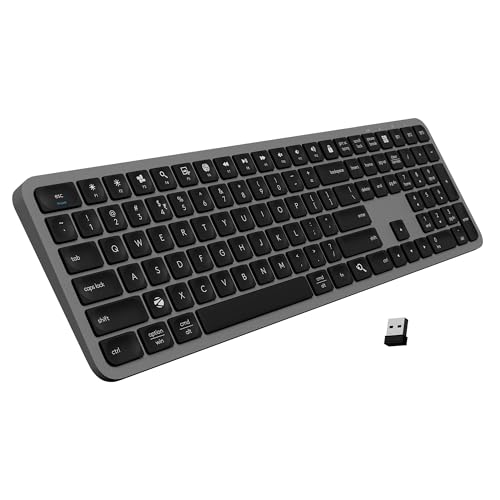
⌨️ Switch Mechanics & Feel: Scissor switch keys — comfortable, efficient keystrokes that reduce typing fatigue.
🔌 Connectivity & Latency: Triple connectivity — 2.4GHz plus up to 3 Bluetooth device connections simultaneously.
🔤 Keycap Architecture & Build: UV-coated keycaps — long-lasting imprints resist fading under heavy daily use.
🛠️ Customization & Hot-Swap: No hot-swap support — dedicated AI Copilot key for instant productivity assistance.
🔋 Battery & Chassis Acoustics: Type-C fast charging, built-in battery — quiet scissor-switch acoustic profile throughout.
The K5002MW positions itself squarely at multitaskers who bounce between a Windows PC, a MacBook, and a phone throughout the day. Toggling between 2.4GHz and up to three paired Bluetooth devices takes one physical switch, and the Mac/Windows toggle avoids the layout confusion that trips up cross-platform users.
Scissor switches here feel closer to a premium laptop keyboard than a desktop mechanical board — quiet, low-travel, and comfortable for extended typing, though gamers chasing raw actuation speed should look elsewhere on this list. Type-C fast charging and a built-in rechargeable battery round out a genuinely convenient, low-maintenance package for home-office setups juggling multiple screens.
Pros
✅ Simultaneous 3-device Bluetooth pairing works reliably
✅ UV-coated keycaps resist fading over years
✅ Type-C charging is fast and convenient
✅ Scissor switches feel comfortable for extended typing
Cons
❌ No mechanical switches or hot-swap capability
❌ Not suited for competitive, latency-sensitive gaming
❌ 109-key full layout takes up more desk space
👉 Check ZEBRONICS K5002MW Latest Price on Amazon
KARNAGE by EVM Visage RGB Keyboard – Best Wireless Mechanical-Style Keyboard Under 2000
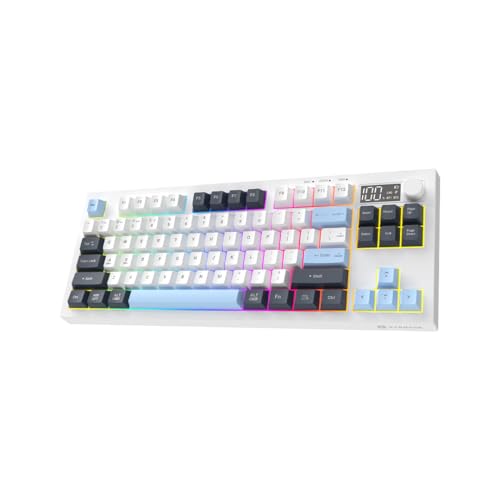
⌨️ Switch Mechanics & Feel: Mecha-membrane keys rated for 10 million keystrokes — hybrid feel between membrane and mechanical.
🔌 Connectivity & Latency: Triple mode — Bluetooth 5.0, 2.4GHz RF, and wired USB-C.
🔤 Keycap Architecture & Build: Compact 84-key gasket structure — adjustable three-level stand for ergonomic typing.
🛠️ Customization & Hot-Swap: No hot-swap socket — built-in volume knob with real-time digital display.
🔋 Battery & Chassis Acoustics: 2000mAh battery with fast charging — anti-ghosting keeps gameplay uninterrupted.
The Visage tries to be the Swiss Army knife of this list — triple connectivity, Mac and Windows switching, a physical volume knob paired with a digital display, and a 2000mAh battery that outlasts most rivals here. It’s genuinely versatile for someone who splits time between console gaming, PC work, and a secondary laptop, all from one board.
The mecha-membrane switches, rated for 10 million keystrokes, feel tougher than typical membrane keys but stop short of authentic mechanical travel and sound. Buyers searching specifically for the best wireless mechanical keyboard under 2000 should treat this as the closest hybrid option rather than a true mechanical substitute — a reasonable trade-off given the connectivity and battery life on offer.
Pros
✅ Triple connectivity covers Bluetooth, RF, and wired
✅ 2000mAh battery lasts significantly longer per charge
✅ Volume knob with digital display adds convenience
✅ Rated for 10 million keystrokes of durability
Cons
❌ Mecha-membrane switches aren’t true mechanical mechanisms
❌ No hot-swap socket for future upgrades
❌ Compact 84-key layout omits standalone numpad
👉 Check KARNAGE Visage Latest Price on Amazon
ZEBRONICS Transformer PRO Wireless Combo – Budget Wireless Keyboard & Mouse Combo Under 2000
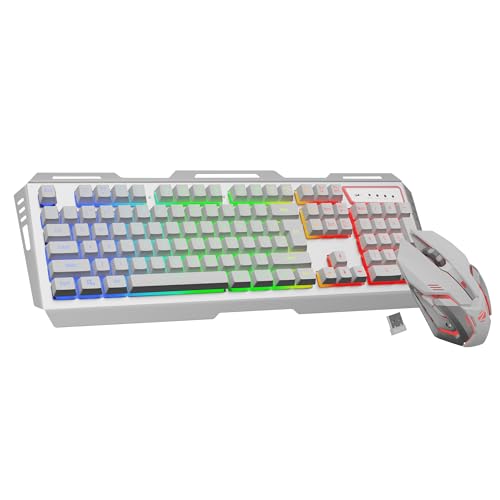
⌨️ Switch Mechanics & Feel: Membrane keys with dedicated Rupee key — detailed 104-key full layout.
🔌 Connectivity & Latency: 2.4GHz wireless connection — reliable range for everyday desktop gaming and typing.
🔤 Keycap Architecture & Build: Double-shot keycaps, aluminum body — 2-step stand improves typing angle comfort.
🛠️ Customization & Hot-Swap: Multicolor LED modes — no hot-swap; bundled mouse includes up to 4000 DPI.
🔋 Battery & Chassis Acoustics: Built-in rechargeable battery, power-saver mode — Type-C charging port included.
The Transformer PRO combo bundles a wireless keyboard with a 4000 DPI optical mouse, aimed squarely at buyers who want a complete wireless desktop setup without hunting for two separate products. The aluminum body and 2-step stand add a surprisingly premium feel for the segment, and the built-in rechargeable battery with power-saver mode keeps you off disposable AAAs.
It’s a membrane board at heart, so don’t expect mechanical-grade actuation or acoustic feedback — this is a general-purpose, dust-tolerant combo suited to home offices and casual gaming rather than competitive esports. As a wireless pairing option, it remains a reasonable pick for buyers prioritizing cable-free convenience and combo value over raw switch performance.
Pros
✅ Bundled mouse with 4000 DPI adds combo value
✅ Aluminum body feels sturdier than typical plastic
✅ Built-in battery avoids constant AAA replacement
✅ Dedicated Rupee key aids Indian typing needs
Cons
❌ Membrane switches unsuitable for serious gaming
❌ No hot-swap or mechanical switch options
❌ 2.4GHz-only connectivity limits multi-device pairing
👉 Check ZEBRONICS Transformer PRO Latest Price on Amazon
HP 230 Wireless Keyboard – Best Basic Wireless Keyboard Under 2000 for Office Use

⌨️ Switch Mechanics & Feel: Chiclet membrane keys — designed to ensure less keypad noise while typing.
🔌 Connectivity & Latency: 2.4GHz wireless connection up to 10 meters — lag-free freedom from cables.
🔤 Keycap Architecture & Build: Standard printed keycaps — 12 dedicated function keys for quick access.
🛠️ Customization & Hot-Swap: No hot-swap or RGB — simple, driver-free plug-and-play USB receiver.
🔋 Battery & Chassis Acoustics: Up to 16 months of battery life — quiet chiclet-style acoustic profile throughout.
The HP 230 is the definition of a no-frills office keyboard — quiet chiclet keys, a reliable 2.4GHz connection reaching up to 10 meters, and up to 16 months of battery life on standard AAAs. It’s a low-noise, plug-and-play option for anyone who wants their desk to just work without configuring drivers or worrying about RGB lighting drains.
There’s nothing mechanical here, and gamers should skip it entirely, but for basic document work, spreadsheets, and casual browsing where budget matters most, HP’s 3-year manufacturer warranty gives real peace of mind rarely seen at this price bracket. It rounds out this list as the safest, most conservative wireless choice for pure productivity use.
Pros
✅ Up to 16 months of battery life reduces maintenance
✅ 3-year manufacturer warranty offers real assurance
✅ 10-meter wireless range suits larger desk setups
✅ Quiet chiclet keys ideal for shared offices
Cons
❌ Membrane keys unsuitable for gaming or fast typing
❌ No backlighting for low-light typing conditions
❌ Lacks any mechanical or hot-swap features
👉 Check HP 230 Wireless Keyboard Latest Price on Amazon
GadgetVeda’s Buying Guide to Best Mechanical Keyboards Under ₹2,000 in India
🔘 Mechanical Switch Types
Linear switches move smoothly from top to bottom with no bump, making them the go-to for gaming since there’s nothing interrupting fast, repeated presses — the Ant Esports Scorpion MK20 and Kreo Hive 65 both use linear switches for this reason. Tactile switches add a mid-travel bump that helps typists feel each keystroke without needing to bottom out, reducing fatigue during long coding sessions. Clicky switches add an audible snap on top of that bump, which feels satisfying but is genuinely loud enough to annoy roommates or coworkers — match your choice to your actual noise tolerance, not just what sounds fun online.
🛠️ Hot-Swappable PCBs
A hot-swap socket lets you pull out a switch and replace it without any soldering iron, and it comes in two flavors: 3-pin and 5-pin. Five-pin sockets add two extra plastic guide pins for stability and can accept virtually any switch on the market, while 3-pin sockets rely on the keyboard’s plate for support but remain compatible with 5-pin switches once the extra legs are clipped off. If you’re unsure which switches you’ll like long-term, prioritizing a hot-swap board like the Kreo Hive 65 or EvoFox Katana models saves real money over buying multiple full keyboards to find your preferred feel.
🔤 Double-Shot PBT vs. ABS Keycaps
PBT plastic has a much higher melting point and resists shine, oil, and UV yellowing far better than ABS, which is critical in India’s humid climate where finger sweat accelerates keycap degradation dramatically. Expect PBT keycaps to hold their texture for 5–7 years of heavy daily use, versus roughly 2–3 years before ABS caps develop that telltale greasy shine on frequently pressed keys like the spacebar. Double-shot molding, where the legend is molded from a second layer of plastic rather than printed on top, ensures the lettering itself won’t fade even after years of finger contact.
📐 Form Factors & Ergonomics
Full-size boards keep every key, including the numpad, but eat up desk space; TKL (tenkeyless) drops the numpad for extra mouse room, 75% shrinks further while keeping arrow keys and function row, and 60% strips everything down to the core alphanumeric cluster for maximum portability. On a cramped Indian study desk or gaming setup, a 75% or 60% layout like the Ant Esports Scorpion MK20 or EvoFox Katana S Mini frees up meaningful space for wide mouse swipes without sacrificing essential keys.
⚡ Latency & Connection Modes
Wired Type-C connections deliver the lowest possible latency and never need charging, making them the default choice for competitive gaming where every millisecond counts. 2.4GHz dongles offer a good wireless middle ground with lower latency than Bluetooth, while Bluetooth trades a small amount of responsiveness for the convenience of pairing across multiple devices like a phone, tablet, and laptop simultaneously. If you’re deciding between the best wired keyboard under 2000 and a wireless alternative, choose wired for ranked gaming and wireless for general multi-device productivity.
Buying Mechanical Keyboards Online in India
Before you check out, verify the seller is either the brand’s official Amazon storefront or an “Amazon Fulfilled” listing — this protects your warranty claim if a switch dies or a key stops registering within months. Look specifically for verified manufacturer warranty language from brands like HP, Dell, Ant Esports, EvoFox, Kreo, or Zebronics rather than vague “seller warranty” text, since third-party sellers often dodge replacement requests. For hot-swap boards, confirm whether the socket is 3-pin or 5-pin before ordering replacement switches separately, since 5-pin switches physically won’t fit into a 3-pin-only socket without clipping.
Always inspect the package on delivery for a bundled keycap puller and, where advertised, a switch puller — missing accessories are grounds for an immediate return request rather than a support ticket weeks later. Indian sale events like the Great Republic Day Sale, Amazon Prime Day, and the festive Great Indian Festival regularly discount these boards by 15–30%, so timing your purchase around these windows can land you a genuinely higher-tier model, like the Kreo Hive 65, for the price of an entry-level pick.
Conclusion
The sub-₹2,000 mechanical keyboard segment in India has matured considerably — genuine hot-swap sockets, PBT keycaps, and 1000Hz polling rates that were premium features two years ago are now realistic expectations rather than wishful thinking. True wireless mechanical keyboards with hot-swap sockets still don’t exist at this price; if wireless is non-negotiable, the Ant Esports MK801 V2 Pro or KARNAGE Visage are your closest mecha-membrane compromises. But for anyone prioritizing genuine mechanical feel, wired boards dominate this budget for good reason — better components, lower latency, and no battery anxiety.
🥇 The Budget Hero: Ant Esports Scorpion MK20 – Best for buyers wanting maximum tactile performance, genuine PBT keycaps, and build quality at the absolute lowest realistic entry price for true mechanical switches.
👑 The Performance King: Kreo Hive 65 – The absolute best in switch acoustics, gasket-mounted comfort, 5-pin hot-swap flexibility, and long-term upgrade potential in this entire price bracket.
Whichever you choose, you’re getting genuinely better hardware than what this budget bought even eighteen months ago — the days of settling for mushy membrane keys just because mechanical felt out of reach are over.
FAQs
1. Is a hot-swappable mechanical keyboard worth buying over a fixed-switch keyboard in India?
Yes — hot-swap sockets let you replace a dead or disliked switch in seconds without soldering, saving repair costs and letting you experiment with linear, tactile, or clicky feel as your preferences change over time.
2. How do PBT keycaps differ from ABS keycaps, and which is better for Indian weather conditions?
PBT resists heat, humidity, and finger-oil shine far better than ABS due to its higher melting point and denser structure, making it the clearly superior choice for India’s hot, humid climate and sweaty daily typing sessions.
3. What is the difference between Linear, Tactile, and Clicky mechanical switches for typing and gaming?
Linear switches move smoothly with no bump, ideal for fast gaming; tactile switches add a mid-travel bump that aids accurate typing; clicky switches add an audible snap on top, best for solo typing away from shared spaces.
4. Can you connect a 2.4GHz wireless mechanical keyboard to a laptop and smartphone simultaneously without lag?
Most 2.4GHz dongles support only one paired device at a time; for simultaneous multi-device use without lag, Bluetooth multi-pairing keyboards like the Zebronics K5002MW or HP 350 are better suited, though wired remains lowest-latency overall.




![10 Best Smart TVs Under ₹30,000 in India [November 2026]](https://gadgetveda.com/wp-content/uploads/2026/10/Best-Smart-TVs-Under-₹30000-in-India-150x150.webp)

![Inverter vs. Non-Inverter Washing Machines [Real Savings]](https://gadgetveda.com/wp-content/uploads/2026/10/Inverter-vs.-Non-Inverter-Washing-Machines-Real-Savings-150x150.webp)
![12 Best Washing Machines Under ₹10,000 in India [November 2026]](https://gadgetveda.com/wp-content/uploads/2026/06/Best-Washing-Machines-Under-₹10000-in-India-150x150.webp)

![10 Best Smart TVs Under ₹30,000 in India [November 2026]](https://gadgetveda.com/wp-content/uploads/2026/10/Best-Smart-TVs-Under-₹30000-in-India-300x167.webp)
![Inverter vs. Non-Inverter Washing Machines [Real Savings]](https://gadgetveda.com/wp-content/uploads/2026/10/Inverter-vs.-Non-Inverter-Washing-Machines-Real-Savings-300x200.webp)