


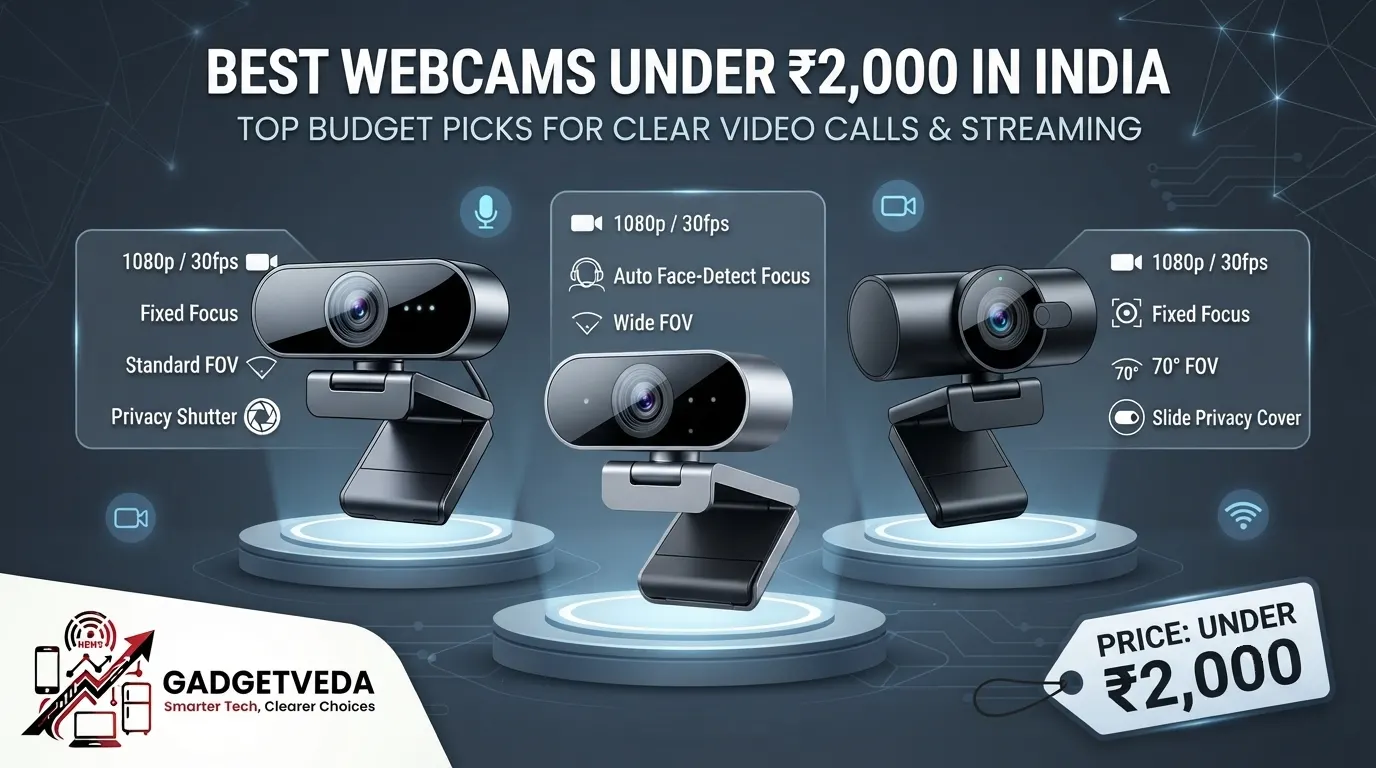
Your laptop’s built-in camera is the weakest link in your entire setup. It smudges your face into a pixelated blur the moment your boss joins a Google Meet, and under a flickering tube light it makes you look like you’re calling from inside a tunnel. This is exactly why the search for the best webcams under 2000 has exploded across India — people want a sharp, color-accurate upgrade without paying flagship prices. The problem is the market is flooded with unbranded cameras claiming “4K” and “AI noise cancellation” that deliver grainy, laggy footage the moment the room lights dim. Finding a genuinely reliable best webcam under 2000 means separating real optics and mic engineering from box copy that oversells a cheap CMOS sensor.
Our evaluation at GadgetVeda isn’t guesswork. We cross-reference publicly available sensor specifications, aggregate verified buyer feedback on low-light grain, auto-focus responsiveness, and microphone clarity, and stress-test claims against real Indian usage patterns — think 50Hz LED tube lights, ceiling fans humming in the background, and thin curved monitor bezels that most clips weren’t designed for. We filtered out generic camera modules and prioritized units with actual auto-exposure correction, usable FOV control, and mic hardware that isolates human vocal frequency instead of amplifying every noise in the room. What follows is our ranked shortlist of the best webcams under 2000 in India for 2026 — picked for real-world video call and streaming performance, not spec-sheet theater.
🛡️ Why Trust GadgetVeda?
At GadgetVeda, our recommendations are driven by independent optical evaluation, aggregated low-light and microphone benchmark data, real-world user feedback telemetry, and hardware teardowns. We do not accept paid placements or sponsored reviews. When you buy through our links, we earn a small affiliate commission at zero extra cost to you, allowing us to keep our testing criteria 100% independent and consumer-first.
Need a tighter budget? Explore our compilation of the best budget webcams under 1500 in India to find reliable entry-level options.
Best Webcams Under ₹2,000 in India [Top 3 Specialist Champions]
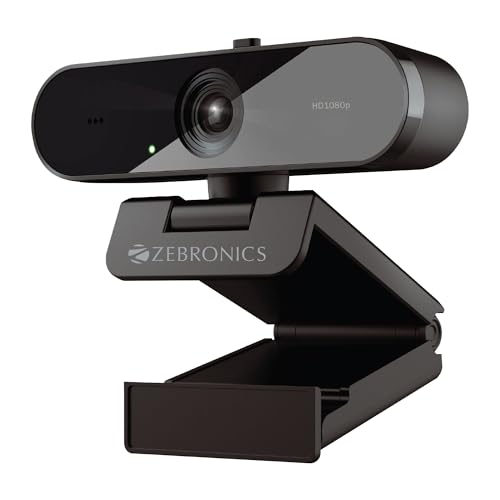
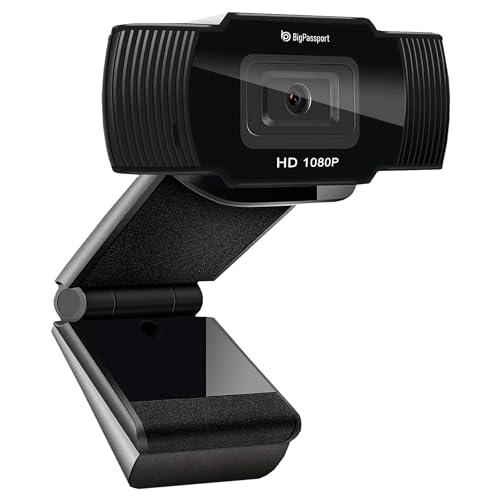

🥇 The Crisp 1080p WFH & Meeting Champion — Zebronics Live Pro
With 1080p FHD resolution at 30fps, a 2P2G lens, auto-white balance, and auto-exposure, this is the cleanest all-round pick for anyone doing back-to-back Zoom and Teams calls. A built-in privacy shutter and natural skin-tone rendering make it the safest, most flicker-resistant choice if you just need to look sharp and professional every single day.
🥈 The Creator & Streamer Specialist — BigPassport Pro-Live N3
This one is built for people recording YouTube content or livestreaming, not just attending meetings. Its 1080p/30fps CMOS sensor pairs with automatic face detection that keeps you locked in focus as you move, plus a noise-canceling stereo mic and dedicated low-light correction — exactly what the best webcam under 2000 for YouTube creators needs to stay sharp on camera.
🥉 The Ultra-Budget HD Value Warrior — Logitech C270 HD
A globally trusted brand name at an entry price, the C270 delivers 720p/30fps with Logitech’s RightLight auto-exposure tech and a noise-reducing mic rated to 1.5 meters. It sacrifices full HD resolution but wins on brand reliability, warranty support, and rock-solid plug-and-play compatibility — maximum clarity-per-rupee for absolute beginners.
Best Webcams Under ₹2,000 in India [Quick Comparison]
| Rank | Model Name | Key Specifications | Expert Rating | Latest Price |
| 1 | Zebronics Live Pro | 1080p / 30fps / Fixed Focus / Standard FOV, Privacy Shutter | 8.7/10 | Check on Amazon |
| 2 | BigPassport Pro-Live N3 | 1080p / 30fps / Auto Face-Detect Focus / Wide FOV | 8.5/10 | Check on Amazon |
| 3 | eMeet C950 | 1080p / 30fps / Fixed Focus / 70° FOV, Slide Privacy Cover | 8.3/10 | Check on Amazon |
| 4 | Zebronics Zeb-Ultimate Pro | 1080p / 30fps / Fixed Focus / Standard FOV, Manual LED | 8.0/10 | Check on Amazon |
| 5 | Logitech C270 HD | 720p / 30fps / Fixed Focus / 55° FOV | 7.8/10 | Check on Amazon |
| 6 | Zebronics Pure Plus 4K | 4K UHD / 30fps / Auto Focus / Standard FOV, Privacy Shutter | 8.2/10 | Check on Amazon |
| 7 | Lapcare Lapcam HD 720M P | 720p / 30fps / Fixed Focus / Wide-Angle Lens | 7.5/10 | Check on Amazon |
| 8 | Vinmooog Webcam | 1080p / 30fps / Fixed Focus / 360° Adjustable Mount | 7.2/10 | Check on Amazon |
8 Best Webcams Under ₹2,000 in India [Detailed Reviews]
Zebronics Live Pro – The Flicker-Free FHD Meeting Fixer
📹 Sensor & Video Resolution: 1920×1080 FHD, 30fps, 2P2G lens — delivers sharp 1080p video clarity for daily calls.
🎙️ Microphone & Audio Suppression: Built-in mic with AAC audio capture — keeps voice clear during Teams and FaceTime.
💡 Low-Light Correction & Lens: Auto-white balance plus auto-exposure — fixes grainy video and reduces evening flicker.
🎯 Focusing System & Privacy: Fixed-focus lens with dedicated privacy shutter — protects camera view when call ends.
🔌 Mounting, Cable & Drivers: Universal USB plug-and-play, standard clip mount — works instantly on any monitor bezel.
This is one of the most balanced picks among the best webcams under 2000 in India, and it earns that spot because the auto-exposure genuinely reacts to dim rooms instead of just brightening everything into a washed-out blob. Skin tones under standard 50Hz LED lighting stay natural rather than yellow-tinted, which matters more than people realize on daily video calls. The privacy shutter slides shut with a satisfying click, addressing the very real anxiety around cameras being accessed without consent.
The built-in mic handles moderate ceiling fan hum reasonably well, though it won’t fully cancel a loud pedestal fan at close range — headset backup is still smart for noisy rooms. As a webcam with a microphone under 2000, it’s an easy recommendation for anyone prioritizing consistent, professional video quality over gimmicky extras.
Pros
✅ Genuine 1080p FHD sensor, not upscaled footage
✅ Auto-exposure handles Indian LED flicker well
✅ Physical privacy shutter for real security
✅ Reliable plug-and-play on Windows and Mac
Cons
❌ No autofocus; blurs when leaning too close
❌ Mic struggles against loud fan noise nearby
👉 Check Today’s Price & Bank Offers on Amazon
BigPassport Pro-Live N3 – Th e Autofocus Streamer’s Secret Weapon
📹 Sensor & Video Resolution: 1/3″ CMOS, 1080p at 30fps, 5P lens — sharp footage for recordings and streams.
🎙️ Microphone & Audio Suppression: Built-in stereo dual mics with noise-canceling — filters ceiling fan and keyboard noise.
💡 Low-Light Correction & Lens: Advanced auto light-correction technology — brightens dim rooms without heavy grain.
🎯 Focusing System & Privacy: Automatic face-detection autofocus — tracks movement for consistent sharpness on-camera.
🔌 Mounting, Cable & Drivers: Universal USB clip, driverless setup — instant compatibility across Windows and macOS.
If you’re chasing the best webcam under 2000 for video streaming, this is the standout in our list because of the face-tracking autofocus — a feature most budget webcams simply skip. It keeps you sharp even when you lean in to gesture or shift position mid-stream, which is exactly the kind of small detail that separates amateur-looking footage from a polished YouTube upload. The stereo mic setup does a genuinely good job isolating your voice from ambient fan hum, a common complaint with Indian desk setups.
Low-light performance impresses for the price bracket, though it introduces mild digital grain past dusk in fully dark rooms — pair it with a cheap ring light for night streams. As the best webcam under 2000 for gaming commentary or reaction cams, the autofocus tracking alone justifies the purchase over static-focus rivals.
Pros
✅ Rare autofocus with face-detection tracking
✅ Stereo noise-canceling mic isolates fan hum
✅ Strong low-light brightness correction
✅ Zero-driver plug-and-play setup
Cons
❌ Mild grain appears in near-total darkness
❌ No physical privacy shutter included
👉 View Current Deal & Discounts on Amazon
eMeet C950 – The Privacy-First Personal Call Camera
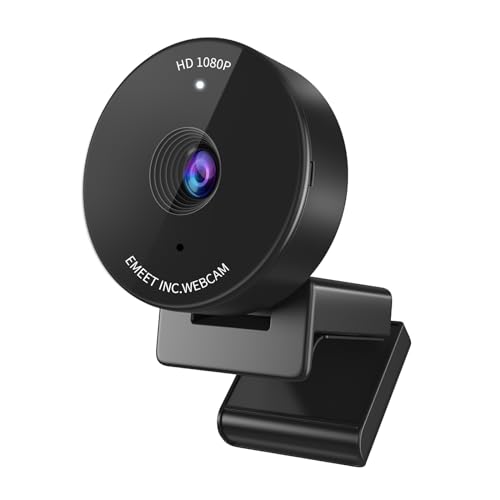
📹 Sensor & Video Resolution: 1080p CMOS sensor, focused 70° FOV — sharp footage without messy background reveal.
🎙️ Microphone & Audio Suppression: Built-in noise-canceling mic — reduces keyboard clatter and fan noise on calls.
💡 Low-Light Correction & Lens: Automatic light correction for home lighting — improves visibility in dim workspaces.
🎯 Focusing System & Privacy: Fixed focus with slide-action physical privacy cover — visible on/off camera confirmation.
🔌 Mounting, Cable & Drivers: USB plug-and-play clip, no tripod thread — works instantly across major platforms.
The narrower 70° FOV is a deliberate design choice, and it works brilliantly for anyone self-conscious about a cluttered room appearing on-screen during calls — a very common Indian desk-space reality. Sliding the physical cover shut takes one motion, offering the kind of tangible, visible privacy assurance that software toggles simply can’t match against camera-hacking fears.
Skin tone rendering stays balanced under LED lighting, and the noise-canceling mic noticeably tones down typing clatter, though it isn’t as aggressive against loud fan hum as the BigPassport’s stereo setup. As a dedicated best webcam for wfh under 2000 pick, its combination of framing discipline and physical privacy makes it ideal for shared or public workspace calls.
Pros
✅ Narrow FOV hides cluttered room backgrounds
✅ Visible slide-action physical privacy cover
✅ Solid auto light correction for home lighting
✅ Reliable driverless UVC plug-and-play mode
Cons
❌ No tripod mount, clip-only positioning
❌ Mic less effective against loud fan noise
👉 Check Live Price & Stock Availability on Amazon
Zebronics Zeb-Ultimate Pro – The Night-Vision Webinar Workhorse
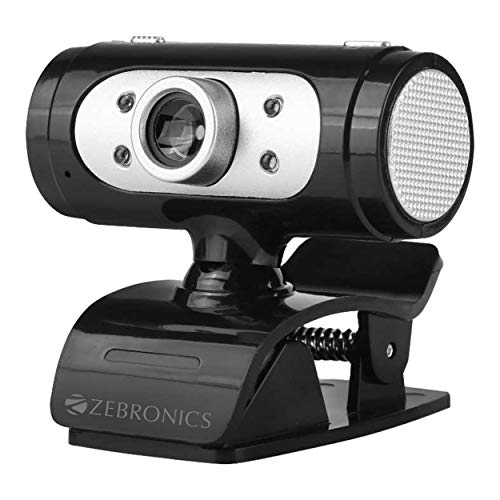
📹 Sensor & Video Resolution: 1920×1080 at 30fps, premium 5P lens — crisp detail for webinars and interviews.
🎙️ Microphone & Audio Suppression: Built-in mic supporting MP3/AAC formats — captures clear voice for meetings.
💡 Low-Light Correction & Lens: Auto white balance plus night vision mode — visible footage even in near-dark rooms.
🎯 Focusing System & Privacy: Fixed-focus lens, manual LED brightness switch — user-controlled light boost on demand.
🔌 Mounting, Cable & Drivers: USB interface, 1.58m cable, universal clip — plug-and-play across operating systems.
What makes this a distinctive 1080p webcam under 2000 is the manual LED switch — a physical control you can toggle when auto-correction alone isn’t enough during a genuinely dark evening call. That extra layer of user control is reassuring when software-only fixes leave your face in shadow. The 5P lens resolves fine facial detail well, holding up nicely in typical office and bedroom lighting.
Colors stay accurate rather than oversaturated under standard tube lights, though the auto white balance occasionally overcorrects in mixed lighting (daylight plus LED). It’s a dependable option for anyone who wants manual control as a backup to automation rather than relying entirely on the sensor to guess correctly.
Pros
✅ Manual LED switch backs up auto-correction
✅ Sharp 5P lens resolves fine facial detail
✅ Night vision mode aids very dim rooms
✅ Stable universal clip fits most monitors
Cons
❌ White balance overcorrects in mixed lighting
❌ No physical lens privacy shutter
👉 Check Price & EMI Options on Amazon
Logitech C270 HD – The Trusted-Brand Budget Hero
📹 Sensor & Video Resolution: 720p HD at 30fps, 55° diagonal FOV — smooth, lag-free video for standard calls.
🎙️ Microphone & Audio Suppression: Noise-reducing mic effective up to 1.5 meters — clear voice pickup in busy rooms.
💡 Low-Light Correction & Lens: RightLight auto-exposure technology — brighter, contrasted image in dim lighting.
🎯 Focusing System & Privacy: Fixed-focus lens, no physical shutter — manual lens cap recommended for privacy.
🔌 Mounting, Cable & Drivers: Adjustable universal clip, 1.5m cable — attaches securely to laptops and monitors.
Logitech’s RightLight auto-exposure correction isn’t just a marketing gimmick; it means your face stays visible and reasonably contrasted during evening calls without needing an expensive ring light. This is the best webcam under 2000 pick for shoppers who value brand reliability, easy replacement parts, and genuine after-sales support over chasing the highest resolution spec on paper.
The 720p ceiling is the honest trade-off here — text and fine detail in the background will look softer than on true 1080p rivals, and there’s no privacy shutter, so a physical lens cap is worth adding. Still, for pure call stability, warranty confidence, and driverless plug-and-play reliability, it remains one of the most dependable entries in this full HD webcam under 2000 in India price bracket, even without full HD resolution.
Pros
✅ Trusted global brand with strong warranty support
✅ RightLight tech improves dim-room visibility
✅ Noise-reducing mic, clear up to 1.5m
✅ Rock-solid universal clip and cable build
Cons
❌ Capped at 720p, softer than 1080p rivals
❌ No built-in physical privacy shutter
👉 Check Today’s Price & Bank Offers on Amazon
Zebronics Pure Plus 4K – The Resolution Overachiever
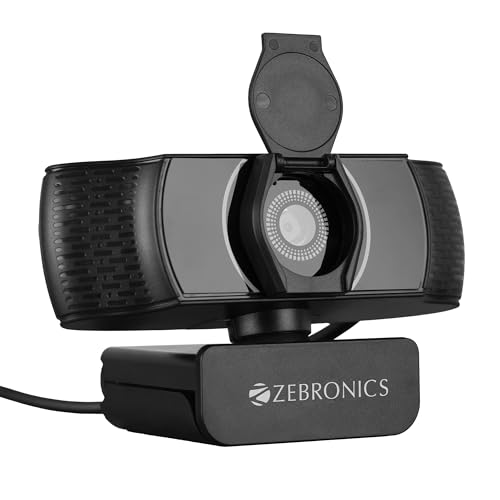
📹 Sensor & Video Resolution: 3840×2160 4K UHD at 30fps, 2P2G lens — exceptional detail well beyond FHD rivals.
🎙️ Microphone & Audio Suppression: Built-in AAC microphone — captures clear audio for Skype and Teams calls.
💡 Low-Light Correction & Lens: Auto brightness correction plus auto white balance — stable exposure in dim rooms.
🎯 Focusing System & Privacy: Genuine autofocus with built-in privacy shutter — sharp tracking and lens security combined.
🔌 Mounting, Cable & Drivers: USB interface, 2m cable, universal clip — plug-and-play across common platforms.
For creators wanting genuine resolution headroom, this is the closest thing on this list to a best webcam for streaming under a 2000 upgrade path, offering true autofocus and 4K capture that lets you crop and reframe footage in post without losing sharpness. The auto brightness correction handles typical Indian LED room lighting competently, keeping exposure stable rather than flickering as the sensor hunts for the right setting.
Where it demands a small compromise is file size and USB bandwidth — 4K footage at this price tier can occasionally stutter on older USB 2.0 ports, so check your PC’s port specification before committing. Even so, the combination of autofocus, privacy shutter, and genuine 4K sensor makes it the segment’s clear performance overachiever.
Pros
✅ True 4K UHD sensor with real autofocus
✅ Built-in privacy shutter for camera security
✅ Stable auto brightness in typical LED rooms
✅ 2-meter cable eases desk placement flexibility
Cons
❌ Can stutter on older USB 2.0 ports
❌ Larger file sizes strain slower PCs
👉 View Current Deal & Discounts on Amazon
Lapcare Lapcam HD 720M P – The Tripod-Ready Entry Pick
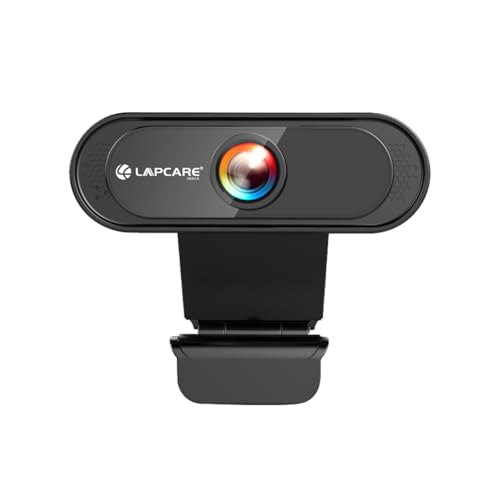
📹 Sensor & Video Resolution: 1280×720 HD at standard fps, 5-glass lens — clear calling for Zoom and Meet.
🎙️ Microphone & Audio Suppression: Noise-isolating built-in microphone — reduces background chatter during conferences.
💡 Low-Light Correction & Lens: Auto white balance with low-light correction — brighter visuals in dim environments.
🎯 Focusing System & Privacy: Fixed-focus wide-angle lens, no shutter — manual cap advised when idle.
🔌 Mounting, Cable & Drivers: Universal clip plus tripod-thread support — flexible desk or tripod positioning options.
The standout here is genuine tripod compatibility at this price, letting you position the camera away from a wobbly monitor clip entirely — useful if your desk setup has a thin or curved bezel that regular clips slip off. The 5-glass lens construction resolves noticeably less distortion than typical single-plastic-element budget cameras, and the noise-isolating mic handles moderate background chatter competently for casual meetings.
It stays firmly in 720p territory, so text-heavy screen shares or close-up product demos will look softer than on FHD alternatives, and there’s no autofocus for leaning-forward moments. Backed by a 12-month all-India warranty, it remains a sensible best webcam under 2000 entry choice for students and casual WFH users prioritizing stability over top-tier resolution.
Pros
✅ Rare tripod-thread support at this price
✅ 5-glass lens reduces distortion vs plastic rivals
✅ Noise-isolating mic handles moderate chatter well
✅ 12-month all-India warranty and service support
Cons
❌ Capped at 720p, softer fine detail
❌ No autofocus causes blur when leaning forward
👉 Check Price & EMI Options on Amazon
Vinmooog Webcam – The 360° Flexible All-Rounder

📹 Sensor & Video Resolution: 1080p CMOS sensor, standard fps — solid clarity for calls and casual recordings.
🎙️ Microphone & Audio Suppression: Built-in noise-canceling digital mic — reduces background noise on calls.
💡 Low-Light Correction & Lens: CMOS sensor adapts to varying light levels — usable footage in moderate dimness.
🎯 Focusing System & Privacy: Fixed focus, no privacy shutter — manual lens cover recommended for peace of mind.
🔌 Mounting, Cable & Drivers: 360° adjustable mount, USB plug-and-play — flexible framing on any desk surface.
The 360° adjustable mount is genuinely handy for irregular desk setups where a standard monitor clip won’t sit flush, letting you angle the camera precisely without extra accessories. As a driverless webcam with a microphone under 2000, it installs in seconds, and the digital noise-canceling mic keeps voice pickup reasonably clean for everyday Skype and YouTube use.
Being a generic-brand unit, build quality and long-term durability feel less reassuring than the branded alternatives on this list, and there’s no dedicated low-light correction algorithm — just standard CMOS adaptation, which shows visible grain past dusk. It’s a fair pick only if budget is the absolute top priority and you’re comfortable with fewer software refinements.
Pros
✅ Flexible 360° mount fits unusual desk angles
✅ Noise-canceling mic keeps voice pickup clean
✅ Genuine 1080p sensor at entry-level pricing
✅ Zero-driver USB plug-and-play installation
Cons
❌ Generic build feels less durable long-term
❌ Visible grain in low-light without correction
👉 Check Live Price & Stock Availability on Amazon
Things to Check in the Best Webcams Under 2000 in India
📹 Resolution vs. Frame Rate
A true 1080p sensor at 30fps beats a marketing-claimed “720p at 60fps” for standard office calls, since platforms like Zoom and Teams rarely stream video above 30fps anyway — resolution sharpness matters more than frame count for meetings. For gaming commentary or fast-motion streaming, though, consistent 30fps with good bitrate handling still outperforms an unstable higher-fps claim from a cheap sensor that can’t actually sustain it without dropping frames or introducing compression artifacts.
💡 Auto-Light Correction & Anti-Flicker
Indian homes and offices run almost entirely on 50Hz AC-powered LED and fluorescent lighting, which causes visible banding or flicker on cameras not tuned for that frequency. A dedicated anti-flicker and auto-exposure algorithm — not just basic brightness boosting — is what separates a best webcam under 2000 that looks professional from one that strobes distractingly on video calls after sunset.
🎙️ Built-in Mics vs. Ceiling Fan Noise
Cheap single-element mics pick up everything indiscriminately, turning your ceiling fan’s hum into a constant background drone. Dual-mic or noise-canceling digital mic arrays are engineered to isolate the human vocal frequency range, actively suppressing steady mechanical noise — genuinely useful for anyone in a fan-cooled Indian bedroom-turned-office without air conditioning or soundproofing.
🎯 Auto-Focus vs. Fixed Focus
Fixed focus is perfectly fine if you sit still at a consistent distance for meetings. But if you lean toward the screen to show a document, hold up a product for an unboxing video, or move around while presenting, fixed-focus cameras blur immediately — autofocus with face-tracking is mandatory for that kind of dynamic, hands-on use.
🔒 Field of View (FOV) & Physical Privacy
A narrower 60-70° FOV frames just your face and shoulders, conveniently hiding a messy room or unmade bed behind you — valuable in shared living spaces. Wider 90°+ FOV suits group calls or desk-setup showcases but reveals more background. Regardless of FOV, a physical privacy shutter or slide cover remains the only real defense against camera-hacking anxiety, since software-based “camera off” indicators can be bypassed by malware.
Buying Webcams Online in India
Before you finalize any purchase, verify the seller is an authorized reseller so your warranty claim doesn’t get rejected later — Logitech, Zebronics, and Lapcare all list official service centers on their India websites, and it’s worth cross-checking the ASIN or model number against that list. Check the delivery box immediately for bundled accessories like a tripod adapter or mini-stand, since third-party sellers occasionally ship incomplete kits. Confirm driverless UVC plug-and-play compatibility with your specific OS version, particularly if you’re on an older Windows 7 machine or a Linux distribution, since a handful of budget webcams only ship Windows-only software.
Festive sale events — Amazon Great Indian Festival, Republic Day, and end-of-season clearance — are consistently the best windows to grab a higher-tier model like the Zebronics Pure Plus 4K within this same budget range, since discounts of 30-40% are common on webcams during these periods. Setting a price-drop alert ahead of these dates is a smart way to upgrade specs without upgrading your spend.
Conclusion
The under-₹2000 webcam segment has matured considerably — genuine 1080p sensors, auto-exposure correction, and even entry-level autofocus are now realistic expectations rather than premium extras. Low-light performance across this list has improved noticeably over older generations of budget webcams, and the presence of physical privacy shutters on multiple models reflects growing consumer awareness around camera security. Price-to-performance in this bracket has never been stronger for Indian WFH and creator audiences.
🥇 The Budget Hero: Logitech C270 HD – Best for buyers wanting a trusted brand, dependable RightLight exposure correction, and rock-solid warranty support at the absolute lowest entry price, even with a 720p ceiling.
👑 The Performance King: BigPassport Pro-Live N3 – The best all-round pick for genuine autofocus tracking, noise-canceling stereo mic isolation, low-light correction, and fluid 1080p/30fps footage that holds up for both meetings and content creation.
FAQs
1. Is a 1080p 30fps webcam sufficient for Zoom/Teams meetings and YouTube streaming in India?
Yes, for the vast majority of use cases. Video conferencing platforms like Zoom, Teams, and Google Meet typically cap outgoing video streams at 30fps regardless of your camera’s capability, so a genuine 1080p sensor at 30fps already meets the platform ceiling. For YouTube content, 1080p/30fps is broadly accepted as standard quality; only fast-motion gaming footage benefits meaningfully from higher frame rates like 60fps.
2. How do you fix screen flickering on a webcam under Indian 50Hz LED tube lights?
Look for webcams with dedicated anti-flicker or auto-exposure correction tuned to 50Hz AC frequency, common across models like the Zebronics Live Pro and BigPassport Pro-Live N3 in this guide. If flickering persists, manually set your camera software’s frequency setting to 50Hz (not 60Hz, which is the US standard) in the driver or UVC control panel, and avoid direct backlighting from the tube light behind your monitor.
3. Do budget webcams require driver software installation, or are they driverless plug-and-play?
Nearly all webcams under ₹2000, including every model reviewed here, use the USB Video Device Class (UVC) standard, meaning they work instantly on Windows, macOS, ChromeOS, and Linux without installing separate drivers. Some brands offer optional companion apps for extra controls like manual white balance or FOV cropping, but these are never mandatory for basic plug-and-play functionality.
4. Why is a physical privacy shutter cover essential on a desktop webcam?
Software-based camera indicators and “disable camera” settings can be bypassed by malware or remote access exploits, leaving a false sense of security. A physical shutter or slide cover — like those on the Zebronics Live Pro, eMeet C950, and Zebronics Pure Plus 4K — physically blocks the lens, guaranteeing zero video capture regardless of what software on your PC is doing, which is the only foolproof defense against camera-hacking concerns.



![10 Best Smart TVs Under ₹30,000 in India [November 2026]](https://gadgetveda.com/wp-content/uploads/2026/10/Best-Smart-TVs-Under-₹30000-in-India-150x150.webp)

![Inverter vs. Non-Inverter Washing Machines [Real Savings]](https://gadgetveda.com/wp-content/uploads/2026/10/Inverter-vs.-Non-Inverter-Washing-Machines-Real-Savings-150x150.webp)
![12 Best Washing Machines Under ₹10,000 in India [November 2026]](https://gadgetveda.com/wp-content/uploads/2026/06/Best-Washing-Machines-Under-₹10000-in-India-150x150.webp)
![10 Best Smart TVs Under ₹30,000 in India [November 2026]](https://gadgetveda.com/wp-content/uploads/2026/10/Best-Smart-TVs-Under-₹30000-in-India-300x167.webp)

![Inverter vs. Non-Inverter Washing Machines [Real Savings]](https://gadgetveda.com/wp-content/uploads/2026/10/Inverter-vs.-Non-Inverter-Washing-Machines-Real-Savings-300x200.webp)