


![10 Best Laptops Under ₹40,000 in India [2026] GadgetVeda](https://gadgetveda.com/wp-content/uploads/2026/05/Best-Laptops-Under-₹40000-in-India.webp)
Finding a genuinely capable laptop under ₹40,000 in India is harder than it looks. The market is flooded with aggressively priced options that look great on Amazon listings — but peel back the surface, and you’ll often find dual-core processors struggling with modern workloads, HD-resolution displays that feel dated, or machines running DOS instead of a proper operating system. Component prices have shifted significantly over the past two years, and what ₹40,000 could buy even eighteen months ago is different from what you get today. Whether you’re a college student searching for a reliable laptop for studies and streaming, a first-time buyer looking for your daily driver, a working professional who needs a dependable office laptop, or someone who simply wants a machine for YouTube, web browsing, and light document work, navigating this segment without the right guidance can lead to purchase regret.
At GadgetVeda, we don’t work off sponsored rankings or bestseller tags. Our approach is what we call a Specification Audit — every laptop we feature is evaluated on its processor generation and core count, RAM type and speed, storage technology, display resolution and quality, build durability, real-world practicality, and long-term brand support availability across India. We don’t just list products; we tell you exactly what a machine can and cannot do in your hands. In this guide, we’ve reviewed the 10 best laptops under the ₹40,000 budget range — covering everything from Ryzen-powered workhorses and Intel i5 performers to budget Celeron and Pentium machines that serve specific, limited use cases. Here’s exactly what to expect: best laptops under 40000 offer integrated graphics, HD or FHD displays, 8GB RAM, and 512GB SSD — solid for everyday productivity but not built for gaming or video editing. Let’s find the right one for you.
💸 Also Shopping on a Higher Budget? Explore our expert-reviewed guide on the Best Gaming Laptops Under ₹60,000 in India— for buyers ready to step up to dedicated GPU performance and higher refresh rate displays.
🏆 Best Laptops Under ₹40,000 in India [Our Top 3 Picks]
Best Laptops Under ₹40,000 in India [Quick Comparison]
| Rank | Model Name | Key Specifications | Expert Rating | Latest Price |
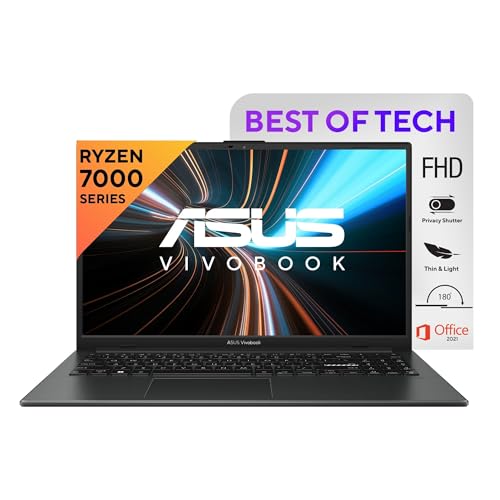
| 1 | ASUS Vivobook Go 15 (E1504FA-BQ2322WS) | Ryzen 3 7320U, 8GB LPDDR5, 512GB NVMe PCIe 3.0, 15.6″ FHD 60Hz 250 nits, AMD Radeon iGPU, Wi-Fi 6E, Win 11 | 9.3/10 | Check on Amazon |
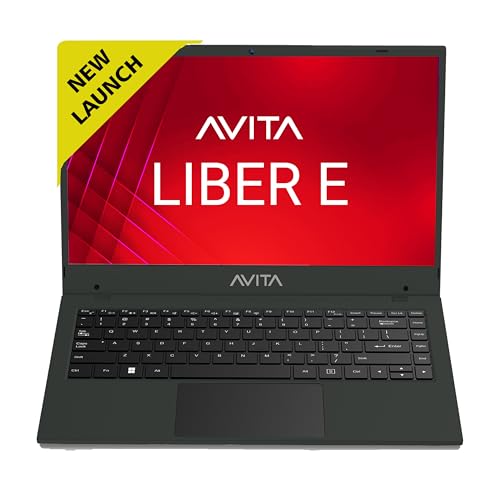
| 2 | Avita Liber E (AM14A2INF56F-CHF) | Intel Core i5-1235U, 8GB RAM, 512GB SSD, 14.1″ FHD, Intel UHD Graphics, Win 11 Home | 9.1/10 | Check on Amazon |
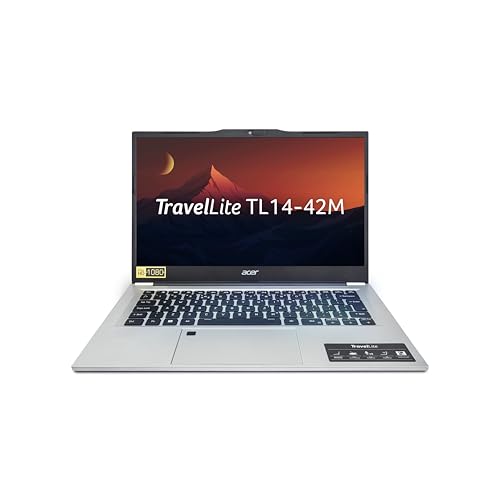
| 3 | Acer TravelLite (TL14-42M) | Ryzen 3 7330U, 8GB DDR4, 512GB SSD, 14″ FHD TN 250 nits, AMD Radeon iGPU, 1.34kg, Win 11 Home | 9.0/10 | Check on Amazon |
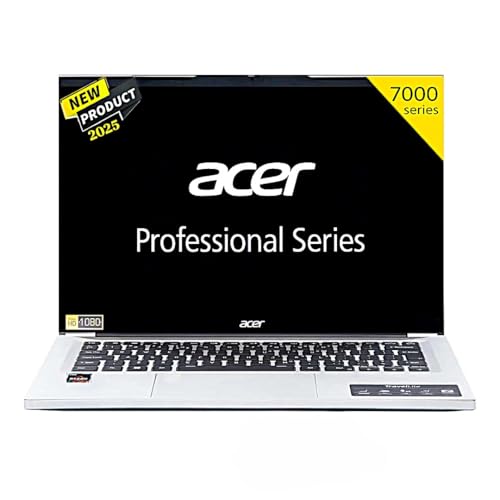
| 4 | Acer Professional 14 / Travel Lite (TL14-52M) | Ryzen 3 7330U, 8GB DDR4, 512GB SSD, 14″ FHD, Intel iGPU, All-Metal Build, Win 11 Pro + MS Office 21 | 8.8/10 | Check on Amazon |
| 5 | ASUS Vivobook Go 14 (E1404FA-EB2321WS) | Ryzen 3 7320U, 8GB LPDDR5, 512GB NVMe PCIe 3.0, 14″ FHD 60Hz 250 nits, AMD Radeon iGPU, Win 11 | 8.9/10 | Check on Amazon |
| 6 | Lenovo V15 G4 (Athlon Silver 7120U) | Athlon Silver 7120U, 8GB LPDDR5, 512GB PCIe Gen4 SSD, 15.6″ FHD 250 nits, Wi-Fi 6, 180° Hinge, Win 11 | 8.7/10 | Check on Amazon |
| 7 | HP 15 2026 (Athlon 7120U) | Athlon Dual Core 7120U, 8GB DDR5, 512GB NVMe, 15.6″ HD 250 nits, AMD Radeon 610M, Copilot Key, Win 11 Pro | 8.6/10 | Check on Amazon |
| 8 | Acer Aspire 3 (Pentium N6000) | Intel Pentium N6000, 12GB LPDDR4X, 512GB SSD, 15.6″ HD, Win 11 Home, 1.5kg | 8.4/10 | Check on Amazon |
| 9 | HP 255R G10 (Athlon 7120U, DOS) | Athlon Silver 7120U, 8GB DDR4, 512GB NVMe, 15.6″ HD 250 nits, AMD Radeon 610M, DOS | 8.6/10 | Check on Amazon |
| 10 | Acer Aspire 3 (Celeron N4500) | Intel Celeron N4500, 8GB LPDDR4X, 512GB SSD, 15.6″ HD, Win 11 Home, 1.5kg, 38Whr | 8.3/10 | Check on Amazon |
10 Best Laptops Under ₹40,000 in India [Detailed Reviews]
ASUS Vivobook Go 15 — E1504FA-BQ2322WS (Ryzen 3 7320U)
⚡ AMD Ryzen 3 7320U | 4 Cores / 8 Threads | Up to 4.1GHz | 4nm Architecture — The most efficient quad-core processor available at this budget, delivering smooth multitasking, fast app launches, and reliable everyday performance with 8GB LPDDR5 RAM and 512GB PCIe NVMe SSD
🖥️ 15.6″ FHD (1920×1080) | 60Hz | 250 nits | Anti-Glare | 84% Screen-to-Body Ratio — Full HD clarity with a near-bezel-less design for comfortable long-session studying and work
🎁 Wi-Fi 6E Triple Band | Office Home 2024 (Lifetime) + M365 Basic (1yr) Bundled | Win 11 Home — Fastest wireless connectivity in this budget class, with a complete software suite included at no extra cost
The ASUS Vivobook Go 15 is GadgetVeda’s top pick for the best laptop under 40000, and it earns that position through a combination of specs that genuinely punch above its price. The AMD Ryzen 3 7320U — a 4-core, 8-thread processor from AMD’s 7000 series built on the efficient 4nm TSMC process — boosts up to 4.1GHz and handles everyday workloads like web browsing, YouTube streaming, Microsoft Office, and video calls with clear headroom to spare. Paired with 8GB LPDDR5 RAM (the fastest memory type in this budget category) and a 512GB PCIe NVMe SSD, the system boots fast, apps load snappily, and multitasking feels smooth.
What truly sets this machine apart from most competitors at this price is the combination of a proper FHD (1920×1080) display, Wi-Fi 6E triple-band wireless connectivity, and ASUS’s bundled software package — Microsoft 365 Basic (1 year with 100GB cloud storage) plus Office Home 2024 with lifetime validity. That’s real money saved out of the box. The 15.6-inch anti-glare panel with 84% screen-to-body ratio and 250 nits brightness is comfortable for extended study and work sessions.
At 1.63kg, the Vivobook Go 15 is easily portable for daily campus commutes. The Wi-Fi 6E support is genuinely impressive for this price tier — most competing laptops at ₹40,000 offer Wi-Fi 5 or basic Wi-Fi 6 at best. ASUS’s build quality and India-wide service support round off an excellent all-around proposition. For first-time buyers, students, and anyone needing a dependable best laptop under 40000 for daily productivity, this is the safest and smartest pick on the list.
Pros
✅ Ryzen 3 7320U (4nm, 4-core/8-thread) — best processor efficiency in this budget
✅ Wi-Fi 6E Triple Band — fastest wireless in its class, far above budget average
✅ Office 2024 Lifetime + M365 Basic (1yr) bundled — outstanding software value
✅ FHD IPS display + 8GB LPDDR5 — premium specs combination at ₹40K
Cons
❌ Only 8GB RAM with no easy upgrade path noted (single-channel LPDDR5 onboard)
❌ 60Hz display — no refresh rate advantage for even light gaming
Check ASUS Vivobook Go 15 Latest Price on Amazon
Avita Liber E — AM14A2INF56F-CHF (Intel Core i5-1235U)
⚡ Intel Core i5-1235U 12th Gen | 10 Cores (2P+8E) | Up to 4.4GHz | Intel UHD Graphics — The only Core i5 laptop on this list — hybrid architecture delivers the strongest multi-threaded processing performance available under ₹40,000
🖥️ 14.1″ FHD (1920×1080) | 16:9 Ratio | Anti-Glare | 1.53kg Portable Build — Sharp full HD display in a lightweight chassis built for daily mobility and comfortable long work sessions
💾 8GB RAM | 512GB SSD Expandable Up to 2TB | Windows 11 Home — Practical everyday configuration with generous future-proof storage upgrade headroom built in
The Avita Liber E is the standout performer from a processing power perspective in this entire list — and it earns the #2 spot for one compelling reason: it’s the only laptop under ₹40,000 here powered by a 12th Gen Intel Core i5-1235U. This is a 10-core (2 Performance + 8 Efficiency) hybrid architecture processor that boosts up to 4.4GHz — a generation ahead of all the Ryzen 3 and Athlon-based competition on this list. For tasks like running multiple Chrome tabs alongside Office applications, handling light data work, video streaming in high quality, or managing college assignments and presentations simultaneously, the i5-1235U delivers a noticeably more capable experience than entry-level dual-core or quad-core processors.
The 14.1-inch FHD display with a 16:9 ratio, 8GB RAM, and 512GB SSD (expandable up to 2TB) offers a solid, functional configuration. Intel UHD Graphics handles everyday video playback, light image editing, and standard computing tasks competently. The 1.53kg chassis is portable and travel-friendly, and Avita’s build quality on the Liber series is solid for a brand at this price point.
The honest caveat here: Avita is a comparatively newer brand in India, as launched in January 2019, compared to ASUS, HP, Acer, or Lenovo — their after-sales service network is smaller and less widespread. If you’re buying in a tier-1 city, this is less of a concern; in smaller towns, established brands may offer better support and accessibility. Still, for the Intel Core i5 performance it brings at this price, the Avita Liber E is among the best laptops under 40000 for anyone who needs genuine processing muscle for office-level multitasking.
Pros
✅ Intel Core i5-1235U 12th Gen (10 cores) — strongest CPU performance in this entire list
✅ Boosts up to 4.4GHz — handles multi-app productivity and Office work effortlessly
✅ 512GB SSD expandable up to 2TB — generous storage upgrade flexibility
✅ 14.1″ FHD display in a lightweight 1.53kg build — portable and practical
Cons
❌ Avita’s India service network is limited vs. established brands like HP or ASUS
❌ No bundled Office or Windows productivity software included
Check Avita Liber E Latest Price on Amazon
Acer TravelLite — TL14-42M (Ryzen 3 7330U, 1.34kg)
🏋️ 1.34kg Ultra-Light Build | AMD Ryzen 3 7330U | Up to 4.0GHz | Spill-Resistant Keyboard — The lightest laptop on this list with a capable quad-core processor — built specifically for professionals and students who commute and travel daily
🖥️ 14″ Full HD (1920×1080) | 250 nits | Anti-Glare TN Panel | 8GB DDR4 | 512GB SSD — Sharp FHD resolution in a compact 14-inch form factor with fast storage for snappy everyday performance
🔌 USB 3.2 Gen 2 Type-C (Display + Charging) | SD Card Slot | HDMI | Windows 11 Home — More versatile port selection than most budget competitors, with full-function USB-C for single-cable desk setups
The Acer TravelLite TL14-42M is purpose-built for one type of buyer: the professional or student who moves constantly and needs a laptop that genuinely travels well. Weighing just 1.34kg — the lightest machine on this list — it packs an AMD Ryzen 3 7330U processor (up to 4.0GHz) into an ultra-portable 14-inch form factor that doesn’t sacrifice practical performance in the process. The Ryzen 7330U is a step up from the entry-level Athlon dual-core machines and handles everyday tasks, Office workflows, video calls, and web-based applications comfortably throughout a working day.
The 14-inch Full HD TN panel at 250 nits delivers sharp 1920×1080 resolution, though it’s worth noting the TN panel technology means viewing angles are narrower compared to IPS alternatives — this is a common trade-off on ultra-light budget laptops where the weight saving takes priority. The 8GB DDR4 RAM and 512GB SSD deliver smooth day-to-day performance. Practical port selection — including a USB 3.2 Gen 2 Type-C with full display output and charging support, two USB 3.2 Type-A ports, HDMI, and even an SD card slot — is more versatile than most competitors here.
Windows 11 Home is pre-installed, and the spill-resistant keyboard adds durability for real-world daily use. For working professionals who attend frequent meetings, travel between offices, or commute daily, the TravelLite TL14-42M is the best laptop under 40000 with SSD for mobility-first buyers.
Pros
✅ 1.34kg — lightest laptop on this list, genuinely travel-ready
✅ Ryzen 3 7330U — capable processor for all standard productivity tasks
✅ USB-C with display output + charging + SD card slot — practical port set
✅ Spill-resistant keyboard — real-world durability for office and travel use
Cons
❌ TN panel — limited viewing angles compared to IPS displays at similar prices
❌ 8GB DDR4 RAM — adequate but non-upgradeable configuration
Check Acer TravelLite TL14-42M Latest Price on Amazon
Acer Professional 14 — TL14-52M (Ryzen 3 7330U, All-Metal)
🏢 All-Metal Premium Chassis | AMD Ryzen 3 7330U | Up to 4.0GHz | 1.39kg — Professional-grade all-metal build at a budget price — looks and feels significantly above its class for office, boardroom, and client-facing environments
🔐 Windows 11 Pro + MS Office 2021 (Lifetime) Pre-Installed | 14″ Full HD | 8GB DDR4 | 512GB SSD — The only Windows 11 Pro laptop on this list — includes BitLocker, Remote Desktop, and full Office suite straight out of the box
🌐 Acer India Service Network | Spill-Resistant Keyboard | 14-inch Ultra-Slim Design — Reliable brand support backed by Acer’s wide nationwide presence, with a durable, everyday-ready keyboard and slim professional profile
The Acer Professional 14 TL14-52M is the premium-feeling option in this budget range — and it may be priced slightly above ₹40,000 at regular pricing, but buyers who can stretch to ₹42,000–₹43,000 will find it delivers noticeably better build quality and software value than any strictly sub-₹40K machine. The AMD Ryzen 3 7330U processor handles all professional workloads smoothly, and the all-metal chassis — described as “premium silver” with a professional-grade design — gives this laptop a look and feel that significantly outclasses plastic-bodied competitors.
The 14-inch Full HD display, 8GB DDR4 RAM, and 512GB SSD are the standard configuration here, but what sets the Professional 14 apart is the pre-installation of Windows 11 Pro (not Home) — a meaningful upgrade for business users who need BitLocker encryption, remote desktop access, or advanced group policy management. Microsoft Office 2021 is also bundled with lifetime validity. The ultra-slim 1.39kg body and professional design make this a viable choice for corporate settings and client-facing work.
The honest limitation: at its price point, you’re paying a premium primarily for the build quality and Windows 11 Pro license — the core specs (Ryzen 3, 8GB RAM) are shared with cheaper alternatives. But for buyers who value a durable, professional-grade machine they can carry into boardrooms, the upgrade in feel and OS capability is worth every rupee of the premium.
Pros
✅ All-metal premium build — stands apart from plastic-bodied budget competitors
✅ Windows 11 Pro + MS Office 2021 (Lifetime) — best OS & software package in the list
✅ 1.39kg lightweight professional design — office and travel ready
✅ Acer brand support — widespread India service network
Cons
❌ Price may exceed ₹40,000 — slight budget stretch required
❌ Ryzen 3 7330U — capable but not a step up in CPU performance vs. lower-ranked options
Check Acer Professional 14 Latest Price on Amazon
ASUS Vivobook Go 14 — E1404FA-EB2321WS (Ryzen 3 7320U)

⚡ AMD Ryzen 3 7320U | 4 Cores / 8 Threads | Up to 4.1GHz | 8GB LPDDR5 RAM | 512GB PCIe NVMe SSD — Same powerful quad-core processor as the top-ranked Go 15, paired with fast LPDDR5 memory for snappy everyday computing and multitasking
🖥️ 14″ FHD (1920×1080) IPS | 60Hz | 250 nits | Anti-Glare | 1.38kg — Compact, portable full HD display with comfortable brightness — ideal for students who carry their laptop between classes every day
🎁 Office Home 2024 (Lifetime) + M365 Basic (1yr) + 100GB Cloud | Wi-Fi | Windows 11 Home — Complete software value bundle with cloud storage included, ensuring zero additional software spend after purchase
The ASUS Vivobook Go 14 is the compact sibling of the top-ranked Vivobook Go 15 — and for buyers who prefer a more portable 14-inch form factor without compromising on the Ryzen 3 7320U processing core, this is a smart pick. The specs are nearly identical to the larger model: same AMD Ryzen 3 7320U chip boosting up to 4.1GHz, 8GB LPDDR5 RAM, 512GB PCIe NVMe SSD, and the same impressive software bundle of Office Home 2024 (lifetime) plus Microsoft 365 Basic with 100GB cloud storage for one year.
The 14-inch FHD (1920×1080) IPS display with 250 nits brightness is sharp and comfortable for long working sessions, and at just 1.38kg, this is among the most portable FHD laptops you can buy at this price. The anti-glare coating reduces reflections in bright indoor and semi-outdoor environments, which is a genuine daily use benefit. The integrated AMD Radeon Graphics handles video streaming, standard content consumption, and light image viewing without any issues.
The only meaningful trade-off vs. the Go 15 is screen real estate — 14 inches is smaller than 15.6 inches, and for users who multitask across multiple windows or prefer more vertical space, the Go 15 would serve better. But for a student laptop under 40000 with SSD that’s easy to carry between classes and gives you all the software you need out of the box, the Vivobook Go 14 is an outstanding value pick.
Pros
✅ Ryzen 3 7320U 4-core + 8GB LPDDR5 — top-tier budget processing configuration
✅ 1.38kg ultra-portable — easy daily carry for students and commuters
✅ FHD IPS display + Office 2024 Lifetime bundled — premium value package
✅ ASUS’s build quality and India-wide service support
Cons
❌ 14-inch screen — less workspace vs. 15.6-inch alternatives at similar pricing
❌ No Wi-Fi 6E (unlike Vivobook Go 15) — standard wireless connectivity
Check ASUS Vivobook Go 14 Latest Price on Amazon
Lenovo V15 G4 — Athlon Silver 7120U (180° Hinge)
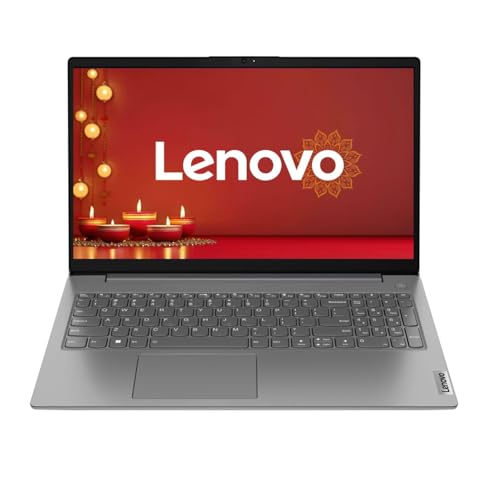
🔒 TPM 2.0 | Webcam Privacy Shutter | Kensington Nano Security Slot | Dolby Audio — Rare security and audio feature stack for an entry-level budget laptop — built for buyers who value data protection and daily reliability
💾 PCIe Gen4 SSD | 8GB LPDDR5-5500MHz | AMD Athlon Silver 7120U | Up to 3.5GHz — Gen4 SSD delivers faster boot and app load times than most Gen3 competitors, with efficient LPDDR5 memory for smooth basic computing
🔄 180° Lay-Flat Hinge | Wi-Fi 6 (2×2) | 15.6″ FHD 250 nits | Lifetime Windows 11 | 1-Year Brand Warranty — Versatile flat hinge for easy screen sharing and presentations, with Lenovo’s trusted warranty and lifetime OS validity included
The Lenovo V15 G4 running the AMD Athlon Silver 7120U is a straightforward, no-nonsense daily productivity machine backed by Lenovo’s strong brand trust and India service network. The Athlon Silver 7120U is a dual-core (2 cores, 2 threads) processor that clocks up to 3.5GHz — adequate for web browsing, document editing, YouTube streaming, online classes, and light Office applications, but clearly limited for heavy multitasking involving multiple demanding apps running simultaneously. For buyers whose primary use is simple day-to-day computing, it gets the job done.
Where the Lenovo V15 G4 genuinely stands out in this price range is its feature set beyond the processor. The PCIe Gen4 SSD is notably faster than the Gen3 alternatives found in most competitors at this price — boots and app launches feel snappier. The 180-degree lay-flat hinge is genuinely useful for presentations and sharing screens with colleagues or classmates. The webcam privacy shutter, TPM 2.0 security chip, Kensington Nano security slot, and Dolby Audio stereo speakers add a professional feature package you rarely see at this price point.
The Lifetime Validity Windows 11 Home is pre-installed, and the 1-year brand warranty from Lenovo provides solid purchase peace of mind. For first-time laptop buyers or buyers who need a dependable, safe machine for basic computing needs with Lenovo’s backing, the V15 G4 is a reliable choice — just be clear-eyed about the dual-core processor’s limitations before purchasing.
Pros
✅ PCIe Gen4 SSD — faster boot and load speeds than most Gen3 competitors
✅ 180° lay-flat hinge — versatile for presentations, sharing, and collaboration
✅ TPM 2.0 + Privacy Shutter + Kensington Slot — strong security feature set
✅ Lenovo brand reliability — strong India after-sales network
Cons
❌ Athlon Silver 7120U dual-core — noticeably limited under heavy multitasking
❌ 8GB LPDDR5 onboard RAM — no upgrade flexibility noted
Check Lenovo V15 G4 Latest Price on Amazon
HP 15 (2026) — AMD Athlon 7120U, Copilot Key
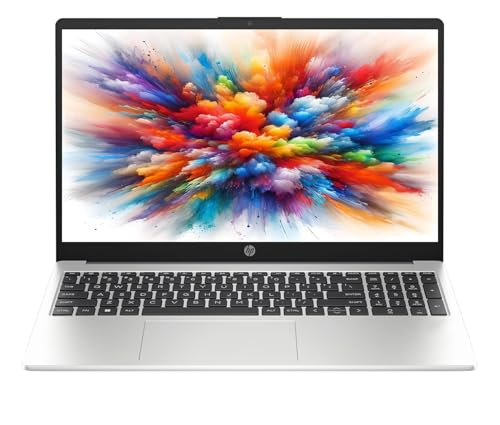
🤖 Copilot Key | Windows 11 Pro | MS Office Lifetime Validity | AMD Athlon 7120U | Up to 3.5GHz — AI-ready keyboard shortcut for Windows Copilot features, bundled with Windows 11 Pro and full Office suite — the strongest OS + software package at this price
💾 8GB DDR5-5500MHz RAM | 512GB PCIe NVMe SSD | AMD Radeon 610M Graphics — Faster DDR5 memory generation than most budget competitors, with quick NVMe storage for smooth everyday performance
📷 720p Camera with Privacy Shutter | Spill-Resistant Keyboard with Numpad | Wi-Fi 6 | 1.5kg — Practical everyday features including a secure privacy shutter camera, full-size keyboard, and HP’s India-wide after-sales support
HP’s 2026 refresh of the HP 15 brings a few genuinely interesting additions to what is otherwise a straightforward entry-level machine. The AMD Athlon Dual Core 7120U (2 cores, 2 threads, up to 3.5GHz) is identical in processing performance to the Lenovo V15 G4 reviewed above — solid for basic tasks but not a multitasking powerhouse. The key differentiators here are HP-specific: 8GB DDR5-5500MHz RAM (faster than the DDR4 in most competitors), a Copilot key on the keyboard (a forward-looking Windows AI feature access button), and the OS upgrade to Windows 11 Pro with bundled MS Office lifetime validity.
The 15.6-inch HD display at 1366×768 resolution is the clear weakness here — HD resolution in 2026 is noticeably lower quality than FHD alternatives, and for students who spend long hours reading, coding, or working with spreadsheets, the lower pixel density becomes apparent. The 41Wh battery, spill-resistant keyboard with numeric keypad, and 720p privacy shutter camera round out the package practically.
At 1.5kg, it’s reasonably portable. HP’s brand reliability and widespread India service network are genuine assets for first-time buyers. This is a budget laptop under 40000 for office use that does exactly what it promises — straightforward, reliable computing at a competitive price — just don’t expect FHD clarity or multi-core performance from it.
Pros
✅ Windows 11 Pro + MS Office Lifetime — strong OS and software package
✅ DDR5-5500MHz RAM — faster memory generation than most competitors here
✅ Copilot Key — AI-ready hardware for Windows 11 AI features
✅ HP India service network — strong nationwide after-sales support
Cons
❌ HD (1366×768) display — noticeably lower quality than FHD alternatives
❌ Athlon dual-core — limited multitasking under heavier workloads
Check HP 15 2026 Latest Price on Amazon
Acer Aspire 3 — Intel Pentium N6000 (12GB RAM)
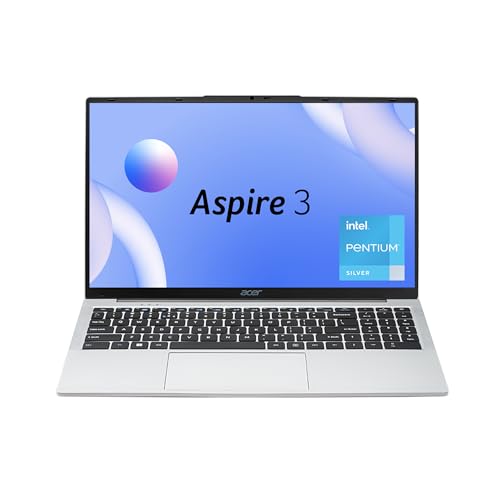
💾 12GB LPDDR4X RAM | Intel Pentium N6000 | 4 Cores | Up to 3.3GHz | 512GB SSD — The only laptop on this list with 12GB RAM out of the box — extra memory headroom for browser-heavy users running multiple tabs and background applications
🖥️ 15.6″ HD Narrow Bezel Display | Acer BlueLight Shield | Anti-Glare | 1.5kg | Pure Silver — Eye-protection technology built in with a slim-bezel design for cleaner visuals during long online study and remote work sessions
📶 HD Webcam | Optimized Microphone | Wi-Fi 5 | Windows 11 Home | Acer India Service — Complete out-of-box video call setup with Acer’s reliable nationwide service backing for long-term ownership confidence
The Acer Aspire 3 with Intel Pentium N6000 occupies an unusual but somewhat useful niche — it’s the only laptop on this list offering 12GB of RAM out of the box. For buyers who regularly run multiple browser tabs, background sync apps, and Office documents simultaneously, that extra 4GB over the standard 8GB configuration can genuinely reduce slowdowns. The Intel Pentium N6000 (4 cores, up to 3.3GHz) is a modest but functional Jasper Lake generation processor adequate for standard everyday tasks, web browsing, YouTube, and light productivity.
The 15.6-inch HD (1366×768) display and 512GB SSD are standard for the segment. At 1.5kg and finished in Pure Silver, the design is clean and portable. The inclusion of Acer BlueLight Shield eye-protection technology, a narrow bezel, and optimized webcam and microphones for video calls makes this a practical choice for remote work and online education scenarios. Wi-Fi supports 802.11a/b/g/n/ac — standard Wi-Fi 5 connectivity.
The Pentium N6000’s processing ceiling is a real limitation for any task beyond basic computing — this is not a laptop under 40000 for students who need to run code compilers, engineering software, or heavy web apps. But for the buyer who primarily needs more RAM headroom for browser-heavy usage and a reliable daily machine for basic tasks, the Aspire 3 Pentium variant offers a unique value point at this budget.
Pros
✅ 12GB LPDDR4X RAM — most memory of any laptop on this list
✅ 512GB SSD + Acer BlueLight Shield — practical daily use features
✅ 15.6″ display with narrow bezel — clean, modern visual design
✅ 1.5kg lightweight chassis — easy everyday carry
Cons
❌ Intel Pentium N6000 — entry-level processor, limited for demanding workloads
❌ HD (1366×768) display — pixelation visible in text-heavy tasks and reading
Check Acer Aspire 3 Pentium N6000 Latest Price on Amazon
HP 255R G10 — Athlon Silver 7120U (DOS, 512GB)
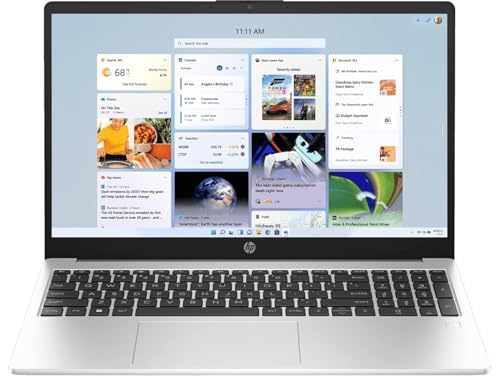
🛡️ HP Build Quality | 512GB PCIe NVMe SSD | 8GB DDR4 | AMD Athlon Silver 7120U | Wi-Fi 6 + BT 5.3 — Trusted HP hardware reliability with fast NVMe storage and modern wireless connectivity at an entry-level price point
🖥️ 15.6″ HD 250 nits Anti-Glare | Spill-Resistant Keyboard with Numpad | 720p Privacy Camera — Practical everyday feature set with HP’s spill-resistant keyboard and camera privacy shutter for secure daily use
⚠️ Ships with DOS (No OS Pre-Installed) | Recommended for Technically Confident Buyers Only — Lower cost vs. Windows models — but requires independent OS installation; factor in Windows license cost before comparing final price
The HP 255R G10 is one for the technically aware buyer — it ships with DOS (no operating system pre-installed) rather than Windows, which is why it sits at a lower price point than the HP 15 2026 reviewed above. For buyers who plan to install a fresh copy of Windows 11 themselves, or who need a clean-slate machine for custom OS deployment, this becomes a viable option. The specs are fundamentally the same as the HP 15 — same Athlon Silver 7120U dual-core processor, 8GB DDR4 RAM, 512GB NVMe SSD, 15.6-inch HD 250-nit display, and HP’s spill-resistant keyboard with numpad.
The practical cost saving from buying a DOS machine and adding Windows separately can sometimes work out favorably when Windows licenses are available at discounted rates — but for most first-time buyers, this requires technical comfort that many don’t have. The machine itself is well-built, reliable, and backed by HP’s service network across India.
Important buyer note: Factor in the cost of a Windows 11 license before comparing prices with Windows-pre-installed alternatives. Without an OS, this machine cannot be used productively out of the box. Recommended only for buyers who have a clear plan for OS installation.
Pros
✅ HP build quality and India service network — trusted brand at entry-level price
✅ 512GB NVMe SSD + spill-resistant keyboard + privacy shutter
✅ Cost saving vs. pre-installed Windows models — value for technically confident buyers
✅ Wi-Fi 6 + Bluetooth 5.3 — solid wireless connectivity
Cons
❌ Ships with DOS — not usable out of the box without OS installation
❌ Athlon dual-core + HD display — limited performance and display quality
❌ 8GB DDR4 onboard (non-upgradeable) — no future RAM expansion
Check HP 255R G10 Latest Price on Amazon
Acer Aspire 3 — Intel Celeron N4500 (Entry-Level)
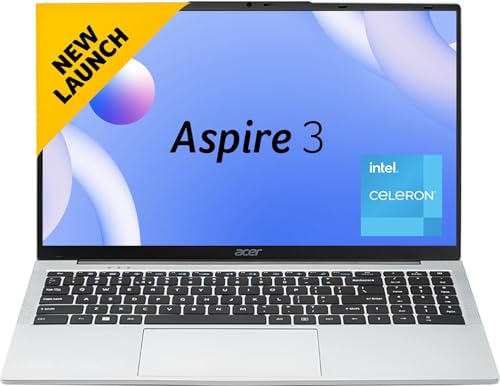
💻 Intel Celeron N4500 | Up to 2.8GHz | 2 Cores | 8GB LPDDR4X RAM | 512GB SSD — Entry-level processor suited strictly for basic tasks — web browsing, YouTube, simple document work, and video calls on stable connectivity
🖥️ 15.6″ HD Anti-Glare Display | Narrow Bezel | Windows 11 Home Pre-Installed | 1.5kg — Ready to use immediately with Windows 11 pre-loaded, in a lightweight and portable form factor for basic everyday mobility
🔋 38Whr Battery | Acer India Service Network | Acer BlueLight Shield | HD Webcam — Practical basic features for light daily use, backed by Acer’s widespread India after-sales service network for reliable ownership support
The Acer Aspire 3 with Intel Celeron N4500 is the most basic machine on this entire list — and we’re including it here purely for completeness and transparency. The Celeron N4500 is a dual-core Jasper Lake processor with a base clock of 1.1GHz (boost up to 2.8GHz, 2 cores, 4MB cache) — a chip that is genuinely at the bottom of Intel’s processor lineup for consumer laptops. For ultra-basic tasks like web browsing with two or three tabs, watching YouTube at standard definition, writing simple documents, and attending online classes on a stable internet, it functions. For anything beyond that, including running multiple Office apps together, downloading large files in the background, or running modern web apps, performance will feel sluggish.
The 15.6-inch HD (1366×768) display, 8GB LPDDR4X RAM, and 512GB SSD are the supporting specs, and Windows 11 Home is pre-installed. The 38Whr battery and 1.5kg chassis keep things portable. Acer’s build quality on the Aspire 3 series is well-regarded for durability at budget price points, and their India service network offers solid accessibility.
This is a machine GadgetVeda would recommend only to buyers with the absolute simplest computing needs — think basic typing, form-filling, light browsing, and video calling — and no plans for multitasking. It should not be considered a serious laptop for students managing coursework or professionals handling office workloads.
Pros
✅ Windows 11 Home pre-installed — ready to use immediately
✅ 512GB SSD + 8GB RAM — adequate storage and memory for basic tasks
✅ Acer brand durability and India-wide service network
✅ 1.5kg lightweight — practical for basic daily portability
Cons
❌ Intel Celeron N4500 — insufficient for modern multitasking or demanding applications
❌ HD (1366×768) display — noticeably poor resolution for daily reading and work
❌ 38Whr small battery — limited unplugged endurance
Check Acer Aspire 3 Celeron N4500 Latest Price on Amazon
Best Laptops Under ₹40,000 in India [The Ultimate Buying Guide] — What to Check Under ₹40,000
Buying the best laptop under 40000 in India requires knowing exactly where the trade-offs are in this budget segment. Here’s what to prioritize and what to watch out for:
🕹️ CPU & Processing Power — The Most Critical Decision
The processor you choose determines how capable your laptop feels every single day. In this budget range, there are four processor tiers you’ll encounter:
Best in segment: AMD Ryzen 3 7320U / 7330U (4 cores, 8 threads, 4nm) — genuinely capable quad-core CPUs with efficient architecture. These offer the best day-to-day performance at ₹40K.
Mid-tier: Intel Core i5-1235U (10 cores hybrid) — powerful but tends to push the price above ₹40K.
Entry-level: AMD Athlon Silver 7120U (2 cores, 2 threads) — handles very basic tasks; limited for multitasking.
Avoid for serious use: Intel Celeron N4500 / Pentium N6000 — better than nothing, but frustrating for modern workloads.
As a rule, never buy a dual-core laptop in 2026 if your budget allows a quad-core alternative. The Ryzen 3 7320U available in both the ASUS Vivobook Go 14 and Go 15 is the sweet spot for this budget.
🖥️ Display & Resolution — Don’t Accept HD in 2026
This is one area where buyers commonly get misled. HD (1366×768) resolution is outdated and noticeably inferior for text-heavy reading, spreadsheet work, video streaming, and content creation. Always look for FHD (1920×1080) as the minimum display standard. At ₹40,000, FHD displays are fully available — the ASUS Vivobook Go 15, Go 14, Avita Liber E, and both Acer TravelLite models all offer FHD. The HP 15, HP 255R G10, and both Aspire 3 budget variants come with HD screens — acceptable only for the most basic use cases.
Also look for anti-glare coating (reduces eye strain during long sessions) and IPS panel technology (better colors and wider viewing angles than TN panels). Brightness of 250 nits minimum is standard at this price range.
💾 RAM & Storage — Know the Difference
At ₹40,000, 8GB RAM is standard across almost all options. Here’s what matters beyond the number:
LPDDR5 (as in ASUS Vivobook Go models) is faster and more power-efficient than DDR4
DDR5-5500MHz (HP 15 2026) offers high memory bandwidth in a dual-core system
Onboard/soldered RAM (many models here) means you cannot upgrade later — factor this in before buying
For storage, a 512GB PCIe NVMe SSD is the current standard you should demand at this price. Any laptop offering 256GB SSD (like the HP 255 G10) should be evaluated carefully for future storage needs — 256GB fills up quickly with Windows 11, apps, and files. A few models (Avita Liber E) offer SSD expandability up to 2TB — strong future-proofing.
🔋 Battery Life & Portability
For college students and working professionals who carry laptops daily, battery life and weight are practical priorities. In this segment:
40–42Whr batteries (most Acer and ASUS models) deliver approximately 5–7 hours of mixed-use
HP models with 41Whr batteries are similar
Lighter chassis (ASUS at 1.38–1.63kg, Acer TravelLite at 1.34kg) reduces daily carry fatigue significantly
Fast charge is rarely available at this price point — check adapter wattage before purchase
If you regularly have 6+ hour unplugged work sessions, prioritize the ASUS Go models or Acer TravelLite with proven efficient AMD architecture — they manage battery consumption better than Celeron/Pentium Jasper Lake processors.
🛡️ Brand Warranty & After-Sales Support
Don’t overlook this when buying a budget laptop — especially in India, where repair costs can be disproportionately high relative to laptop value. ASUS, HP, Acer, and Lenovo all offer well-established nationwide service networks with clear 1-year manufacturer warranties. Avita is competent but has a smaller footprint, particularly in tier-2 and tier-3 cities. Always register your product post-purchase to activate the warranty, and check the brand’s toll-free support and nearest service center before finalizing your purchase.
💡 Operating System — Windows vs. DOS
Several laptops on this list ship with DOS (HP 255R G10) — meaning no operating system is installed. While the lower cost is tempting, factor in: the price of a genuine Windows 11 license, the technical effort to install it, and the risk of pirated OS installs that void warranties and create security vulnerabilities. For most buyers, a laptop with Windows 11 Home pre-installed with lifetime validity (as offered by ASUS, Lenovo, and Acer models here) represents far better long-term value.
Final Verdict – GadgetVeda
After auditing all 10 laptops under 40000 in India across processor capability, display quality, RAM type, storage, build, portability, brand support, and real-world value, here are two clear winners:
💸 The Budget King — ASUS Vivobook Go 15 (E1504FA-BQ2322WS)
If you want the absolute best value laptop under ₹40,000 budget, the ASUS Vivobook Go 15 delivers on every front that matters: a modern Ryzen 3 quad-core processor, FHD display, LPDDR5 RAM, Wi-Fi 6E, and a complete software bundle including Office 2024 lifetime. ASUS’s build reliability and service network seal the deal. This is the safest, most complete, and overall best laptop under 40000 available right now in the Indian market.
⚡ The Performance Pick — Avita Liber E (AM14A2INF56F-CHF)
For buyers who can stretch slightly or catch a deal, the Avita Liber E with Intel Core i5-1235U is the only machine at this price offering genuine multi-core performance capable of handling more demanding office tasks, faster multitasking, and heavier workloads. If raw processing power is your #1 priority and you’re comfortable with a smaller brand, this is the best laptop under 40000 for students and working professionals from a performance-per-rupee standpoint.
FAQs
Which is the best laptop under 40000 in India for college students in 2026?
The ASUS Vivobook Go 15 is GadgetVeda’s top recommendation for college students. It offers the Ryzen 3 7320U quad-core processor, FHD anti-glare display, 8GB LPDDR5 RAM, 512GB SSD, Wi-Fi 6E for fast campus connectivity, and a complete Office 2024 + M365 software bundle — everything a student needs without paying for unnecessary extras. Lightweight at 1.63kg, it handles classes, assignments, research, streaming, and video calls without missing a beat.
Is 8GB RAM enough in a laptop under 40000 in 2026?
Yes, for the use cases common at this price range. Web browsing, Microsoft Office, YouTube, video calls, and light multitasking all run well on 8GB RAM. Where 8GB starts to show limits is when you’re running very heavy browser sessions (20+ tabs), large Excel datasets, or multiple demanding applications together. If RAM is a concern, the Acer Aspire 3 Pentium model offers 12GB — though its weaker processor offsets the RAM advantage. For most buyers in this budget, 8GB is the right standard.
Should I buy a laptop with an HD (1366×768) or an FHD (1920×1080) display under ₹40,000?
Always choose FHD if the option is available within your budget. At ₹40,000, FHD laptops are fully accessible — there’s no reason to accept HD resolution in 2026 unless you’re buying the absolute cheapest entry-level machine. The difference in daily comfort is significant: FHD text is sharper and easier to read, videos look considerably better, and working with spreadsheets or documents becomes much less tiring on the eyes over long sessions. Laptops like the ASUS Vivobook Go 14/15 and Acer TravelLite all offer FHD at this budget.
What’s the difference between AMD Athlon Silver 7120U and AMD Ryzen 3 7320U at this budget?
The difference is meaningful. The Ryzen 3 7320U has 4 cores and 8 threads, built on AMD’s efficient 4nm architecture, and boosts up to 4.1GHz — it’s genuinely capable for modern multitasking. The Athlon Silver 7120U is a dual-core, 2-thread entry-level chip that caps at 3.5GHz — around 50–60% less multi-threaded performance in real-world tasks. If you’re choosing between two laptops at similar prices and one has Ryzen 3 while the other has Athlon, the Ryzen 3 is the better choice every time, unless you have a very specific reason to pick otherwise.
Is it worth buying a laptop under 40000 or should I stretch to 50000–60000?
That depends entirely on your use case. If you primarily need a laptop under 40000 for office work— browsing, Office applications, video streaming, video calls, and basic productivity — the ₹40,000 segment covers these needs completely. You don’t need to spend more. However, if you want a laptop for light gaming, faster multitasking, a higher refresh rate display, or better GPU capability, stretching to ₹50,000–₹60,000 opens up options like the Ryzen 5 or Core i5 H-series machines with dedicated graphics and 144Hz displays.




![OnePlus Nord Buds 4 Review [Price, ANC & Battery Verdict]](https://gadgetveda.com/wp-content/uploads/2026/10/OnePlus-Nord-Buds-4-Review-GadgetVeda-150x150.webp)
![5 Best Smart TVs Under ₹15,000 in India [2026]](https://gadgetveda.com/wp-content/uploads/2026/10/Best-Smart-TVs-Under-₹15000-in-India-150x150.webp)


![OnePlus Nord Buds 4 Review [Price, ANC & Battery Verdict]](https://gadgetveda.com/wp-content/uploads/2026/10/OnePlus-Nord-Buds-4-Review-GadgetVeda-300x167.webp)
![5 Best Smart TVs Under ₹15,000 in India [2026]](https://gadgetveda.com/wp-content/uploads/2026/10/Best-Smart-TVs-Under-₹15000-in-India-300x167.webp)