


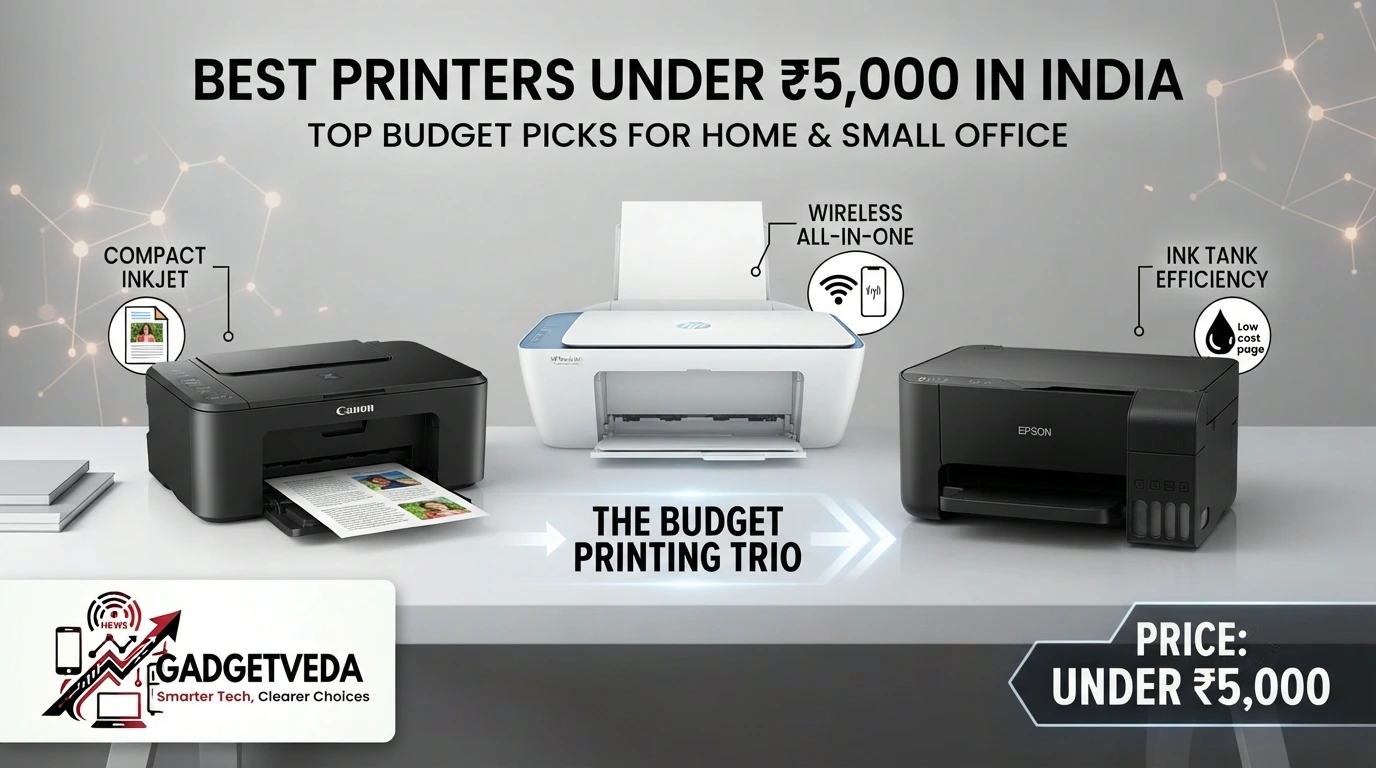
The Canon PIXMA E477 is the strongest all-rounder, best printer under 5000 in India in this shortlist because it combines print, scan, and copy functions with Wi‑Fi, 4800 × 600 dpi maximum resolution, and higher stated cartridge yields than the other Canon cartridge models. Choose the Canon PIXMA TS307 if you only need wireless printing and already have a scanner. For the lowest upfront cost and a simple USB-based setup, the Canon PIXMA MG2577s is the practical budget pick.
Why Buying Cheaply Can Become Expensive
A printer under ₹5,000 looks attractive until the first cartridge replacement. Entry-level cartridge printers commonly trade a low purchase price for small cartridge yields, so a student printing assignments every week may spend more on consumables than expected. They can also be slower for color work, lack automatic duplex printing, and require occasional maintenance when left unused for weeks.
The right choice depends on volume. Occasional users may value compact size and a low entry price. Families and students who print color projects should prioritize cartridge yield, while work-from-home users may prefer Wi‑Fi and scanning over marginally higher headline speed. In dusty Indian rooms, keep the printer covered when idle, use clean 70–80 GSM paper, and avoid leaving cartridges or printheads exposed. In short, if you are planning to buy a printer for home use and need fewer prints per day or week, printers under 5000 can be a suitable option to consider.
How GadgetVeda Evaluated These Budget Printers?
We compared the supplied specifications by mapping each feature to a real household task: assignment printing, document copying, ID scanning, photo output, and smartphone convenience. We considered black and color speed, stated page yield, maximum resolution, functions, connectivity, paper capacity, operating-system support, and warranty information where supplied.
The source sheet does not provide a verified ink price for every model, so that a universal cost-per-page ranking would be misleading. Treat the stated yields as manufacturer test figures, not a promise for photographs or heavy-coverage graphics. Before purchase, check the current price of genuine replacement cartridges and whether a seller is offering a full or setup cartridge.
Why Trust GadgetVeda?
At GadgetVeda, our recommendations are driven by independent hardware evaluation, aggregated cost-per-page benchmarks, real-world user feedback telemetry, and long-term durability assessments. We do not accept paid placements or sponsored reviews. When you buy through our links, we earn a small affiliate commission at zero extra cost to you, allowing us to keep our testing criteria 100% independent and consumer-first.
Best Printers Under ₹5,000 in India [Our Top 3 Picks]

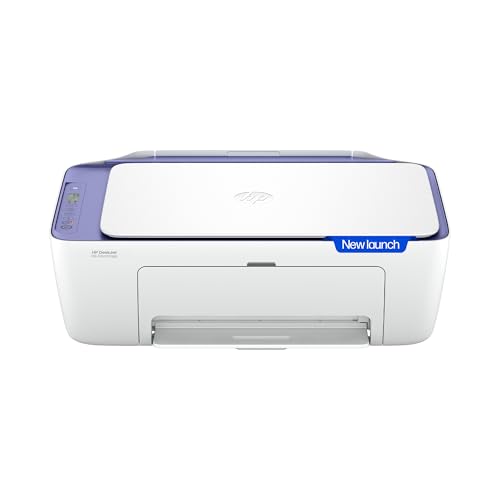

Best Low-Cost Cartridge Option for Students: Canon PIXMA E477
The E477 is the most balanced student and home choice here. Its stated yield reaches 400 black and 180 color prints, while Wi‑Fi and Canon mobile printing reduce cable dependence. It remains a cartridge printer, not an ink tank, so heavy users should calculate replacement costs before ordering. It suits light-to-moderate assignments, forms, and occasional color projects.
Best All-in-One WFH Specialist: HP DeskJet 2931
The DeskJet 2931 adds print, scan and copy functions with dual-band Wi‑Fi, a useful advantage in homes where 2.4GHz networks are crowded or unreliable. Its headline rating is up to 20 ppm black and 16 ppm color, though buyers should confirm the exact ISO figures and bundled ink on the current listing. It is best for connected home desks.
Best Ultra-Budget Compact Printer: Canon PIXMA MG2570S
The MG2570S focuses on the essentials: color printing, scanning, and copying over USB in a compact body. It supports standard and XL cartridge options, with the supplied data listing up to 300 pages from the XL black and color cartridges. There is no Wi‑Fi, but the wired setup avoids mobile pairing problems and keeps the entry price focused.
Best Printers Under ₹5,000 in India [Quick Comparison]
| Rank | Model Name | Key Specifications | Expert Rating | Latest Price |
| 1 | Canon PIXMA E477 | Inkjet / 8 black, 4 color / up to 4800 × 600 / USB + Wi‑Fi | 9.0/10 | Check on Amazon |
| 2 | HP DeskJet 2931 | Inkjet / up to 20 black, 16 color / Not supplied / Dual-band Wi‑Fi | 8.9/10 | Check on Amazon |
| 3 | HP DeskJet Ink Advantage 2338 | Inkjet / supplied listing varies: 7.5–20 black, 16 color / Not supplied / USB 2.0 | 8.8/10 | Check on Amazon |
| 4 | Canon PIXMA TS307 | Inkjet, print-only / 7.7 black, 4 color / up to 4800 × 1200 / USB + Wi‑Fi | 8.7/10 | Check on Amazon |
| 5 | Canon PIXMA MG2577s | Inkjet / 8 black, 4 color / up to 4800 × 600 / USB | 8.6/10 | Check on Amazon |
| 6 | Canon MG2570S | Inkjet / 8 black, 4 color / Not supplied / USB | 8.5/10 | Check on Amazon |
6 Best Printers Under ₹5,000 in India [Detailed Reviews]
Canon PIXMA E477 – The Connected Student All-Rounder
🖨️ Inkjet, up to 4800 × 600 dpi: Produces crisp documents and decent color images for home assignments.
⚡ 8 black, 4 color IPM; 400/180-page yield: Handles regular documents without constant cartridge changes.
💰 Black and color CPP: Verify current PG-47 and CL-57s prices before calculating long-term savings.
📑 Print, scan and copy: Supports everyday forms, IDs and assignments, though optical DPI is unspecified.
📶 USB and Wi‑Fi: Enables Canon mobile printing from phones, tablets and laptops without cable swapping.
The E477 is the most versatile all-in-one printer under 5000 in this supplied group. Its 8 IPM black and 4 IPM color rates are sufficient for a few pages at a time, although a large school project will not finish as quickly as a laser printer. Text should look clean at normal settings, while its high maximum resolution supports decent color output on suitable paper.
The real advantage is balance: scanning and copying are built in, and Wi‑Fi is more convenient than a USB-only desk setup. The stated 400 black and 180 color yields are stronger than the 100-page standard cartridges listed for several Canon rivals. However, Canon does not provide a separate verified scanner optical DPI or full replacement-cost calculation in the supplied data. Expect audible paper feeding and no automatic duplexing.
Pros
✅ Higher stated black and color yields.
✅ Wi‑Fi supports convenient mobile printing.
✅ Print, scan, and copy in one unit.
✅ 4800 × 600 dpi maximum resolution.
Cons
❌ Color printing remains relatively slow.
❌ Cartridge costs need careful checking.
❌ Automatic duplexing is not listed.
👉 Check Today’s Price & Bank Offers on Amazon
HP DeskJet 2931 – The Easiest Wireless Home-Office Pick
🖨️ Color inkjet, maximum DPI unspecified: Targets everyday text and color documents for home offices.
⚡ Up to 20 black, 16 color ppm: Reduces waiting during assignments, forms, and small office tasks.
💰 CPP and page yield unspecified: Check HP cartridge prices and included setup-cartridge capacity before buying.
📑 Print, scan, and copy: Covers routine document digitization, copying, and color printing from one desktop unit.
📶 Dual-band Wi‑Fi and automatic reconnection: Helps reduce 2.4GHz congestion and repeated setup interruptions.
The DeskJet 2931 is the best printer under 5000 for home when wireless reliability matters more than cartridge economics. Its advertised dual-band Wi‑Fi can be valuable in apartments where several devices compete on 2.4GHz. Automatic reconnection should also reduce the familiar frustration of sending a document from a phone and finding the printer offline.
The headline 20 ppm black and 16 ppm color figures look excellent for this price category, but the supplied sheet does not clarify the test standard. Do not assume those are sustained, full-color speeds. It should suit WFH forms, schoolwork, and occasional color projects, but replacement-ink cost, scanner optical resolution, tray capacity, and duplex support need confirmation on the live listing. The body is heavier than the Canon compact models, so allow more desk space.
Pros
✅ Dual-band Wi‑Fi improves network flexibility.
✅ Automatic reconnection reduces failed print jobs.
✅ Integrated scanning and copying.
✅ High advertised black and color speeds.
Cons
❌ Yield and CPP are unspecified.
❌ Maximum print resolution is unspecified.
❌ Larger, heavier desktop footprint.
👉 View Current Deal & Discounts on Amazon
HP DeskJet Ink Advantage 2338 – The Dependable USB All-in-One
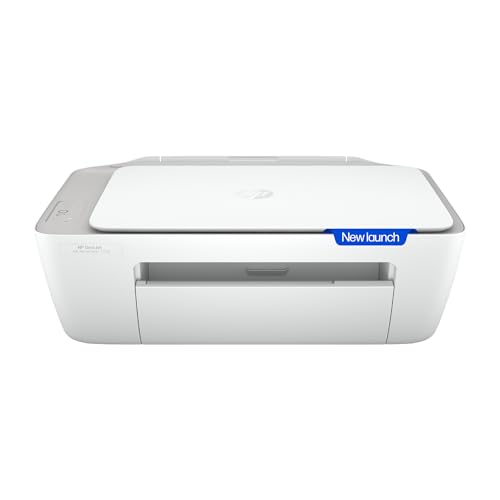
🖨️ Inkjet color printer; maximum DPI unspecified: Produces everyday documents and vibrant home photos.
⚡ Listing states up to 20/16 ppm; 240/75-page yield: Speeds up routine pages, but color yield is limited.
💰 CPP not supplied; HP 682 cartridges: Compare genuine black and tri-color replacement prices carefully.
📑 Print, scan and copy: Supports schoolwork, forms and basic document digitization from one compact machine.
📶 Hi-Speed USB 2.0: Provides stable wired printing without Wi‑Fi pairing or router troubleshooting.
The HP 2338 is a sensible best printer under 5000 for home if the printer will stay beside one computer. USB is less flexible than wireless, but it is predictable: no app login, router password, or single-band dropout to troubleshoot. The supplied description lists a 60-sheet input tray, 25-sheet output tray, and 1,000-page duty cycle, practical for light household work.
The data contains conflicting headline speed information: the product title says up to 20/16 ppm, while the technical field lists 7.5 ppm monochrome and 16 ppm color. Verify the current HP specification page before treating it as a fast printer. The stated 240 black and 75 color cartridge yields make frequent color printing expensive. Scanning and copying add value, but duplex support and optical scanner DPI are not supplied.
Pros
✅ Stable Hi-Speed USB connection.
✅ Print, scan, and copy functions.
✅ 60-sheet input tray.
✅ One-year limited hardware warranty stated.
Cons
❌ No wireless smartphone printing.
❌ Very low stated color yield.
❌ Conflicting black-speed specifications.
👉 Check Live Price & Stock Availability on Amazon
Canon PIXMA TS307 – Wireless Printing Without Scanning

🖨️ Inkjet print-only, up to 4800 × 1200 dpi: Delivers sharp documents and borderless color output.
⚡ 7.7 black, 4-color IPM; 100-page yield: Handles light printing but needs timely cartridge replacements.
💰 ₹7.20 black, ₹10.10 color CPP listed: Makes regular color work costly at entry-level cartridge rates.
📑 Print-only design; no scanner: Keeps the body compact but cannot copy or digitize paper documents.
📶 USB, Wi‑Fi, AirPrint, Mopria and Canon apps: Enables phone printing without a computer connection.
The TS307 is a good match for someone who already owns a scanner or only needs printed pages. It is one of the few models here with clearly listed mobile options, including AirPrint, Mopria and Canon PRINT. That makes it useful for printing a form from a phone, but the 4 IPM color speed is better suited to occasional pages than urgent project batches.
The supplied CPP figures are a warning rather than a hidden advantage: ₹7.20 per black page and ₹10.10 per color page can quickly outweigh a low purchase price. The printer supports borderless output and up to 275 GSM paper according to the source data, but no duplex function is listed. Expect a compact footprint and ordinary inkjet feed noise; do not buy it if scanning is essential.
Pros
✅ Strong maximum color resolution.
✅ Wi‑Fi and USB connectivity.
✅ AirPrint and Mopria support.
✅ Compact print-only footprint.
Cons
❌ No scanner or copier.
❌ High listed color CPP.
❌ Only 100-page standard yield.
👉 Check Price & EMI Options on Amazon
Canon PIXMA MG2577s – The Compact USB Multifunction Budget Pick

🖨️ Inkjet, up to 4800 × 600 dpi: Creates sharp routine text and acceptable color images for home use.
⚡ 8 black, 4 color IPM; 100-page yield: Handles occasional pages but requires frequent standard cartridges.
💰 PG-745s/CL-746s cartridges: Compare standard and XL replacements to avoid expensive high-volume printing.
📑 Print, scan and copy: Adds practical document handling despite its low entry-level positioning.
📶 USB with Auto Power On: Provides straightforward computer printing without wireless setup complications.
The MG2577s is a straightforward, best printer under 5000 for students as well as work-from-home professionals when the desk has a computer and the workload is modest. It prints, scans, and copies, while the 4800 × 600 dpi maximum is reassuring for forms and occasional graphics. Its compact body works on a small shelf, though leave clearance for paper loading and output.
The trade-off is running cost. The supplied data lists only 100 pages each for the included PG-745s and CL-746s cartridges, so regular color assignments can become expensive. XL cartridges can improve the economics, but calculate the actual price per page before buying. There is no Wi‑Fi, automatic duplexing, or stated scanner optical DPI. It remains attractive for simple, infrequent USB printing.
Pros
✅ Compact body suits small desks.
✅ Integrated print, scan, and copy.
✅ 4800 × 600 dpi maximum resolution.
✅ Auto Power On simplifies USB printing.
Cons
❌ No Wi‑Fi connectivity.
❌ Included cartridge yields are limited.
❌ No automatic duplexing listed.
👉 Check Today’s Price & Bank Offers on Amazon
Canon MG2570S – Simple Multifunction Printing with XL Support
🖨️ Color inkjet; resolution not supplied: Targets everyday documents, copies, and basic color images.
⚡ 8 black, 4 color IPM; up to 300-page XL yield: Reduces replacement frequency when using higher-capacity cartridges.
💰 PG-745/CL-746 family: XL options can improve value, but current cartridge prices determine real CPP.
📑 Print, scan and copy: Covers home forms, assignments and basic paper-document digitization.
📶 USB connection with Auto Power On: Delivers reliable computer printing without wireless configuration.
The MG2570S is a practical all-in-one printer for a USB-connected home desk. Its 8 IPM black and 4 IPM color figures are adequate for light workloads, while Auto Power On detects a print command and starts the machine automatically. The compact 30.6 × 42.6 × 14.5 cm dimensions help it fit on a narrow shelf.
Its key advantage over the smallest standard cartridges is cartridge flexibility: the supplied data lists 100-page standard and up to 300-page XL black and color options. That does not automatically make it cheap, because the replacement price must be included in the calculation. Wi‑Fi, duplex printing, and scanner optical resolution are not listed. Expect ordinary inkjet feed noise and keep it covered against dust when idle.
Pros
✅ XL cartridges offer higher stated yields.
✅ Compact all-in-one desktop design.
✅ Auto Power On improves convenience.
✅ USB setup remains dependable.
Cons
❌ No wireless mobile printing.
❌ Resolution specification is unavailable.
❌ Color output remains slow.
👉 View Current Deal & Discounts on Amazon
What to Check When Buying Printers Under ₹5,000 in India
🖨️ Inkjet vs Ink Tank vs Laser
Most options in this shortlist are cartridge inkjets. They are affordable to buy and can produce color, but replacement cartridges may be expensive and low-yield. Ink-tank printers normally cost more upfront but are better for frequent printing because bottled ink reduces running costs. Laser printers are excellent for black text and long periods of storage, but color laser models generally sit outside this budget. For a student printing only occasionally, a cartridge all-in-one can still be sensible; for weekly batches, calculate ink first.
⚡ Print Speed Versus Resolution
PPM or IPM tells you how quickly documents emerge, while DPI describes the maximum detail the print engine can place on paper. A high DPI figure does not guarantee fast output or perfect photos. For a 20-page assignment, black speed matters more than headline color resolution. For certificates, charts, and photos, consistent color and suitable paper matter more. Also check whether the advertised speed is ISO-rated, draft-rated, or a manufacturer maximum; the HP 2338 data demonstrates why this distinction matters.
💰 CPP and Cartridge Lifespan
Calculate black CPP as cartridge price divided by stated black yield, then do the same for color. For example, if a ₹900 black cartridge produces 180 pages, the theoretical black CPP is ₹5 before paper and wastage. Actual results vary with photos, bold graphics, cleaning cycles, and page coverage. Compare standard and XL cartridges, use genuine supplies for warranty protection, and avoid buying a cheap printer whose replacement ink costs more than expected.
📶 Wi‑Fi/App Versus USB-Only Printing
Wi‑Fi is valuable when several family members print from phones and laptops. Canon PRINT, Canon Easy-PhotoPrint, AirPrint, Mopria, and HP’s ecosystem can remove the need to transfer files to a computer. Dual-band Wi‑Fi may help in congested homes, but setup still depends on router compatibility and app permissions. USB is less convenient but generally stable and simpler. Choose USB-only if the printer will remain beside one Windows or Mac computer.
📑 All-in-One Versus Single-Function
An all-in-one printer earns its desk space when you scan IDs, copy forms, or digitize handwritten notes. A flatbed scanner is also useful for school worksheets and signed documents. The TS307 is cheaper and smaller because it only prints, but adding a separate scanner later can erase that saving. Check whether automatic duplexing exists; none is confirmed for the supplied models. Also verify tray capacity, supported paper sizes, and whether the output tray prevents sheets from sliding onto the floor.
Buying Printers Online in India
Before ordering, verify that the seller is offering an India-market unit with an official brand warranty from HP, Canon, Epson, Brother, or the relevant manufacturer. Check the warranty period, carry-in versus onsite service, and the support process for your PIN code. Do not assume every listing includes a full retail cartridge: some boxes contain setup cartridges or lower-yield starter supplies.
Confirm that the box includes the power cable and, where promised, the USB cable. For wireless models, check Windows and macOS support, current mobile-app compatibility, and whether the setup requires a 2.4GHz network. Review the live Amazon page for return conditions, seller rating, delivery damage, and replacement ink availability. Sale pricing and bank discounts can sometimes move a higher-tier Wi‑Fi all-in-one into budget range, but compare the post-sale cartridge cost before clicking Buy Now.
Conclusion
The best printer under the 5000 segment is dominated by entry-level cartridge inkjets. That keeps purchase prices accessible but makes the ownership calculation more important than the box price. Wi‑Fi, scanning, and copying add everyday value, while cartridge yield determines whether the printer remains affordable after the included ink runs out. The supplied data also shows why buyers should distrust headline PPM alone: listed speeds can vary by test method, and actual color printing is slower than black document work.
For occasional home and student printing, choose a compact all-in-one with the functions you will actually use. For heavier weekly output, consider stretching toward an ink-tank model rather than repeatedly buying low-yield cartridges. Always confirm live stock, price, warranty, and consumables on Amazon.
🥇 The Budget Hero: Canon PIXMA MG2570S – Best for buyers wanting reliable USB document printing, scanning, and copying at a compact entry-level price, with XL cartridge options available.
👑 The Performance King: Canon PIXMA E477 – The best balance of wireless printing, all-in-one functionality, stated cartridge yield and 4800 × 600 dpi output in this six-model shortlist.
FAQs
1. Is an inkjet printer or an ink-tank printer better for home and student use under ₹5,000?
An inkjet cartridge printer usually wins on upfront price and compactness, while an ink-tank printer is normally better for frequent printing because bottled ink costs less per page. Under ₹5,000, the available choices may be mostly cartridge models, so compare genuine replacement costs before buying. Occasional users can accept cartridges; students printing weekly assignments should calculate black and color CPP over six months. Avoid choosing solely by the lowest printer price.
2. How do you prevent printer printheads from drying or clogging if unused for weeks?
Print a small black-and-color test page every one or two weeks if possible. Keep the printer powered correctly so its capped parking position protects the printhead, and do not remove cartridges unnecessarily. Store it covered in a dry, low-dust area away from direct sunlight. Use genuine cartridges, keep paper clean and flat, and run the manufacturer’s nozzle-check or cleaning utility only when necessary; repeated deep cleaning consumes ink.
3. Do budget printers come with full ink cartridges or bottles included in India?
They generally include at least a starter cartridge set, but the supplied data does not prove that every model contains a full retail-yield cartridge. The HP 2338 listing states HP 682 setup cartridges, while the Canon TS307 data lists one PG-745s and one CL-746s cartridge. Check the live product description, box contents, and stated yield. Also confirm whether the listing is for a new India unit and not an open-box or refurbished product.
4. Can I print directly from my smartphone without connecting to a PC or laptop?
Yes, but only with a compatible wireless printer and supported app or protocol. The Canon E477 supports Canon mobile-printing services, and the TS307 data lists Canon PRINT, AirPrint, Mopria, and PIXMA Cloud Link. The HP 2931 supports dual-band Wi‑Fi according to the supplied listing. USB-only models such as the MG2570S and HP 2338 require a computer unless you use a compatible intermediary device. Check the phone’s OS and router band before buying.




![7 Best Webcams Under ₹3,000 in India [2026] | GadgetVeda](https://gadgetveda.com/wp-content/uploads/2026/10/Best-Webcams-Under-₹3000-in-India-150x150.png)
![8 Best Printers Under ₹10,000 in India [2026] | GadgetVeda](https://gadgetveda.com/wp-content/uploads/2026/09/Best-Printers-Under-₹10000-in-India-150x150.webp)
![6 Best Printers Under ₹5,000 in India [2026] | GadgetVeda](https://gadgetveda.com/wp-content/uploads/2026/09/Best-Printers-Under-₹5000-in-India-150x150.webp)


![7 Best Webcams Under ₹3,000 in India [2026] | GadgetVeda](https://gadgetveda.com/wp-content/uploads/2026/10/Best-Webcams-Under-₹3000-in-India-300x167.png)
![8 Best Printers Under ₹10,000 in India [2026] | GadgetVeda](https://gadgetveda.com/wp-content/uploads/2026/09/Best-Printers-Under-₹10000-in-India-300x167.webp)
![6 Best Printers Under ₹5,000 in India [2026] | GadgetVeda](https://gadgetveda.com/wp-content/uploads/2026/09/Best-Printers-Under-₹5000-in-India-300x167.webp)