


![8 Best Printers Under ₹10,000 in India [2026]](https://gadgetveda.com/wp-content/uploads/2026/09/Best-Printers-Under-₹10000-in-India.webp)
Quick Verdict
The Canon PIXMA MegaTank G1730 is the best choice for frequent printing if you already own a scanner. Canon lists up to 6,000 black and 7,700 color prints per ink set, 4800 x 1200 dpi resolution, and 11/6 ipm speeds, which is the strongest long-term value among the best printers under 10000 in India that we reviewed.
Need scanning and copying too? The Canon PIXMA MegaTank G2010 is our pick for the best printer under 10000 in India for all-round home use. Choose the HP Smart Tank 529 for the fastest listed speeds, and the Canon PIXMA E4570 if you want Wi-Fi, an ADF, fax and automatic duplex in one machine. Occasional users can look at the HP DeskJet models, but should check cartridge prices and cartridge-lock policies first.
Which Printer Should You Buy?
| Your situation | Best fit | Why |
| Print every week, own a scanner | Canon G1730 | Highest listed yield, print-only |
| Print, scan and copy at lowest running cost | Canon G2010 | Ink tank plus flatbed scanner |
| Invoices and long documents; USB is fine | HP Smart Tank 529 | Fastest listed speeds |
| WFH with phone printing, ADF and duplex | Canon E4570 | Wi-Fi, ADF, fax, auto duplex |
| Small desk, light use, wireless | HP 4929 or Canon E3370 | Compact cartridge all-in-ones |
| Crowded Wi-Fi at home | HP 4388 or HP 2986 | Dual-band Wi-Fi listed |
The Real 10000 Rupee Printer Dilemma
A cheap printer can save one trip to the local print shop and still become expensive within months. Students print assignments at the last minute, WFH users need signed forms and invoices, and families want school-project color pages without queuing outside a stationery shop. Then the hidden problems appear: replacement cartridges drain the budget, nozzles dry after weeks of disuse, ordinary 70-80 GSM paper jams, and a noisy feed mechanism becomes irritating during late-night study sessions.
This price band is where refillable ink tanks start to make real financial sense, while cartridge all-in-ones add conveniences such as Wi-Fi, an ADF and duplex printing. The decision is not simply “ink tank versus cartridge.” It depends on how many pages you print each month, whether you scan, whether you print from a phone, how much desk space you have and what genuine ink costs in your city.
How GadgetVeda Evaluated These Printers
We compared each model against real home, student, and small-office jobs. For every printer, we reviewed the listed print speed, black and color page yield, maximum resolution, ink system (bottle or cartridge), scanner type (flatbed or ADF), duplex support, Wi-Fi and USB options, mobile-app support, warranty terms, paper handling, and desk footprint. Where a listing gave enough data, we worked out cost per page (CPP); where it did not, we say so.
We also keep manufacturer claims separate from measured results. A listed 30 ppm figure does not mean 30 pages a minute on a mixed color job. Scanner optical DPI, noise level, jam resistance, and printhead drying behavior were not consistently available in the source data, so we flag those gaps instead of guessing.
Why Trust GadgetVeda?
At GadgetVeda, our recommendations are driven by independent hardware evaluation, aggregated cost-per-page benchmarks, real-world user feedback telemetry, and long-term durability assessments. We do not accept paid placements or sponsored reviews. When you buy through our links, we earn a small affiliate commission at zero extra cost to you, allowing us to keep our testing criteria 100% independent and consumer-first.
💡 Need a tighter budget? Explore our compilation of the best budget printers under 5000 in India to find reliable entry-level single-function options.
Best Printers Under ₹10,000 in India [Our Top 3 Picks]


Low-Cost-Per-Page Champion: Canon PIXMA MegaTank G1730
The G1730 is the high-volume value pick. Its refillable GI-71 bottles are rated for up to 6,000 black and 7,700 color prints, far beyond what a cartridge printer manages. It is print-only and USB-only, so choose it when scanning is not needed or already covered.
WFH and Small-Office Specialist: Canon PIXMA E4570
The E4570 is the most complete productivity model here: print, scan, copy, and fax, plus an ADF, Wi-Fi, AirPrint, and Mopria support. Speeds are modest at 8.8 black and 4.4 color ipm, but duplex and the ADF save time on paperwork.
Ultra-Budget Entry-Value Warrior: HP DeskJet Ink Advantage Ultra 4929
The HP 4929 is a compact wireless all-in-one with a 60-sheet tray and 7.5/5.5 ppm speeds. The listing advertises extra ink sets and up to 1,300 black pages. It suits light home use, not heavy business printing.
Best Printers Under ₹10,000 in India [Quick Comparison]
| Rank | Model Name | Key Specifications | Expert Rating | Latest Price |
| 1 | Canon PIXMA MegaTank G1730 | Ink tank / 11 black, 6 color / 4800 x 1200 / USB | 9.2/10 | Check on Amazon |
| 2 | Canon PIXMA MegaTank G2010 | Ink tank AIO / 8.8 black, 5 color / 4800 x 1200 / USB | 9.0/10 | Check on Amazon |
| 3 | HP Smart Tank 529 | Ink tank AIO / up to 30 black, 24 color / Not listed / USB | 8.7/10 | Check on Amazon |
| 4 | Canon PIXMA E4570 | Cartridge AIO / 8.8 black, 4.4 color / 4800 x 1200 / USB, Wi-Fi | 8.5/10 | Check on Amazon |
| 5 | HP DeskJet Ink Advantage Ultra 4929 | Cartridge AIO / 7.5 black, 5.5 color / Not listed / USB, Wi-Fi | 8.2/10 | Check on Amazon |
| 6 | HP AI Capable Ink Advantage 4388 | Cartridge AIO with ADF / 20 black, 16 color / Not listed / USB, Wi-Fi | 8.1/10 | Check on Amazon |
| 7 | Canon PIXMA E3370 | Cartridge AIO / 7.7 black, 4 color / Not listed / USB, Wi-Fi Direct | 7.8/10 | Check on Amazon |
| 8 | HP AI Capable Ink Advantage 2986 | Cartridge AIO / 20 black, 16 color / Not listed / USB, Wi-Fi | 7.7/10 | Check on Amazon |
8 Best Printers Under ₹10,000 for Home & Office Use [Detailed Reviews]
1. Canon PIXMA MegaTank G1730 – Maximum Yield Without Paying for a Scanner
🖨️ Ink tank, 4800 x 1200 dpi: Produces sharp text and vibrant borderless color prints economically.
⚡ 11 black, 6 color ipm; 6000/7700 yield: Handles frequent assignments without constant ink replacement.
💰 GI-71 refill bottles; CPP unspecified: Delivers tank-level value, but verify current genuine bottle pricing.
📑 Single-function printer; scanner unavailable: Saves money and desk space when document scanning is unnecessary.
📶 Hi-Speed USB 2.0: Provides stable computer printing without Wi-Fi pairing or router interruptions.
If you are searching for the best printer under 10000 ink tank buyers can trust for volume, the G1730 is where we start. The stated 6,000 black and 7,700 color yields are far more practical for students, tutors and home businesses than the 100-300 page cartridge sets common at this price. The 11 ipm black speed should feel brisk for routine documents, while 6 ipm color is better than most cartridge rivals for batches.
The compromise is deliberate. There is no scanner, copier or Wi-Fi in the listing, and feed noise during late-night work is likely, as with most inkjets. Maximum resolution supports detailed color output, but photo accuracy still depends on paper and settings. Refill carefully to avoid spills. Buy it for volume, not all-in-one convenience.
Pros
✅ Extremely high stated ink yields.
✅ Strong 4800 x 1200 dpi output.
✅ Faster black printing than cartridge rivals.
✅ One-year/30,000-page on-site warranty stated.
Cons
❌ No scanner, copier, or fax.
❌ USB-only connectivity limits phone printing.
❌ Ink refilling requires careful handling.
👉 Check Today’s Price & Bank Offers on Amazon
2. Canon PIXMA MegaTank G2010 – The Best All-in-One Tank Value

🖨️ Ink tank, 4800 x 1200 dpi: Delivers crisp text and rich color for assignments and home offices.
⚡ 8.8 black, 5 color ipm; 6000/7000 yield: Supports heavy printing with infrequent bottle replacement.
💰 GI-790 CMYK bottles; CPP unspecified: Keeps recurring costs low, subject to current bottle prices.
📑 Print, scan and copy: Digitises forms, IDs and schoolwork without purchasing a separate scanner.
📶 Hi-Speed USB 2.0: Offers dependable computer printing without unstable wireless setup.
The G2010 is the most balanced all-in-one printer under 10000 in this shortlist, and a strong best printer under 10000 for home use. You get a refillable tank, flatbed scanning and copying, a 1.2-inch LCD and the same 4800 x 1200 dpi maximum as the G1730. Black speed of 8.8 ipm suits routine documents, and 5 ipm color is acceptable for worksheets and occasional project pages.
It is a strong buy when low cost per page matters more than wireless convenience. USB avoids 2.4GHz dropouts, but phone-first households will need a computer in the loop. Scanner optical resolution and noise levels are not listed, so do not expect silent operation. The stated one-year/15,000-page onsite warranty adds reassurance.
Pros
✅ Very high black and color yields.
✅ Integrated scan and copy functions.
✅ 4800 x 1200 dpi maximum resolution.
✅ One-year/15,000-page on-site warranty stated.
Cons
❌ No Wi-Fi mobile printing.
❌ Color output remains moderately slow.
❌ Manual ink refilling can spill.
👉 View Current Deal & Discounts on Amazon
3. HP Smart Tank 529 – Budget’s Fastest Tank All-in-One Printer
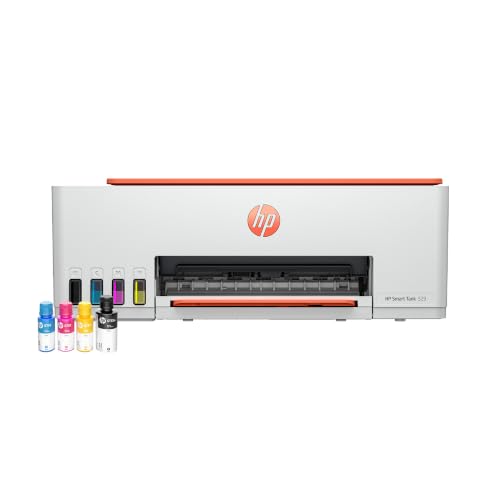
🖨️ Ink tank; resolution not supplied: Supports sharp everyday documents and home color printing.
⚡ Up to 30 black, 24 color ppm; 4000/6000 yield: Reduces waiting on larger family-office print jobs.
💰 HP GT53/GT53XL and GT52 bottles: Tank refills promise lower running costs; CPP remains unverified.
📑 Print, scan and copy: Handles home-office paperwork, assignments and basic document digitisation.
📶 Hi-Speed USB 2.0: Provides reliable wired printing, though wireless support is not listed.
For anyone hunting the best printer under 10000 for business use where documents are long and Wi-Fi is not essential, the Smart Tank 529 stands out. The advertised 30 ppm black and 24 ppm color speeds are far ahead of the Canon tank models, which matters for invoices, reports and multi-page worksheets. The tank system also removes the constant cartridge swaps that frustrate busy households.
Verify before buying: the listing does not state the ISO test standard, resolution, tray capacity or scanner optical DPI. Wireless is not listed, so this is not the best printer under 10000 with WiFi. Scanning is flatbed only, so multi-page stacks stay manual. Check that the box includes all GT bottles and a USB cable.
Pros
✅ Highest advertised print speeds here.
✅ Refillable tank lowers replacement frequency.
✅ Integrated scanning and copying.
✅ One-year warranty and HP support stated.
Cons
❌ Wireless printing is not listed.
❌ Resolution specification is unavailable.
❌ Speed claims need ISO confirmation.
👉 Check Live Price & Stock Availability on Amazon
4. Canon PIXMA E4570 – The WFH Productivity Specialist
🖨️ Cartridge inkjet, 4800 x 1200 dpi: Produces sharp documents and respectable color output for office use.
⚡ 8.8 black, 4.4 color ipm; 400/180 yield: Handles light workloads but color cartridges need monitoring.
💰 PG-47/CL-57s cartridges; CPP unlisted: Calculate current genuine cartridge costs before regular business printing.
📑 Print, scan, copy, fax and ADF: Speeds document handling and supports professional home-office workflows.
📶 Wi-Fi, AirPrint, Mopria and Canon apps: Enables smartphone printing and convenient laptop connectivity.
The E4570 is the best color printer under 10000 in this list for people who value workflow over ink economy, and the most complete pick for wireless WFH. The ADF is far more useful than a plain flatbed for multi-page forms, and automatic duplex cuts paper use on long documents. Wi-Fi, AirPrint, Mopria, and Canon apps make phone printing straightforward.
The trade-off is running cost. Stated yields of 400 black and 180 color pages are fine for a cartridge printer but nowhere near a tank. Color at 4.4 ipm will feel slow on photo-heavy projects, and scanner DPI and noise are not listed. If you print about 150-300 pages a month and need fax, ADF, and duplex, it justifies the price; heavier users should choose a tank.
Pros
✅ Automatic duplex reduces paper consumption.
✅ ADF improves multi-page scanning.
✅ Wi-Fi and mobile protocols included.
✅ Print, scan, copy, and fax.
Cons
❌ Cartridge CPP may rise quickly.
❌ Color printing is relatively slow.
❌ Scanner optical DPI unavailable.
👉 Check Price & EMI Options on Amazon
5. HP DeskJet Ink Advantage Ultra 4929 – Budget Wireless All-in-One
🖨️ Cartridge inkjet; resolution not supplied: Produces everyday color documents and home office prints.
⚡ 7.5 black, 5.5 color ppm; 1300/700 yield: Reduces replacements if the bundled yield is genuine.
💰 HP 47 cartridges; additional sets advertised: Check cartridge policy and real replacement cost before buying.
📑 Print, scan and copy: Covers basic household paperwork, schoolwork and document digitisation.
📶 Wi-Fi and USB 2.0: Enables phone printing while retaining dependable wired fallback connectivity.
The HP 4929 is an appealing printer for home under 10000 because it pairs a compact footprint with wireless printing and scanning. The listing claims up to 1,300 black and 700 color pages and includes additional ink sets, which could improve first-year value if the bundle arrives as advertised. Its 60-sheet input tray suits a small desk but needs frequent reloading for big assignments.
Speeds of 7.5 black and 5.5 color ppm are fine for light use, not a busy office. Resolution, scanner DPI and duplex support are not specified. HP states the printer works only with cartridges carrying original HP chips, so do not count on cheap third-party refills. Keep it covered against dust and print a test page every week or two when idle.
Pros
✅ Wi-Fi and USB connectivity included.
✅ Print, scan and copy functions.
✅ Additional ink sets advertised.
✅ Compact 60-sheet home-office design.
Cons
❌ Cartridge compatibility is restricted.
❌ Small input tray needs refilling.
❌ Maximum resolution is unspecified.
👉 Check Today’s Price & Bank Offers on Amazon
6. HP AI Capable Ink Advantage 4388 – Wireless ADF Convenience
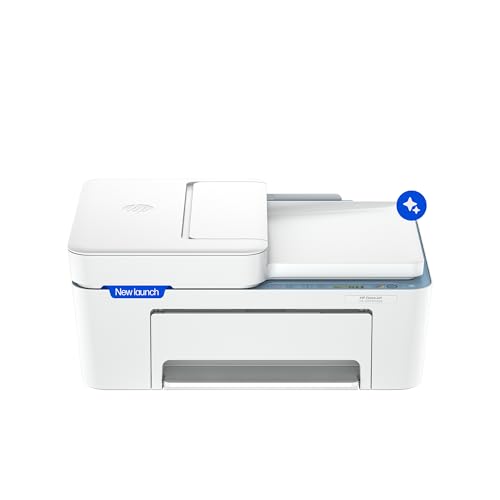
🖨️ Cartridge inkjet; resolution not supplied: Produces practical text and color documents for connected homes.
⚡ 20 black, 16 color ppm; yield unspecified: Speeds routine prints, though actual ISO output needs confirmation.
💰 Ink cartridge costs unlisted: Compare genuine replacements carefully before choosing for frequent color work.
📑 Print, scan, copy with ADF: Makes multi-page document handling easier for home and small offices.
📶 Dual-band Wi-Fi and HP app: Reduces 2.4GHz congestion and enables direct mobile printing.
If you want the best printer under 10000 with wifi that copes with a crowded router, the 4388 is worth a look. Dual-band support (2.4GHz and 5GHz) should hold up better than single-band models in apartments, and the HP app simplifies setup and phone printing. The ADF is a real advantage for scanning several pages, forms or receipts without placing each sheet by hand.
The hesitation is consumables. No page yield or CPP is stated, so a good hardware deal can turn expensive on color-heavy school projects. The 20/16 ppm figures are promising but not guaranteed mixed-document speeds. Resolution, scanner DPI, tray capacity and duplex support are not listed. Expect typical inkjet feed noise, and allow desk space for the 7.19 kg body.
Pros
✅ Dual-band Wi-Fi supports stable connections.
✅ ADF speeds multi-page document scanning.
✅ Print, scan, and copy included.
✅ HP app simplifies wireless setup.
Cons
❌ Cartridge yield is unspecified.
❌ CPP cannot be confirmed.
❌ Heavy body needs a sturdy desk.
👉 View Current Deal & Discounts on Amazon
7. Canon PIXMA E3370 – Compact Wireless Everyday Printer

🖨️ Cartridge inkjet; maximum DPI unspecified: Delivers routine text and color prints for household use.
⚡ 7.7 black, 4 color ppm; 400/180 yield: Supports light monthly printing without immediate replacements.
💰 PG-47/CL-57s cartridges; CPP unlisted: Verify genuine cartridge costs before choosing for frequent documents.
📑 Print, scan and copy: Handles basic copying, scanning and school assignments from one compact unit.
📶 Wi-Fi Direct and USB: Enables mobile printing while preserving a stable wired fallback.
The E3370 is a sensible entry in the all-in-one printer under 10000 segment for light home use. Wi-Fi Direct and Canon’s mobile apps make it easy to print a form from a smartphone, and the LCD shows basic status. Speeds of 7.7 black and 4 color ipm suit occasional pages but will feel slow on a large color project.
The 400 black and 180 color yields beat the smallest cartridge packs, yet this is still a cartridge printer, not a tank. The listing says duplex printing is not available, so two-sided documents need manual flipping. Scanner DPI, tray capacity and noise are not listed. If you print weekly batches, compare the G2010 or G1730 economics first.
Pros
✅ Wi-Fi Direct supports mobile printing.
✅ USB fallback keeps printing reliable.
✅ Print, scan and copy functions.
✅ Stated 400-page black yield.
Cons
❌ No automatic duplex printing.
❌ Color output is relatively slow.
❌ Cartridge costs limit heavy use.
👉 Check Live Price & Stock Availability on Amazon
8. HP AI Capable Ink Advantage 2986 – Simple Dual-Band Home Printer
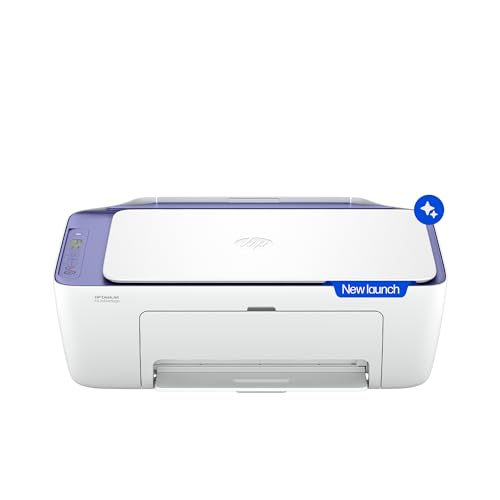
🖨️ Cartridge inkjet; resolution not supplied: Targets everyday home documents and occasional color projects.
⚡ 20 black, 16 color ppm; yield unspecified: Promises quick output, subject to real-world ISO testing.
💰 HP cartridge costs not supplied: Calculate replacement CPP before committing to frequent color printing.
📑 Print, scan and copy: Provides convenient home-office document handling in one desktop machine.
📶 Dual-band Wi-Fi and HP app: Simplifies mobile printing and reduces congested 2.4GHz connection problems.
The HP 2986 suits households that want Wi-Fi, scanning, and copying without paying for a tank. Dual-band support is the practical highlight: it can use a less congested 5GHz network where your router allows, while the HP app handles setup and print jobs. The 20 black and 16 color ppm figures look attractive for forms and assignments.
It is not a high-volume machine, though. The source sheet gives no cartridge yield, CPP, resolution, scanner DPI, duplex, or tray details, and those gaps matter more than headline speed when ink is costly. It suits occasional users; frequent students and small businesses should move to an ink tank. Keep the paper path clean to reduce 70-80 GSM jams.
Pros
✅ Dual-band Wi-Fi supports flexible setup.
✅ HP app enables smartphone printing.
✅ Integrated scanning and copying.
✅ Advertised 20/16 ppm output.
Cons
❌ Ink yield remains unspecified.
❌ Maximum resolution is unavailable.
❌ High-volume use may become expensive.
👉 Check Price & EMI Options on Amazon
Buying Guide for Printers Under ₹10,000 in India
🖨️ Inkjet vs Ink Tank vs Laser
Cartridge inkjets cost less upfront and print color, but low yields make them expensive for frequent assignments. Ink tanks cost more at purchase yet suit steady home-office, student and small-business work because bottles produce thousands of pages. A laser printer under 10000 can be excellent for black text and long idle periods, but color laser models are uncommon at this price, and none of the printers we reviewed is a laser. Choose a tank for steady volume, a cartridge model for occasional use.
⚡ Print Speed (PPM) vs Resolution (DPI)
PPM or ipm tells you how fast pages come out; DPI describes maximum detail. Neither guarantees real mixed-document performance. A true 8.5 ipm black speed prints a 20-page assignment in roughly two and a half minutes before pauses, while color graphics take longer. High DPI helps charts and photos, but paper, ink and color settings matter as much as the number on the box. Check whether the maker quotes ISO or draft-mode speed.
💰 Cost Per Page (CPP) and Cartridge Lifespan
Divide the genuine cartridge or bottle price by the stated yield, separately for black and color, then add paper. For example, a Rs 900 cartridge rated for 180 pages works out to Rs 5 per page in theory. That is an illustration, not a quoted price. Tank models often win because one bottle set can cover thousands of pages. Check whether XL cartridges exist and whether firmware blocks third-party ink.
📶 Wireless (Wi-Fi/App) vs USB-Only Printing
Wi-Fi helps when family members print from phones, tablets and laptops. HP Smart, Canon PRINT, AirPrint, Mopria and Epson iPrint reduce dependence on a PC, but app permissions and router bands still matter. Dual-band Wi-Fi helps in congested apartments, while a single-band 2.4GHz printer may drop out near a busy router. USB is less convenient but very stable. If phone printing is essential, verify the app and OS support before ordering.
📑 All-in-One vs Single Function
An all-in-one earns its desk space if you scan IDs, copy forms, or digitize receipts. An ADF helps with multi-page jobs, and automatic duplex saves paper. Many readers also ask about xerox machine price under 10000: a true photocopier is a different class of machine, but any all-in-one here with a copy function covers everyday photocopying for forms and IDs. A single-function tank such as the G1730 is better value if you already have a scanner.
Buying Printers Online in India
Before you compare printer prices in India across sellers, confirm that the listing is an India-market unit with an official brand warranty from HP, Canon, Epson or Brother. Check whether service is onsite or carry-in, how long the warranty runs and whether your PIN code is covered. For tank printers, confirm all CMYK bottles are in the box; for cartridge models, check whether the cartridges are set up or full-yield, and whether a USB cable is included.
Also confirm Windows and macOS compatibility and whether setup needs a 2.4GHz network. Read the seller rating, return policy, and damage terms, especially for heavier tank models. Sale events and bank offers can bring an ADF or Wi-Fi model into budget, but compare genuine bottle or cartridge costs first. A printer is only a bargain if its ink, warranty, and service network stay practical in India.
Conclusion
The top printers under 10000 mark a shift from low-price cartridge hardware toward refillable tanks. The Canon G1730 and G2010 offer the strongest stated yield economics, while the HP Smart Tank 529 prioritizes speed. Cartridge models still make sense when you need compact wireless access, an ADF, fax or automatic duplex, but long-term value depends on genuine replacement prices and bundled ink.
A student printing every week will usually recover a tank’s higher upfront cost. A light home user may value wireless convenience and a small footprint more than theoretical CPP. Whatever you pick, print a small test page every week or two, keep dust off the feed path, and use clean paper to limit jams and clogged nozzles.
🥇 The Budget Hero: Canon PIXMA MegaTank G2010 – Best for buyers wanting reliable high-yield printing, scanning and copying with low running costs and stable USB connectivity.
👑 The Performance King: Canon PIXMA MegaTank G1730 – The strongest low-cost-per-page and speed choice for frequent black and color printing, if you do not need scanning or Wi-Fi.
FAQs
1. Is an ink tank better than a cartridge printer under 10000?
For regular printing, yes. Ink tanks generally give far higher yields and lower running costs. Cartridge models remain sensible for occasional users who want a lower upfront price, Wi-Fi, an ADF, or duplex printing.
2. Is there a good printer under 10000 with Wi-Fi?
Yes. The Canon E4570 and E3370 and the HP 4929, 4388, and 2986 list Wi-Fi. Confirm app support, router-band compatibility, and genuine ink costs before buying.
3. Is a laser printer under 10000 suitable for home use?
A monochrome laser suits text-heavy users who print infrequently. Verify current India pricing, toner availability, scanning, and warranty. Every model in this guide is a color inkjet or ink tank.
4. Can these printers print directly from a smartphone?
Wi-Fi models can, using HP Smart, Canon PRINT, AirPrint, Mopria, or Wi-Fi Direct where supported. USB-only models need a computer or compatible intermediary device.




![7 Best Webcams Under ₹3,000 in India [2026] | GadgetVeda](https://gadgetveda.com/wp-content/uploads/2026/10/Best-Webcams-Under-₹3000-in-India-150x150.png)
![8 Best Printers Under ₹10,000 in India [2026] | GadgetVeda](https://gadgetveda.com/wp-content/uploads/2026/09/Best-Printers-Under-₹10000-in-India-150x150.webp)
![6 Best Printers Under ₹5,000 in India [2026] | GadgetVeda](https://gadgetveda.com/wp-content/uploads/2026/09/Best-Printers-Under-₹5000-in-India-150x150.webp)



![7 Best Webcams Under ₹3,000 in India [2026] | GadgetVeda](https://gadgetveda.com/wp-content/uploads/2026/10/Best-Webcams-Under-₹3000-in-India-300x167.png)
![8 Best Printers Under ₹10,000 in India [2026] | GadgetVeda](https://gadgetveda.com/wp-content/uploads/2026/09/Best-Printers-Under-₹10000-in-India-300x167.webp)
![6 Best Printers Under ₹5,000 in India [2026] | GadgetVeda](https://gadgetveda.com/wp-content/uploads/2026/09/Best-Printers-Under-₹5000-in-India-300x167.webp)