


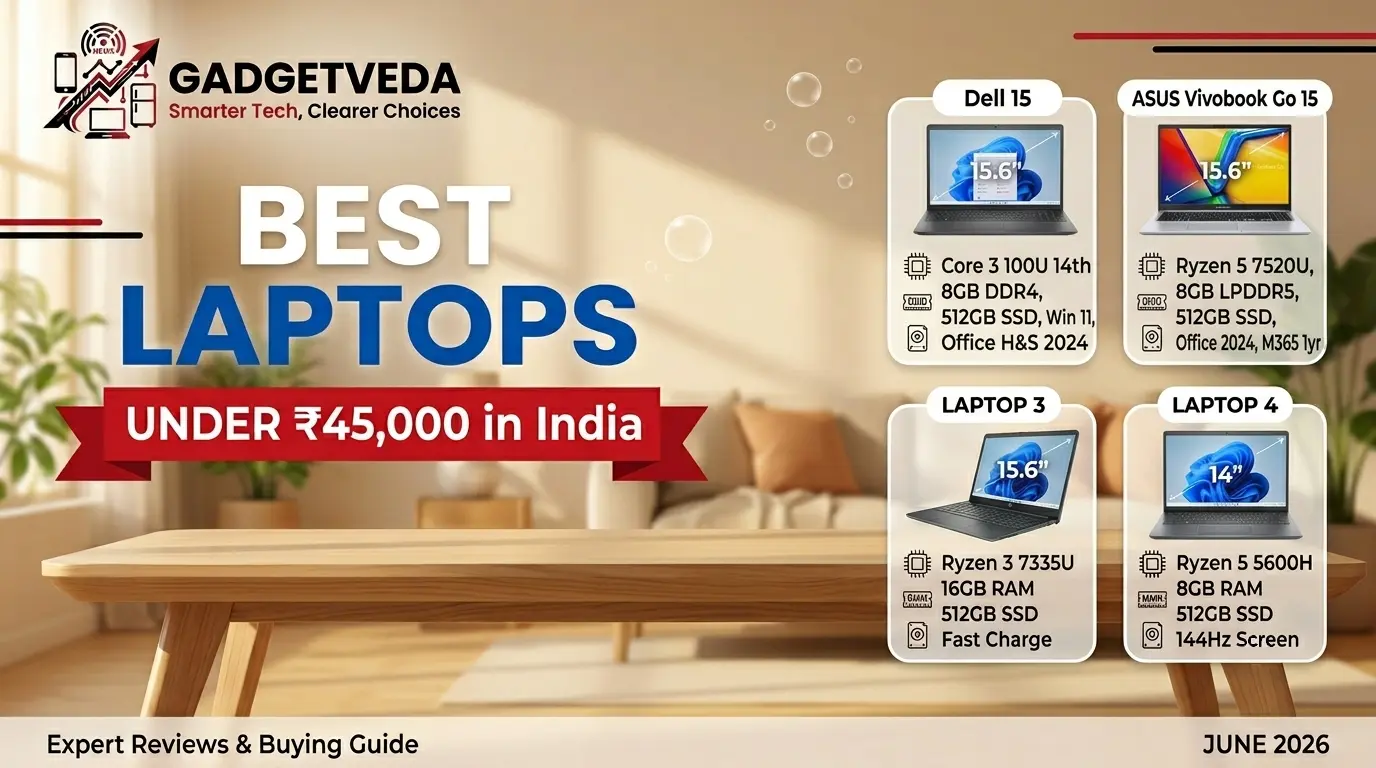
Searching for the best laptops under 45000 is one of the most common — and most easily botched — buying decisions Indian consumers face today. At this price point, your ₹45,000 is genuinely capable of buying you a laptop that handles morning office calls, afternoon college assignments, coding sessions, and casual weekend streaming without breaking a sweat. But there’s a real problem: the market at this budget is flooded with outdated processor configurations, 8GB RAM bottlenecks dressed up in modern chassis, and display panels that look great in photos but wash out completely under your hostel room tube light or office overhead lighting. The difference between the right laptop and the wrong one at ₹45K often comes down to understanding three hardware pillars: processor generation, RAM speed, and storage configuration — and in 2026, all three standards have shifted considerably from what was considered “acceptable” just two years ago.
At GadgetVeda, our product selection and editorial rankings aren’t influenced by brand sponsorships or promotional budgets. Every laptop in this guide was evaluated through a rigorous spec-to-price value extraction matrix — we cross-reference processor architecture tier and real-world thermal design, evaluate RAM channel configuration and memory speed, assess display panel type and actual nit brightness against verified user feedback, and map each machine against distinct audience profiles: college students on a daily commute, office professionals managing heavy tab-loaded workloads, coders who need responsive typing and snappy compile times, and casual users who want dependable entertainment after work hours. This is how we ensure you’re not buying last year’s clearance stock at this year’s price.
🏆 GadgetVeda Expert Picks — Skip the Research, Buy With Confidence
For readers who need a fast answer before diving into the full technical breakdown, here are our three definitive picks from this list:
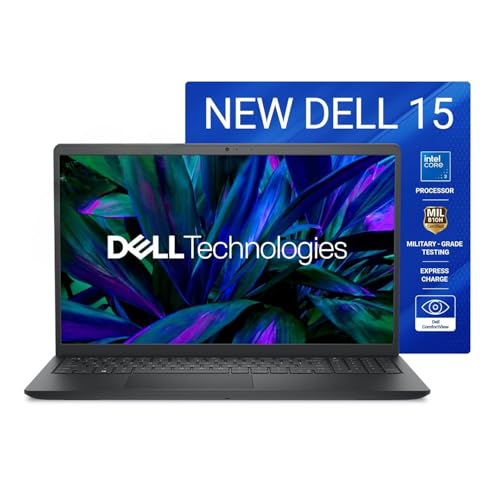
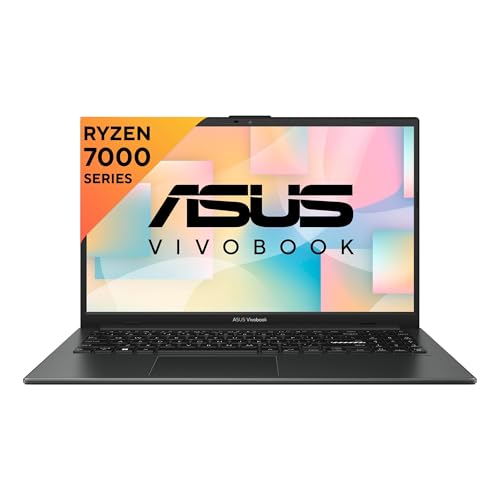
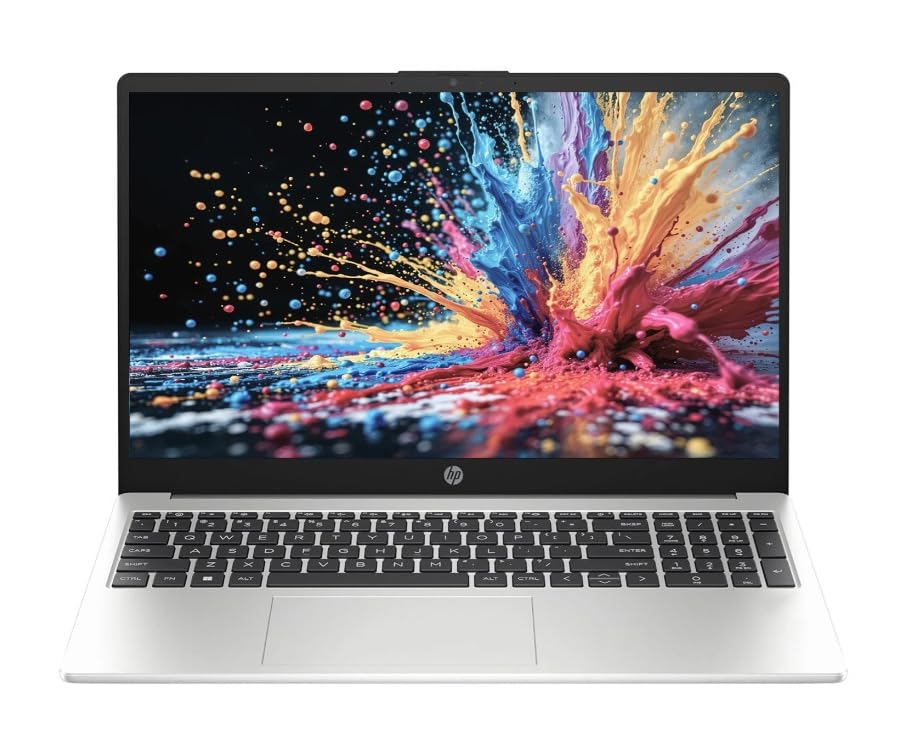
🥇 Our Top Pick Overall — Dell 15 (Core 3 100U, 15.6″ 120Hz)
Why it wins: The only laptop in this bracket combining a 120Hz IPS display, 14th Gen Intel Core 3 100U processor, lifetime Windows 11 + MS Office 2024, and Dell’s 1-year onsite hardware warranty — all at under ₹45,000. The 120Hz panel is a standout differentiator that no competitor at this price range offers, and Dell’s pan-India service network gives it a clear long-term reliability edge for office buyers and students alike.
🥈 Best Budget Value — ASUS Vivobook Go 15 (Ryzen 5 7520U)
Why it wins: This is the only Ryzen 5-powered machine at this price bracket — a meaningful step up in multi-core capability over Ryzen 3 or Athlon-class chips. The LPDDR5 RAM, PCIe 3.0 SSD, military-grade MIL-STD-810H chassis, and bundled Office Home 2024 + M365 Basic subscription make this genuinely over-spec’d for its price. For students and coders who want the fastest processor available under ₹45K, nothing else comes close.
🥉 The Performance Pro — HP 15 (2026, Win 11 Pro, Ryzen 3 7335U)
Why it wins: The only Windows 11 Pro configuration in this entire guide — a significant advantage for corporate employees, IT professionals, and anyone who needs BitLocker encryption, Remote Desktop, and advanced Group Policy features. Paired with DDR5 RAM, a 65W USB-C charger, and USB Type-C 10Gbps with DisplayPort 1.4, this HP delivers a professional-grade connectivity stack that punches well above its ₹45K price tag.
👉 Exploring other budgets? We’ve got dedicated guides for every bracket:
🟠 Best Laptops Under ₹40,000 in India — Handpicked options for buyers who want seamless multitasking, better display quality, and overall office-ready value
🟡 Best Laptops Under ₹35,000 in India — Value-for-money laptops for students and working professionals who need reliable daily performance
🔵 Best Laptops Under ₹25,000 in India — Entry-level picks for basic web browsing, video streaming, and online learning without overspending
🔍 Best Laptops Under ₹45,000 in India [Quick Comparison]
| Rank | Model Name (Best For) | Key Specifications | Expert Rating | Latest Price |
| 1 | Dell 15 — Core 3 100U (Best for Office Professionals) | Core 3 100U 14th Gen, 8GB DDR4, 512GB SSD, 15.6″ FHD 120Hz IPS 250 nit, Win 11 + Office H&S 2024, 1-yr Onsite Warranty | 9.4/10 | Check Current Offer |
| 2 | ASUS Vivobook Go 15 — Ryzen 5 7520U (Best for Students & Coders) | Ryzen 5 7520U, 8GB LPDDR5, 512GB PCIe NVMe SSD, 15.6″ FHD 250 nit Anti-glare, MIL-STD 810H, Office 2024 + M365 1yr | 9.3/10 | Check Current Offer |
| 3 | HP 15 2026 — Win 11 Pro (Best for Corporate Professionals) | Ryzen 3 7335U, 8GB DDR5, 512GB SSD, 15.6″ FHD 250 nit Anti-glare, Win 11 Pro, Office 2024, USB-C 10Gbps + DP 1.4 | 9.2/10 | Check Current Offer |
| 4 | Acer One 15 (Acer 15 Smartchoice) | Ryzen 3 7320U, 8GB DDR5, 256GB SSD, 15.6″ FHD, Win 11, MS Office 2021 Pro Plus, 55Wh, 1.59kg | 9.0/10 | Check Current Offer |
| 5 | HP 255 G10 (Best for Casual Work + School) | Athlon Silver 7120U, 8GB DDR4, 256GB SSD, 15.6″ HD, Win 11, Wi‑Fi 6, 41Wh, numpad | 8.8/10 | Check Current Offer |
| 6 | Dell Inspiron 5440 — Ubuntu (Best for Developers & Linux Users) | Core 3 100U 14th Gen, 8GB DDR5, 512GB SSD, 14″ FHD+ 300 nit Anti-glare 16:10, Ubuntu, MIL-STD tested, Dolby Atmos | 9.0/10 | Check Current Offer |
| 7 | HP 15 2026 — MS Office (Best for Daily Work + College) | Ryzen 3 7335U, 8GB DDR5, 512GB SSD, 15.6″ FHD 250 nit, Win 11 Home, MS Office Lifetime, Copilot Key, Wi-Fi 6 | 8.9/10 | Check Current Offer |
| 8 | ASUS Vivobook Go 14 — Ryzen 3 7320U (Best Compact Student Laptop) | Ryzen 3 7320U, 8GB RAM, 512GB SSD, 14″ FHD IPS-Level, Win 11, Office 2024 + M365 1yr, Mixed Black, 1.38 kg | 8.8/10 | Check Current Offer |
| 9 | Acer TravelLite TL14-42M (Best for Business Travelers) | Ryzen 3 7330U, 8GB DDR4, 512GB SSD, 14″ FHD TN Anti-glare, LAN Port, USB-C Full Function, 1.34 kg | 8.7/10 | Check Current Offer |
| 10 | Acer Aspire Lite AL15-41 (Best Metal Body Thin & Light) | Ryzen 3 7330U, 8GB DDR4, 256GB SSD, 15.6″ FHD IPS, Metal Body, 2 SODIMM slots (up to 32GB), 180° hinge, 1.59 kg | 8.5/10 | Check Current Offer |
| 11 | Lenovo V15 G4 Athlon — With Office (Best Budget Productivity Laptop) | Athlon Silver 7120U, 8GB LPDDR5, 512GB SSD, 15.6″ FHD Anti-glare, Win 11 + MS Office, MIL-SPEC 810H, Wi-Fi 6, 1.65 kg | 8.3/10 | Check Current Offer |
| 12 | Lenovo V15 G4 Athlon — Lifetime Win 11 (Best Entry-Level Office Laptop) | Athlon Silver 7120U, 8GB LPDDR5, 512GB SSD, 15.6″ FHD Anti-glare, Win 11 Lifetime Validity, Wi-Fi 6, Privacy Shutter | 8.2/10 | Check Current Offer |
12 Best Laptops Under ₹45,000 in India [Detailed Reviews]
Dell 15 (Core 3 100U) — Best Office Laptop Under 45000 With 120Hz Display
⚡ Intel Core 3 100U 14th Gen | Up to 4.70GHz | 6 Cores | 10MB Cache | 8GB DDR4 | 512GB NVMe SSD — Latest-gen Intel architecture delivering smooth office multitasking, fast tab handling, and responsive daily performance.
🖥️ 15.6″ FHD 120Hz WVA IPS | 250 Nits | Anti-Glare | Narrow Bezel | Carbon Black Thin & Light | 1.63 kg — Only 120Hz display available under ₹45,000; dramatically smoother scrolling and screen experience than all 60Hz rivals.
🛡️ Win 11 Home Lifetime + MS Office H&S 2024 Lifetime | Dell 1-Year Onsite Hardware Warranty | McAfee 12-Month Security — Complete productivity software stack plus technician-at-your-door service; strongest warranty tier in this budget.
The Dell 15 earns the top spot in our best laptops under 45000 rankings for one defining reason that no other competitor at this price point can match: a 120Hz WVA IPS display with 250 nit brightness and narrow bezels. At ₹45,000, every other laptop ships with a standard 60Hz panel, making Dell’s panel decision here a genuine differentiator for anyone who spends 6-8 hours daily in front of their screen. Whether you’re scrolling through spreadsheets, browsing research tabs, or watching content in the evening, the smoother 120Hz experience is immediately and consistently noticeable.
Under the hood, the 14th Gen Intel Core 3 100U processor (up to 4.70GHz, 6 cores, 10MB cache) handles the workloads this laptop is designed for — document editing, multi-tab browsing, video calls, light data work — with confident composure. The 8GB DDR4 paired with a 512GB SSD keeps the system snappy, and the pre-loaded Windows 11 Home with lifetime validity plus MS Office Home & Student 2024 means you’re genuinely productive from day one, no subscription required.
The real-world kicker is Dell’s 1-year onsite hardware service warranty — meaning if something goes wrong, a technician comes to you rather than you shipping the device or visiting a service center. For office buyers who can’t afford downtime, this warranty tier is significantly more valuable than the standard carry-in service that most competitors offer at this price.
📋 GadgetVeda Review Note: Based comprehensive analysis, the Core 3 100U handles everyday multitasking smoothly. Users report the keyboard deck is firm with minimal flex, and the display holds up well under bright indoor lighting conditions. The DDR4 (vs DDR5 on HP) configuration is a minor step down in memory bandwidth, but in real office workloads at this tier, the difference is negligible.
Pros
✅ 120Hz IPS display — the only 120Hz panel available under ₹45,000; immediately superior to all 60Hz competitors for daily screen use
✅ 14th Gen Core 3 100U (up to 4.70GHz, 6 cores) — the most recent Intel architecture in this price segment with efficient 10MB cache
✅ Dell 1-year onsite hardware warranty — a technician visits you; significantly more practical than carry-in service for office users
✅ Pre-loaded Win 11 Home Lifetime + MS Office H&S 2024 Lifetime — complete productivity stack with zero recurring software cost
Cons
❌ 8GB DDR4 (not DDR5) — slight memory bandwidth disadvantage vs HP’s DDR5 configuration at similar pricing
❌ Carbon Black chassis is fully plastic — no metal lid reinforcement, which affects structural rigidity in daily bag carrying
🛒 Check Dell 15 Core 3 100U Current Amazon Offer
ASUS Vivobook Go 15 (Ryzen 5 7520U) — Best Student Laptop Under 45000 for Coding & Heavy Multitasking
⚡ AMD Ryzen 5 7520U | Zen 4 | Up to 4.3GHz | 4 Cores / 8 Threads | 8GB LPDDR5 RAM | 512GB PCIe NVMe SSD — Only Ryzen 5 laptop under ₹45K; measurable multi-core advantage for coding, IDE compilation, and heavy multitasking.
🖥️ 15.6″ FHD Anti-Glare | 250 Nits | 45% NTSC | MIL-STD-810H Military-Grade | 180° Lay-Flat Hinge | 1.63 kg — Military-tested durability across 26 procedures plus lay-flat hinge for collaborative classroom and co-working use.
🔋 Fast Charge 60% in 49 Min | Wi-Fi 6E | Office Home 2024 Lifetime + M365 Basic 1yr (100GB Cloud) | Windows 11 Home — Best combined software bundle at this price; Wi-Fi 6E ensures stable connectivity in congested campus and coworking networks.
The ASUS Vivobook Go 15 is the unambiguous performance leader in our best laptops under 45000 list from a pure processor standpoint. While every other laptop in this guide runs on a Ryzen 3, Athlon, or Core 3 chip, the Ryzen 5 7520U here brings 4 Zen 4 cores with 8 threads, a 6MB L3 cache, and a max boost of 4.3GHz — delivering a meaningful multi-core performance advantage that matters in real use cases like simultaneous IDE compilation, running local development servers, video rendering, and multi-app multitasking that is common in college assignments and light professional work.
The LPDDR5 memory architecture is faster than the DDR4 configurations found on cheaper alternatives, and the 512GB M.2 NVMe SSD on PCIe 3.0 keeps data access times competitive. The 15.6-inch FHD anti-glare display at 250 nits with 45% NTSC color gamut is honest and capable for extended use — not a color-critical creator display, but entirely comfortable for 8-10 hour daily sessions. ASUS’s WiFi 6E connectivity is a significant bonus for campus or coworking space environments with congested wireless networks.
What makes this machine remarkable at its price is the combination of MIL-STD-810H military-grade certification (12 test methods, 26 procedures), a 180° lay-flat hinge for collaborative work, fast charge to 60% in 49 minutes, and a bundled software package of Office Home 2024 (lifetime) plus M365 Basic (1-year, 100GB cloud). For the best laptops under 45000 for students and coding work, the value density here is hard to beat.
📋 GadgetVeda Review Note: Spec analysis and user reviews confirm the Ryzen 5 7520U handles VS Code, Python environments, and browser-heavy research workflows smoothly. ASUS SonicMaster + DTS Audio Processing delivers notably better speaker quality than most budget laptops. Users consistently highlight fast boot times and responsive daily performance as standout real-world positives.
Pros
✅ AMD Ryzen 5 7520U (Zen 4, 4.3GHz max boost) — only Ryzen 5 configuration available under ₹45K; measurable multi-core edge for coding and heavy multitasking
✅ MIL-STD-810H military-grade chassis certification — 26 test procedures for drop, humidity, temperature, and vibration resistance
✅ Fast charge: 60% in 49 minutes — valuable for college students between lectures without reliable plug access
✅ Office Home 2024 (lifetime) + M365 Basic 1yr (100GB cloud) — most complete software bundle in this price segment
Cons
❌ Only one USB-C 3.2 Gen 1 and limited port count — a USB hub is practically mandatory if you connect multiple peripherals
❌ 8GB LPDDR5 (non-expandable) — LPDDR5 RAM is often soldered; upgrading to 16GB later may not be possible
🛒 Check ASUS Vivobook Go 15 Ryzen 5 Current Amazon Offer
HP 15 (2026, Win 11 Pro) — Best Professional Laptop Under 45000 for Corporate Use
⚡ AMD Ryzen 3 7335U | Up to 4.3GHz | 4 Cores / 8 Threads | 8GB DDR5-4800 RAM | 512GB PCIe NVMe SSD | Copilot Key — DDR5-4800 memory bandwidth with modern Ryzen 3 performance; Copilot key enables native AI-assisted workflows in Windows 11.
🖥️ 15.6″ FHD IPS Anti-Glare | 250 Nits | Narrow Bezel | USB-C 10Gbps + DisplayPort 1.4 | 65W USB-C Charging Adapter — Drives external 4K monitors from a single USB-C cable; 65W fast charger included — premium connectivity at this price tier.
🛡️ Windows 11 Pro | BitLocker + Remote Desktop + Group Policy | MS Office 2024 Lifetime | Wi-Fi 6 | HP Pan-India Service — Only Win 11 Pro laptop under ₹45K; enterprise-grade security features essential for corporate, IT, and finance professionals.
If your job requires Windows 11 Pro — or if you’re in IT support, systems administration, finance, or any corporate role where BitLocker encryption, Group Policy, Remote Desktop Protocol, and enterprise-grade security are not optional — then this HP 15 2026 edition is the only laptop in our best laptops under 45000 in India guide that delivers that operating system at this price. Every other model ships with the Home edition. That distinction alone is worth more than its face value to the right buyer.
Beyond the OS advantage, the HP 15 Pro packs the AMD Ryzen 3 7335U (up to 4.3GHz, 4 cores, 8 threads, DDR5-4800 memory support), 8GB DDR5-4800 RAM for faster memory bandwidth than DDR4 configurations, and a 512GB PCIe NVMe SSD. The USB Type-C 10Gbps port with DisplayPort 1.4 and HP Sleep and Charge, combined with a 65W USB-C adapter, means you can drive an external 4K monitor from a single USB-C cable — a genuinely premium setup capability at this price tier. The Copilot key integration also enables AI-assisted productivity workflows native to Windows 11.
The 15.6-inch FHD IPS anti-glare display at 250 nits is clean and accurate enough for professional presentations and document work, and HP’s pan-India service network means warranty claims are handled reliably in most Tier 1 and Tier 2 cities.
📋 GadgetVeda Review Note: User feedback highlights the keyboard responsiveness and build quality as consistently strong. The DDR5 memory advantage, combined with Windows 11 Pro’s security layer, makes this the most enterprise-ready configuration under ₹45K. The 41Wh battery is honest rather than spectacular — expect 6-7 hours of mixed professional workloads.
Pros
✅ Windows 11 Pro — BitLocker, Remote Desktop, Group Policy; the only Win 11 Pro laptop in this under-₹45K guide
✅ USB-C 10Gbps with DisplayPort 1.4 — drives external 4K monitors and high-speed peripherals from a single port
✅ DDR5-4800 memory + AMD Ryzen 3 7335U — modern memory architecture with strong single-core performance at 4.3GHz
✅ 65W USB-C fast charging adapter included — charges both laptop and peripherals through one cable
Cons
❌ 41Wh battery is compact — real-world endurance on moderate professional workloads runs approximately 6-7 hours; not an all-day unplugged machine
❌ 45% NTSC display — accurate for office work but not suitable for color-critical design or photo editing tasks
🛒 Check HP 15 2026 Win 11 Pro Current Amazon Offer
Acer One 15 (Acer 15 Smartchoice) — Thin-and-Light Windows Laptop Built for Everyday Productivity
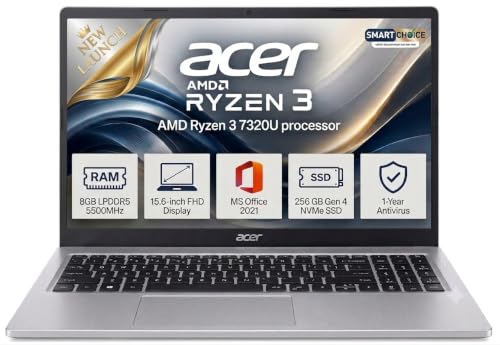
🖥️ FHD Productivity Display — 15.6-inch Full HD screen gives sharper text and more comfortable viewing for long study or office sessions.
⚡ Modern Memory & Storage — Ryzen 3 7320U, 8GB DDR5 5500MHz, and 256GB SSD combine for quick boot times and smooth everyday multitasking.
🎁 Ready-to-Use Package — Windows 11 Home, MS Office 2021 Pro Plus, antivirus, and a 55Wh battery make it easy to start working immediately.
If your readers want the best laptop under 45000 in India that looks professional, stays light enough for daily carry, and still feels quick in office use, the Acer One 15 is a strong fit. The Ryzen 3 7320U gives it a much better everyday rhythm than older entry-level chips, and the 8GB DDR5 RAM at 5500MHz means switching between browser tabs, spreadsheets, video calls, and documents feels smoother than on many older DDR4 systems. The 256GB SSD keeps boot times short and makes the machine feel responsive from the first click.
Its 15.6-inch Full HD display is the big comfort advantage here, especially for users who spend hours reading, typing, or attending classes on a laptop. The 55Wh battery and 1.59kg body make it practical for work-from-anywhere routines without feeling bulky. What improves the value further is the inclusion of Windows 11 Home, MS Office 2021 Pro Plus, and antivirus support, which makes it ready for students and professionals who want a laptop that can be used immediately rather than configured later. Compared with the HP 255 G10, Acer wins clearly on display quality, RAM type, and overall polish.
Pros
✅ Full HD 15.6-inch display is better for study, work, and streaming than the HP’s HD screen.
✅ Ryzen 3 7320U with 8GB DDR5 and SSD offers fast, balanced everyday performance.
✅ MS Office 2021 Pro Plus and antivirus add real out-of-the-box value.
✅ 55Wh battery and 1.59kg weight make it a practical thin-and-light option.
Cons
❌ Not meant for gaming or heavy creative workloads.
❌ 256GB storage is adequate, but not generous if users keep large media libraries locally.
HP 255 G10 — Practical Office-First Laptop with Wi‑Fi 6 and Full Keyboard

🔐 Office-Friendly Features — Spill-resistant full-size keyboard, numeric keypad, USB-C, and Wi‑Fi 6 make it a practical work machine.
💾 Fast Daily Use — 256GB PCIe NVMe SSD keeps Windows 11 responsive for browsing, documents, and meetings.
🧳 Simple, Reliable Design — 15.6-inch anti-glare chassis with Bluetooth 5.3 and a 41Wh battery suits routine productivity.
For buyers who want a no-drama machine for emails, spreadsheets, browsing, and meetings, the HP 255 G10 is the more conservative choice. The Athlon Silver 7120U is not a headline-grabbing chip, but it is perfectly adequate for routine office tasks, and the 8GB DDR4 plus 256GB SSD combination keeps basic workflows moving without the sluggishness of eMMC-based budget laptops. The presence of Wi‑Fi 6, Bluetooth 5.3, USB-C, and a spill-resistant full-size keyboard with numeric keypad gives it a practical edge for office and data-entry users.
The main trade-off is display quality: the 15.6-inch HD panel is serviceable, but it cannot match the Acer’s Full HD sharpness or overall visual comfort. Even so, the HP makes sense when the priority is straightforward productivity at a lower cost, especially for users who care more about reliable connectivity and a proper keyboard than screen finesse. Relative to the Acer One 15, HP loses on the display and RAM speed story, but it can still appeal to budget-conscious office buyers who value rugged practicality. You can also explore our expert guide on Best Laptops Under 50000 in India for more reliable performance and better value.
Pros
✅ Wi‑Fi 6 and Bluetooth 5.3 are useful modern touches for office networks and accessories.
✅ Spill-resistant keyboard with numeric keypad is great for office work and data entry.
✅ 256GB SSD keeps Windows 11 usable and far snappier than HDD or eMMC alternatives.
Cons
❌ HD display is the weakest part of the package.
❌ Athlon Silver 7120U is fine for basics, but not for demanding multitasking.
Dell Inspiron 5440 (Ubuntu, FHD+ 300 nit) — Best Laptop Under 45000 for Developers & Linux Users
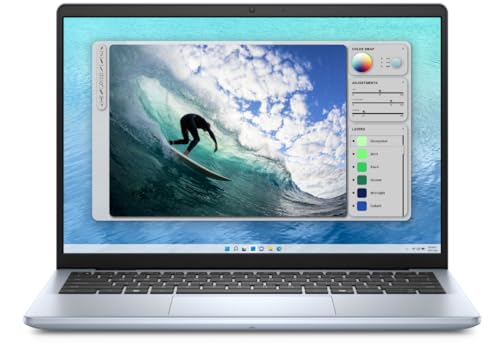
⚡ Intel Core 3 100U 14th Gen | 8GB DDR5 RAM | 512GB SSD | Ubuntu Pre-Installed | TPM Encryption | MIL-STD Tested Chassis — Security-first developer configuration; TPM data encryption, military-grade chassis, and low-overhead Ubuntu for faster compile times.
🖥️ 14″ FHD+ Anti-Glare | 300 Nits | 16:10 Aspect Ratio | Mechanical Webcam Privacy Shutter | FHD Camera + Noise Reduction — 300-nit 16:10 display offers more vertical screen real estate; critical advantage for IDE, terminal, and multi-pane developer workflows.
🎵 Dolby Atmos Spatial Audio | Dell 1-Year Manufacturer Warranty | Trusted Platform Module | Ice Blue Compact Thin & Light Design — Dolby Atmos and FHD video noise reduction deliver premium multimedia quality; Dell nationwide service backs long-term reliability.
The Dell Inspiron 5440 with Ubuntu is a laptop that deserves far more attention than it typically receives in Indian buying guides, and it earns its high placement in our best laptop under 45000 in India rankings for a specific but important reason: it’s the only machine here with a 300-nit, 16:10 aspect ratio FHD+ display. That 16:10 ratio gives you noticeably more vertical screen real estate — particularly useful for coding in any IDE, working in terminal windows, reading long documents, and multi-pane workflows where horizontal density is critical.
The 14th Gen Intel Core 3 100U at up to 1.2GHz base (with efficient cores architecture) on Ubuntu runs lean, clean, and fast because Linux overhead is significantly lower than Windows. Combined with 8GB DDR5 RAM and a 512GB SSD, developers working in Python, JavaScript, Java, or any web stack will find compile times and environment loading notably snappier than the equivalent Windows configuration. The military-grade tested chassis, Trusted Platform Module (TPM) for data encryption, and mechanical webcam privacy shutter make this a security-first developer machine.
Dolby Atmos spatial audio and an FHD camera with visual noise reduction round out a premium specification sheet that Dell has somehow managed to pack into an Ice Blue thin-and-light chassis at this price.
📋 GadgetVeda Review Note: Based on developer community feedback and spec analysis, Ubuntu on this Core 3 100U configuration is notably responsive. The 300-nit FHD+ display genuinely reduces eye fatigue during long coding sessions. One practical note: buyers who need MS Office will need to use LibreOffice (included) or purchase it separately, as there’s no Windows OEM license bundled.
Pros
✅ 14″ FHD+ 300 nit display with 16:10 aspect ratio — more vertical screen height; genuinely better for coding and developer terminal workflows
✅ Ubuntu pre-installed with TPM encryption and mechanical webcam privacy shutter — purpose-built for developer security requirements
✅ Dolby Atmos + FHD camera with visual noise reduction — premium multimedia and video call quality at this price bracket
✅ Dell 1-year manufacturer warranty with military-grade tested chassis — structural reliability backed by Dell’s nationwide service network
Cons
❌ Ubuntu OS — buyers who need Windows 11 must factor in additional licensing cost (~₹4,000–₹5,000), which effectively changes the price equation
❌ No MS Office included — unlike most competitors here that bundle Office Home 2024 or MS365; LibreOffice is the default alternative
🛒 Check Dell Inspiron 5440 Ubuntu Current Amazon Offer
HP 15 (2026, Win 11 Home + MS Office) — Best All-Rounder Laptop Under 45000 for College & Daily Use
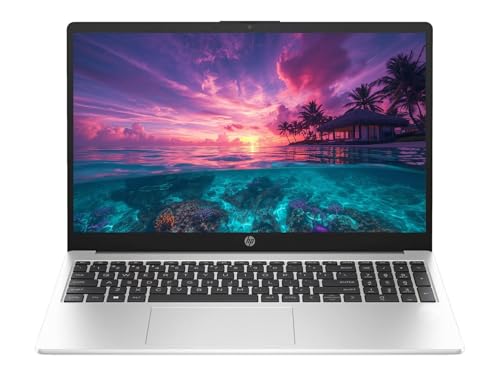
⚡ AMD Ryzen 3 7335U | Up to 4.3GHz | 4 Cores / 8 Threads | 8GB DDR5-4800 RAM | 512GB PCIe NVMe SSD | Copilot Key 2026 — Modern DDR5 memory architecture with Copilot key integration; noticeably faster than DDR4 configurations at equivalent price points.
🖥️ 15.6″ FHD IPS Anti-Glare | 250 Nits | Narrow Bezel | Spill-Resistant Keyboard + Numpad | 720p Privacy Shutter Webcam — Spill-resistant numpad keyboard and privacy shutter webcam — practical daily-use features rarely included at this budget tier.
💼 Win 11 Home + MS Office Lifetime | Wi-Fi 6 | Bluetooth 5.4 | USB-C 5Gbps | HP Long Life 41Wh Battery | Turbo Silver 1.5 kg — Zero recurring software cost; MS Office lifetime plus Windows 11 means complete productivity readiness straight out of the box.
This HP 15 2026 Home variant sits right in the sweet spot for the largest segment of buyers searching for the best laptop under 45000 with SSD — students who need a reliable daily machine for college assignments, office employees managing spreadsheets and video calls, and families who want one dependable laptop for general household productivity. The Ryzen 3 7335U (up to 4.3GHz, 4 cores, 8 threads) on DDR5-4800 memory delivers a performance profile noticeably above entry-level Athlon or older Ryzen 3 5000-series chips, handling multi-tab browsing, document multitasking, and light media workloads with genuine ease.
The FHD 1920×1080 anti-glare display at 250 nits is well-calibrated for indoor use, and the narrow bezel design gives it a modern, clean aesthetic that holds up against more expensive laptops visually. HP’s spill-resistant keyboard with numeric keypad is a practical feature that many budget laptops overlook, and the 720p HD camera with a privacy shutter is increasingly valuable in a post-pandemic hybrid work reality.
HP’s included MS Office with lifetime validity alongside Windows 11 Home means zero recurring software costs from day one — an important consideration when you’re working within a tight ₹45K budget and don’t want hidden subscription costs eating into your ownership ROI.
📋 GadgetVeda Review Note: User reviews consistently highlight boot time (under 10 seconds on SSD), keyboard comfort, and display quality as the most praised daily-use attributes. The Copilot key integration — unique to the 2026 models — gives students and professionals quick access to AI assistance natively within Windows 11, which is a genuinely useful workflow addition in 2026.
Pros
✅ Ryzen 3 7335U on DDR5-4800 memory — modern processor + memory architecture combination; faster than DDR4 configurations at similar price points
✅ MS Office Lifetime + Windows 11 Home — complete out-of-box software value with no additional spend required
✅ Copilot key (2026 exclusive) + Wi-Fi 6 RTL8852BE — AI productivity integration and next-gen wireless connectivity
✅ HP spill-resistant keyboard with numpad + privacy shutter webcam — thoughtful daily-use features at this budget
Cons
❌ 41Wh battery — compact battery cell limits unplugged endurance to approximately 6 hours on moderate workloads
❌ 8GB single-channel RAM — upgradeability depends on slot availability; check if the second SODIMM slot is accessible before purchasing, if 16GB is a priority
🛒 Check HP 15 2026 Win 11 Home Current Amazon Offer
ASUS Vivobook Go 14 (Ryzen 3 7320U) — Best Compact Student Laptop Under 45000
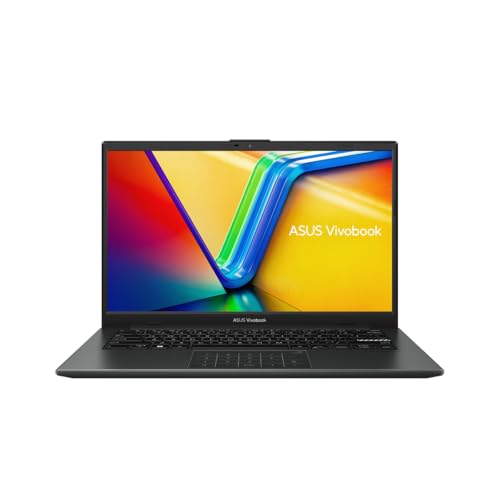
⚡ AMD Ryzen 3 7320U | Zen 4 Architecture | 4 Cores / 8 Threads | 8GB RAM | 512GB NVMe SSD | AMD Radeon Integrated Graphics — Zen 4 efficiency core architecture; more power-efficient and thermally stable than older Ryzen 3 5000U chips still sold at this price.
🖥️ 14″ FHD IPS-Level Display | Sharp Visuals | Anti-Glare | Mixed Black Sleek Chassis | Ultra-Portable 1.38 kg Design — Lightest laptop in this entire guide at 1.38 kg; built for students who commute daily with heavy backpacks between home and campus.
💼 Win 11 Home | Office Home 2024 Lifetime + M365 Basic 1yr (100GB Cloud) | Best Software Bundle in 14″ Segment Under ₹45K — Most generous software bundle in any 14-inch laptop under ₹45K; M365 Basic’s 100GB cloud storage adds immediate real workflow value.
The ASUS Vivobook Go 14 is the lightest capable student laptop in our best laptops under 45000 list at just 1.38 kg — a weight advantage that matters more than most spec sheets acknowledge for students commuting daily between home, college, and libraries with a fully loaded backpack. The Ryzen 3 7320U (4 cores, 8 threads, AMD Radeon integrated graphics) delivers smooth everyday performance for document editing, online classes, video streaming, and presentation work without thermal complaints.
The 14-inch FHD IPS-level display is vivid and sharp for its class, covering standard sRGB territory comfortably for presentations and content consumption. Bundled with Windows 11 Home, Office Home 2024 (lifetime), and a 1-year M365 Basic subscription (including 100GB of OneDrive storage), ASUS has packed the most generous software bundle in this entire price segment into a sub-1.4kg package.
For college students specifically — the target buyer for the best student laptops under 45000 — the combination of ASUS’s reliable build reputation, the 1.38kg carry weight, and the complete software bundle makes this one of the most sensible purchases in the list. It won’t outperform the Ryzen 5 Vivobook Go 15 in raw horsepower, but for typing notes, browsing, streaming, and light assignments, it delivers everything needed.
📋 GadgetVeda Review Note: User consistently praise the compact form factor and display quality for the price. The Ryzen 3 7320U is a Zen 4 architecture chip, which is important — it’s more power-efficient and thermally well-managed compared to older Ryzen 3 5000U or 5300U chips you might still find in clearance stock at similar prices. Do not confuse this with older-generation Ryzen 3 chips.
Pros
✅ 1.38 kg ultra-portable chassis — lightest laptop in this entire guide; ideal for students commuting with heavy bags
✅ Ryzen 3 7320U (Zen 4 architecture) — modern efficient cores; superior to older Ryzen 3 5000U/5300U chips often sold at this price
✅ Office Home 2024 (lifetime) + M365 Basic 1yr with 100GB cloud — best software bundle-to-price ratio in the 14-inch segment
✅ 14″ FHD IPS-level display — sharp, clear visuals for daily college and productivity use in a compact package
Cons
❌ 8GB RAM — ASUS Vivobook Go 14’s memory configuration may be soldered LPDDR5; verify upgradeability before purchase if 16GB is needed
❌ No numeric keypad — compact 14-inch chassis omits the numpad, which matters for accounting students and office work heavy in numerical data entry
🛒 Check ASUS Vivobook Go 14 Ryzen 3 7320U Current Amazon Offer
Acer TravelLite TL14-42M — Best Business Travel Laptop Under 45000 With LAN Port
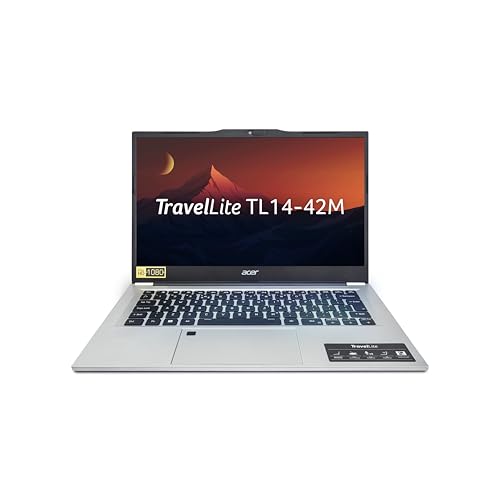
⚡ AMD Ryzen 3 7330U | Up to 4.3GHz | 8GB DDR4 RAM | 512GB NVMe SSD | USB 3.2 Gen 2 Type-C Full Function (Display + Charge) — Full-function USB-C enables single-cable dock connection to drive monitors, peripherals, and charging from one port simultaneously.
🌐 Built-In Gigabit LAN (RJ-45) Port | Wi-Fi 6 | Only Laptop in This Guide with Native Wired Ethernet | No Dongle Required — The sole laptop under ₹45K with built-in Gigabit LAN; eliminates dongle dependency in offices, hotels, and conference venues.
🏋️ 14″ FHD Anti-Glare | 220–250 Nits | Spill-Resistant Keyboard | 180° Hinge | Ultra-Light 1.34 kg | Windows 11 Home — Lightest overall laptop in this roundup; 1.34 kg paired with native LAN makes it the most travel-practical configuration available under ₹45K.
The Acer TravelLite TL14-42M is the most travel-optimized machine in our best laptops under 45000 for professional work lineup, and it earns its place through one hardware decision that most competitors at this price have abandoned: a full Gigabit LAN (RJ-45) port built directly into the chassis. In offices, hotel business centers, conference venues, and co-working spaces where Wi-Fi is unreliable, congested, or security-compromised, a wired Ethernet connection is not a luxury — it’s a productivity necessity. The TravelLite is the only laptop here that delivers that without a dongle or adapter.
At 1.34 kg, it’s also the second lightest laptop in this guide and the lightest 14-inch business-targeted machine here. The Ryzen 3 7330U handles everyday professional workloads confidently, and the USB 3.2 Gen 2 Type-C with full function (including display output and charging) means you can connect a single USB-C hub to drive your entire office desk setup from one cable.
One honest note: the 14-inch FHD display uses a TN panel at 220-250 nits rather than IPS. TN panels have narrower viewing angles and slightly less vibrant color reproduction than IPS — acceptable for a single user working straight-on, but not ideal for group presentations or side-by-side screen sharing. For solo business travel use, it’s a workable trade-off for the weight and LAN advantages.
📋 GadgetVeda Review Note: The spill-resistant keyboard and 180° hinge on the TravelLite are consistent user positives. For buyers who travel between offices, client sites, or campuses regularly, the native LAN port combined with the 1.34kg weight represents a practical productivity package that no other laptop in this price range provides simultaneously.
Pros
✅ Built-in Gigabit LAN (RJ-45) port — the only laptop in this guide with native wired Ethernet; eliminates dongle dependency in offices and travel venues
✅ 1.34 kg — lightest overall laptop in this guide; genuinely unburdensome for daily commutes and frequent business travel
✅ USB 3.2 Gen 2 Type-C full function (display + charging) — connects to USB-C docks and hubs for a complete desk setup from a single cable
✅ AMD Ryzen 3 7330U — reliable 7th Gen Ryzen 3 performance for all standard professional and productivity workloads
Cons
❌ TN panel display (not IPS) — narrower viewing angles and less color accuracy than IPS competitors; noticeable when sharing screen at oblique angles
❌ 8GB DDR4 RAM (not DDR5 or LPDDR5) — slower memory architecture compared to HP DDR5 and ASUS LPDDR5 configurations in this tier
🛒 Check Acer TravelLite TL14-42M Current Amazon Offer
Acer Aspire Lite AL15-41 — Best Metal Body Thin & Light Laptop Under 45000

⚡ AMD Ryzen 3 7330U | Up to 4.3GHz | 8GB DDR4 (2 SODIMM Slots, Up to 32GB) | 256GB PCIe SSD (Expandable to 1TB) — Highest RAM upgrade ceiling in this guide; dual SODIMM slots support up to 32GB DDR4 — exceptional future-proof memory headroom.
🏗️ Metal Body (Steel Gray) | Only Metal Chassis Laptop Under ₹45K | Minimal Keyboard Deck Flex | Premium Tactile Rigidity — Genuine metal construction delivers torsional rigidity and a premium feel that no plastic-chassis competitor at this price can match.
🔊 15.6″ FHD IPS Anti-Glare | Nahimic Audio | 180° Lay-Flat Hinge | MS Office 2024 + M365 Basic | Windows 11 Home | 1.59 kg — Nahimic audio enhances speaker output significantly; 180° hinge and bundled lifetime Office complete a premium-feel package at budget pricing.
The Acer Aspire Lite AL15-41 is the only laptop in this guide featuring a genuine metal body construction — and if chassis build quality and tactile premium feel are priorities in your purchase decision, this is the machine that delivers that at the ₹45K price point. The steel gray metal finish resists flex far better than plastic alternatives, providing better torsional rigidity for the keyboard deck and lid — a quality difference you feel every single time you lift the lid one-handed or type on your lap.
Spec-wise, the Ryzen 3 7330U handles the expected office and college workloads without issue. The notable asterisk here is the 256GB SSD — half the storage of every other laptop in this guide. However, the two SODIMM slots supporting up to 32GB DDR4 and SSD expandability to 1TB give this machine one of the best upgrade pathways in the segment. If you’re comfortable adding a 512GB SSD yourself (₹2,500–₹3,000), the effective specification rises significantly.
The 15.6-inch FHD IPS display with Nahimic Audio enhancement, a 180° hinge, and MS Office 2024 + M365 Basic bundled round out a genuinely attractive package for buyers who prioritize build quality and upgrade potential over raw out-of-box storage capacity.
📋 GadgetVeda Review Note: The metal body is a real differentiator — user feedback consistently highlights the premium feel and chassis rigidity compared to plastic-body competitors at this price. The 256GB base storage is the primary compromise that must be factored in. Budget-conscious buyers who are comfortable with a DIY SSD upgrade will find this represents the best build quality per rupee in the under-₹45K market.
Pros
✅ Genuine metal body (steel gray) — only metal chassis laptop in this guide; superior torsional rigidity and premium tactile quality
✅ 2 SODIMM slots expandable to 32GB DDR4 — best RAM upgrade ceiling in this list; future-proof memory headroom
✅ 180° lay-flat hinge + Nahimic Audio — versatile collaboration angles and better-than-average speaker quality for a budget laptop
✅ PCIe Gen3 SSD expandable to 1TB — upgrade path available for storage-hungry users at reasonable post-purchase component cost
Cons
❌ 256GB base SSD — only half the storage of every other laptop in this guide; inadequate for most users without immediate upgrade
❌ USB 2.0 ports still present — two USB 2.0 Type-A ports in 2026 are a dated choice for a premium-positioned device
🛒 Check Acer Aspire Lite AL15-41 Current Amazon Offer
Lenovo V15 G4 Athlon (With MS Office) — Best Budget Productivity Laptop Under 45000

⚡ AMD Athlon Silver 7120U | Up to 3.5GHz | 8GB LPDDR5 RAM | 512GB PCIe NVMe SSD | AMD Radeon 610M Integrated Graphics — LPDDR5 memory delivers modern bandwidth for smooth light-workload performance; fast SSD ensures sub-10-second boot times consistently.
🛡️ MIL-SPEC 810H Certified | TPM Encryption | Physical Webcam Privacy Shutter | Wi-Fi 6 | Gigabit Ethernet (RJ-45) Built-In — Enterprise-grade security stack: military-tested chassis, hardware encryption, and privacy shutter — rarely bundled at this price point.
💼 Win 11 + MS Office Lifetime | Lenovo 1-Year Brand Warranty | Pan-India Authorized Service Network | Thin & Light 1.65 kg — Fully productive out of the box with lifetime Office; Lenovo’s pan-India service coverage provides the most accessible warranty support nationally.
The Lenovo V15 G4 with AMD Athlon Silver 7120U and bundled MS Office occupies an important position in the best laptops under 45000 in the Indian landscape as the most feature-complete entry-level option for buyers who genuinely only need basic productivity functionality and want the most reliable brand warranty coverage. The Athlon Silver 7120U (up to 3.5GHz boost) is designed specifically for efficient light-duty office workloads — email, spreadsheets, document editing, online meetings, and casual browsing.
The 512GB PCIe NVMe SSD ensures fast boot times and responsive file access even on the modest processor, and the 8GB LPDDR5 RAM keeps day-to-day task switching smooth. Lenovo’s MIL-SPEC 810H certification, webcam privacy shutter, Trusted Platform Module (TPM), and Wi-Fi 6 connectivity collectively create a secure and modern daily-use environment. The 1-year brand warranty with pan-India Lenovo service coverage is among the most reliable service networks in India for authorized support.
One key point for buyers to understand: the Athlon Silver 7120U is a budget-tier Zen 3 + chip with only 2 performance cores — appropriate for light office use, but not suitable for coding workloads, parallel compilation, or intensive multi-app multitasking. Set expectations accordingly.
📋 GadgetVeda Review Note: For buyers whose primary use is typing documents, browsing, attending Zoom calls, and managing basic spreadsheets — and who are buying a laptop for an older family member, a first work computer, or supplementary office use — the V15 G4 Athlon with included MS Office and Lenovo’s service network represents solid, dependable value. Not the choice for power users; the right choice for light users who value brand reliability.
Pros
✅ Lenovo MIL-SPEC 810H + TPM + webcam privacy shutter — enterprise-grade security and durability features in a budget laptop
✅ Wi-Fi 6 + Gigabit Ethernet (RJ-45) — native wired and wireless connectivity without dongles
✅ MS Office included (lifetime) + Windows 11 — fully productive out of the box with no additional software investment
✅ 512GB PCIe NVMe SSD + 8GB LPDDR5 — fast storage and modern memory generation for smooth basic-use performance
Cons
❌ Athlon Silver 7120U — only 2 performance cores; significantly weaker than Ryzen 3/5 chips for multi-app or CPU-intensive workloads
❌ No upgradeable RAM expansion confirmed — check specific unit variant for SODIMM slot availability before purchasing if RAM upgrade is planned
🛒 Check Lenovo V15 G4 Athlon With Office Current Amazon Offer
Lenovo V15 G4 Athlon (Lifetime Win 11 Validity) — Best Entry-Level Laptop Under 45000 for Office Work
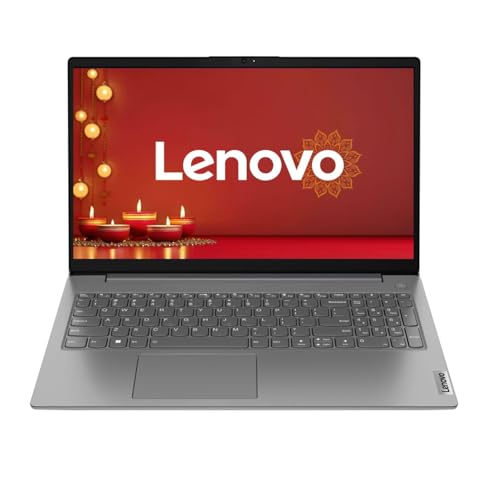
⚡ AMD Athlon Silver 7120U | Up to 3.5GHz | 8GB LPDDR5 RAM | 512GB PCIe NVMe SSD | Wi-Fi 6 | Bluetooth 5.1 | 1.65 kg — LPDDR5 speed and PCIe SSD storage deliver responsive daily performance for email, documents, video calls, and casual browsing workloads.
🔒 Windows 11 Home Lifetime Validity | TPM Security | Physical Webcam Privacy Shutter | MIL-SPEC Tested | No Re-Activation Risk — Genuinely licensed lifetime OS validity with TPM hardware encryption; critical for small businesses needing compliant, long-term secure deployments.
🛡️ 15.6″ FHD Anti-Glare Display | 720p Privacy Shutter Webcam | Lenovo 1-Year Brand Warranty | Pan-India Authorized Service — Ergonomic keyboard, privacy-first webcam, and Lenovo’s nationwide service network make this the most dependable no-frills entry-level office pick.
The second Lenovo V15 G4 Athlon variant is the most straightforward, no-frills entry-level laptop under 45000 for office use — differentiated from the #9 variant primarily by its Windows 11 Lifetime Validity emphasis and its positioning as a pure daily productivity machine for light workloads. Both share the Athlon Silver 7120U processor and 8GB LPDDR5 + 512GB SSD core specification, but this variant’s headline feature is the genuine lifetime Windows 11 Home license, ensuring long-term OS security updates without any risk of license expiry or activation issues.
The 15.6-inch FHD anti-glare display, 720p HD webcam with physical privacy shutter, and robust Wi-Fi 6 connectivity make this a complete package for remote workers, home office setups, and entry-level corporate deployments where IT departments need cost-effective, license-compliant hardware. The 1.65kg chassis and ergonomic keyboard layout are consistent with Lenovo’s strong build reputation at the entry level.
For buyers looking for a laptop under 45000 for office use that checks all the basic compliance boxes — genuine OS license, brand warranty, privacy protection, and reliable connectivity — the V15 G4 Lifetime delivers exactly what it promises without overcomplicating the value proposition.
📋 GadgetVeda Review Note: The Lifetime Windows 11 Validity distinction is more important than it sounds. Several budget laptops in the Indian market ship with OEM Windows versions that are tied to device activation — the V15 G4’s clear lifetime validity documentation provides peace of mind for both individual and small-business buyers who need compliant, updatable OS installations long-term.
Pros
✅ Windows 11 Home Lifetime Validity — fully genuine OS license; confirmed long-term security update eligibility without re-activation concerns
✅ Physical webcam privacy shutter + TPM security — practical privacy and data security features rarely found at this price tier
✅ Wi-Fi 6 + 1.65kg chassis — modern wireless and comfortable carry weight for daily mobility
✅ Lenovo 1-year brand warranty + authorized pan-India service network — dependable post-purchase support coverage
Cons
❌ Athlon Silver 7120U (2 cores) — same processor limitation as variant #9; clearly underpowered for multi-app intensive workloads
❌ No MS Office bundled — unlike the #9 variant; factor in ₹3,000–₹4,500 additional cost for Office licence if needed
🛒 Check Lenovo V15 G4 Athlon Lifetime Win 11 Current Amazon Offer
💡 Why Should You Consider Laptops Under ₹45,000?
The ₹45,000 bracket is arguably the most important laptop budget tier in India — and for good reason. It’s the price point where genuine modern productivity hardware becomes accessible without crossing into premium territory, and in 2026, this bracket has meaningfully advanced from where it was even 18 months ago.
Here’s why this budget deserves serious consideration in 2026:
➤ Full Windows 11 (Lifetime) is now standard — you no longer have to worry about OEM or S-Mode restrictions that plagued budget laptops two years ago
➤ 512GB NVMe SSDs are now the floor — the market has eliminated HDD configurations at this price, which was a real pain point as recently as 2023
➤ Ryzen 7000-series and Core 3 100U chips are genuinely modern — the processor architectures in this guide are 13th-14th Gen Intel and Zen 3+/Zen 4 AMD, which means software compatibility and performance longevity through at least 2028-2030
➤ FHD anti-glare displays are universal — HD TN panels have largely been pushed out of this bracket, which was a common complaint from buyers two years ago
➤ Bundled productivity software has real value — MS Office 2024 lifetime licenses alone retail for ₹4,500–₹6,000 separately; most laptops here include them.
For students, this budget buys a machine that handles 4 years of college without feeling outdated. For professionals, it covers 90% of real office workloads without compromise. For families, it’s the sweet spot between durability and affordability.
🧭 Smart Buying Guide — What to Actually Look For Best Laptops Under ₹45,000 in India?
🔲 Processor Architecture & Generations — The Most Important Decision You’ll Make
In 2026, the minimum acceptable processor standard under ₹45,000 has shifted. Here’s your clear framework:
Acceptable (Buy with confidence):
➤ AMD Ryzen 5 7520U / 7530U (Zen 4 — best under ₹45K)
➤ AMD Ryzen 3 7335U / 7330U / 7320U (Zen 3+ / Zen 4 — solid daily performance)
➤ Intel Core 3 100U / Core i3-1315U 13th Gen (modern architectures, reliable for office)
Marginal (Buy only for entry-level light use):
➤ AMD Athlon Silver 7120U (Zen 3+ but only 2 cores — adequate for email, docs, casual browsing; not suitable for coding or heavy multitasking)
Avoid completely (Clearance stock — do not buy in 2026):
➤ Intel 11th Gen Core i3/i5 (Outdated architecture, poor thermal efficiency, end-of-support approaching)
➤ Intel Celeron / Pentium (Any generation — consumer productivity use is completely inappropriate in 2026)
➤ AMD Athlon 3000-series / Ryzen 3 5300U and below (2020-era chips; acceptable 3 years ago, obsolete now)
Many retailers still stock older-generation laptops at attractive prices that appear competitive. The price looks right, but the hardware will become a bottleneck within 12-18 months. Always verify the processor model name includes a 7000-series AMD number or a 13th/14th Gen Intel designation before purchasing.
💾 RAM & Storage Standards — 16GB Is the Real Target, 512GB SSD Is Non-Negotiable
RAM reality in 2026: Every laptop in this guide ships with 8GB RAM. That’s honest — 8GB is functional for basic multitasking, but it will start showing limitations when you’re running Chrome with 15+ tabs, a video call, a document, and background Windows processes simultaneously. Here’s how to think about it:
➤ 8GB with expandable SODIMM slot: Acceptable — plan a ₹1,500–₹2,000 RAM upgrade in year 1
➤ 8GB soldered (LPDDR5 in Vivobook/HP configurations): Check before buying; some LPDDR5 implementations are soldered to the motherboard and cannot be upgraded
➤ 16GB configurations: If you find 16GB at this price point, it’s an exceptional value; prioritize it
Storage: 512GB NVMe SSD is the mandatory floor in 2026. If any retailer tries to sell you a laptop with an HDD (Hard Disk Drive) at this budget, walk away. HDDs are a decade behind NVMe SSDs in read/write speed and will make every aspect of the experience feel sluggish, regardless of how good the processor is. No exceptions.
🖥️ Display Parameters & Panel Quality — What You’re Looking at for 8 Hours a Day
Your display is arguably more important than your processor for daily satisfaction. Here’s what to insist on:
Must have:
➤ Full HD (1920×1080) — anything lower (like HD 1366×768) in 2026 is unacceptable; the difference in sharpness is immediately obvious
➤ Anti-glare coating — critical for use under office overhead lighting, near windows, or in any classroom without controlled lighting
➤ IPS panel preferred — wider viewing angles (178°), better color accuracy, and less eye fatigue vs TN panels; the Acer TravelLite in this guide ships with TN as its single notable display downgrade
Nice to have:
➤ 250+ nits brightness — the realistic minimum for comfortable indoor use; 300 nits (Dell Inspiron 5440) is better
➤ 120Hz refresh rate — only the Dell 15 Core 3 100U offers this under ₹45K; noticeably smoother for daily scroll and general use
Hard avoid:
➤ HD TN panels (1366×768, narrow viewing angles) — still sold in clearance stock under ₹40K; do not purchase under any circumstances in 2026
🔋 Battery Endurance & Build Quality — Realistic Expectations Before You Unplug
Budget laptops at ₹45K use 38–45Wh battery cells — this is the practical engineering reality at this price. What does that translate to in real hours?
➤ Light use (documents, browsing, video calls): 6–8 hours
➤ Moderate multitasking (multiple apps, streaming, light coding): 4–6 hours
➤ Demanding tasks (video editing, large compilations): 2–3 hours
The ASUS Vivobook Go 15’s fast charge capability (60% in 49 minutes) and the HP 15’s 65W USB-C charging are the best power management stories in this guide. For students who need to manage power between lectures, fast charging is genuinely valuable.
On build quality: the Acer Aspire Lite AL15-41 (metal chassis) leads for a structural premium feel. The Lenovo V15 G4 and ASUS Vivobook Go models have earned strong user feedback for chassis durability. Plastic doesn’t automatically mean poor build — it means you should look at hinge smoothness, keyboard deck flex under typing pressure, and lid rigidity as the real quality indicators rather than judging by material alone.
🧰 Software Bundle — Factor This Into the Total Value Calculation
Software bundling at this price tier has become a serious competitive differentiator, and it directly affects your total cost of ownership:
➤ MS Office Home & Student 2024 Lifetime: Standalone retail value ₹4,699–₹6,000
➤ M365 Basic 1-Year (100GB cloud): Retail value ₹840/year
➤ Windows 11 Pro vs Home: Pro adds BitLocker encryption, Remote Desktop, and Advanced Group Policy — worth ₹8,000–₹10,000 as a standalone upgrade license
➤ McAfee LiveSafe bundled (Dell): 12-month security suite
When comparing two laptops at similar prices, always calculate the combined hardware + software value — a laptop with bundled Office and M365 is effectively ₹5,000+ cheaper in real terms than one without.
📋 Best Laptops Under 45000 in India [Price List]
| Model Name | Price |
| Dell 15 (Core 3 100U, 120Hz, Win 11 + Office 2024) | 45490 |
| ASUS Vivobook Go 15 (Ryzen 5 7520U, MIL-STD, Office 2024 + M365) | 48990 |
| HP 15 2026 (Ryzen 3 7335U, Win 11 Pro, Office 2024) | 45990 |
| Dell Inspiron 5440 (Core 3 100U, Ubuntu, FHD+ 300 nit, 16:10) | 42136 |
| HP 15 2026 (Ryzen 3 7335U, Win 11 Home, MS Office Lifetime) | 44000 |
| ASUS Vivobook Go 14 (Ryzen 3 7320U, 14″, 1.38 kg, Office 2024 + M365) | 43990 |
| Acer TravelLite TL14-42M (Ryzen 3 7330U, LAN, 1.34 kg) | 45990 |
| Acer Aspire Lite AL15-41 (Ryzen 3 7330U, Metal Body, 256GB SSD) | 41990 |
| Lenovo V15 G4 Athlon (Athlon 7120U, MS Office, Wi-Fi 6, MIL-SPEC) | 44999 |
| Lenovo V15 G4 Athlon (Athlon 7120U, Win 11 Lifetime Validity) | 43999 |
🏆 Conclusion — 2 Absolute Winners
The best laptop under 45000 segment in India is fundamentally healthier than it’s been in years. Modern processor architectures from both Intel (Core 3 100U) and AMD (Ryzen 5 7520U, Ryzen 3 7335U/7330U) have pushed the performance floor significantly higher, NVMe SSD is now universally standard at this price, and the inclusion of lifetime Office and Windows licenses has dramatically improved the real value proposition for Indian buyers.
The key market trend to understand: OEM software bundling is currently the single most significant variable in this budget. Two laptops with near-identical hardware specifications can differ by ₹5,000–₹6,000 in real purchase-equivalent value based purely on what software ships in the box. Factor this into every comparison you make.
Rising DDR5 adoption at this tier (HP, Dell Inspiron 5440) is bringing better memory bandwidth to entry-level buyers — a welcome shift that will enable smoother multi-tab and multi-app performance as applications continue to grow in memory demands through 2026 and beyond.
💸 Budget Value Champion — ASUS Vivobook Go 15 (Ryzen 5 7520U)
For buyers who want maximum hardware performance per rupee at this price: the only Ryzen 5 processor available under ₹45K, military-grade chassis, fast charge, M365 + Office 2024 bundled, and Wi-Fi 6E connectivity. If you code, multitask heavily, or simply want the machine to stay relevant and fast for 4+ years, this is the one.
👑 Performance Pro King — Dell 15 (Core 3 100U, 120Hz IPS)
For buyers who want the best overall daily-use experience: the 120Hz IPS display advantage is real and tangible every single day you use this laptop. Paired with Dell’s onsite warranty, 14th Gen Intel Core 3 100U, lifetime Windows + Office bundle, and the most reliable brand service network in India — this is the safest, most satisfying all-around purchase under ₹45,000 in 2026.
FAQs
1. Which is the best laptop under 45000 for students in India in 2026?
The ASUS Vivobook Go 15 (Ryzen 5 7520U) is the top pick for students — strongest processor, MIL-STD durability, Office 2024 + M365 bundled, and fast charge. For those prioritizing lighter weight, the 1.38kg ASUS Vivobook Go 14 is the most portable option.
2. Can I play GTA V or other games on a laptop under ₹45,000?
Integrated AMD Radeon graphics on Ryzen 5 7520U / Ryzen 3 7335U can run GTA V at low-to-medium settings at 720p-1080p with 30-40fps — functional but not comfortable for regular gaming sessions. For any serious gaming, a dedicated GPU laptop (under ₹60,000 range) is genuinely recommended. Casual games, older titles (2015 and below), and eSports-lite titles run more acceptably on the Ryzen 5 iGPU.
3. Is 8GB RAM enough for coding, office work, and daily multitasking in 2026?
8GB is sufficient for light-to-moderate coding (Python, JavaScript, web development) and standard office multitasking. It starts feeling constrained when you’re running Docker containers, Android Studio, or 20+ browser tabs simultaneously. If expandable, upgrade to 16GB within 6-12 months of purchase — it costs approximately ₹1,500–₹2,000 and delivers a noticeable real-world improvement. For the HP and ASUS models with DDR5/LPDDR5 memory, verify whether the RAM is soldered before assuming upgradeability.
4. Which brand gives the best laptop warranty service under ₹45,000 in India?
Dell’s 1-year onsite hardware warranty (technician visits your location) is the strongest service tier at this price — available on the Dell 15 Core 3 100U and Dell Inspiron 5440. Lenovo and HP both offer strong pan-India carry-in warranty service. ASUS has expanded its service network significantly and is reliable in Tier 1 and Tier 2 cities. For buyers in Tier 3 or rural areas, Dell’s onsite service and Lenovo’s nationwide network are the most consistently available.
5. Do laptops under ₹45,000 overheat during long use? How hot do they actually get?
Budget laptops at this tier use low-TDP (Thermal Design Power) processors — Ryzen 3 7335U at ~15W and Core 3 100U at ~15W — which generate significantly less heat than gaming or HX-class processors. Under normal office and student workloads, chassis temperatures stay comfortable. Under sustained heavy loads (video transcoding, extended compilation), fans become audible and the bottom surface warms to 35–40°C — warm but not uncomfortably hot. Using the laptop on a hard flat surface (not a bed/sofa) ensures proper underside ventilation for all models in this guide.



![12 Best Earbuds Under ₹3,000 in India [2026] | GadgetVeda](https://gadgetveda.com/wp-content/uploads/2026/09/Best-Earbuds-Under-₹3000-in-India-150x150.webp)
![11 Best Washing Machines Under ₹50,000 in India [2026]](https://gadgetveda.com/wp-content/uploads/2026/09/Best-Washing-Machines-Under-₹50000-in-India-150x150.webp)
![14 Best Wireless Earbuds Under ₹2,000 in India [2026]](https://gadgetveda.com/wp-content/uploads/2026/09/Best-Wireless-Earbuds-Under-₹2000-in-India-150x150.webp)
![10 Best Wireless Earbuds Under ₹1,000 in India [2026]](https://gadgetveda.com/wp-content/uploads/2026/09/Best-Wireless-Earbuds-Under-₹1000-in-India-150x150.webp)


![12 Best Earbuds Under ₹3,000 in India [2026] | GadgetVeda](https://gadgetveda.com/wp-content/uploads/2026/09/Best-Earbuds-Under-₹3000-in-India-300x167.webp)
![11 Best Washing Machines Under ₹50,000 in India [2026]](https://gadgetveda.com/wp-content/uploads/2026/09/Best-Washing-Machines-Under-₹50000-in-India-300x167.webp)
![14 Best Wireless Earbuds Under ₹2,000 in India [2026]](https://gadgetveda.com/wp-content/uploads/2026/09/Best-Wireless-Earbuds-Under-₹2000-in-India-300x167.webp)
![10 Best Wireless Earbuds Under ₹1,000 in India [2026]](https://gadgetveda.com/wp-content/uploads/2026/09/Best-Wireless-Earbuds-Under-₹1000-in-India-300x167.webp)