


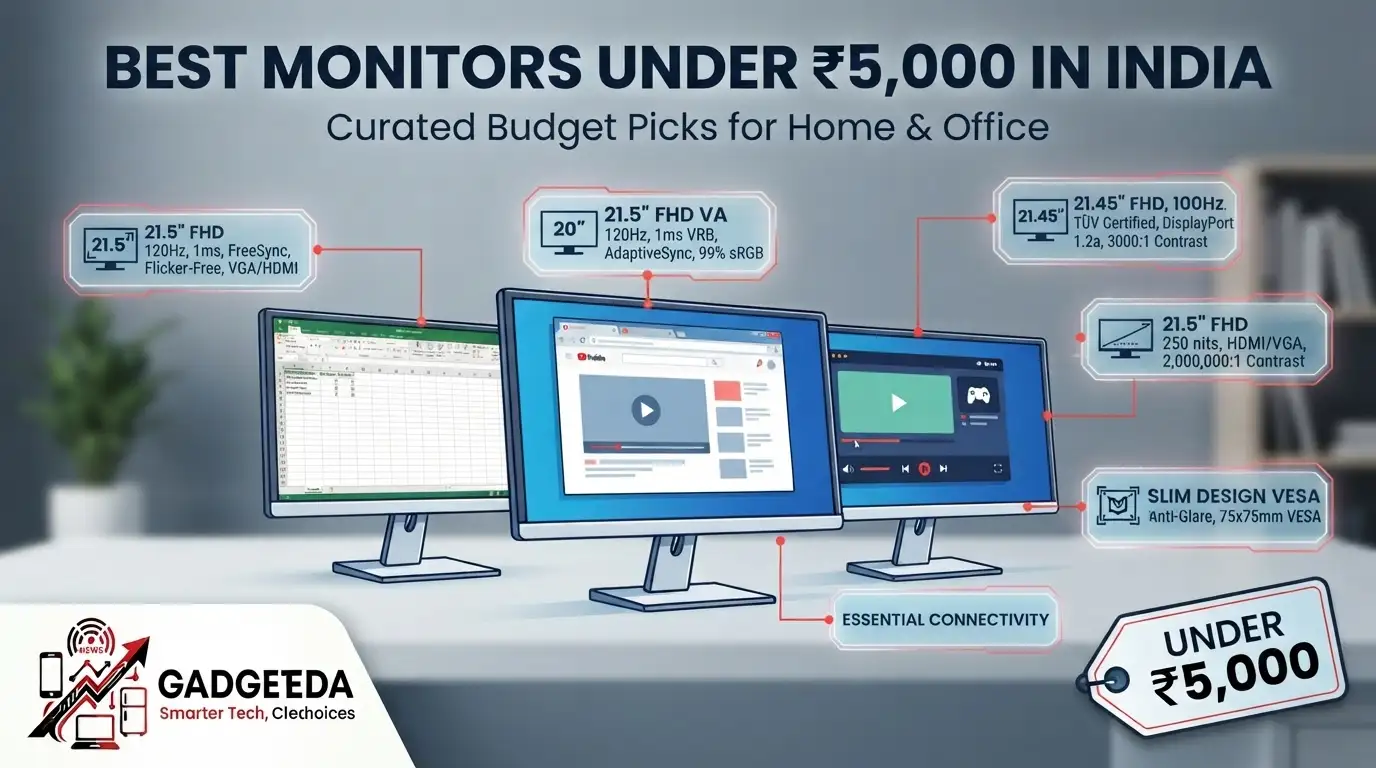
If you’re searching for the best monitors under 5000 in India, you’re entering a segment built around one simple promise: usable screen real estate without breaking your budget. Below, GadgetVeda breaks down 10 genuinely available options — from basic HD panels to surprisingly capable 120Hz displays — so you know exactly what you’re getting before you click buy.
Finding the best monitor under 5000 in India used to mean settling for a dim, flickery HD panel with a single VGA port. That’s changed. Today, this budget bracket includes monitors from Zebronics, AOC, Acer, MSI, and Foxin that pack in 100Hz-120Hz refresh rates, FreeSync support, TÜV-certified flicker-free panels, and even curved designs — features that were exclusive to ₹15,000+ displays just a few years ago. But this abundance creates a real problem: not every “100Hz monitor under 5000” or “IPS monitor under 5000” claim on a listing page holds up once you actually use it daily for coding, streaming, or gaming.
At GadgetVeda, we built this guide by cross-referencing every listed spec — panel type, refresh rate, response time, brightness, and port selection — against official brand datasheets rather than just marketing bullet points. We also factored in stand stability, backlight uniformity in dark rooms, and connectivity flexibility, because a spec sheet rarely tells you whether a stand wobbles or whether the screen looks washed out under office lighting. Whether you need a desktop monitor under 5000 for basic billing work, a monitor under 5000 for gaming on weekends, or a second screen for your WFH laptop, this list is built to match real use cases, not just price tags.
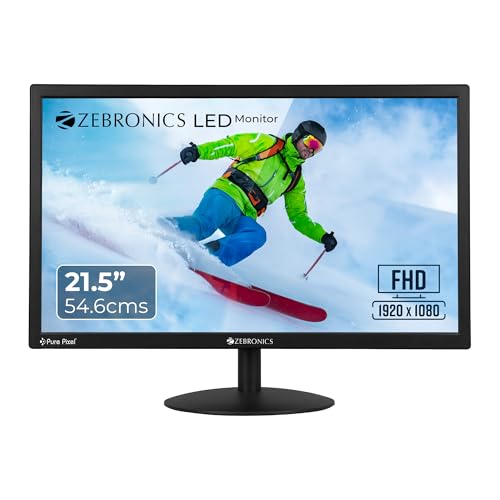
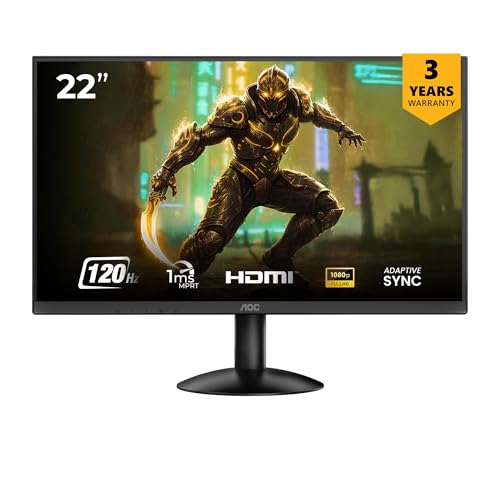
Best Monitors Under ₹5,000 in India [Our Top 3 Picks]

Top 10 Monitors Under ₹5,000 in India [Comparison Table]
| Model Name | Key Specifications | Expert Rating | Latest Price |
| 1. AOC 22B30HM2 – Best Overall | 21.5″ FHD, 120Hz, 1ms, FreeSync, Flicker-Free, VGA/HDMI | 9.2/10 | Check on Amazon |
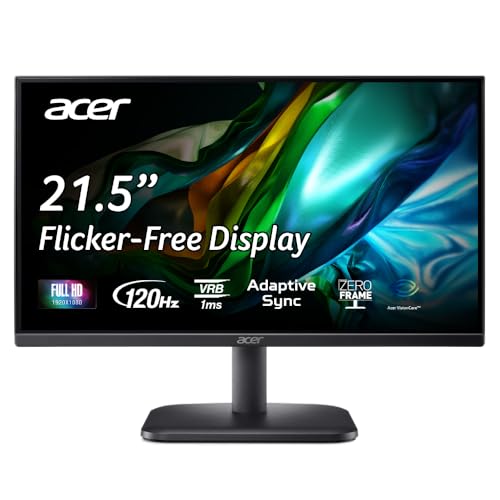
| 2. Acer EK220Q J0 – Best for Gaming | 21.5″ FHD VA, 120Hz, 1ms VRB, AdaptiveSync, 99% sRGB | 9.1/10 | Check on Amazon |
| 3. MSI PRO MP223 E2 – Best for Office & Coding | 21.45″ FHD, 100Hz, TÜV Certified, DisplayPort 1.2a, 3000:1 Contrast | 9.0/10 | Check on Amazon |
| 4. Zebronics EA122 21.5″ – Best Value FHD | 21.5″ FHD, 250 nits, HDMI/VGA, 2,000,000:1 Contrast | 8.9/10 | Check on Amazon |
| 5. Zebronics A122 21.5″ – Best Budget 100Hz | 21.5″ FHD, 100Hz, Bezel-less, Anti-Glare, 75x75mm VESA | 8.7/10 | Check on Amazon |
| 6. Foxin FM 2200 – Best Budget 22-Inch | 21.5″ FHD, 100Hz, 5ms, Frameless, HDMI Cable Included | 8.6/10 | Check on Amazon |
| 7. FRONTECH MON-0079C – Best Curved Monitor | 21.5″ Curved (3500R) FHD, 100Hz, 178° Viewing Angle | 8.5/10 | Check on Amazon |
| 8. HP P204v – Best Compact Office Pick | 19.5″ HD+, Low Blue Light, 100mm VESA, HDMI/VGA | 8.4/10 | Check on Amazon |
| 9. Zebronics V22HD+ – Best Large HD+ Screen | 22″ HD+, 16:10, Dual Input, 20W Power Draw | 8.3/10 | Check on Amazon |
| 10. LG 19M38LB – Best Ultra-Budget Pick | 18.5″ HD, 75Hz, Flicker Safe, 3-Year Onsite Warranty | 8.2/10 | Check on Amazon |
10 Best Monitors Under ₹5,000 in India [Detailed Reviews]
AOC 22B30HM2 – Best Overall Monitor Under 5000
✦ ⟶ ⚙️ Quick Specification Card:
🖥️ Display & Size: 21.5-inch panel, Full HD 1920×1080 resolution
⚡ Speed & Motion: 120Hz refresh, 1ms response, FreeSync supported
🎨 Color & Visuals: Full HD clarity with sharp detail for everyday computing and gaming visuals
🔌 Connectivity & Audio: VGA and HDMI ports, VESA mount included
🏗️ Ergonomics & Eye Care: Flicker-Free tech, Blue Light Filter for eye protection
✦ ⟶ 👍 Reasons to Buy:
🎮 Best Monitor Under 5000 for Balanced Use: A 21.5-inch Full HD panel that handles office documents, streaming, and casual gaming without compromise on any front.
⚡ Panel & Speed Focus: The 120Hz refresh rate combined with 1ms response time makes this one of the fastest displays available in this price bracket.
👁️ Eye Care & Work Efficiency Focus: Flicker-Free and Blue Light Filter technology work together to reduce eye fatigue during long work-from-home sessions.
🔌 Connectivity & Setup Focus: Dual VGA and HDMI ports plus VESA mount support make this genuinely flexible for desk or wall setups.
🏗️ Build & Mounting Focus: FreeSync support paired with VESA compatibility suits both casual gamers and productivity-focused buyers alike.
The AOC 22B30HM2 earns its Best Overall tag in our feature of best monitors under 5000 in India because it doesn’t force you to compromise between speed and everyday usability. Text sharpness while browsing or working through spreadsheets is clean, and the 120Hz refresh rate makes cursor movement and scrolling noticeably smoother than typical 60Hz budget panels. FreeSync keeps screen tearing in check during casual gaming sessions, which is a genuine surprise at this price point. In dimmer rooms, the glossy screen finish reflects some ambient light, so positioning away from windows helps. The stand feels stable enough for daily use, though it’s tilt-only, and the OSD menu is straightforward to navigate once you locate the buttons.
Pros
✅ Rare 120Hz refresh rate with 1ms response time at this price tier
✅ FreeSync support genuinely reduces screen tearing during casual gaming
✅ Flicker-Free and Blue Light Filter tech ease long work sessions
Cons
❌ Glossy screen finish reflects glare in bright or window-lit rooms
❌ Stand offers only tilt adjustment, no height or swivel flexibility
👉 Check AOC 22B30HM2 Latest Price on Amazon
Acer EK220Q J0 – Best Gaming Monitor Under 5000
✦ ⟶ ⚙️ Quick Specification Card:
🖥️ Display & Size: 21.5-inch VA panel, Full HD 1920×1080
⚡ Speed & Motion: 120Hz refresh, 1ms VRB, AdaptiveSync enabled
🎨 Color & Visuals: 250 nits brightness, 99% sRGB, 16.7M colors for vivid, punchy visuals
🔌 Connectivity & Audio: HDMI 1.4 and VGA ports
🏗️ Ergonomics & Eye Care: Tilt -5° to 20°, Acer VisionCare+ Flicker-less tech
✦ ⟶ 👍 Reasons to Buy:
🎮 Best Gaming Monitor Under 5000: The VA panel’s deeper blacks paired with 120Hz refresh give casual gamers a genuine motion-clarity advantage over standard budget displays.
⚡ Panel & Speed Focus: 1ms VRB and AdaptiveSync work together to eliminate screen tearing and ghosting during fast-paced gameplay sessions.
👁️ Eye Care & Work Efficiency Focus: Acer VisionCare+ bundles Flicker-less, BlueLightShield, and ComfyView anti-glare tech for all-day comfort.
🔌 Connectivity & Setup Focus: ZeroFrame bezel design makes this a strong pick for a clean, immersive single or dual-monitor gaming setup.
🏗️ Build & Mounting Focus: Adjustable -5° to 20° tilt range gives more ergonomic flexibility than most rivals in this price segment.
The Acer EK220Q J0 stands out among the best monitors under 5000 for gaming options because it pairs a VA panel’s contrast advantage with a genuinely fast 120Hz refresh rate. During gameplay, the 1ms VRB response keeps fast-moving objects sharp, and AdaptiveSync noticeably reduces the stutter you’d expect at this price. Text sharpness for browsing and light coding work is decent, though VA panels naturally render fine text a touch softer than IPS alternatives. In darker rooms, the VA panel’s deeper blacks are a genuine advantage for movie nights. The ZeroFrame design makes the screen feel larger than 21.5 inches suggests, and the tilt range accommodates more desk heights than typical budget stands.
Pros
✅ VA panel delivers deeper blacks, ideal for dark-room movie viewing
✅ 120Hz refresh with 1ms VRB and AdaptiveSync smooths out gaming motion
✅ Acer VisionCare+ suite genuinely reduces eye strain over long sessions
Cons
❌ VA panel renders fine text slightly softer than IPS alternatives
❌ Only HDMI 1.4 and VGA — no DisplayPort for future-proofing
👉 Check Acer EK220Q J0 Latest Price on Amazon
MSI PRO MP223 E2 – Best Monitor for Office & Coding Under 5000
✦ ⟶ ⚙️ Quick Specification Card:
🖥️ Display & Size: 21.45-inch panel, Full HD 1920×1080 resolution
⚡ Speed & Motion: 100Hz refresh rate, 1ms MPRT, Adaptive-Sync supported
🎨 Color & Visuals: 99% sRGB, 250 nits brightness, 3000:1 contrast ratio for sharper detail
🔌 Connectivity & Audio: HDMI 1.4b and DisplayPort 1.2a, headphone jack
🏗️ Ergonomics & Eye Care: TÜV Rheinland Anti-Flicker and Low Blue Light certified
✦ ⟶ 👍 Reasons to Buy:
🎮 Best Monitor for Programming and Office Under 5000: The 99% sRGB coverage and 3000:1 contrast ratio give text and code editors genuinely sharp, high-contrast rendering.
⚡ Panel & Speed Focus: A 100Hz refresh rate with 1ms MPRT smooths document scrolling and reduces the visual fatigue of long reading sessions.
👁️ Eye Care & Work Efficiency Focus: TÜV Rheinland-certified Anti-Flicker and Low Blue Light tech plus Eye-Q Check software actively monitor eye strain.
🔌 Connectivity & Setup Focus: Rare DisplayPort 1.2a inclusion at this price makes this a genuine monitor with HDMI and DisplayPort contender.
🏗️ Build & Mounting Focus: Tool-free 75mm VESA mounting and an accessory slot suit minimalist, cable-managed desk setups.
The MSI PRO MP223 E2 is built specifically with desk-bound professionals and coders in mind, and it shows in daily use. Text rendering across IDEs, spreadsheets, and long documents stays crisp thanks to the 3000:1 contrast ratio, and the 100Hz refresh makes scrolling through long files feel noticeably smoother than a standard office monitor. The TÜV-certified Anti-Flicker and Low Blue Light technologies genuinely reduce the mid-afternoon eye fatigue common during 8-hour workdays, and the built-in Eye-Q Check software is a thoughtful touch rarely seen at this price. The tool-free stand assembles quickly, and having DisplayPort alongside HDMI adds real flexibility for multi-device setups.
Pros
✅ TÜV Rheinland-certified Anti-Flicker and Low Blue Light for genuine eye comfort
✅ Rare DisplayPort 1.2a plus HDMI 1.4b connectivity combo at this price
✅ Strong 3000:1 contrast ratio sharpens text for coding and reading
Cons
❌ Stand is tilt-only, lacking height or swivel adjustment
❌ 100Hz cap over HDMI 1.4b limits future high-refresh upgrades
👉 Check MSI PRO MP223 E2 Latest Price on Amazon
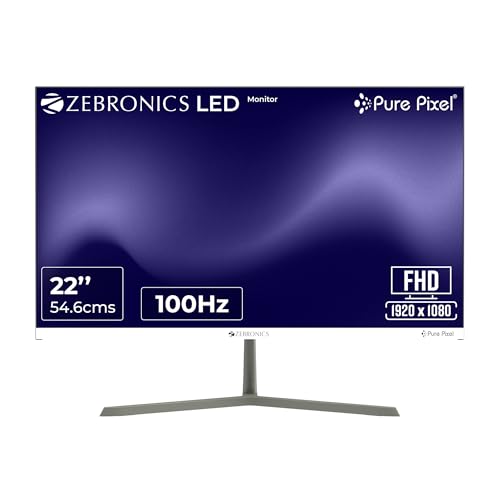
Zebronics EA122 21.5-Inch – Best Value FHD Monitor Under 5000
✦ ⟶ ⚙️ Quick Specification Card:
🖥️ Display & Size: 21.5-inch panel, Full HD 1920×1080 resolution
⚡ Speed & Motion: Standard refresh rate suited for everyday browsing and office tasks
🎨 Color & Visuals: 250 nits brightness, 2,000,000:1 dynamic contrast, 16.7M colors
🔌 Connectivity & Audio: Dual HDMI and VGA input ports
🏗️ Ergonomics & Eye Care: Wall mountable design, low 26W power consumption
✦ ⟶ 👍 Reasons to Buy:
🎮 Best Desktop Monitor Under 5000 for Everyday Use: Full HD resolution on a 21.5-inch screen covers browsing, document work, and media playback comfortably.
⚡ Panel & Speed Focus: The 2,000,000:1 dynamic contrast ratio delivers noticeably deeper blacks than typical entry-level LED monitors in this segment.
👁️ Eye Care & Work Efficiency Focus: 16.7 million color support keeps visuals vibrant enough for extended daily use without feeling flat.
🔌 Connectivity & Setup Focus: Dual HDMI and VGA inputs make switching between an old desktop and a newer laptop effortless.
🏗️ Build & Mounting Focus: Wall-mountable design and just 26W power draw suit compact, energy-conscious desk setups.
The Zebronics EA122 is a straightforward, no-nonsense pick for buyers who just need a reliable desktop monitor under 5000 without gaming-oriented extras. Text and image clarity across the Full HD panel look clean for browsing, billing software, and video calls, and the dynamic contrast ratio gives dark scenes noticeably more depth than expected. Color output out of the box leans accurate rather than oversaturated, which works well for general productivity. Backlight uniformity in dim rooms is acceptable, though slight unevenness shows near the edges under close inspection. The glossy screen surface does pick up some glare under direct light, so desk placement matters here.
Pros
✅ Strong 2,000,000:1 dynamic contrast ratio for the price segment
✅ Dual HDMI and VGA inputs simplify multi-device connectivity
✅ Low 26W power consumption keeps running costs minimal
Cons
❌ Glossy screen finish reflects glare under bright room lighting
❌ No mention of flicker-free or blue-light certification
👉 Check Zebronics EA122 21.5-Inch Latest Price on Amazon
Zebronics A122 21.5-Inch – Best Budget 100Hz Monitor Under 5000
✦ ⟶ ⚙️ Quick Specification Card:
🖥️ Display & Size: 21.5-inch anti-glare panel, Full HD 1920×1080 resolution
⚡ Speed & Motion: 100Hz refresh rate for smoother scrolling and reduced motion blur
🎨 Color & Visuals: 250 nits brightness, 16.7 million colors, bezel-less design
🔌 Connectivity & Audio: Dual HDMI and VGA inputs
🏗️ Ergonomics & Eye Care: Anti-glare screen, 75x75mm wall mount support
✦ ⟶ 👍 Reasons to Buy:
🎮 100Hz Monitor Under 5000 for Everyday Smoothness: A genuinely rare refresh rate upgrade at this budget, reducing flicker during scrolling and casual gameplay.
⚡ Panel & Speed Focus: 100Hz refresh combined with Full HD resolution keeps motion cleaner during video playback and light gaming sessions.
👁️ Eye Care & Work Efficiency Focus: Anti-glare coating reduces reflections and eye strain during extended work-from-home or study sessions.
🔌 Connectivity & Setup Focus: Ultra-slim bezel-less design suits dual-monitor setups without excessive visual clutter between screens.
🏗️ Build & Mounting Focus: 75x75mm VESA wall mount support saves desk space in cramped home-office corners.
For buyers specifically hunting a 100hz monitor under a 10000 budget stretched down to 5K, the Zebronics A122 delivers a genuinely rare refresh-rate upgrade. Daily browsing and document scrolling feel noticeably smoother compared to standard 60Hz monitors in this range, and the anti-glare coating handles daytime room lighting well without excessive washout. Text sharpness for spreadsheets and reading is respectable, though color vibrancy is modest rather than punchy. In darker rooms, backlight bleed is present at the edges but not distracting during typical use. The bezel-less design genuinely helps if you’re pairing this with a second monitor for a cleaner desk look.
Pros
✅ 100Hz refresh rate is a genuine standout feature at this price
✅ Anti-glare coating reduces reflections during daytime work sessions
✅ Bezel-less design suits clean dual-monitor productivity setups
Cons
❌ Color vibrancy is modest compared to higher-end IPS alternatives
❌ Noticeable backlight bleed at edges during dark-room use
👉 Check Zebronics A122 21.5-Inch Latest Price on Amazon
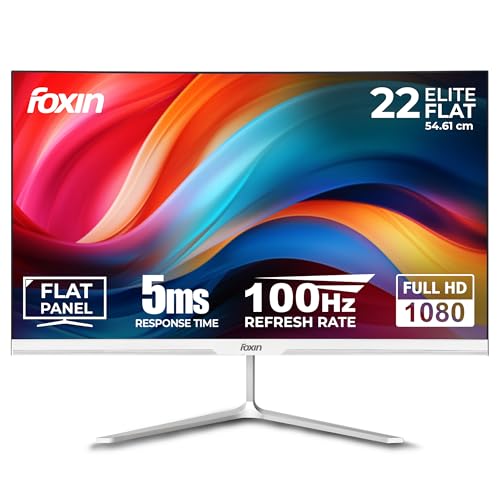
Foxin FM 2200 – Best Budget 22-Inch Monitor Under 5000
✦ ⟶ ⚙️ Quick Specification Card:
🖥️ Display & Size: 21.5-inch flat panel, Full HD 1920×1080 resolution
⚡ Speed & Motion: 100Hz refresh rate, 5ms response time
🎨 Color & Visuals: 16.7 million colors, anti-glare coating for reduced fatigue
🔌 Connectivity & Audio: HDMI and VGA ports, cable included
🏗️ Ergonomics & Eye Care: -5° to 5° tilt, flicker-free, frameless design
✦ ⟶ 👍 Reasons to Buy:
🎮 Best 24 Inch Monitor Under 5000 Alternative: Though technically 21.5 inches, the frameless design makes the visible screen feel larger for web browsing and streaming.
⚡ Panel & Speed Focus: 100Hz refresh with 5ms response supports smooth multitasking and casual flat gaming monitor use without noticeable lag.
👁️ Eye Care & Work Efficiency Focus: Built-in anti-glare and flicker-free technology genuinely reduce eye fatigue during extended coding or study sessions.
🔌 Connectivity & Setup Focus: Included HDMI cable and dual-port support make setup straightforward for first-time buyers.
🏗️ Build & Mounting Focus: Ultra-slim bezels and wall-mount compatibility suit compact hostel or shared-room desk arrangements.
The Foxin FM 2200 targets first-time monitor buyers who want a complete, ready-to-use package without extra accessory costs. Text sharpness for web browsing and coding work is clean, and the 100Hz refresh rate makes everyday scrolling feel noticeably more fluid than a 60Hz baseline panel. Color output is serviceable rather than vibrant, suiting general productivity better than color-critical creative work. In dim rooms, the anti-glare coating does its job well, though backlight bleed is visible near the bottom edge on close inspection. The frameless design keeps the desk footprint minimal, and the included HDMI cable is a nice convenience for budget-conscious buyers setting up their first PC monitor.
Pros
✅ Complete accessory bundle including HDMI cable saves extra spending
✅ 100Hz refresh rate improves everyday motion smoothness over 60Hz panels
✅ Frameless, anti-glare design suits compact desk and hostel setups
Cons
❌ Color output is modest compared to higher sRGB-rated competitors
❌ Visible backlight bleed near bottom edge in dark-room testing
👉 Check Foxin FM 2200 Latest Price on Amazon
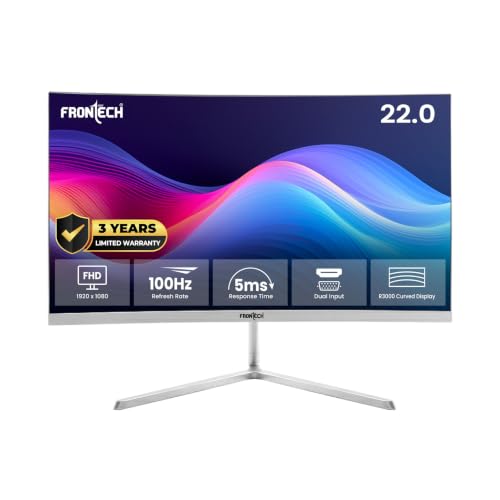
FRONTECH MON-0079C – Best Curved Monitor Under 5000
✦ ⟶ ⚙️ Quick Specification Card:
🖥️ Display & Size: 21.5-inch curved (3500R) panel, Full HD 1920×1080
⚡ Speed & Motion: 100Hz refresh rate, 5ms response time
🎨 Color & Visuals: 200-250 cd/m² brightness, 1000:1 contrast, 16.7M colors
🔌 Connectivity & Audio: HDMI, VGA, and DC input ports
🏗️ Ergonomics & Eye Care: 178° wide viewing angles, bezel-less frameless design
✦ ⟶ 👍 Reasons to Buy:
🎮 Curved Monitor Under 5000 for Immersive Viewing: The 3500R curvature genuinely wraps the screen slightly into your peripheral vision, adding immersion during movies and casual gaming.
⚡ Panel & Speed Focus: 100Hz refresh with 5ms response handles everyday multitasking and video playback with noticeably reduced motion blur.
👁️ Eye Care & Work Efficiency Focus: Wide 178° viewing angles keep colors consistent even when viewed off-center from a cramped desk.
🔌 Connectivity & Setup Focus: Triple input support via HDMI, VGA, and DC gives more device flexibility than typical budget monitors.
🏗️ Build & Mounting Focus: Bezel-less frameless design keeps the curved panel’s desk footprint surprisingly compact.
The FRONTECH MON-0079C is the rare curved monitor under 5000 that genuinely delivers on its visual promise. The 3500R curve is subtle but noticeable during video streaming, gently wrapping content at the edges without distorting straight lines in office documents. Text sharpness holds up reasonably well for browsing and casual coding, though it’s not the crispest panel on this list. In darker rooms, backlight uniformity shows mild inconsistency near the curve’s edges, a common trade-off for budget curved panels. The frameless design and wide viewing angles make it a genuinely good conversation-starter upgrade from a flat monitor at this exact price point.
Pros
✅ Genuine 3500R curve adds immersion rarely found under ₹5,000
✅ Wide 178° viewing angles maintain color consistency off-center
✅ Triple connectivity (HDMI, VGA, DC) adds unusual setup flexibility
Cons
❌ Mild backlight unevenness near curved edges in dark-room use
❌ Text sharpness trails behind flat-panel alternatives on this list
👉 Check FRONTECH MON-0079C Latest Price on Amazon
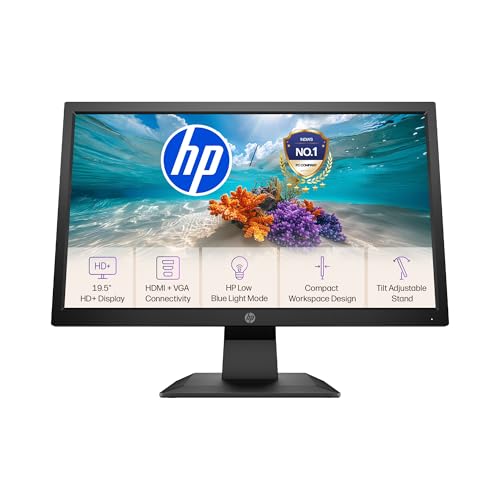
HP P204v – Best Compact Office Monitor Under 5000
✦ ⟶ ⚙️ Quick Specification Card:
🖥️ Display & Size: 19.5-inch panel, HD+ 1600×900 resolution
⚡ Speed & Motion: Standard refresh suited for document and spreadsheet work
🎨 Color & Visuals: Anti-glare LED backlighting for clear image reproduction
🔌 Connectivity & Audio: HDMI and VGA connectivity, 100mm VESA mount
🏗️ Ergonomics & Eye Care: HP Low Blue Light mode, tilt-adjustable stand
✦ ⟶ 👍 Reasons to Buy:
🎮 Best Monitor Under 5000 for Compact Desks: The 19.5-inch footprint suits smaller desks and cubicles where a 21.5-inch panel would feel oversized.
⚡ Panel & Speed Focus: HD+ resolution keeps text and icons appropriately sized without excessive scaling adjustments on smaller screens.
👁️ Eye Care & Work Efficiency Focus: HP Low Blue Light mode filters emissions and shifts to a warmer color spectrum for comfortable extended viewing.
🔌 Connectivity & Setup Focus: Supports attaching an HP Desktop Mini or Thin Client directly behind the display for a clean all-in-one setup.
🏗️ Build & Mounting Focus: 100mm VESA mounting frees up desk space, a rare inclusion at this size and price.
The HP P204v is built for a very specific buyer: someone who wants a trusted brand name and a genuinely compact footprint over raw specs. Text clarity for spreadsheets and browsers is solid for an HD+ panel, though it won’t match Full HD sharpness on the larger monitors in this list. HP’s Low Blue Light mode does noticeably warm up the color temperature, easing eye strain during late-night work sessions. The anti-glare coating handles typical office lighting well, and the ability to mount an HP mini PC directly behind the screen is a genuinely clever space-saving touch for cramped desks. Gaming performance isn’t this monitor’s focus, but it’s a very value-for-money monitor under 5000 for first-time users requiring casual office work to perform.
Pros
✅ Compact 19.5-inch size fits smaller desks better than larger panels
✅ HP Low Blue Light mode genuinely eases extended screen-time strain
✅ 100mm VESA mount and mini-PC attachment save real desk space
Cons
❌ HD+ resolution is lower than the Full HD standard on this list
❌ No stated refresh rate makes it unsuitable for gaming use
👉 Check HP P204v Latest Price on Amazon
Zebronics V22HD+ LED – Best Large HD+ Screen Under 5000
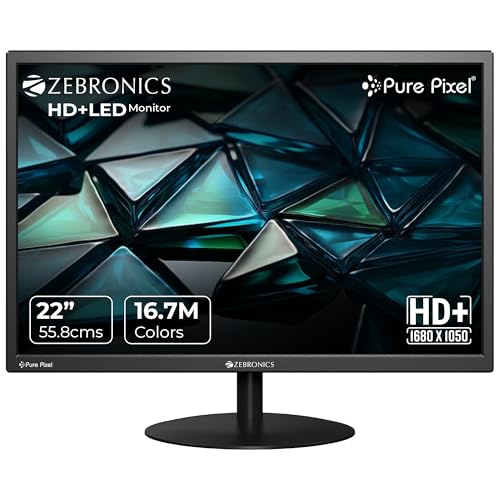
✦ ⟶ ⚙️ Quick Specification Card:
🖥️ Display & Size: 22-inch panel, HD+ 1680×1050 resolution, 16:10 aspect ratio
⚡ Speed & Motion: Standard refresh suited for browsing, spreadsheets, and media
🎨 Color & Visuals: 220 nits brightness, 5,000,000:1 dynamic contrast, 16.7M colors
🔌 Connectivity & Audio: Dual HDMI and VGA input ports
🏗️ Ergonomics & Eye Care: Wall mountable, just 20W maximum power draw
✦ ⟶ 👍 Reasons to Buy:
🎮 Best Monitor Under 5k for Extra Vertical Space: The unusual 16:10 aspect ratio gives noticeably more vertical room than standard 16:9 panels, useful for document-heavy work.
⚡ Panel & Speed Focus: A 5,000,000:1 dynamic contrast ratio produces deeper blacks than most standard LED monitors in this exact price band.
👁️ Eye Care & Work Efficiency Focus: 16.7 million color support keeps everyday visuals rich enough for extended office and study use.
🔌 Connectivity & Setup Focus: Dual HDMI and VGA input covers both modern laptops and older desktop towers.
🏗️ Build & Mounting Focus: Extremely low 20W power draw and wall-mount support suit minimal, energy-conscious setups.
The Zebronics V22HD+ stands apart on this list because of its 16:10 aspect ratio, which genuinely gives more vertical screen space for scrolling through long documents, PDFs, or code files compared to standard 16:9 panels. Text clarity at HD+ resolution is acceptable for office tasks, though it falls short of true Full HD sharpness. The high dynamic contrast ratio does produce noticeably deep blacks during video playback, which is a pleasant surprise at this price. In brighter rooms, the 220 nits brightness feels adequate but not exceptional, so positioning away from direct sunlight helps maintain visibility. This best monitor under 5000 in India prioritizes screen area and low power draw over speed or gaming performance.
Pros
✅ Unusual 16:10 aspect ratio adds useful vertical space for documents
✅ Strong 5,000,000:1 dynamic contrast ratio for deeper video blacks
✅ Extremely low 20W power consumption reduces electricity costs
Cons
❌ HD+ resolution trails Full HD sharpness seen elsewhere on this list
❌ 220 nits brightness feels modest under bright ambient lighting
👉 Check Zebronics V22HD+ LED Latest Price on Amazon
LG 19M38LB – Best Ultra-Budget Monitor Under 5000
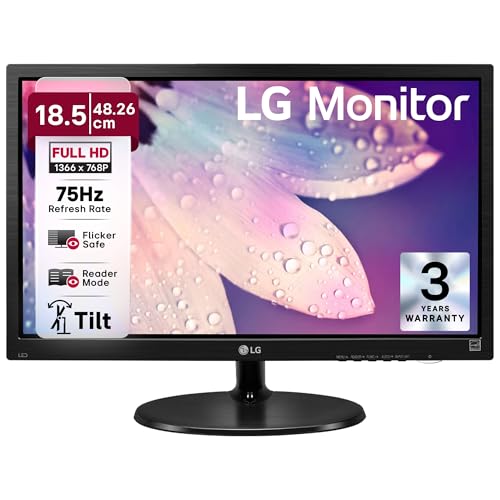
✦ ⟶ ⚙️ Quick Specification Card:
🖥️ Display & Size: 18.5-inch panel, HD 1366×768 resolution
⚡ Speed & Motion: 75Hz refresh rate, 5ms response time
🎨 Color & Visuals: Standard HD color reproduction suited for basic office tasks
🔌 Connectivity & Audio: D-Sub and HDMI ports, headphone-out jack
🏗️ Ergonomics & Eye Care: Flicker Safe, Reader Mode, 3-year onsite warranty
✦ ⟶ 👍 Reasons to Buy:
🎮 Best Monitor Under 5k for Absolute Basics: The compact 18.5-inch HD panel suits billing counters, basic browsing, and entry-level office setups on the tightest budgets.
⚡ Panel & Speed Focus: A 75Hz refresh rate, while modest, still improves on the standard 60Hz baseline for smoother everyday motion.
👁️ Eye Care & Work Efficiency Focus: LG’s Flicker Safe and Reader Mode technologies genuinely help reduce strain during long document-reading sessions.
🔌 Connectivity & Setup Focus: HDMI and D-Sub ports with headphone-out cover both modern and legacy desktop connections.
🏗️ Build & Mounting Focus: Backed by a rare 3-year onsite warranty, adding long-term peace of mind at this exact price.
The LG 19M38LB is the most budget-focused entry on this list of best monitors under 5000 in India, and it’s honest about its priorities: reliability and basic functionality over speed or size. Text clarity at HD resolution is serviceable for browsing and billing software but noticeably softer than the Full HD panels reviewed above. LG’s Reader Mode does help during long text-heavy sessions by adjusting color temperature for reduced glare. Backlight uniformity is decent for a panel this size, without significant bleed in typical use. Gaming or media-heavy use isn’t this monitor’s strength, but for buyers who genuinely just need a functional second screen backed by LG’s 3-year onsite warranty, it delivers dependable basics.
Pros
✅ Backed by a rare 3-year onsite warranty for long-term reliability
✅ Reader Mode and Flicker Safe tech genuinely ease document-reading strain
✅ Compact 18.5-inch size suits the tightest desk spaces and budgets
Cons
❌ HD 1366×768 resolution is noticeably softer than Full HD rivals
❌ 75Hz refresh rate lags behind the 100-120Hz options on this list
👉 Check LG 19M38LB Latest Price on Amazon
Conclusion
Across all ten models, three clear winners emerge from this best monitor under 5000 in India roundup based on distinct buyer priorities.
🥇 The Overall Winner: AOC 22B30HM2 – The best all-round balance of 120Hz speed, FreeSync gaming support, and eye-care features for most everyday buyers.
🥈 The Best for Gaming: Acer EK220Q J0 – A VA panel with 120Hz refresh, 1ms VRB, and AdaptiveSync delivers the smoothest motion handling for casual competitive play.
🥉 The Best for Office, Coding & Productivity: MSI PRO MP223 E2 – TÜV-certified eye comfort, strong contrast, and rare DisplayPort connectivity make this the top pick for desk-bound professionals.
FAQs
Can I get a genuinely good IPS monitor under 5000 in India?
True IPS panels are rare at this price; most options use standard LED or VA panels. Acer’s EK220Q uses VA for better contrast instead.
Is a Zebronics monitor under 5000 reliable for daily office use?
Yes, Zebronics models like the A122 and EA122 offer stable Full HD performance, dual connectivity, and decent brightness for standard office and study tasks.
Should I choose a 21.5-inch or 24-inch monitor under 5000?
Most reliable, feature-rich options at this budget top out around 21.5 inches; genuine 24-inch panels with matching specs typically start closer to ₹6,000-7,000.
Is a curved monitor under 5000 worth buying over a flat panel?
Yes, if immersion matters more than pixel-perfect sharpness — the FRONTECH MON-0079C offers a real 3500R curve without a major price premium.
Can these budget monitors handle gaming without screen tearing?
Models with FreeSync or AdaptiveSync, like the AOC 22B30HM2 and Acer EK220Q, reduce tearing effectively; monitors without these lack that protection.



![16 Best Laptops Under ₹1,00,000 in India [2026] | GadgetVeda](https://gadgetveda.com/wp-content/uploads/2026/09/Best-Laptops-Under-₹100000-in-India-150x150.webp)
![Hard Water Washing Machine Care India [Scale, Heater & Aqua Energie]](https://gadgetveda.com/wp-content/uploads/2026/09/Hard-Water-Washing-Machine-Problems-in-India-150x150.webp)
![12 Best Monitors Under ₹20,000 in India [2026]](https://gadgetveda.com/wp-content/uploads/2026/09/Best-Monitors-Under-₹20000-in-India-150x150.webp)
![Googlebook Laptops Launched With Gemini Intelligence And Android Integration [Price, Specs, India Availability]](https://gadgetveda.com/wp-content/uploads/2026/09/Googlebook-Laptops-Launched-With-Gemini-Intelligence-And-Android-Integration-150x150.webp)
![12 Best Mobile Phones Under ₹40,000 in India [2026]](https://gadgetveda.com/wp-content/uploads/2026/09/Best-Mobile-Phones-Under-₹40000-in-India-150x150.webp)

![16 Best Laptops Under ₹1,00,000 in India [2026] | GadgetVeda](https://gadgetveda.com/wp-content/uploads/2026/09/Best-Laptops-Under-₹100000-in-India-300x167.webp)
![Hard Water Washing Machine Care India [Scale, Heater & Aqua Energie]](https://gadgetveda.com/wp-content/uploads/2026/09/Hard-Water-Washing-Machine-Problems-in-India-300x167.webp)
![12 Best Monitors Under ₹20,000 in India [2026]](https://gadgetveda.com/wp-content/uploads/2026/09/Best-Monitors-Under-₹20000-in-India-300x167.webp)
![Googlebook Laptops Launched With Gemini Intelligence And Android Integration [Price, Specs, India Availability]](https://gadgetveda.com/wp-content/uploads/2026/09/Googlebook-Laptops-Launched-With-Gemini-Intelligence-And-Android-Integration-300x169.webp)