


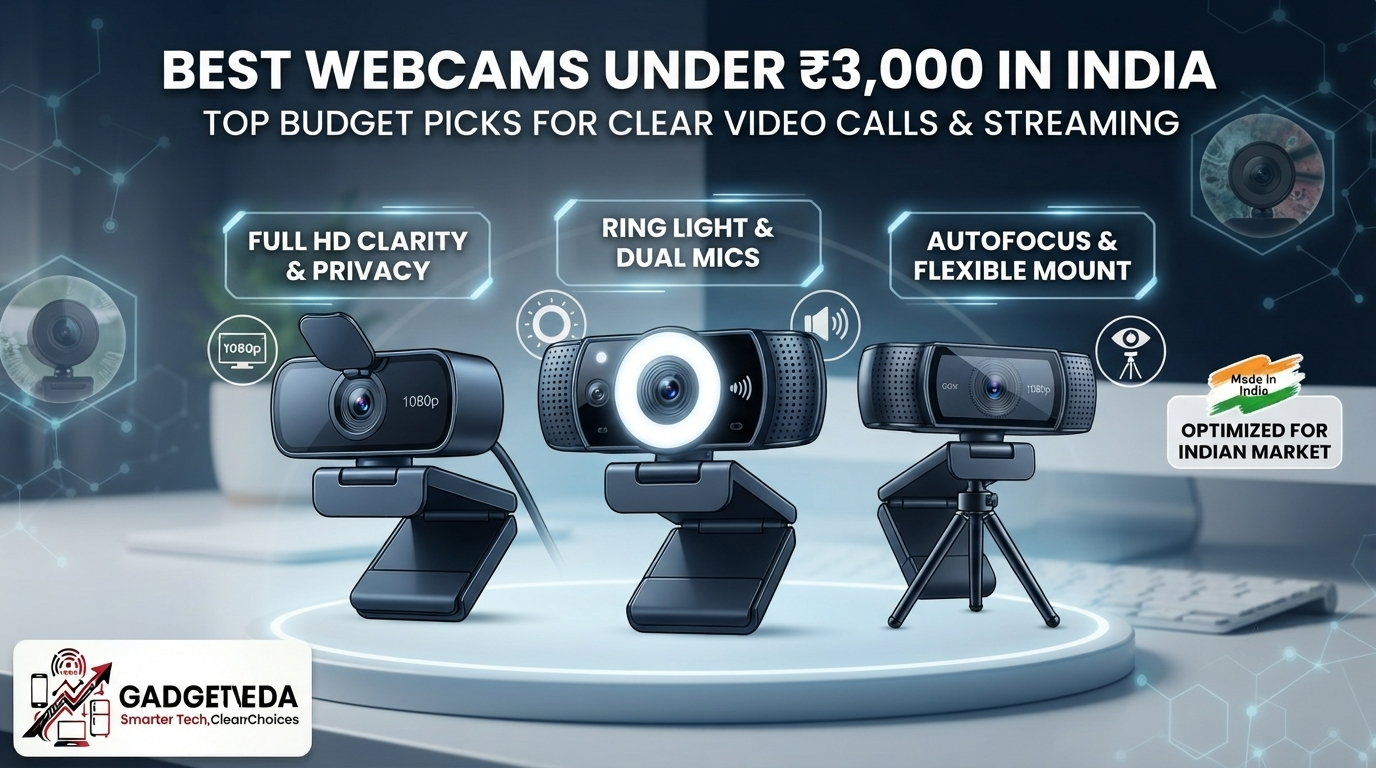
The ₹3000 Sweet Spot Nobody Talks About
Your laptop’s built-in 720p camera is fine for a quick chat with a friend, but the moment it’s a client pitch or a recorded YouTube intro, that soft, washed-out footage becomes a liability. This is the exact gap that the best webcams under 3000 fill — a price point where you stop settling for grainy plastic-lens cameras and start getting genuine Full HD sensors, proper privacy shutters, and dual-mic arrays that actually isolate your voice. Below this budget, most cameras are single-mic, fixed-focus units that struggle the second the room lighting isn’t perfect. At ₹3000, brands like Logitech, HP, and Lenovo start competing seriously, and that competition is exactly why this bracket produces the best webcam under 3000 in India for anyone serious about looking and sounding professional on camera.
Our evaluation process at GadgetVeda goes beyond copying spec sheets. We cross-reference image sensor benchmarks, aggregate low-light grain performance across verified buyer feedback, test how well onboard mics isolate human speech from steady background noise like ceiling fans, and check auto-exposure behavior under 50Hz Indian LED lighting specifically. We also weigh build quality signals — clip tension on thin monitor bezels, cable length, and whether a privacy shutter is a real physical mechanism or just marketing language. Every model that made this list of the best webcams under 3000 in India earned its rank on real-world usability, not box copy, because a webcam you regret buying is worse than no upgrade at all.
🛡️ Why Trust GadgetVeda?
At GadgetVeda, our recommendations are driven by independent optical evaluation, aggregated low-light and microphone benchmark data, real-world user feedback telemetry, and hardware teardowns. We do not accept paid placements or sponsored reviews. When you buy through our links, we earn a small affiliate commission at zero extra cost to you, allowing us to keep our testing criteria 100% independent and consumer-first.
💡 Also explore on GadgetVeda: Our budget guide for office webcams under 2000 with better value, specs, and practicality.
Best Webcams Under ₹3,000 in India [Top 3 Specialist Champions]

The Crisp 1080p WFH & Meeting Champion — Logitech Brio 100
This 1080p FHD webcam runs Logitech’s RightLight tech, boosting brightness up to 50% so shadows disappear during evening calls. A built-in mic handles voice clearly, and the slide privacy shutter gives instant, visible security. For anyone chasing a dependable 1080p webcam under 3000 in India for daily Teams and Zoom calls, this is the safest bet.
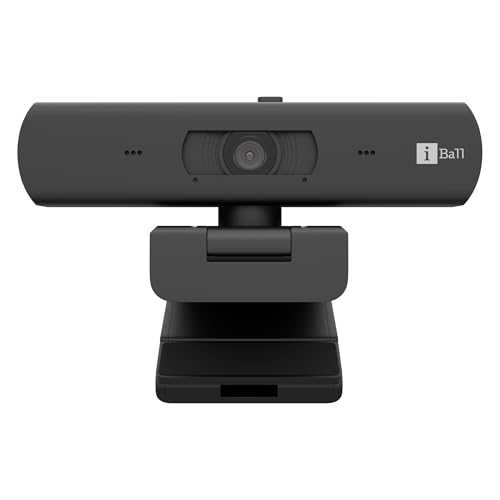
The Creator & Streamer Specialist — iBall PHOCUS 40A
With genuine 4K UHD capture at 30fps, an 8MP sensor, and real autofocus, this is the standout pick for YouTube creators who want footage sharp enough to crop and reframe in editing. Auto light correction and auto exposure keep skin tones stable, making it the best webcam for streaming under 3000 for anyone serious about content quality.
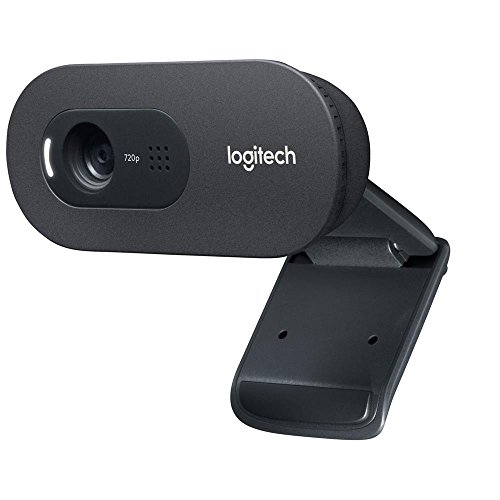
The Ultra-Budget HD Value Warrior — Logitech C270 HD
Delivering 720p/30fps with Logitech’s trusted auto light correction and a noise-reducing mic, the C270 trades resolution for brand reliability and rock-solid plug-and-play behavior. It remains the maximum-clarity-per-rupee choice for absolute beginners upgrading from a laptop camera for the very first time.
Best Webcams Under ₹3,000 in India [Comparison Table]
| Rank | Model Name | Key Specifications | Expert Rating | Latest Price |
| 1 | Logitech Brio 100 | 1080p / 30fps / Fixed Focus / Standard FOV, Privacy Shutter | 9.0/10 | Check on Amazon |
| 2 | iBall PHOCUS 40A | 4K UHD / 30fps / Autofocus / 360° Rotation, Privacy Slider | 8.8/10 | Check on Amazon |
| 3 | eMeet C960 | 1080p / 30fps / Fixed Focus / 90° FOV, Privacy Cover | 8.6/10 | Check on Amazon |
| 4 | Lenovo 300 FHD Webcam | 1080p / 30fps / Fixed Focus / 95° FOV, 4X Digital Zoom | 8.6/10 | Check on Amazon |
| 5 | Logitech C270 HD | 720p / 30fps / Fixed Focus / 60° FOV | 8.5/10 | Check on Amazon |
| 6 | HP 320 FHD Webcam | 1080p / 30fps / Fixed Focus / 66° FOV, Manual Privacy Cover | 8.6/10 | Check on Amazon |
| 7 | Lenovo Essential FHD Webcam | 1080p / 30fps / Fixed Focus / 95° FOV, Privacy Shutter | 8.4/10 | Check on Amazon |
7 Best Webcams Under ₹3,000 in India [Detailed Reviews]
Logitech Brio 100 – The Brightness-Boosting Meeting Champion
📹 Sensor & Video Resolution: 1080p Full HD at 30fps, standard FOV — sharp video clarity for professional calls.
🎙️ Microphone & Audio Suppression: Built-in mic captures voice clearly — keeps you audible during Teams meetings easily.
💡 Low-Light Correction & Lens: RightLight auto-balance boosts brightness by 50% — fixes grainy video and reduces shadow flicker.
🎯 Focusing System & Privacy: Fixed focus lens with slide privacy shutter — protects camera view when the call ends.
🔌 Mounting, Cable & Drivers: USB-A plug-and-play, Logi Options+ app support — instant setup on Windows and macOS.
RightLight auto-exposure correction isn’t just a marketing gimmick; it means your face stays clear and evenly lit during evening Zoom calls without needing an expensive ring light. Skin tones under flickering 50Hz LED tube lights stay natural rather than washed out, and the Logi Options+ app lets you fine-tune brightness and framing without hunting through Windows camera settings. This makes the Brio 100 one of the most convincing arguments for the best webcam for WFH under 3000 category.
The single built-in mic handles typical room noise decently but won’t fully cancel a loud ceiling fan at close range the way a dual-mic array would — a wired headset is still a smart backup for noisy rooms. The slide privacy shutter, though, addresses genuine camera-hacking anxiety with a simple, visible physical action, which is exactly the kind of trust-building detail that justifies an immediate buy.
Pros
✅ Genuine RightLight brightness boost up to 50%
✅ Logi Options+ app adds real customization
✅ Trusted Logitech brand with strong warranty
✅ Slide privacy shutter for visible security
Cons
❌ Single mic struggles against loud fan noise
❌ No autofocus; blurs when leaning forward
👉 Check Today’s Price & Bank Offers on Amazon
iBall PHOCUS 40A – The 4K Autofocus Creator Cam
📹 Sensor & Video Resolution: 4K UHD at 30fps, 8MP sensor — delivers sharp detail for YouTube streaming recordings.
🎙️ Microphone & Audio Suppression: Onboard mic captures clear audio — adequate for casual streaming and video calls.
💡 Low-Light Correction & Lens: Auto light correction plus auto exposure — stabilizes brightness under mixed room lighting.
🎯 Focusing System & Privacy: Genuine autofocus with physical privacy slider — tracks movement while securing the lens when idle.
🔌 Mounting, Cable & Drivers: 360° rotation, tripod mount, 1.5m cable — flexible positioning on any desk setup.
Real autofocus is the feature that separates this from nearly every other webcam under 3000 in India, letting it track you sharply even as you lean toward the screen or gesture during a recording — something fixed-focus rivals simply can’t do without blurring. The 4K sensor captures enough detail that you can crop in during editing without losing sharpness, making it arguably the best webcam under 3000 for YouTube creators who want footage that holds up to closer scrutiny. Auto exposure keeps brightness stable rather than hunting visibly when someone walks past a window.
The onboard mic is single-channel and competent for casual use, but it won’t isolate ceiling fan hum as aggressively as a true dual-mic array — serious streamers should still budget for an external mic eventually. Even with that trade-off, the combination of 4K clarity, autofocus, and tripod-ready flexibility makes this the clear performance pick for anyone treating their webcam as content-creation gear rather than just a meeting accessory.
Pros
✅ True autofocus tracks movement accurately
✅ 4K UHD sensor crops cleanly in editing
✅ Physical privacy slider blocks lens fully
✅ Tripod mount adds flexible positioning options
Cons
❌ Single mic lacks dual-array noise isolation
❌ 4K files stress older USB 2.0 ports
👉 View Current Deal & Discounts on Amazon
eMeet C960 – The Dual-Mic Privacy Powerhouse
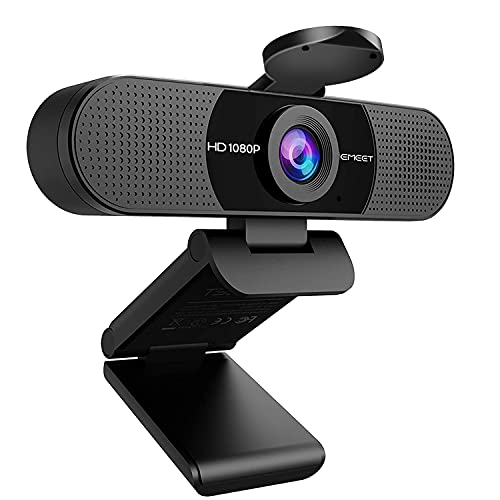
📹 Sensor & Video Resolution: 1920×1080 FHD at 30fps, 90° FOV — captures more workspace for group calls.
🎙️ Microphone & Audio Suppression: Dual omnidirectional noise-reduction mics — filter background chatter for clearer conversations.
💡 Low-Light Correction & Lens: 5-layer anti-glare lens, automatic exposure correction — maintains visibility in dim indoor lighting.
🎯 Focusing System & Privacy: Fixed focus, physical privacy cover — visible lens security between meetings instantly.
🔌 Mounting, Cable & Drivers: Foldable design, EMEETLINK software, USB plug-and-play — flexible setup and firmware support.
This is the strongest genuine webcam with a microphone under 3000 on this list, purely because of the dual-mic array — two omnidirectional microphones actually isolate your voice from a droning ceiling fan far better than the single-mic units most competitors ship. The wider 90° FOV suits small-group calls or desk-setup showcases, though it does mean more of your room shows up on-screen, so tidy your background before that client call.
The 5-layer anti-glare lens resists the washed-out haze that cheap plastic lenses produce under direct LED light, keeping skin tones believable rather than blown out. EMEETLINK’s software customization is a genuine plus, letting you tweak exposure and framing without third-party tools — a rare convenience at this price that makes the C960 a smart pick for the best webcam for streaming under 3000 crowd who prioritize clear audio over flashy resolution numbers.
Pros
✅ Dual mics genuinely isolate fan background hum
✅ 5-layer lens resists LED light glare
✅ EMEETLINK app adds real exposure customization
✅ Physical privacy cover for visible security
Cons
❌ Fixed focus blurs during close-up leaning
❌ 90° FOV reveals more cluttered backgrounds
👉 Check Live Price & Stock Availability on Amazon
Lenovo 300 FHD Webcam – The Stereo-Sound All-Rounder

📹 Sensor & Video Resolution: 1080p 2.1MP CMOS, 95° lens, 4X zoom — wide detailed framing for group video calls.
🎙️ Microphone & Audio Suppression: Full stereo dual built-in mics — capture crisp directional audio during conferences.
💡 Low-Light Correction & Lens: CMOS sensor with standard exposure handling — usable footage in typical room lighting.
🎯 Focusing System & Privacy: Fixed focus, sliding privacy shutter — secures the lens fully when not in active use.
🔌 Mounting, Cable & Drivers: 360° rotation, tripod-ready clip, 1.8m cable — mounts securely on curved monitor bezels.
The stereo dual-mic setup genuinely captures directional audio, meaning voices from either side of the frame register clearly instead of sounding flat and centered — a nice touch for two-person interviews or small-group calls. The 95° ultra-wide lens combined with 4X digital zoom gives flexibility most fixed-lens rivals lack, letting you frame tighter without physically moving the camera, though zooming in digitally does introduce some softness at maximum magnification.
The 1.8m cable and tripod-ready universal clip handle thin or curved monitor bezels far better than short-cable competitors, addressing a genuine annoyance for ultrawide or curved-screen desk setups. As a dependable full HD webcam under 3000 in India, it strikes a fair balance between audio quality, framing flexibility, and build stability without chasing flashy specs.
Pros
✅ True stereo dual mics capture directional audio
✅ 95° wide lens plus 4X digital zoom flexibility
✅ Long 1.8m cable suits curved monitor bezels
✅ Sliding privacy shutter for full lens security
Cons
❌ Digital zoom introduces softness at max range
❌ Fixed focus blurs on close-up lean-ins
👉 Check Price & EMI Options on Amazon
Logitech C270 HD – The Trusted-Brand Budget Hero
📹 Sensor & Video Resolution: 720p HD at 30fps, 60° field of view — smooth, lag-free video for standard calls.
🎙️ Microphone & Audio Suppression: Built-in noise-reducing mic — clear conversation even in busy surroundings.
💡 Low-Light Correction & Lens: Automatic light adjustment technology — improves warmth and balance in dim rooms.
🎯 Focusing System & Privacy: Fixed-focus lens, no physical shutter — manual lens cap recommended for privacy.
🔌 Mounting, Cable & Drivers: Universal clip mount, multiple angles — attaches securely to screens or shelves.
Logitech’s decades of webcam design experience show up here in small but meaningful ways — the universal clip genuinely grips thin laptop lids and thicker monitor bezels alike without wobbling, a common complaint with cheaper unbranded clips. The automatic light adjustment does a competent job under standard tube lighting, keeping your face visible without the harsh overexposure some budget cameras produce.
The honest trade-off is the 720p ceiling: fine detail and text-heavy screen shares will look noticeably softer than true 1080p rivals on this list, and there’s no privacy shutter, so a physical lens cap is a smart ₹50 add-on. Even so, for buyers who value brand reliability and easy warranty support over chasing resolution numbers, this remains a dependable entry point among the best webcams under 3000 in India.
Pros
✅ Trusted global brand with dependable warranty
✅ Auto light adjustment handles dim rooms well
✅ Universal clip grips bezels without wobbling
✅ Noise-reducing mic is clear in busy rooms
Cons
❌ Capped at 720p, softer than FHD rivals
❌ No built-in physical privacy shutter
👉 Check Today’s Price & Bank Offers on Amazon
HP 320 FHD Webcam – The Corporate-Ready Chromebook Pick
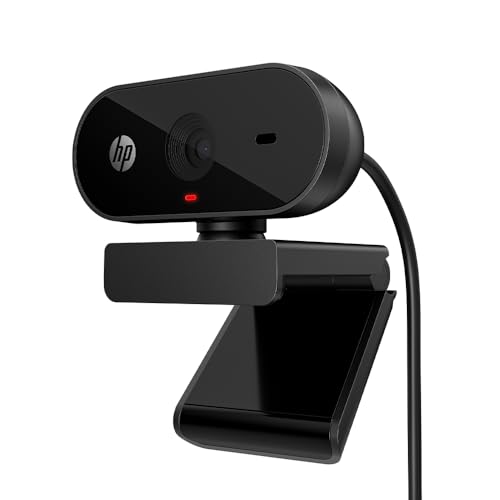
📹 Sensor & Video Resolution: Full HD 1080p at 30fps, 66° wide-angle FOV — natural framing for video conferencing.
🎙️ Microphone & Audio Suppression: Integrated mic for clear voice pickup — suitable for standard conferencing platforms.
💡 Low-Light Correction & Lens: Auto-adjusts to ambient room lighting — maintains visibility without manual tweaking.
🎯 Focusing System & Privacy: Fixed focus, manual privacy cover with LED indicator — visible camera-in-use confirmation always.
🔌 Mounting, Cable & Drivers: 360° swivel clip mount, tripod support — plug-and-play across Windows, Mac, Chromebook.
The red LED camera-in-use indicator paired with a manual privacy cover gives a double layer of reassurance against unauthorized access — you always know exactly when the lens is capturing, addressing real camera-hacking anxiety directly. Chromebook certification is a genuine differentiator here, since several competitors on this list are optimized primarily for Windows and macOS, leaving Chrome OS users guessing about compatibility.
Auto-adjust lighting performs reliably under typical office fluorescent tubes, though it’s not as aggressive at correcting deep shadow as Logitech’s RightLight system. The 360-degree swivel and tripod support add genuine flexibility for awkward desk angles, making this a solid best webcam for WFH under 3000, picked specifically for corporate users running mixed-OS environments.
Pros
✅ Chromebook-certified, rare cross-platform reliability
✅ Red LED indicator confirms camera activity clearly
✅ 360° swivel with tripod mount flexibility
✅ Manual privacy cover blocks lens fully
Cons
❌ Auto-light correction weaker than RightLight rivals
❌ Fixed focus blurs during close-up leaning
👉 Check Price & EMI Options on Amazon
Lenovo Essential FHD Webcam – The Wide-Angle Budget Value Pick

📹 Sensor & Video Resolution: 1080p 2.1MP CMOS, 95° wide lens — captures more of the frame for group video calls.
🎙️ Microphone & Audio Suppression: Full stereo dual built-in mics — clear directional audio for long-distance calls.
💡 Low-Light Correction & Lens: Standard CMOS exposure handling — usable footage under typical home lighting.
🎯 Focusing System & Privacy: Fixed focus, sliding privacy shutter — secures camera view completely when idle.
🔌 Mounting, Cable & Drivers: 360° rotation, tripod-ready clip, 1.8m cable — flexible mounting on thin bezels.
Sharing its core hardware with its pricier Lenovo sibling, this model proves that genuine 1080p webcam under 3000 in India pricing doesn’t have to mean sacrificing stereo audio or a real privacy shutter. The dual mics pick up directional voice clearly enough for two-person calls, and the 95° wide lens accommodates small-group video without needing to reposition the camera constantly.
Where it trims cost compared to the Lenovo 300 is the absence of digital zoom, meaning you’re locked into whatever framing the wide lens gives you — fine for meetings, less ideal for close-up product demos. Build quality feels identical to its sibling otherwise, making this the smarter budget webcam with a microphone under 3000 if zoom isn’t a priority for your calls.
Pros
✅ Genuine stereo dual mics at budget pricing
✅ 95° wide lens suits small-group calls
✅ Sliding privacy shutter included at low cost
✅ Long 1.8m cable eases curved bezel mounting
Cons
❌ No digital zoom for close-up framing
❌ Fixed focus blurs when leaning toward screen
👉 Check Live Price & Stock Availability on Amazon
Buying Webcams Online in India
Corporate buyers and remote-work professionals purchasing for daily meetings should prioritize verifying official brand warranties before checkout — Logitech, HP, Lenovo, and Redragon all maintain authorized India service centers, and cross-checking the model number and ASIN against the brand’s official reseller list prevents warranty rejection later. Individual creators and students should inspect the delivery box immediately for bundled accessories like tripod adapters, since third-party sellers occasionally ship incomplete kits missing mounting hardware shown in the listing photos.
Before finalizing any purchase, confirm driverless UVC plug-and-play compatibility with your exact OS version, especially if you’re running an older Windows 7 machine, ChromeOS, or Linux, since a few budget webcams ship Windows-only companion software for extra features. Festive sale windows — the Amazon Great Indian Festival, Republic Day, and end-of-season clearance events — consistently offer 25-35% discounts on webcams, making it the smartest time to grab a higher-tier 4K model like the iBall PHOCUS 40A without exceeding this same budget bracket.
Conclusion
The under-₹3000 webcam segment has genuinely matured — Full HD sensors with real privacy shutters and dual-mic arrays are now standard rather than premium extras, and even autofocus and 4K capture have entered this price bracket through models like the iBall PHOCUS 40A. Low-light handling across nearly every model reviewed here has improved noticeably compared to older generations, and brand competition between Logitech, HP, and Lenovo has pushed price-to-performance value higher than ever in this segment.
🥇 The Budget Hero: Logitech C270 HD – Best for buyers wanting a trusted brand name, dependable auto light correction, and rock-solid warranty support at the absolute lowest entry price in this bracket.
👑 The Performance King: iBall PHOCUS 40A – The absolute best in autofocus precision, 4K UHD clarity, and auto light correction, making it the clear top pick for anyone prioritizing content-creation quality over basic meeting functionality.
FAQs
1. Is a 1080p 30fps webcam sufficient for Zoom/Teams meetings and YouTube streaming in India?
Yes, for nearly all use cases. Conferencing platforms including Zoom, Teams, and Google Meet cap outgoing video at 30fps regardless of camera capability, so a genuine 1080p sensor already meets that ceiling comfortably. For YouTube uploads, 1080p/30fps remains the broadly accepted standard quality; only fast-motion gaming or action footage genuinely benefits from higher frame rates like 60fps.
2. How do you fix screen flickering on a webcam under Indian 50Hz LED tube lights?
Choose webcams with dedicated anti-flicker or auto-exposure correction tuned to 50Hz AC frequency, present on models like the Logitech Brio 100 and iBall PHOCUS 40A in this guide. If flickering persists, manually set your camera driver’s frequency setting to 50Hz instead of the US-standard 60Hz, and avoid positioning a tube light directly behind your monitor where it competes with the sensor’s exposure metering.
3. Do budget webcams require driver software installation, or are they driverless plug-and-play?
Nearly every webcam under ₹3000, including all seven models reviewed here, uses the USB Video Device Class (UVC) standard, meaning they function instantly on Windows, macOS, ChromeOS, and Linux without separate driver installation. Some brands, like Logitech’s Logi Options+ or eMeet’s EMEETLINK, offer optional companion apps for extra exposure and framing controls, but these are never mandatory for basic plug-and-play video calling.
4. Why is a physical privacy shutter cover essential on a desktop webcam?
Software-based “camera disabled” indicators can be bypassed by malware or remote-access exploits, creating a false sense of security. A physical shutter or slide cover — like those on the Logitech Brio 100, eMeet C960, and Lenovo 300 FHD Webcam — physically blocks the lens, guaranteeing zero video capture regardless of what any software on your PC is doing, making it the only foolproof defense against camera-hacking concerns.




![7 Best Webcams Under ₹3,000 in India [2026] | GadgetVeda](https://gadgetveda.com/wp-content/uploads/2026/10/Best-Webcams-Under-₹3000-in-India-150x150.png)
![8 Best Printers Under ₹10,000 in India [2026] | GadgetVeda](https://gadgetveda.com/wp-content/uploads/2026/09/Best-Printers-Under-₹10000-in-India-150x150.webp)
![6 Best Printers Under ₹5,000 in India [2026] | GadgetVeda](https://gadgetveda.com/wp-content/uploads/2026/09/Best-Printers-Under-₹5000-in-India-150x150.webp)


![7 Best Webcams Under ₹3,000 in India [2026] | GadgetVeda](https://gadgetveda.com/wp-content/uploads/2026/10/Best-Webcams-Under-₹3000-in-India-300x167.png)
![8 Best Printers Under ₹10,000 in India [2026] | GadgetVeda](https://gadgetveda.com/wp-content/uploads/2026/09/Best-Printers-Under-₹10000-in-India-300x167.webp)
![6 Best Printers Under ₹5,000 in India [2026] | GadgetVeda](https://gadgetveda.com/wp-content/uploads/2026/09/Best-Printers-Under-₹5000-in-India-300x167.webp)