


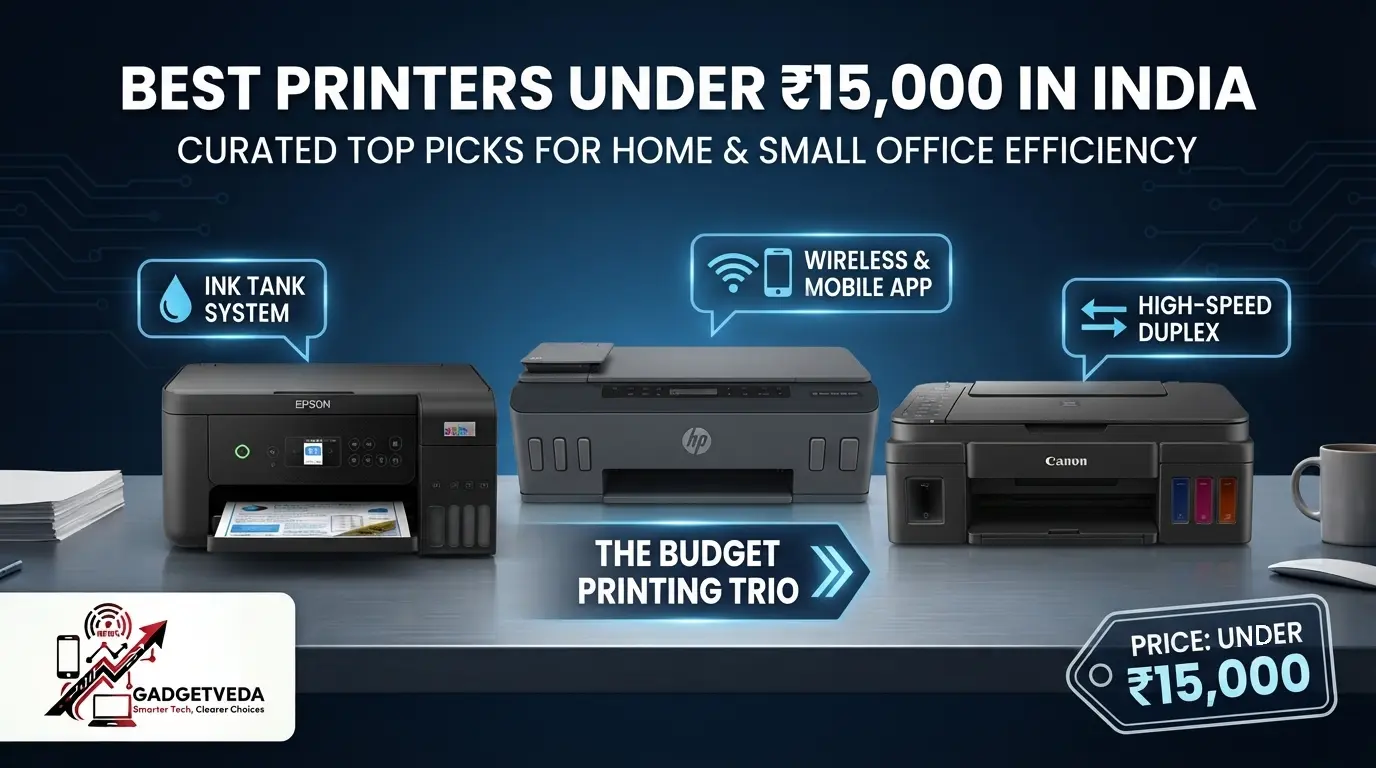
The 30-Second Shortlist
Short on time? Here is the fastest way to narrow down the best printers under 15000 before you read the details.
🚀 Lowest listed running cost: Epson EcoTank L3352. Epson quotes 9 paise per black page and 33 paise per color page.
📶 Best Wi-Fi ink tank for a home office: Brother DCP-T436W, with dual-band Wi-Fi and a 1200 x 2400 dpi optical scanner.
⚡ Fastest all-in-one ink tank: HP Smart Tank 589, listed at up to 30 ppm black and 24 ppm color.
💰 Cheapest way into ink tank savings: Brother DCP-T236, a USB-only all-in-one with 7,500-page black ink.
👑 Best for black-and-white documents only: Brother HL-L2440DW, a Wi-Fi laser with automatic duplex.
If none of those match your situation, use the decision table below. It takes about a minute and prevents the most common regret: buying the wrong printer type for how you actually print.
Which Printer Under 15000 Fits You?
| If you… | Choose | Why |
| Print color school projects every week | Epson EcoTank L3352 | Lowest listed cost per page, 5760 x 1440 dpi |
| Need Wi-Fi, scanning, and a flatbed in one | Brother DCP-T436W | Dual-band Wi-Fi, 150-sheet tray |
| Print long documents fast | HP Smart Tank 589 | 30/24 ppm, 3,000-page monthly duty cycle |
| Want the cheapest ink tank all-in-one | Brother DCP-T236 | Spill-free refills, USB-only |
| Print only black text, in volume | Brother HL-L2440DW | Laser, duplex, 250-sheet tray |
| Share a printer across several devices | HP Laser 303dw | Wi-Fi, auto-duplex, 256 MB memory |
The ₹15,000 Rupee Printer Dilemma
It is 11 p.m., your assignment is due at 9 a.m., and the print shop around the corner closed an hour ago. Or it is a Monday morning and a client wants a signed contract on paper within the hour. Most households and home offices in India have been there, and that is usually the moment someone buys the first cheap printer they see.
The trouble starts weeks later. The starter cartridges run dry after a few hundred pages, a replacement set costs a painful fraction of the printer itself, and the nozzles clog because nobody printed for three weeks. Meanwhile, 70-80 GSM paper jams, the feed mechanism sounds like a drill during late-night study sessions, and the Wi-Fi setup eats an entire evening.
A budget of ₹15,000 changes the picture. It is enough to reach refillable ink tank printers and proper laser machines, where the real cost of ownership drops sharply. That is why choosing the best printer under 15000 in India is less about the sticker price and more about the cost of your tenth thousand pages.
How GadgetVeda Evaluated These Printers
We read every model against the jobs you actually do: a 20-page assignment, a color science chart, an ID copy, a signed form scanned to your phone. For each printer, we compared the listed ISO-style print speed in PPM, black and color page yield, cost per page (CPP) where the manufacturer gives it, flatbed scanner optical resolution, mobile app and Wi-Fi support, tray capacity, duty cycle, warranty terms, and build and weight.
We also looked at the risks buyers rarely see on the box: ink or toner lock-in policies, USB-only limits, printhead maintenance on ink tank models, and how listing speeds differ from real mixed-document throughput. Customer feedback patterns inform our commentary, but we keep manufacturer claims separate from measured results. Where the data is missing, such as scanner DPI on several models, we say so instead of guessing.
Why Trust GadgetVeda?
At GadgetVeda, our recommendations are driven by independent hardware evaluation, aggregated cost-per-page benchmarks, real-world user feedback telemetry, and long-term durability assessments. We do not accept paid placements or sponsored reviews. When you buy through our links, we earn a small affiliate commission at zero extra cost to you, allowing us to keep our testing criteria 100% independent and consumer-first.
💡 Need a tighter budget? Explore our compilation of the Best Printers Under 10000 in India and Best Printers Under 5000 for Home to find reliable entry-level single-function options.
Best Printers Under ₹15,000 in India [Top 3 Specialist Champions]
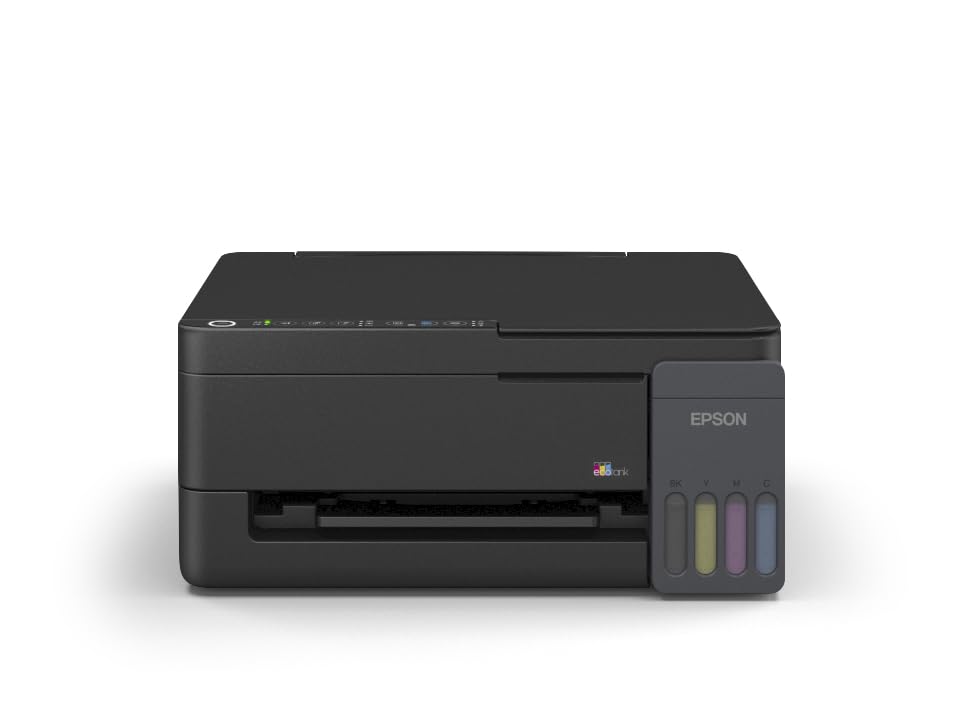
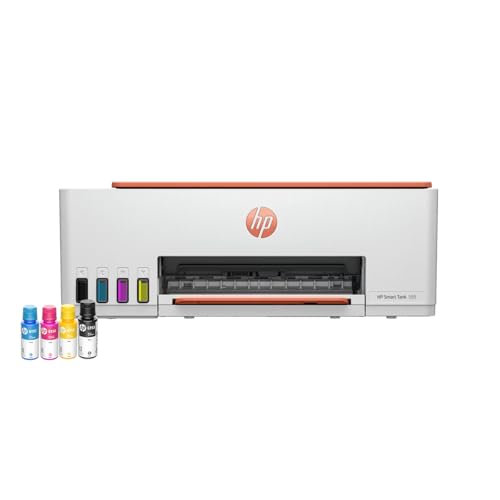
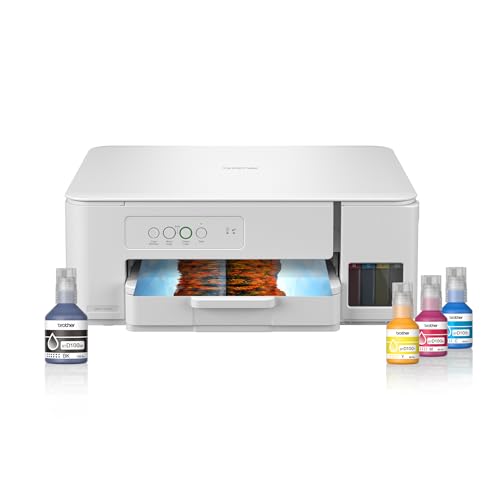
Low-Cost-Per-Page Champion: Epson EcoTank L3352
The L3352 is our pick for students and busy homes. Epson lists 9 paise per black page, 33 paise per color page, and a 5760 x 1440 dpi print engine. Key-lock refill nozzles help keep ink off your desk, and a 1-year onsite warranty (or 50,000 pages) backs it.
WFH and Small-Office Specialist: HP Smart Tank 589
The HP Smart Tank 589 is a fast Wi-Fi all-in-one at up to 30 ppm black and 24 ppm color. A 100-sheet input tray and 3,000-page monthly duty cycle suit invoices, reports, and client paperwork. It fits home offices that print in bursts.
Ultra-Budget Entry Value Warrior: Brother DCP-T236
The DCP-T236 is a compact USB all-in-one with a 150-sheet tray, 27/11 ppm speeds, and up to 7,500 black pages from the in-box ink. It has no Wi-Fi, but it delivers ink tank economics at the entry tier.
Best Printer Under ₹15,000 for Home & Small Office [Master Comparison Table]
| Rank | Model Name | Key Specifications | Expert Rating | Latest Price |
| 1 | Epson EcoTank L3352 | Ink tank AIO / 33 black, 11 color / 5760 x 1440 / USB, Wi-Fi | 9.4/10 | Check on Amazon |
| 2 | Brother DCP-T436W | Ink tank AIO / 27 black, 11 color / 1200 x 6000 / Dual-band Wi-Fi, USB | 9.2/10 | Check on Amazon |
| 3 | Canon PIXMA MegaTank G3010 | Ink tank AIO / 8.8 black, 5 color / 4800 x 1200 / USB, Wi-Fi | 8.9/10 | Check on Amazon |
| 4 | HP Smart Tank 589 | Ink tank AIO / 30 black, 24 color / Not listed / USB, Wi-Fi | 8.8/10 | Check on Amazon |
| 5 | Brother DCP-T236 | Ink tank AIO / 27 black, 11 color / 1200 x 6000 / USB | 8.6/10 | Check on Amazon |
| 6 | HP Smart Tank 584 | Ink tank AIO / 30 black, 24 color / Not listed / Wi-Fi (USB per description) | 8.6/10 | Check on Amazon |
| 7 | Brother HL-L2321D | Mono laser / 30 black / 600 x 600, HQ1200 / USB | 8.5/10 | Check on Amazon |
| 8 | Brother HL-L2440DW | Mono laser / 30 black / up to 1200 x 1200 / USB, dual-band Wi-Fi | 8.4/10 | Check on Amazon |
| 9 | HP Laser 303dw | Mono laser / 30 black / Not listed / Wi-Fi | 8.1/10 | Check on Amazon |
| 10 | HP Laser 1008w | Mono laser / 21 black / Not listed / USB, Wi-Fi Direct | 8.0/10 | Check on Amazon |
10 Best Printers Under ₹15,000 in India [Detailed Reviews]
1. Epson EcoTank L3352 – Lowest Listed Cost Per Page, Fewer Refill Worries
🖨️ Ink tank, 5760 x 1440 dpi: Delivers sharp documents and vivid color prints for home use.
⚡ 33 black, 11 color ppm; 4,700/7,500 yield: Prints long assignments fast without frequent ink refills.
💰 9 paise black, 33 paise color per print: Keeps long-term printing costs low for students and WFH.
📑 Print, scan and copy; flatbed scanner: Provides effortless scanning and copying of documents, IDs and assignments.
📶 Wi-Fi, Wi-Fi Direct, AirPrint, Mopria, Epson Smart Panel: Enables instant wireless printing from smartphones and laptops.
If you want the best ink tank printer under 15000, start here. Epson’s claimed 9 paise per black page means a student printing 200 black and 50 color pages a month spends roughly ₹34 on ink, based on Epson’s own figures. The listed 33 ppm black speed and 10-second first page make last-minute assignment runs far less stressful, and the key-lock refill nozzles reduce the mess that puts people off tank printers.
Be realistic about the limits. Epson’s 11 ppm color figure is a best-case scenario, so photo-heavy projects will be slower. The listing does not state the scanner’s optical DPI or whether duplex is available. Expect normal inkjet feed noise, and print a test page every week or two so the nozzles stay healthy. For heavy printing, the free installation and 400+ service centers add real peace of mind.
Pros
✅ Ultra-low running cost per page for daily use.
✅ Superior 5760×1440 dpi resolution for clear graphics.
✅ Heat-Free technology consumes minimal electrical power.
✅ Free doorstep installation with 50,000-page onsite warranty.
✅ Key-lock ink bottle nozzles ensure spill-free refills.
Cons
❌ Requires manual page flipping for two-sided printing.
❌ Limited 100-sheet tray for heavy volume usage.
👉 Check Today’s Price & Bank Offers on Amazon
2. Brother DCP-T436W – Dual-Band Wi-Fi and a Proper Optical Scanner
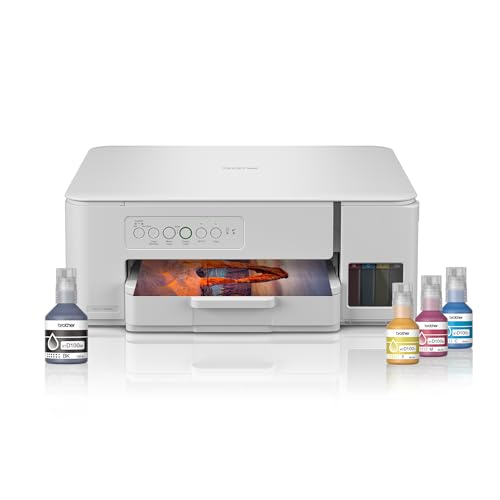
🖨️ Ink tank, up to 1200 x 6000 dpi: Produces crisp text and vibrant color for home use.
⚡ 27 black, 11 color ppm; 7,500/5,000 yield: Ensures fast printing without frequent bottle refills.
💰 Genuine BTD100 bottles in the box: Keeps running costs low, though CPP is not listed.
📑 Flatbed scanner, 1200 x 2400 dpi optical: Delivers detailed scans of IDs, forms, and assignments.
📶 Dual-band Wi-Fi and Brother Mobile Connect app: Lets phones and laptops print wirelessly without cables.
The DCP-T436W is the best printer under 15000 with wifi if your router is crowded. Dual-band support means it can join a less busy 5GHz network, which cuts down the dropouts that plague single-band 2.4GHz printers. The listing is also unusually transparent: a 1200 x 2400 dpi optical scanner, a 150-sheet tray and up to 7,500 black pages from the included bottles.
It is not perfect. There is no automatic duplex, and the 11 ppm color speed will feel slow on big school projects. Brother does not list a CPP figure, so check bottle prices before you decide. The 16W power draw is low, and the 150-sheet tray means fewer reloads. It fits students and small home businesses that scan often.
Pros
✅ Versatile all-in-one printer, scanner, and copier device.
✅ Fast ink tank speeds up to 27 ppm.
✅ Enclosed 150-sheet paper tray protects from dust.
✅ High-yield bottle ink prints up to 7,500 pages.
Cons
❌ Lacks an LCD screen for easy status viewing.
❌ Manual duplex printing only; no auto double-sided.
👉 View Current Deal & Discounts on Amazon
3. Canon PIXMA MegaTank G3010 – Wireless Tank Value from a Familiar Brand
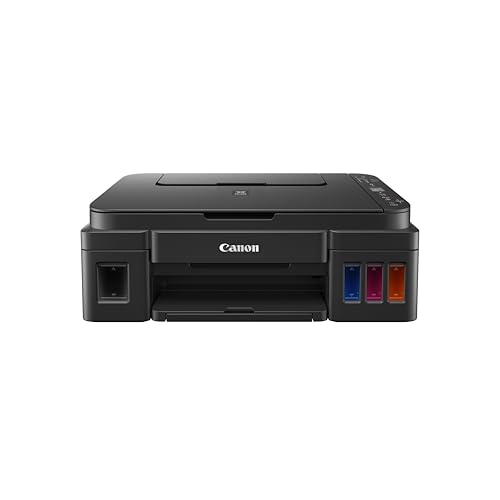
🖨️ Ink tank, 4800 x 1200 dpi: Delivers clear documents and rich color images at home.
⚡ 8.8 black, 5-color ipm; 6,000/7,000 yield: Handles heavy printing with few bottle refills.
💰 GI-790 CMYK bottles; CPP not listed: Keeps recurring costs low if bottle pricing holds.
📑 Print, scan and copy: Provides everyday scanning and copying of forms and homework.
📶 Wi-Fi, Mopria, Canon PRINT and Easy-PhotoPrint: Enables wireless printing from smartphones and laptops.
The G3010 is the best all-in-one printer under 15000 for buyers who trust Canon’s service network and want an uncomplicated machine. Its stated 6,000 black and 7,000 color page yields are high, and the 1.2-inch LCD makes status checks simple. Wi-Fi with Canon PRINT and Mopria means you can print from a phone without installing much.
The compromise is speed. At 8.8 ipm in black and 5 ipm in color, it is the slowest tank here, so a 20-page document takes a couple of minutes, and color batches take longer. There is no duplex and no ADF, and the listing gives no scanner optical DPI. If you print a few times a week and prefer Canon support, the 1-year or 15,000-page onsite warranty makes it a safe, regret-free choice.
Pros
✅ Full all-in-one print, scan, and copy function.
✅ Very low cost per page with high yield.
✅ Direct mobile printing via Wi-Fi and app.
✅ Convenient 1.2-inch LCD screen for status monitoring.
✅ Sharp photo prints with 4800×1200 dpi resolution.
Cons
❌ Relatively slow printing speeds for black and color.
❌ Lacks automatic double-sided printing capability for pages.
👉 Check Live Price & Stock Availability on Amazon
4. HP Smart Tank 589 – The Fast HP Ink Tank Printer for Busy Desks
🖨️ Ink tank inkjet; resolution not listed: Supports sharp office documents and everyday color printing.
⚡ 30 black, 24 color ppm; 4,000/6,000 yield: Cuts waiting time on large print jobs.
💰 HP GT53 and GT52 bottles; CPP unlisted: Refills promise lower running costs than cartridges.
📑 Print, scan and copy: Handles invoices, assignments and basic document digitizing.
📶 Wi-Fi and USB 2.0, Android and iOS: Enables wireless printing from phones and laptops.
Among HP ink tank printers under 15000, the Smart Tank 589 is the speed leader. The listing claims up to 30 ppm black and 24 ppm color, plus a 100-sheet input tray, 30-sheet output tray, and 3,000-page monthly duty cycle. That matters when you print reports and invoices in batches and cannot afford to babysit the machine.
Treat the speed claims carefully, because the listing does not state the test standard or print resolution. It also shows a typo in the bottle description, so confirm the bottles in the box. Scanning is flatbed only, and duplex is not mentioned. If you want the best printer under 15000 for small business use with an HP ecosystem and Wi-Fi, this is the one to check first.
Pros
✅ Excellent high-speed printing for an ink tank.
✅ Smart features include low-ink sensors and buttons.
✅ All-in-one functionality with Wi-Fi and Bluetooth.
✅ Fully compatible with both Windows and macOS systems.
Cons
❌ Small output tray capacity of only 30 sheets.
❌ No automatic duplex printing feature available here.
👉 Check Price & EMI Options on Amazon
5. Brother DCP-T236 – Ink Tank Economics at The Entry Tier
🖨️ Ink tank, up to 1200 x 6000 dpi: Produces crisp text and vibrant color on a budget.
⚡ 27 black, 11 color ppm; 7,500/5,000 yield: Prints assignments fast without constant refills.
💰 Genuine BTD100 bottles in the box: Keeps ongoing costs low for students and WFH.
📑 Flatbed scanner, 1200 x 2400 dpi optical: Delivers detailed scans plus 2-in-1 ID copy.
📶 USB only; mobile connectivity not available: Offers stable wired printing without Wi-Fi setup troubles.
The DCP-T236 is the budget pick if you want ink tank savings and have a laptop or desktop beside the printer. The 150-sheet tray, 27/11 ppm speeds, spill-free refill nozzles, and optical scanner make it a genuine all-in-one for homework, ID copies, and forms. The ID-copy button, which fits two sides of a card on one page, is a small feature that students use constantly.
The trade-off is clear: USB only, and the listing says mobile connectivity is not available. You will need a computer to print. There is no duplex, and no Mac support is listed, so check compatibility. It is the best printer for students under 15000 in India only if they print from a laptop. If you want to print from a phone, step up to the T436W.
Pros
✅ Affordable all-in-one printing, scanning, and copying solution.
✅ Enclosed 150-sheet tray protects paper from dust.
✅ Dedicated shortcut buttons for quick ID card copying.
✅ High ink page yields up to 7,500 pages.
Cons
❌ Lacks Wi-Fi; requires a direct USB cable connection.
❌ Wireless mobile printing from phones is not supported.
❌ Manual duplexing only; lacks automatic double-sided printing.
👉 Check Today’s Price & Bank Offers on Amazon
6. HP Smart Tank 584 – HP Tank Speed with Extended Warranty
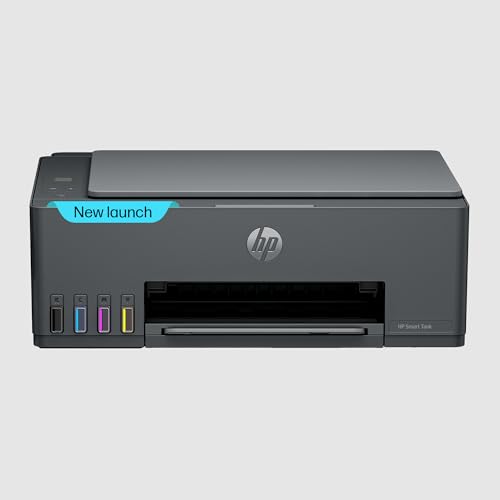
🖨️ Ink tank, borderless printing; resolution unlisted: Prints sharp everyday documents on standard paper.
⚡ 30 black, 24 color ppm; 4,000/6,000 yield: Speeds through assignments and office documents.
💰 HP GT53 and GT52 original bottles: Refills lower ongoing cost compared with cartridges.
📑 Print, scan and copy: Handles homework, forms and basic document scanning.
📶 Wi-Fi, USB 2.0, Android and iOS: Supports wireless printing from phones and laptops.
The Smart Tank 584 is the HP ink tank printer under 15000 for buyers who value warranty reassurance. The listing advertises a 1+1-year extended warranty on registration, a 3,000-page monthly duty cycle, a 100-sheet input tray, and a 33-segment plus 1.2-inch LCD. Print specs match the 589, so the choice largely comes down to current price and warranty terms.
One data issue: the technical field lists Wi-Fi only, while the description mentions Wi-Fi and USB 2.0, so verify before ordering. As with the 589, resolution, scanner DPI, and duplex are not listed. If the 584 is cheaper than the 589 on the day you shop, it is the smarter buy. Register it to unlock the extended warranty, and keep the proof of purchase safe.
Pros
✅ Extended 2-year warranty available upon online registration.
✅ All-in-one design with Wi-Fi and mobile app.
✅ Fast printing speeds up to 30 ppm in black.
✅ Suitable for a 3,000-page monthly duty cycle for work.
Cons
❌ Automatic double-sided printing feature is not included.
❌ Small output tray holds only up to 30 sheets.
👉 View Current Deal & Discounts on Amazon
7. Brother HL-L2321D – Entry-Level Laser with Automatic Duplex
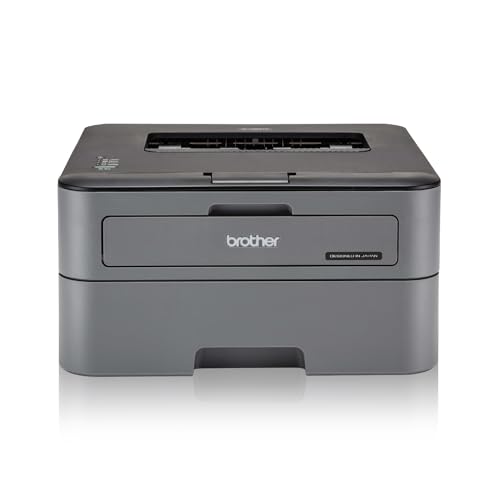
🖨️ Mono laser, 600 x 600 dpi, HQ1200: Delivers crisp black text for reports and forms.
⚡ 30 ppm black; 2,600-page inbox toner: Prints long documents without waiting or frequent toner changes.
💰 TN-2365 toner; CPP not listed: Check toner pricing to confirm low long-term costs.
📑 Print only; automatic two-sided printing: Saves paper on assignments, contracts, and booklets.
📶 Hi-Speed USB 2.0 only: Offers stable wired printing from one computer.
The HL-L2321D is the laser printer under 15000 to consider if all you print is black text. Laser toner does not dry out like ink, so it is forgiving if the printer sits unused for weeks. The 250-sheet tray, 30 ppm speed, and automatic duplex make it quick and economical for assignments, invoices, and legal paperwork.
It will not suit everyone. It prints in black and white only, has no scanner, and offers no Wi-Fi, only USB. The inbox toner is rated at 2,600 pages and, per the listing, needs to be installed. If your school projects need color, choose a tank printer instead. The 6.8 kg body and 537 W power draw during printing mean it is a desktop workhorse, not a portable.
Pros
✅ Affordable price includes automatic duplex printing feature.
✅ Fast 30 ppm speed with durable build quality.
✅ Includes generous 2,600-page inbox toner cartridge standard.
✅ Enclosed 250-sheet paper tray reduces frequent reloading.
Cons
❌ Wired USB connection only; no Wi-Fi support.
❌ Cannot print directly from mobile phones or tablets.
❌ Single-function monochrome device; no scanning or color.
👉 Check Live Price & Stock Availability on Amazon
8. Brother HL-L2440DW – Wi-Fi Laser for Black-and-White Volume
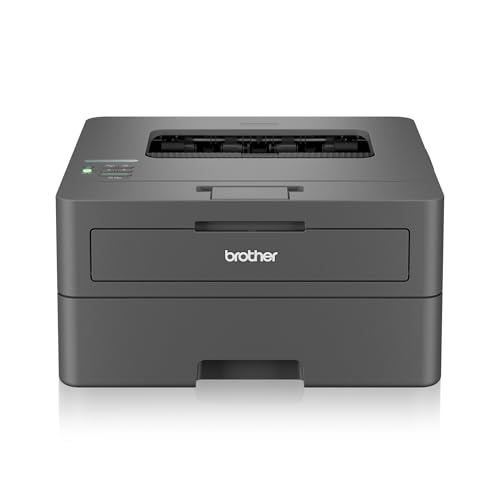
🖨️ Mono laser, up to 1200 x 1200 dpi: Produces crisp text and sharp graphics.
⚡ 30 ppm black; 3,000-page inbox toner: Handles heavy document work with few toner changes.
💰 TN-2570XL toner; CPP not listed: Verify toner price before committing to high volume.
📑 Print only; automatic duplex: Reduces paper use for assignments and office documents.
📶 Dual-band Wi-Fi, Wi-Fi Direct and USB: Lets phones and laptops print without cables.
The HL-L2440DW is the best printer under 15000 for home use if you print mostly black text and want wireless convenience. It adds dual-band Wi-Fi, Wi-Fi Direct, a 250-sheet tray, a manual feed slot, and 64 MB of memory to the HL-L2321D formula, and the box includes a 3,000-page toner and free installation per the listing.
Remember what it cannot do: it does not scan, copy, or print in color. If you need those, the DCP-T436W is the better partner. The 7.1 kg body suits a fixed desk. For students or professionals printing hundreds of black pages monthly, the laser engine’s sharp text and low risk of nozzle clogging are a real long-term advantage. Add a cheap flatbed scanner, and you still save over a cartridge setup.
Pros
✅ Automatic duplexing saves paper and operating costs.
✅ Fast 30 ppm laser output with sharp quality.
✅ Includes large 3,000-page inbox toner cartridge initially.
✅ Dust-protected enclosed 250-sheet paper input tray.
✅ Reliable dual-band Wi-Fi supports faster wireless connections.
Cons
❌ Single-function only with no scan or copy.
❌ Restricted strictly to monochrome black-and-white print output.
❌ High power consumption during active printing cycles.
👉 Check Price & EMI Options on Amazon
9. HP Laser 303dw – Office-Grade Laser with Big Memory and Duplex
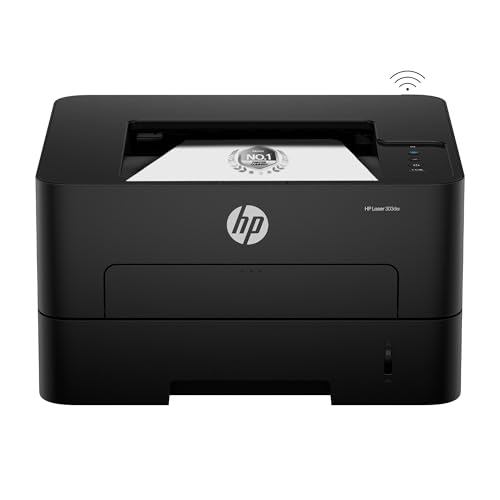
🖨️ Mono laser; resolution not listed: Delivers sharp black text for office documents.
⚡ 30 ppm black; 181A toner cartridge: Supports fast, high-volume document printing.
💰 181A original toner; yield not listed: Confirm cartridge price before heavy printing.
📑 Print only; auto-duplex, 256 MB memory: Handles two-sided jobs and large files smoothly.
📶 Wi-Fi and USB 2.0: Enables wireless printing for shared home offices.
The HP Laser 303dw is the more premium laser here, and it suits a small business or a shared household. With 256 MB of memory, auto-duplex, a 250-sheet input tray, and a 100-sheet output tray, it handles larger files and multi-person queues better than the cheaper Brother models.
The downsides are practical. It weighs about 10.2 kg, so it needs a stable shelf. It is print-only and monochrome, and the listing does not state toner yield or resolution. Check the toner price before you buy, and remember HP’s firmware policy on original cartridges. For people searching for an HP printer under 15000 that prints black documents all day, it is a solid, durable pick rather than a bargain one.
Pros
✅ Built-in automatic double-sided printing saves paper.
✅ High performance with 30 ppm and 256MB RAM.
✅ Upgraded HP 181A laser toner delivers crisp quality.
✅ Large 250-sheet input and 100-sheet output capacity.
Cons
❌ Single-function device lacks scanner and copier features.
❌ Quite heavy at over 10 kilograms.
❌ Blocks non-original third-party toner cartridges automatically.
👉 View Current Deal & Discounts on Amazon
10. HP Laser 1008w – Compact Wi-Fi Laser for Light-to-Moderate Printing

🖨️ Mono laser; resolution not listed: Produces crisp black text for forms and invoices.
⚡ 21 ppm black; 10,000-page duty cycle: Supports frequent home and home-business printing.
💰 Original HP cartridge required; CPP unlisted: Check cartridge price before buying for volume.
📑 Print only; 150-sheet input tray: Keeps setup simple and desk footprint compact.
📶 Wi-Fi and Wi-Fi Direct: Enables wireless printing from compatible phones and laptops.
The HP Laser 1008w is a compact, Wi-Fi laser for people who want crisp black text without the footprint of a larger machine. At 4.2 kg, it is easy to place on a small desk, and the 150-sheet tray handles everyday assignments, forms, and invoices. Wi-Fi Direct lets you print from a phone without relying on your home router.
Read the limits first. HP states that the printer blocks cartridges without original HP chips and may enforce this through firmware updates. At 21 pp,m it is the slowest laser here, with no duplex, no scanner, and no color. It is a reasonable choice for occasional black printing, but if you print a lot, the Brother HL-L2440DW or a tank printer will serve you better in the long run.
Pros
✅ Compact and lightweight design saves desk space easily.
✅ Decent monochrome print speed of 21 ppm.
✅ High monthly duty cycle up to 10,000 pages.
✅ Convenient Wi-Fi and Wi-Fi Direct wireless printing.
Cons
❌ Print-only unit without scanning or copying capabilities.
❌ Manual double-sided printing required for two-sided documents.
❌ Monochrome printing only; cannot produce color outputs.
👉 Check Today’s Price & Bank Offers on Amazon
Things to Check When Buying Printers Under 15000 in India
🖨️ Inkjet vs Ink Tank vs Laser
Cartridge inkjets are cheap upfront but expensive per page, so we skipped them at this budget. An ink tank printer under 15000 is the best fit for color and mixed use because bottles produce thousands of pages and refill costs stay low. Laser printers print only black in this price range, but toner does not dry out, making them ideal if you print rarely or in bulk. Choose a tank for color and school projects; choose a laser for black text volume.
⚡ Print Speed (PPM) vs Resolution (DPI)
PPM tells you how many pages come out per minute, and DPI tells you how fine the detail can be. A genuine 30 ppm black speed means a 20-page assignment finishes in about a minute, while 11 ppm color means a 20-page color project takes nearly two minutes. High DPI helps photos, but paper quality and settings often matter more than the number on the box. Check whether the maker quotes ISO or draft speed.
💰 Cost Per Page (CPP) and Cartridge Lifespan
Divide the genuine bottle or toner price by its stated yield for black and for color. Epson’s claimed 9 paise black and 33 paise color are the only manufacturer CPP figures in our data, so work out the rest from current prices. An illustration: 200 black and 50 color pages a month at Epson’s figures is about ₹34 of ink. Avoid the “cheap printer, expensive ink” trap by comparing the cost of your tenth thousand page, not the first.
📶 Wireless (Wi-Fi/App) vs USB-Only Printing
Wi-Fi saves the hassle of moving a laptop to the printer, and apps such as HP Smart, Canon PRINT, Brother Mobile Connect, and Epson Smart Panel let you print and scan from your phone. Dual-band models like the DCP-T436W and HL-L2440DW avoid the dropouts common on single-band 2.4GHz printers. USB-only models like the DCP-T236 are stable but need a computer. If phone printing matters to you, verify app support before ordering.
📑 All-in-One vs Single Function
An all-in-one with a flatbed scanner pays for itself if you copy IDs, scan forms, or digitize notes. The tank models here are all-in-ones, while all four lasers are print-only. Automatic duplex appears only on the lasers, so inkjet users must flip pages by hand. Choose single-function only if you already own a scanner or print black text in volume. Also check tray capacity, since a 100-150 sheet tray means fewer interruptions.
Buying Printers Online in India
Before you compare printer prices, confirm that the listing is an India-market unit with an official warranty from Epson, HP, Brother, or Canon. Check whether service is onsite or carry-in, how long coverage lasts, and whether your PIN code is served. Epson lists free installation and 400+ service centers, while Canon’s onsite coverage for the G3010 ends at one year or 15,000 pages, whichever is earlier.
Open the box contents list. Tank printers should include all four ink bottles, laser printers should include an inbox toner and a USB cable, and some Brother and HP models require you to install or fill consumables yourself. Confirm Windows and Mac compatibility, and look at the seller rating and return policy. Sale events and bank offers can pull a higher-tier model into your budget, but always compare the replacement ink or toner price first.
Conclusion
The ₹15,000 segment has shifted decisively toward ink tank printers with listed yields in the thousands of pages, and toward laser models with duplex and Wi-Fi as standard. Compared with older cartridge machines, cost per page has dropped from several rupees to paise, with Epson quoting 9 paise black and 33 paise color. That makes a printer at home cheaper than a print shop for almost any regular user.
The remaining decision is a use case. Choose color and scanning, and a tank all-in-one wins. Choose black text only, and a laser saves you from clogged nozzles. Whichever you pick, print a test page every week or two, keep dust off the paper path, and use clean paper to limit jams. Buy genuine ink or toner to keep the warranty valid.
🥇 The Budget Hero: Brother DCP-T236 – Best for buyers wanting reliable document printing, scanning, and copying with ink tank savings, though you must be comfortable printing from a USB-connected computer.
👑 The Performance King: Epson EcoTank L3352 – The strongest low cost-per-page, fastest black printing, and easiest wireless setup in this list, backed by an on-site warranty and free installation.
FAQs
1. Is an ink tank printer better than a laser printer under 15000?
For color printing and mixed home use, ink tanks win on running cost and scanning. Laser suits black-and-white volume, duplex, and infrequent use because toner does not dry out.
2. Which is the best printer under 15000 with Wi-Fi?
The Epson L3352 and Brother DCP-T436W lead for color all-in-ones, with dual-band Wi-Fi on the Brother. For black text, the Brother HL-L2440DW offers dual-band Wi-Fi and duplex.
3. What is the best printer for students under 15000 in India?
The Epson L3352 suits students because of its low listed cost per page and fast black speed. The Brother DCP-T236 is the cheaper option for printing from a laptop.
4. Are HP ink tank printers under 15000 worth buying?
Yes, if you want speed. The HP Smart Tank 589 and 584 list 30 ppm black, 24 ppm color, and a 3,000-page monthly duty cycle. Confirm resolution and connectivity before ordering.



![5 Best Smart TVs Under ₹15,000 in India [2026]](https://gadgetveda.com/wp-content/uploads/2026/10/Best-Smart-TVs-Under-₹15000-in-India-150x150.webp)


![10 Best Printers Under ₹15,000 in India [2026] | GadgetVeda](https://gadgetveda.com/wp-content/uploads/2026/10/Best-Printers-Under-₹15000-in-India-150x150.webp)

![5 Best Smart TVs Under ₹15,000 in India [2026]](https://gadgetveda.com/wp-content/uploads/2026/10/Best-Smart-TVs-Under-₹15000-in-India-300x167.webp)
![10 Best Printers Under ₹15,000 in India [2026] | GadgetVeda](https://gadgetveda.com/wp-content/uploads/2026/10/Best-Printers-Under-₹15000-in-India-300x167.webp)