


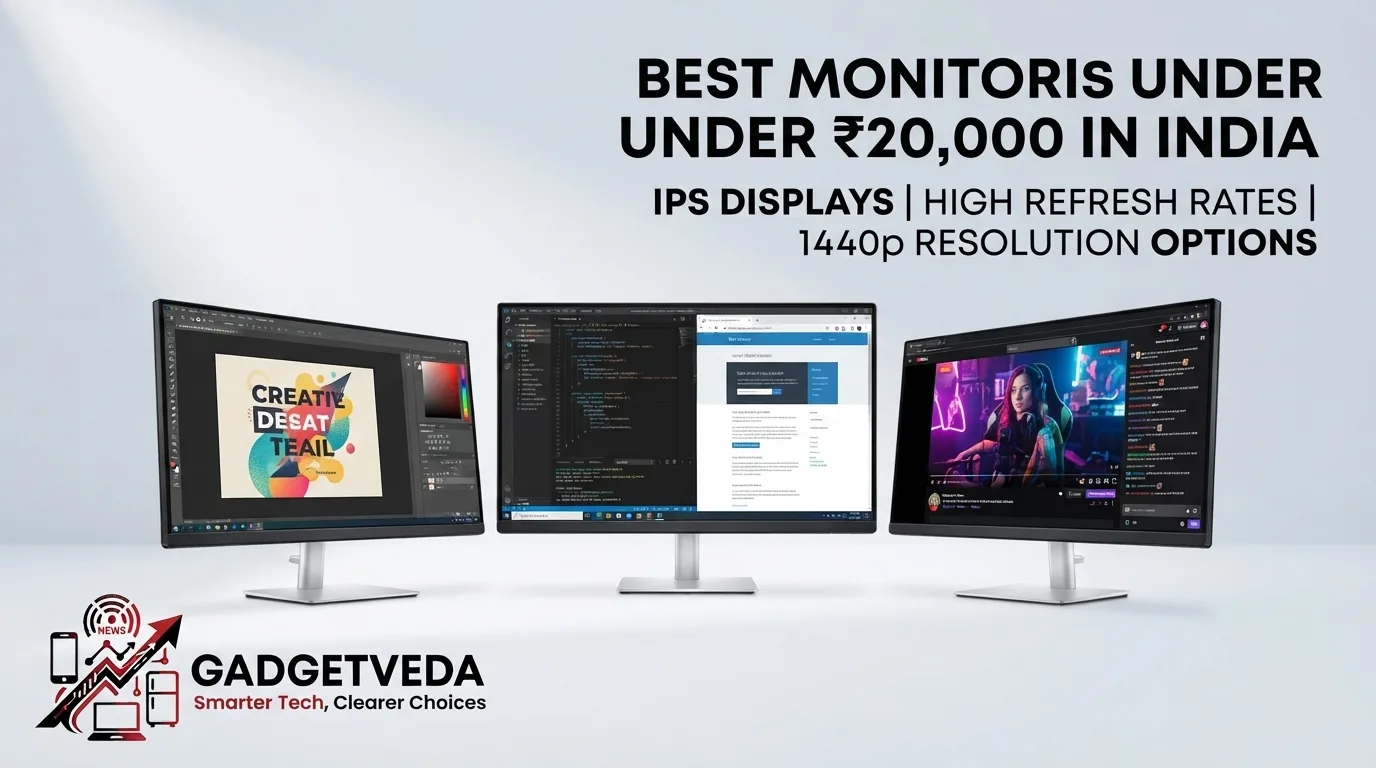
If you’re comparing the best monitors under 20000 in India, this price band has become the true inflection point where QHD 200Hz-300Hz gaming panels, genuine 4K resolution, and full ergonomic stands finally converge. Below, GadgetVeda’s hardware desk reviews 12 verified models — deduplicated and cross-checked against official datasheets — across gaming, editing, and office use cases.
The sub-₹20,000 monitor market in India has matured into genuinely premium territory. Where this budget once bought you a basic 60Hz FHD panel, it now regularly delivers 200Hz-300Hz QHD gaming monitors, 4K IPS displays for creative work, and even curved VA panels with 250Hz overclocked refresh rates. Brands like LG, Samsung, Acer, BenQ, MSI, and Lenovo have pushed features once reserved for ₹35,000+ displays — G-Sync Compatible certification, USB-C power delivery, HDR10, and full height/swivel/pivot stands — squarely into this bracket. For a buyer trying to identify the best monitor under 20000 in India for gaming, editing, or daily office work, this is genuinely good news, but it also means comparing dozens of near-identical spec sheets where the real differentiators — actual panel type, true refresh-rate bandwidth over each port, and stand build quality — get buried in marketing language.
At GadgetVeda, this guide was built by manually cross-referencing every listed specification against the respective brand’s official datasheet, not just the Amazon listing copy. Our evaluation criteria covered panel technology (IPS vs. VA), resolution and pixel density, color gamut coverage (sRGB%/DCI-P3%), motion clarity through refresh rate and true response time (GTG vs. MPRT), eye-care certifications such as TÜV Rheinland Flicker-Free, physical stand ergonomics, and connectivity depth across HDMI and DisplayPort generations. This is a living, editorially reviewed guide — updated as new verified units enter this price bracket — so whether you need the best monitor under 20000 for gaming, the best monitor under 20000 for video editing, or a reliable pick for the best monitor under 20000 for office work, every recommendation here reflects real specification accuracy rather than promotional claims.
💡 Also on GadgetVeda: If you have a budget issue, you may explore our guide on Best Monitors Under 15000, Monitors Under 10000, and Monitors Under 5000 for better value options.
Best Monitors Under ₹20,000 in India [Our Top 3 Picks]

Best Monitors Under ₹20,000 in India [Quick Comparison]
| Model Name | Winner Tag | Key Specifications | Expert Rating | Check Price |
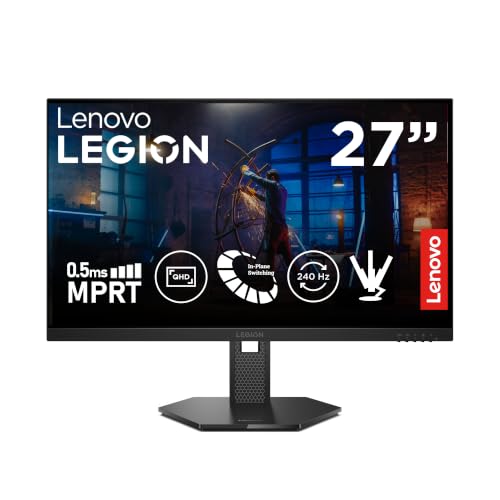
| Lenovo Legion 27Q-10 | Best Overall | 27″ QHD IPS, 240Hz, G-Sync Compatible | 9.5/10 | Buy on Amazon |
| Acer Nitro XV272U F3 | Best for Gaming | 27″ QHD IPS, 300Hz, 0.5ms, HDR400 | 9.3/10 | Buy on Amazon |
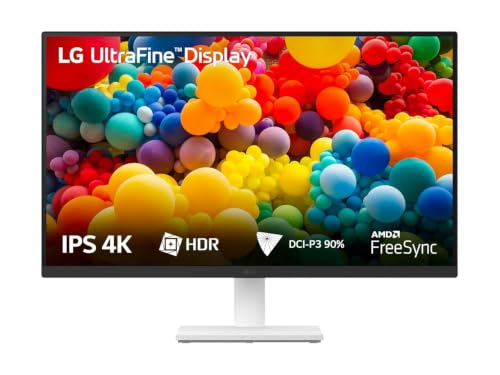
| LG 27US500 | Best 4K Monitor Under 20000 | 27″ 4K UHD IPS, 60Hz, 90% DCI-P3 | 9.1/10 | Buy on Amazon |
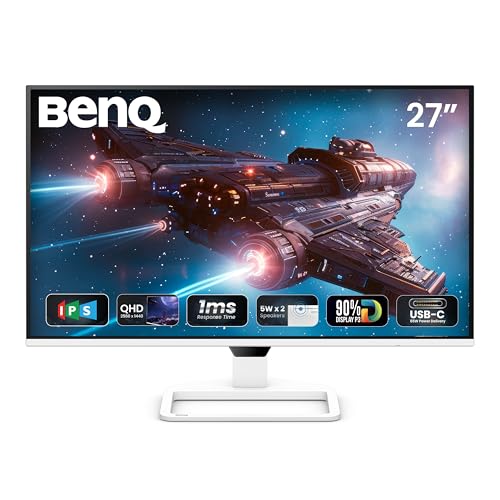
| BenQ EW270Q | Best for Video Editing | 27″ QHD IPS, 200Hz, USB-C 65W, HDRi | 9.0/10 | Buy on Amazon |
| LG 27G610A UltraGear | Best 27 Inch Monitor Under 20000 | 27″ QHD IPS, 200Hz, DisplayHDR 400 | 8.9/10 | Buy on Amazon |
| Samsung Odyssey G5 | Best Monitor Under 20000 for PS5 | 27″ QHD Fast IPS, 180Hz, G-Sync Compatible | 8.9/10 | Buy on Amazon |
| Lenovo L27q-4A | Best for Office & Coding | 27″ QHD IPS, 100Hz, 90% DCI-P3 | 8.8/10 | Buy on Amazon |
| LG 32GS60QC UltraGear | Best 32 Inch Monitor Under 20000 for Gaming | 32″ Curved QHD VA, 180Hz, HDR10 | 8.7/10 | Buy on Amazon |
| MSI MAG 32C6X | Best Curved 32-Inch Gaming | 32″ Curved FHD VA, 250Hz(OC), 1ms MPRT | 8.5/10 | Buy on Amazon |
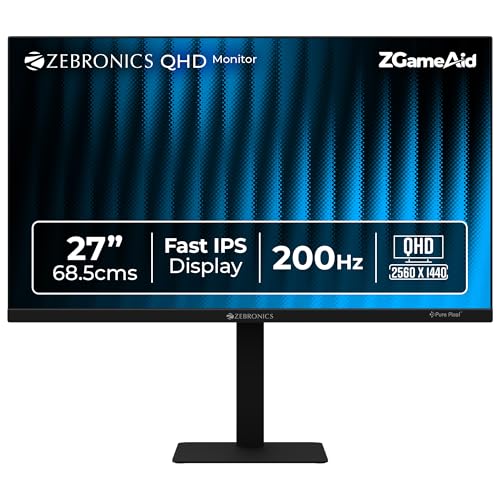
| Zebronics S27A | Best Value 200Hz QHD Monitor | 27″ QHD Fast IPS, 200Hz, Full Ergonomic Stand | 8.4/10 | Buy on Amazon |
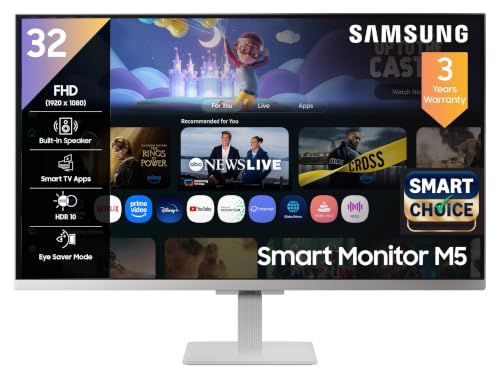
| Samsung M5 Smart Monitor | Best Smart Monitor Under 20000 | 32″ FHD, 60Hz, Wi-Fi, Smart TV Apps | 8.3/10 | Buy on Amazon |
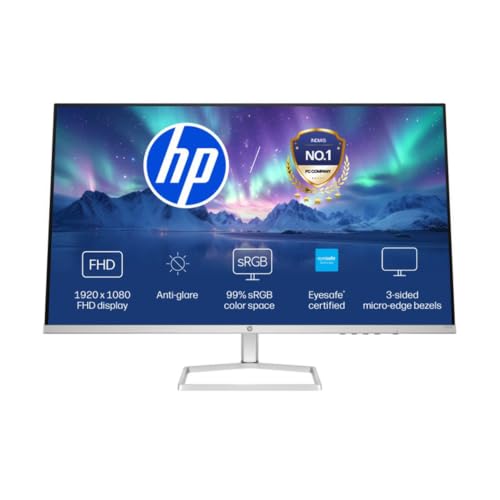
| HP Series 5 532sf | Best Budget 32-Inch Monitor Under 20000 | 31.5″ FHD, 100Hz, 99% sRGB, Eyesafe | 8.2/10 | Buy on Amazon |
12 Best Monitors Under ₹20,000 in India [Detailed Reviews]
Lenovo Legion 27Q-10 – Best Overall Monitor Under 20000
✦ ◆ ⟶ Quick Specifications:
🖥️ Display & Size: 27-inch QHD IPS panel, 2560×1440 resolution with Delta E<2 factory color calibration for accurate visuals
⚡ Speed & Motion: 240Hz refresh rate, 0.5ms response, NVIDIA G-Sync Compatible and AMD FreeSync Premium supported
🎨 Color & Visuals: 99% sRGB, 90% DCI-P3 coverage delivering punchy, accurate color for both gaming and creative work
🔌 Connectivity & Audio: 2x HDMI 2.1 TMDS, 1x DisplayPort 1.4 for high-bandwidth 240Hz output
🏗️ Ergonomics & Eye Care: Full tilt, swivel, pivot, and height adjustment stand with Legion Space software
✦ ◆ ⟶ Reasons to Buy:
🖥️ Best Monitor Under 20000 for Competitive Gaming: A genuine 240Hz QHD combination with factory Delta E<2 calibration suits both esports and color-sensitive creative work.
⚡ Panel & Speed Focus: Dual G-Sync Compatible and FreeSync Premium certification removes GPU-brand anxiety entirely for buyers.
👁️ Eye Care & Work Efficiency Focus: Legion Space and Lenovo Artery software let you fine-tune display and audio settings per use case.
🔌 Connectivity & Setup Focus: HDMI 2.1 TMDS ports future-proof this for next-gen console gaming at full refresh rate.
🏗️ Build & Mounting Focus: Full ergonomic stand with height, swivel, and pivot adjustment suits any desk configuration.
The Lenovo Legion 27Q-10 earns the top spot in this best monitors under 20000 in India roundup because it doesn’t force a compromise between speed, color, and ergonomics. Text sharpness during coding sessions is excellent thanks to the QHD IPS panel, and the 240Hz refresh rate paired with 0.5ms response makes competitive titles feel remarkably fluid. Dual G-Sync and FreeSync certification means this pairs cleanly with either GPU brand without tearing concerns. In dark rooms, backlight uniformity is strong with minimal bleed, and colors out-of-the-box lean accurate thanks to the factory calibration. The full height, swivel, and pivot stand genuinely eliminates the neck strain of fixed-tilt alternatives, and menu navigation through Legion Space is intuitive.
Pros
✅ Dual G-Sync Compatible and FreeSync Premium certification for any GPU
✅ Factory-calibrated Delta E<2 color accuracy rare at this price point
✅ Full height, swivel, and pivot ergonomic stand included as standard
Cons
❌ Built-in speakers are absent, requiring an external audio setup
❌ 240Hz output requires a capable GPU to actually utilize fully
👉 Check Lenovo Legion 27Q-10 Latest Price on Amazon
Acer Nitro XV272U F3 – Best Gaming Monitor Under 20000
✦ ◆ ⟶ Quick Specifications:
🖥️ Display & Size: 27-inch IPS Agile Splendor panel, WQHD 2560×1440 resolution, 400 nits brightness
⚡ Speed & Motion: 300Hz refresh rate, 0.5ms response, AMD FreeSync Premium with zero screen tearing
🎨 Color & Visuals: 99% sRGB wide color gamut, VESA DisplayHDR 400 for deeper contrast and vivid highlights
🔌 Connectivity & Audio: 2x HDMI 2.1, 1x DisplayPort 1.4, integrated 2Wx2 stereo speakers
🏗️ Ergonomics & Eye Care: ErgoStand with 150mm height, tilt, pivot, and swivel; Acer VisionCare eye protection
✦ ◆ ⟶ Reasons to Buy:
🖥️ Best Gaming Monitor Under 20000 for Esports: A blistering 300Hz refresh rate on a QHD panel is genuinely rare at this exact price tier.
⚡ Panel & Speed Focus: 0.5ms response time paired with Black Boost technology helps spot enemies in dark competitive scenes.
👁️ Eye Care & Work Efficiency Focus: Acer VisionCare bundles Flicker-less, BlueLightShield, and low-dimming tech for marathon sessions.
🔌 Connectivity & Setup Focus: Dual HDMI 2.1 ports support full-bandwidth 300Hz output for next-gen consoles and PCs.
🏗️ Build & Mounting Focus: Full ErgoStand adjustment with a 150mm height range suits any competitive gaming posture.
For buyers specifically hunting the best monitor under 20000 for gaming, the Acer Nitro XV272U F3’s 300Hz refresh rate is the standout feature on this entire list. During fast-paced FPS gameplay, motion feels exceptionally crisp, and the 0.5ms response time virtually eliminates ghosting on rapidly moving targets. Text sharpness for browsing and coding benefits noticeably from the QHD resolution’s higher pixel density compared to FHD alternatives. In dark rooms, backlight bleed is minimal, and HDR400 adds genuine punch to compatible game content. The full ErgoStand with height, pivot, and swivel adjustment is a standout at this price, letting competitive players dial in their exact seating posture without compromise.
Pros
✅ Class-leading 300Hz refresh rate on a genuine QHD IPS panel
✅ Full ErgoStand with height, pivot, and swivel adjustment included
✅ HDR400 and 99% sRGB deliver vivid, accurate color for gaming
Cons
❌ Built-in 2W x 2 speakers remain thin and are best paired with a headset
❌ Reaching true 300Hz requires a high-end GPU to fully utilize
👉 Check Acer Nitro XV272U F3 Latest Price on Amazon
LG 27US500 – Best 4K Monitor Under 20000
✦ ◆ ⟶ Quick Specifications:
🖥️ Display & Size: 27-inch IPS panel, genuine 4K UHD 3840×2160 resolution with 8.29 million pixels
⚡ Speed & Motion: 60Hz refresh rate, 5ms GTG response — suited to detail work rather than fast motion
🎨 Color & Visuals: HDR10 with 90% DCI-P3 color gamut, 1000:1 contrast ratio for deep, vivid imagery
🔌 Connectivity & Audio: Dual HDMI ports for flexible desktop and laptop connections
🏗️ Ergonomics & Eye Care: Flicker Safe and Reader Mode, 3-side virtually borderless ergonomic stand
✦ ◆ ⟶ Reasons to Buy:
🖥️ Best 4K Monitor Under 20000 for Creative Work: True 3840×2160 resolution delivers exceptional pixel density, rare at this exact price point.
⚡ Panel & Speed Focus: 90% DCI-P3 coverage makes this genuinely suited for photo and video color grading work.
👁️ Eye Care & Work Efficiency Focus: Flicker Safe and Reader Mode reduce strain during long editing or document-review sessions.
🔌 Connectivity & Setup Focus: The LG Switch app allows splitting the display into up to 6 sections for multitasking workflows.
🏗️ Build & Mounting Focus: 3-side virtually borderless design keeps the desk footprint minimal despite the large canvas.
The LG 27US500 is the rare genuine 4K monitor under 20000 on the Indian market, and it delivers convincingly on detail retention for creative work. Text sharpness is exceptional thanks to the 4K pixel density, making this a strong pick for photographers, illustrators, and video editors who need to see fine detail accurately. The 90% DCI-P3 gamut brings noticeably richer color than standard sRGB panels, and HDR10 support adds depth to compatible content. In dark rooms, backlight uniformity is solid with minor bleed at the edges. The 60Hz refresh rate is a clear trade-off — this isn’t a gaming display — but for photo editing, document layout, and video color review, the resolution genuinely justifies the compromise.
Pros
✅ Genuine 4K UHD resolution with 90% DCI-P3 rare at this price
✅ Exceptional pixel density benefits photo, video, and design work
✅ LG Switch app enables flexible multi-window workflow splitting
Cons
❌ 60Hz refresh rate makes this unsuitable for fast-paced gaming
❌ Stand offers only tilt adjustment, lacking height or swivel
👉 Check LG 27US500 Latest Price on Amazon
BenQ EW270Q – Best Monitor Under 20000 for Video Editing
✦ ◆ ⟶ Quick Specifications:
🖥️ Display & Size: 27-inch IPS panel, QHD 2560×1440 resolution, 350 nits brightness, 1200:1 contrast
⚡ Speed & Motion: 200Hz refresh rate, 1ms response, AMD FreeSync Premium for smooth motion handling
🎨 Color & Visuals: 90% P3 color gamut, HDR10 with exclusive HDRi tech for adaptive contrast tuning
🔌 Connectivity & Audio: USB-C with 65W Power Delivery, HDMI 2.0, DisplayPort 1.4, 5Wx2 treVolo speakers
🏗️ Ergonomics & Eye Care: Tilt and swivel adjustment, Low Blue Light panel, Scenario Hotkey presets
✦ ◆ ⟶ Reasons to Buy:
🖥️ Best Monitor Under 20000 for Video Editing: The 90% P3 gamut and exclusive HDRi tech deliver genuinely accurate, punchy color for content creation workflows.
⚡ Panel & Speed Focus: 200Hz refresh combined with QHD resolution suits both editing timeline scrubbing and casual gaming.
👁️ Eye Care & Work Efficiency Focus: Visual Optimizer dynamically adjusts brightness and color temperature based on ambient lighting conditions.
🔌 Connectivity & Setup Focus: USB-C with 65W Power Delivery charges a laptop and carries video through a single cable.
🏗️ Build & Mounting Focus: VESA 100x100mm wall mount compatibility supports arm-mounted, space-saving desk setups.
The BenQ EW270Q’s standout feature for creators is genuinely its exclusive HDRi technology, which intelligently blends optimal HDR picture quality with comfortable daily viewing — a rare combination for editing work. Color output feels notably accurate and vibrant thanks to the 90% P3 gamut, making footage review and color grading genuinely more reliable. The single-cable USB-C setup with 65W Power Delivery is a major convenience for laptop-based editors, cutting cable clutter significantly. Text sharpness for spreadsheet and timeline work is sharp given the QHD resolution, and in dark rooms, the High Pixel Contrast tech noticeably deepens blacks without affecting surrounding detail. The 5W x 2 built-in speakers are unusually capable for a monitor at this price.
Pros
✅ USB-C with 65W Power Delivery simplifies single-cable laptop editing setups
✅ HDRi technology and 90% P3 gamut deliver genuinely accurate creative color
✅ Unusually strong 5W x 2 built-in speakers reduce the need for external audio
Cons
❌ Stand offers only tilt and swivel, lacking height or pivot adjustment
❌ 200Hz refresh benefit is limited without a capable GPU behind it
👉 Check BenQ EW270Q Latest Price on Amazon
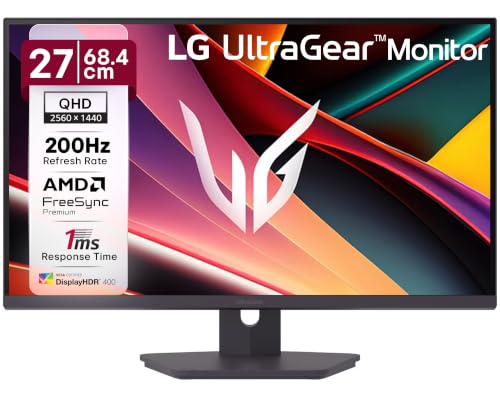
LG 27G610A UltraGear – Best 27 Inch Monitor Under 20000
✦ ◆ ⟶ Quick Specifications:
🖥️ Display & Size: 27-inch UltraGear IPS panel, QHD 2560×1440 resolution, 400 nits brightness
⚡ Speed & Motion: 200Hz refresh rate, 1ms GTG response, AMD FreeSync Premium for tear-free motion
🎨 Color & Visuals: DisplayHDR 400, 99% sRGB, factory color-calibrated for accurate out-of-box visuals
🔌 Connectivity & Audio: 2x HDMI 2.0, 1x DisplayPort 1.4, supporting full VRR 48-200Hz range
🏗️ Ergonomics & Eye Care: Tilt, swivel, height, and pivot adjustment; Flicker Safe and Reader Mode included
✦ ◆ ⟶ Reasons to Buy:
🖥️ Best 27 Inch Monitor Under 20000 for Balanced Use: A well-rounded QHD panel that handles gaming, editing, and office tasks equally well.
⚡ Panel & Speed Focus: 200Hz refresh with 1ms GTG keeps motion sharp across both gaming and everyday scrolling.
👁️ Eye Care & Work Efficiency Focus: Flicker Safe and Color Weakness Mode genuinely reduce strain during extended sessions.
🔌 Connectivity & Setup Focus: Full VRR range from 48-200Hz ensures smooth adaptive sync across varying frame rates.
🏗️ Build & Mounting Focus: Full ergonomic adjustment including 110mm height range and pivot capability.
The LG 27G610A UltraGear stands out as a genuine all-rounder among the best monitors under 20000 because it doesn’t lean too heavily into any single use case. Text sharpness for coding and browsing is excellent given the QHD resolution and factory calibration, and the 200Hz refresh rate makes both gaming and everyday cursor movement feel notably smooth. DisplayHDR 400 support brings real depth to compatible content without oversaturating colors. In dark rooms, backlight uniformity is strong, and the Black Stabilizer feature genuinely helps spot details in shadowed game areas. The full ergonomic stand with height, swivel, and pivot adjustment rounds out a genuinely well-balanced package for buyers who split time between work and gaming.
Pros
✅ Well-balanced 200Hz QHD panel suited equally to gaming and productivity
✅ Full ergonomic stand with height, swivel, and pivot adjustment included
✅ DisplayHDR 400 and factory calibration deliver accurate, vivid visuals
Cons
❌ Built-in speakers aren’t included, requiring external audio solutions
❌ Glossy-leaning color profile may need manual tuning for pure accuracy work
👉 Check LG 27G610A UltraGear Latest Price on Amazon
Samsung Odyssey G5 – Best Monitor Under 20000 for PS5

✦ ◆ ⟶ Quick Specifications:
🖥️ Display & Size: 27-inch Fast IPS panel, QHD 2560×1440 resolution, 300 nits brightness
⚡ Speed & Motion: 180Hz refresh rate, 1ms response, both AMD FreeSync and G-Sync Compatible certified
🎨 Color & Visuals: HDR10 support, 99% sRGB coverage for vivid, accurate console and PC gaming visuals
🔌 Connectivity & Audio: DisplayPort, HDMI 2.0, headphone jack for flexible console and PC pairing
🏗️ Ergonomics & Eye Care: Height, tilt, swivel, and pivot adjustable stand; Eye Saver Mode included
✦ ◆ ⟶ Reasons to Buy:
🖥️ Best Monitor Under 20000 for PS5 Gaming: HDMI 2.0 connectivity and 180Hz QHD support make this a genuinely strong console gaming companion.
⚡ Panel & Speed Focus: Fast IPS technology combines wide viewing angles with quick 1ms response for realistic game scenes.
👁️ Eye Care & Work Efficiency Focus: Eye Saver Mode and Flicker Free tech reduce strain during extended console or PC sessions.
🔌 Connectivity & Setup Focus: Auto Source Switch+ automatically detects and switches to an active connected device.
🏗️ Build & Mounting Focus: Full height, tilt, swivel, and pivot stand accommodates both couch-adjacent and desk setups.
The Samsung Odyssey G5 is a genuinely strong pick for console gamers searching for the best monitor under 20000 for PS5, thanks to its combination of QHD resolution, 180Hz refresh, and dual FreeSync/G-Sync certification. Console gameplay through HDMI feels sharp and responsive, and the Fast IPS panel maintains consistent color even when viewed from a couch angle rather than directly in front. Text sharpness for occasional PC browsing is excellent given the QHD density. In dark rooms, HDR10 adds noticeable contrast depth to supported titles, and Auto Source Switch+ is a genuinely convenient touch for buyers alternating between console and PC inputs. The full ergonomic stand makes this flexible for both desk and living-room-adjacent setups.
Pros
✅ Genuine dual FreeSync and G-Sync Compatible certification for any platform
✅ Auto Source Switch+ simplifies toggling between console and PC inputs
✅ Full height, tilt, swivel, and pivot stand suits varied room setups
Cons
❌ Built-in speakers are absent, requiring a soundbar or headset
❌ 300-nit brightness is modest for HDR content in brightly lit rooms
👉 Check Samsung Odyssey G5 Latest Price on Amazon
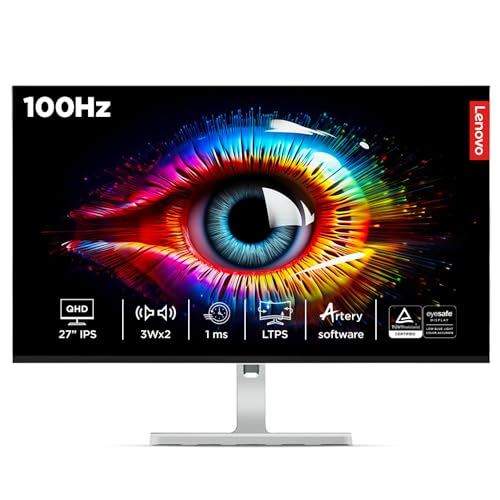
Lenovo L27q-4A – Best Monitor Under 20000 for Office Work
✦ ◆ ⟶ Quick Specifications:
🖥️ Display & Size: 27-inch QHD IPS panel, 2560×1440 resolution, 350 nits brightness
⚡ Speed & Motion: 100Hz refresh rate, 1ms MPRT response, AMD FreeSync for smoother document scrolling
🎨 Color & Visuals: 99% sRGB, 90% DCI-P3 coverage delivering accurate, professional-grade color reproduction
🔌 Connectivity & Audio: 2x HDMI 2.1 TMDS, 1x DisplayPort 1.4, integrated 3Wx2 speakers
🏗️ Ergonomics & Eye Care: Tilt, swivel, pivot, and height-adjustable stand; anti-glare surface treatment
✦ ◆ ⟶ Reasons to Buy:
🖥️ Best Monitor Under 20000 for Office Work: QHD resolution combined with strong color accuracy suits document work, spreadsheets, and design review equally well.
⚡ Panel & Speed Focus: 100Hz refresh smooths everyday scrolling noticeably compared to standard 60Hz office panels.
👁️ Eye Care & Work Efficiency Focus: Anti-glare treatment and Lenovo Smart Artery software reduce fatigue during long workdays.
🔌 Connectivity & Setup Focus: Dual HDMI 2.1 plus DisplayPort 1.4 supports multi-device desk configurations easily.
🏗️ Build & Mounting Focus: Full tilt, swivel, pivot, and height adjustment stand rare among office-focused monitors.
The Lenovo L27q-4A targets desk-bound professionals directly, and its QHD resolution genuinely elevates daily productivity work beyond what FHD panels offer. Text sharpness across spreadsheets, browsers, and coding editors is excellent, and the 99% sRGB with 90% DCI-P3 coverage makes this equally capable for light design review work. The 100Hz refresh rate, while modest by gaming standards, makes everyday scrolling and window management noticeably smoother than 60Hz alternatives. In dark rooms, backlight uniformity is solid with minimal bleed. The standout feature here is genuinely the full ergonomic stand — height, swivel, and pivot adjustment are rarely bundled with an office-focused monitor at this price, letting you rotate to portrait mode for document review.
Pros
✅ Full height, swivel, and pivot ergonomic stand rare for office-focused monitors
✅ QHD resolution with 99% sRGB and 90% DCI-P3 aids design review work
✅ Built-in 3W x 2 speakers are genuinely usable for calls without a headset
Cons
❌ 100Hz refresh rate isn’t intended for serious competitive gaming
❌ Glossy screen surface can reflect glare in bright, window-lit offices
👉 Check Lenovo L27q-4A Latest Price on Amazon
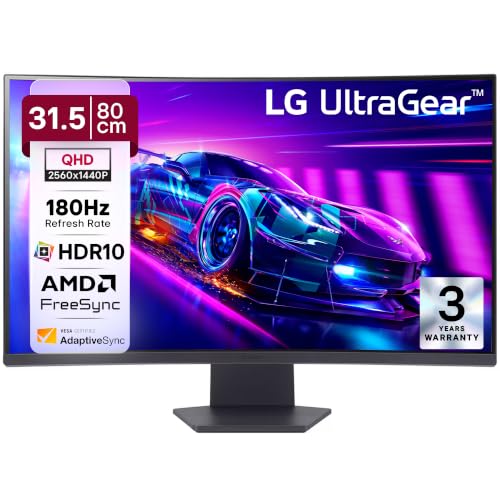
LG 32GS60QC UltraGear – Best 32 Inch Monitor Under 20000 for Gaming
✦ ◆ ⟶ Quick Specifications:
🖥️ Display & Size: 31.5-inch curved (1000R) VA panel, QHD 2560×1440 resolution, 300 nits brightness
⚡ Speed & Motion: 180Hz refresh rate, 1ms response, AMD FreeSync for smooth, tear-free gaming motion
🎨 Color & Visuals: HDR10 with HDR Effect mode, 99% sRGB color gamut, 3000:1 contrast ratio
🔌 Connectivity & Audio: Dual HDMI 2.0 (VRR 48-144Hz), 1x DisplayPort, 3-pole headphone out
🏗️ Ergonomics & Eye Care: Tilt adjustment -5° to 20°, Flicker Safe and Reader Mode included
✦ ◆ ⟶ Reasons to Buy:
🖥️ Best 32 Inch Monitor Under 20000 for Gaming: The tight 1000R curve combined with QHD resolution delivers genuine immersion for fast-paced titles.
⚡ Panel & Speed Focus: 180Hz refresh with 1ms response and VA panel technology produces deep blacks alongside smooth motion.
👁️ Eye Care & Work Efficiency Focus: Flicker Safe and Color Weakness Mode reduce strain during extended gaming or streaming sessions.
🔌 Connectivity & Setup Focus: Auto Input Switch automatically detects active connections for seamless multi-device use.
🏗️ Build & Mounting Focus: 3-side virtually borderless design maximizes screen space on a compact desk footprint.
For buyers specifically hunting the best 32-inch monitor under 20000 for gaming, the LG UltraGear 32GS60QC brings genuine curved immersion without stretching the budget too far. The tight 1000R curve wraps noticeably into peripheral vision during gameplay, and the VA panel’s 3000:1 contrast ratio delivers deep, satisfying blacks during dark scenes that IPS panels can’t match. Text sharpness for browsing holds up reasonably, though VA panels naturally render fine text slightly softer than IPS alternatives on this list. AMD FreeSync keeps tearing in check during fast gameplay, and Black Stabilizer helps visibility in shadowed areas. The stand’s tilt-only range is a genuine limitation for buyers wanting more ergonomic flexibility.
Pros
✅ Immersive 1000R curve with deep 3000:1 VA contrast for gaming and movies
✅ 180Hz refresh with 1ms response delivers smooth, tear-free motion
✅ Auto Input Switch simplifies toggling between multiple connected devices
Cons
❌ VA panel renders fine text slightly softer than the IPS options here
❌ Stand offers tilt adjustment only, without height or swivel flexibility
👉 Check LG 32GS60QC UltraGear Latest Price on Amazon
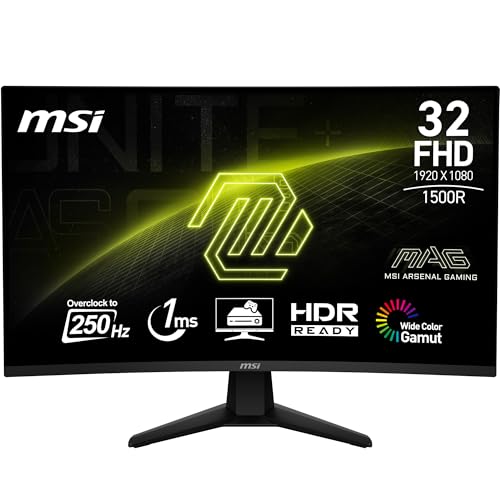
MSI MAG 32C6X – Best Curved 32-Inch Gaming Monitor Under 20000
✦ ◆ ⟶ Quick Specifications:
🖥️ Display & Size: 32-inch curved (1500R) VA panel, Full HD 1920×1080 resolution, native 3000:1 contrast
⚡ Speed & Motion: 250Hz (OC) refresh rate, 1ms MPRT response, Adaptive Sync for esports-grade smoothness
🎨 Color & Visuals: 101% sRGB, 78% DCI-P3, dynamic contrast up to 100M:1 with MSI AI Vision tuning
🔌 Connectivity & Audio: DisplayPort 1.4a, HDMI 2.0b CEC, supporting up to 250Hz over DP
🏗️ Ergonomics & Eye Care: Tilt-adjustable stand, TÜV Rheinland Anti-Flicker and Low Blue Light certified
✦ ◆ ⟶ Reasons to Buy:
🖥️ Best Curved Gaming Monitor Under 20000: A genuine 250Hz overclocked refresh rate on a 32-inch curved VA panel is rare at this exact price.
⚡ Panel & Speed Focus: 1ms MPRT response combined with the 1500R curvature keeps fast esports motion clean and immersive.
👁️ Eye Care & Work Efficiency Focus: TÜV-certified Anti-Flicker and Less Blue Light tech genuinely ease long gaming sessions.
🔌 Connectivity & Setup Focus: Full 250Hz bandwidth over DisplayPort 1.4a removes cable-related bottleneck concerns.
🏗️ Build & Mounting Focus: 100mm VESA mount support enables arm mounting despite the large curved footprint.
The MSI MAG 32C6X leans hard into raw speed, and its 250Hz overclocked refresh rate is genuinely the fastest panel on this entire list. During competitive gameplay, motion feels exceptionally fluid, and MSI’s AI Vision black-tuner noticeably lifts shadow detail without overexposing bright areas. The 1500R curve adds real immersion, particularly noticeable during racing and flight simulation titles. Text sharpness for casual browsing is acceptable but trails the QHD panels reviewed above, since this is an FHD panel stretched across 32 inches. In dark rooms, the VA panel’s deep blacks are a genuine highlight, though backlight uniformity shows mild inconsistency near the curved edges — a common trade-off in this segment.
Pros
✅ Blazing 250Hz overclocked refresh rate is fastest among all models reviewed
✅ TÜV Rheinland certified Anti-Flicker and Low Blue Light for eye comfort
✅ 1500R curve delivers genuine immersion for racing and action titles
Cons
❌ FHD resolution stretched over 32 inches reduces overall pixel density
❌ Stand is tilt-only, limiting ergonomic customization options
👉 Check MSI MAG 32C6X Latest Price on Amazon
Zebronics S27A – Best Value 200Hz QHD Monitor Under 20000
✦ ◆ ⟶ Quick Specifications:
🖥️ Display & Size: 27-inch Fast IPS panel, QHD 2560×1440 resolution, 300-400 nits brightness
⚡ Speed & Motion: 200Hz refresh rate, 1ms MPRT response for reduced input lag and motion blur
🎨 Color & Visuals: 1.07 billion colors, 120-125% sRGB coverage delivering vivid, precise visuals
🔌 Connectivity & Audio: 2x HDMI, 2x DisplayPort — unusually generous port selection at this price
🏗️ Ergonomics & Eye Care: Full height, pivot, tilt, and swivel adjustment; anti-glare coating; built-in reading lamp
✦ ◆ ⟶ Reasons to Buy:
🖥️ Best Value 200Hz QHD Monitor Under 20000: A genuine 200Hz QHD panel with full ergonomic adjustment undercuts most branded competitors on price.
⚡ Panel & Speed Focus: 1ms MPRT response combined with the Fast IPS panel keeps motion clean during gaming and video playback.
👁️ Eye Care & Work Efficiency Focus: Anti-glare coating minimizes reflections, while the unique built-in reading lamp aids desk illumination.
🔌 Connectivity & Setup Focus: Dual HDMI and dual DisplayPort ports are unusually generous for a monitor at this exact price.
🏗️ Build & Mounting Focus: Full height, pivot, tilt, and swivel stand rivals pricier branded alternatives on this list.
The Zebronics S27A punches well above its price bracket by bundling a genuine 200Hz QHD Fast IPS panel with a full ergonomic stand — a combination that’s genuinely rare from a value-focused brand. Text sharpness for coding and reading is crisp thanks to the QHD resolution, and the 120-125% sRGB coverage produces surprisingly vivid color output. The unique built-in reading lamp is a thoughtful, unusual touch for late-night desk work. In dark rooms, backlight bleed is present but not excessive for the price tier. Gaming motion at 200Hz feels smooth, though color consistency across the panel is slightly less refined than the premium brands reviewed above. The quad-port connectivity (2x HDMI, 2x DP) is genuinely generous.
Pros
✅ Genuine 200Hz QHD Fast IPS panel at an aggressive value price point
✅ Full height, pivot, tilt, and swivel stand rivals pricier competitors
✅ Unusually generous dual HDMI and dual DisplayPort connectivity
Cons
❌ Color consistency is slightly less refined than premium brand alternatives
❌ Noticeable backlight bleed in dark rooms compared to top-tier panels
👉 Check Zebronics S27A Latest Price on Amazon
Samsung M5 Smart Monitor – Best Smart Monitor Under 20000
✦ ◆ ⟶ Quick Specifications:
🖥️ Display & Size: 32-inch panel, Full HD 1920×1080 resolution, 250 cd/m² brightness
⚡ Speed & Motion: 60Hz refresh rate, 4ms response time — suited to casual streaming rather than gaming
🎨 Color & Visuals: HDR10 support, 16.7M colors, Adaptive Sound tech tuning audio to content type
🔌 Connectivity & Audio: Wi-Fi 5, Bluetooth 5.2, 2x HDMI, 2x USB-A, 10W built-in speaker
🏗️ Ergonomics & Eye Care: Tilt adjustment, Eye Saver Mode, Flicker-Free technology included
✦ ◆ ⟶ Reasons to Buy:
🖥️ Best Smart Monitor Under 20000 for Hybrid Use: Built-in Smart TV apps and screen mirroring turn this into both a work display and entertainment hub.
⚡ Panel & Speed Focus: The 60Hz FHD panel suits streaming and casual browsing rather than fast-paced gaming.
👁️ Eye Care & Work Efficiency Focus: Eye Saver Mode and Flicker Free tech reduce strain during extended streaming or work sessions.
🔌 Connectivity & Setup Focus: Wi-Fi and Bluetooth connectivity eliminate the need for a separate streaming device or PC.
🏗️ Build & Mounting Focus: Knox Security and multiple USB ports support a clean, cable-light desk setup.
The Samsung M5 Smart Monitor takes a genuinely different approach from every other model on this list by functioning as both a PC display and a standalone Smart TV. Streaming apps work directly without needing a connected laptop, and screen mirroring from a phone is genuinely convenient for quick presentations or casual viewing. Text sharpness for office work is acceptable at FHD resolution, though it trails the QHD panels reviewed above for fine detail. The 10W built-in speaker is notably stronger than typical monitor audio, making this usable without external speakers for casual media. Gaming performance is limited by the 60Hz refresh rate, so this is best suited to buyers prioritizing versatility over raw speed.
Pros
✅ Built-in Smart TV apps and Wi-Fi eliminate need for separate streaming devices
✅ Strong 10W built-in speaker outperforms typical monitor audio significantly
✅ Screen mirroring adds genuine convenience for phone-to-monitor casting
Cons
❌ 60Hz refresh rate makes this unsuitable for competitive or fast-paced gaming
❌ FHD resolution trails the QHD panels reviewed elsewhere on this list
👉 Check Samsung M5 Smart Monitor Latest Price on Amazon
HP Series 5 532sf – Best Budget 32-Inch Monitor Under 20000
✦ ◆ ⟶ Quick Specifications:
🖥️ Display & Size: 31.5-inch panel, Full HD 1920×1080 resolution, 300 nits brightness, 3000:1 contrast
⚡ Speed & Motion: 100Hz refresh rate delivering seamless scrolling and stutter-free viewing for office tasks
🎨 Color & Visuals: 99% sRGB color accuracy for vibrant, true-to-life imagery across a large canvas
🔌 Connectivity & Audio: 1x VGA, 2x HDMI 1.4 ports for broad device compatibility
🏗️ Ergonomics & Eye Care: HP Eye Ease with Eyesafe certification, tilt-adjust stand, 3-sided borderless design
✦ ◆ ⟶ Reasons to Buy:
🖥️ Best Budget 32-Inch Monitor Under 20000: A large 31.5-inch canvas at 99% sRGB accuracy suits buyers prioritizing screen size over resolution.
⚡ Panel & Speed Focus: The 100Hz refresh rate noticeably smooths everyday scrolling compared to standard 60Hz office displays.
👁️ Eye Care & Work Efficiency Focus: Eyesafe-certified Eye Ease genuinely limits blue light without compromising color accuracy.
🔌 Connectivity & Setup Focus: Dual HDMI 1.4 ports plus VGA cover both modern and legacy device connections.
🏗️ Build & Mounting Focus: Thin-and-light 3-sided borderless design suits seamless side-by-side dual-screen setups.
The HP Series 5 532sf offers genuine large-screen real estate for buyers who want a spacious 31.5-inch canvas without stepping into gaming-monitor pricing. Text clarity for spreadsheets and documents is solid given the 99% sRGB accuracy, though the FHD resolution stretched across this size shows softer detail up close compared to the smaller, denser QHD panels reviewed above. The Eyesafe-certified Eye Ease mode genuinely reduces the gritty-eyed feeling during long workdays without dulling colors. In dark rooms, backlight uniformity is solid with HP’s typical quality control. This isn’t built for gaming, with HDMI 1.4 capping bandwidth, but for pure office use and casual media consumption, it’s a dependable, spacious choice.
Pros
✅ Spacious 31.5-inch canvas with 99% sRGB accuracy at a budget price
✅ Eyesafe-certified Eye Ease genuinely reduces strain during long workdays
✅ Thin-and-light 3-sided borderless design suits dual-screen office setups
Cons
❌ HDMI 1.4 ports cap bandwidth, limiting future high-refresh upgrades
❌ FHD resolution stretched over 31.5 inches softens fine text detail
👉 Check HP Series 5 532sf Latest Price on Amazon
Buying Guide: Best Monitors Under 20000 in India
🖥️ IPS vs. VA Panels: Which Panel Type Fits Your Workflow?
At this price, you’ll encounter both IPS and VA panels, and the choice genuinely matters for daily comfort. IPS panels — found in the Lenovo Legion 27Q-10, Acer Nitro XV272U F3, and most models on this list — deliver superior color accuracy and wide 178-degree viewing angles, making them ideal for coding, design review, and shared-screen collaboration where color consistency matters from any angle. VA panels, like those in the MSI MAG 32C6X and LG 32GS60QC, trade some viewing-angle consistency for significantly deeper blacks and higher native contrast ratios (often 3000:1 versus IPS’s typical 1000:1), which genuinely benefits dark-room movie viewing and competitive gaming where shadow detail matters.
⚡ Refresh Rate (100Hz vs. 180Hz vs. 300Hz) & Response Time
Refresh rate benefits extend well beyond gaming. A 144hz monitor under 20000, or the 200Hz-300Hz panels found on models like the Acer Nitro XV272U F3, genuinely reduces the subtle motion blur your eyes track during everyday cursor movement, document scrolling, and window dragging — this lowers eye fatigue during long work sessions, not just gaming ones. Response time, measured as either GTG (Grey-to-Grey) or MPRT (Moving Picture Response Time), determines how quickly pixels transition between colors; lower numbers mean less ghosting behind fast-moving objects, which matters more for competitive shooters than for office work.
👁️ Eye Care Technologies (Flicker-Free & Low Blue Light)
Genuine hardware-level flicker reduction, verified through TÜV Rheinland certification as seen on the MSI MAG 32C6X and BenQ EW270Q, prevents the invisible screen pulsing that causes headaches during extended study or work sessions. This differs meaningfully from software-based blue light filters, which simply shift color temperature without addressing the underlying flicker issue. When evaluating the best monitor under 20000 for office work, prioritize models with explicit TÜV certification over generic “eye care” marketing claims.
🔌 Port Selection & Cable Compatibility
At this price tier, most monitors offer HDMI 2.0 or 2.1 alongside DisplayPort 1.4, both of which support full-bandwidth high-refresh output at QHD resolution — a genuine upgrade from the HDMI 1.4 bottleneck common in cheaper monitors. Before buying, confirm your GPU or laptop’s actual port version, since a 200Hz-rated monitor connected via an older HDMI 1.4 cable will cap out well below its advertised refresh rate. USB-C monitors like the BenQ EW270Q add the convenience of single-cable video and power delivery for laptop users, which meaningfully reduces desk clutter.
🏗️ Ergonomics, Stand Wobble & VESA Wall Mounting
This price segment is where full ergonomic stands — height, tilt, swivel, and pivot adjustment — genuinely become the norm rather than the exception, as seen across the Lenovo Legion 27Q-10, Acer Nitro XV272U F3, and Lenovo L27q-4A. This flexibility directly impacts long-term neck and shoulder comfort, especially for buyers spending 8+ hours daily at their desk. Always verify 100x100mm VESA mount compatibility if you plan to eventually upgrade to a monitor arm, since it saves both desk space and posture strain in the long run.
Conclusion
Across all 12 models, three clear winners emerge from this best monitors under 20000 in India roundup based on distinct buyer priorities.
🥇 The Overall Winner: Lenovo Legion 27Q-10 – The best overall balance of 240Hz QHD speed, dual G-Sync/FreeSync compatibility, factory color calibration, and full ergonomic reliability for most users.
🥈 The Best for Gaming: Acer Nitro XV272U F3 – A class-leading 300Hz refresh rate, 0.5ms response, and full ErgoStand deliver the fastest, most competitive-ready gaming experience.
🥉 The Best for Office, Coding & Productivity: Lenovo L27q-4A – QHD sharpness, strong color accuracy, and a rare full ergonomic stand make it ideal for multi-monitor work desks.
FAQs
1. Is a 27-inch 1080p Full HD monitor sharp enough for reading text, or should I stick to 24-inch?
At this budget, most 27-inch options are QHD rather than FHD, which actually improves text sharpness over smaller FHD panels through higher pixel density.
2. Can I connect a budget monitor to my laptop using an HDMI cable to get the full 100Hz/180Hz refresh rate?
Only if your laptop’s HDMI port is version 2.0 or higher; older HDMI 1.4 ports, as found on the HP Series 5, cap output around 60-75Hz at higher resolutions.
3. What is backlight bleed, and is it normal in budget IPS panel monitors?
Backlight bleed is uneven light leakage visible in dark scenes; minor bleed is common even in premium IPS panels and generally doesn’t affect daily use significantly.
4. Do I need a monitor with built-in speakers, or are external headphones/speakers mandatory?
Most gaming-focused monitors here have weak or no built-in speakers, so external audio is recommended; the BenQ EW270Q and Samsung M5 are exceptions with genuinely usable audio.
5. What is the difference between GTG and MPRT response times?
GTG measures pixel color-transition speed between two shades, while MPRT measures total motion blur duration; MPRT figures often appear lower but aren’t directly comparable to GTG numbers.



![16 Best Laptops Under ₹1,00,000 in India [2026] | GadgetVeda](https://gadgetveda.com/wp-content/uploads/2026/09/Best-Laptops-Under-₹100000-in-India-150x150.webp)
![Hard Water Washing Machine Care India [Scale, Heater & Aqua Energie]](https://gadgetveda.com/wp-content/uploads/2026/09/Hard-Water-Washing-Machine-Problems-in-India-150x150.webp)
![12 Best Monitors Under ₹20,000 in India [2026]](https://gadgetveda.com/wp-content/uploads/2026/09/Best-Monitors-Under-₹20000-in-India-150x150.webp)
![Googlebook Laptops Launched With Gemini Intelligence And Android Integration [Price, Specs, India Availability]](https://gadgetveda.com/wp-content/uploads/2026/09/Googlebook-Laptops-Launched-With-Gemini-Intelligence-And-Android-Integration-150x150.webp)
![12 Best Mobile Phones Under ₹40,000 in India [2026]](https://gadgetveda.com/wp-content/uploads/2026/09/Best-Mobile-Phones-Under-₹40000-in-India-150x150.webp)

![16 Best Laptops Under ₹1,00,000 in India [2026] | GadgetVeda](https://gadgetveda.com/wp-content/uploads/2026/09/Best-Laptops-Under-₹100000-in-India-300x167.webp)
![Hard Water Washing Machine Care India [Scale, Heater & Aqua Energie]](https://gadgetveda.com/wp-content/uploads/2026/09/Hard-Water-Washing-Machine-Problems-in-India-300x167.webp)
![12 Best Monitors Under ₹20,000 in India [2026]](https://gadgetveda.com/wp-content/uploads/2026/09/Best-Monitors-Under-₹20000-in-India-300x167.webp)
![Googlebook Laptops Launched With Gemini Intelligence And Android Integration [Price, Specs, India Availability]](https://gadgetveda.com/wp-content/uploads/2026/09/Googlebook-Laptops-Launched-With-Gemini-Intelligence-And-Android-Integration-300x169.webp)